

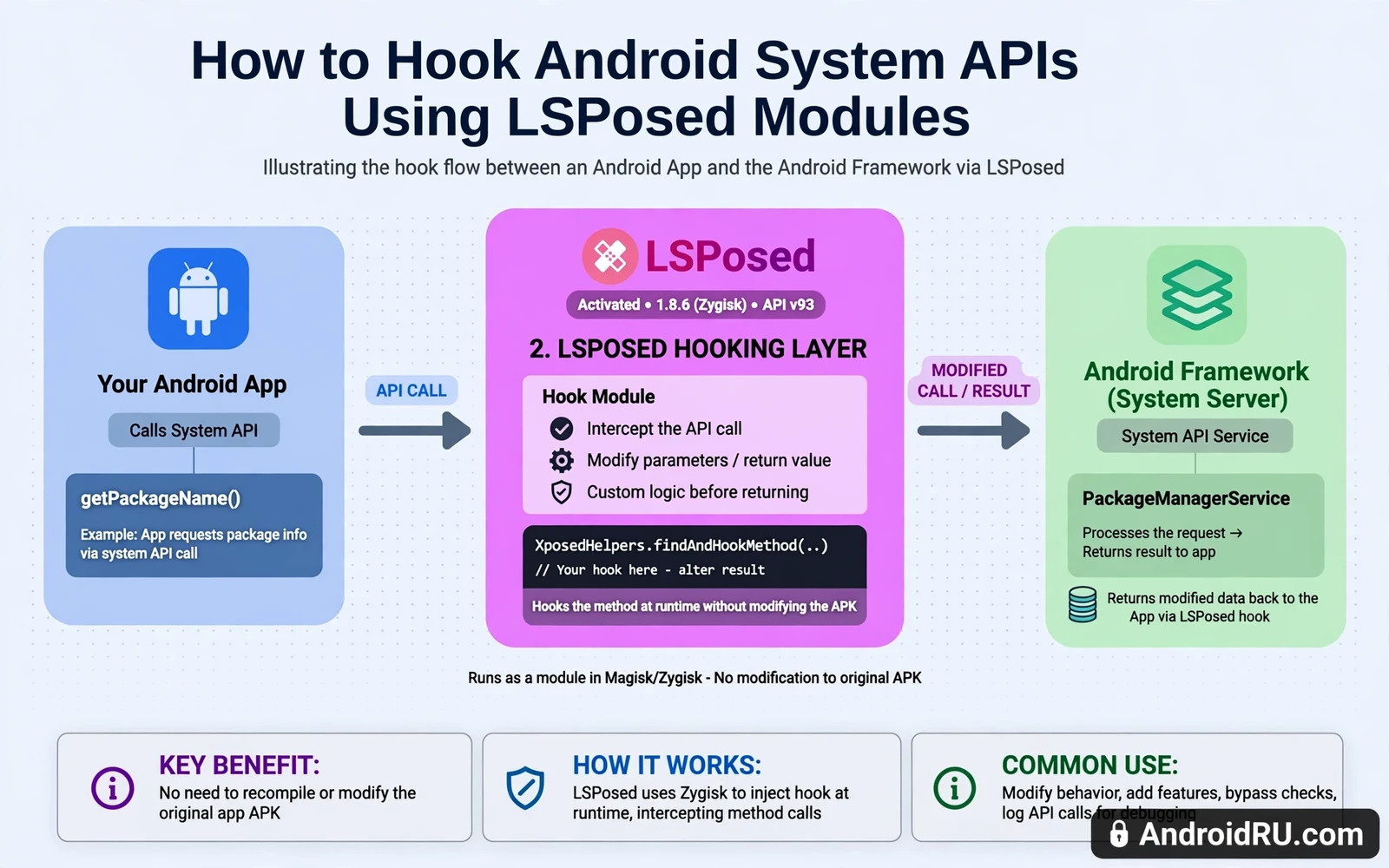
What hooking means inside Android
Hooking intercepts a call between two parts of software and changes what happens next. An app calls a system API to get a result. A hook can watch that call and return a different result. A hook can also run extra code before the original call or after it. That power makes hooking useful for customisation and testing. It also makes hooking risky when a hook is wrong or greedy. A bad hook can crash an app or leak data or break a secure flow.
LSPosed is a modern framework for this kind of hooking on rooted Android. It builds on the older Xposed idea with a systemless design. A module is a small app that declares which calls it wants to hook. LSPosed loads the module into target apps at runtime. The module code then runs inside the target app process. That placement gives the module deep access to app behaviour. It also means a module bug can crash the target app directly. Choose modules with the same care you would choose a system patch.
Read this warning before you install any hooking framework. Hooking needs root access on most setups. Root access can void the device warranty. A bad module can cause bootloops. A bad module can break banking apps and payment apps. A bad module can expose private data to code you did not audit. Back up all data before you install a framework. Do not hook apps on your only phone without a spare device ready. Test each module alone before you combine modules. A hook that touches money or identity deserves extra caution.
How a system API hook is built
A hook starts with a precise target. The target is a class and a method inside an app or inside the system framework. A module author finds that target by inspecting the app code. The author then writes code that runs when the method is called. That code can read the method arguments. It can change the arguments before the original method runs. It can replace the return value after the original method runs. It can also skip the original method entirely when that is the intent. Each choice has different side effects. Skipping an original method is the most disruptive choice.
A good module hooks as narrowly as possible. It targets one method in one app rather than a broad method in every app. Narrow hooks reduce surprise crashes in other apps. They also make debugging possible when something breaks. A broad hook that touches a common system method can break many apps at once. A module that hooks every app for a cosmetic tweak is a warning sign. Prefer modules that name their exact scope in plain language. A vague scope statement hides broad behaviour.
Hook code must handle unexpected data gracefully. An app update can change a method signature or a return type. A hook written for an old signature can crash the new app version. A robust module checks types before it casts values. It returns the original result when its own logic cannot run safely. It logs its failure in a way the user can read. That defensive style keeps one broken hook from taking down an app. Modules without defensive checks age badly after app updates.
Setting up LSPosed safely
Install LSPosed only after root is stable and the phone boots reliably. A framework installed on an unstable root setup multiplies debugging pain. Enable one module at a time and reboot after each enable. Test the target app thoroughly after each single change. That slow method isolates the cause when a crash appears. Enabling five modules at once turns a crash into a guessing game. A methodical setup takes longer on day one. It saves hours of confusion later.
Use the LSPosed scope settings to limit each module to its intended apps. A module that needs only one app should never be enabled for the whole system. Scope control is the main safety tool in the framework. Review scopes after every module update. An update can request a wider scope without a clear notice. A wider scope that lacks a reason should be rejected. Keep a written list of each module and its scope and its purpose. That list speeds up recovery when a module misbehaves.
Module safety checklist
- One module enabled at a time
- Scope limited to intended apps only
- Target app tested after each change
- Module disabled before any app update test
- Backup verified before framework install
Disable all modules before you update a target app or the system. An update can change the code that a hook depends on. Testing the update with hooks disabled proves whether the update itself works. Enable modules again one at a time after the update. That routine catches hook breakage early. It also prevents a broken hook from being blamed on the update. Many bootloops after updates trace back to a stale hook rather than to the update.
Testing a hook without fooling yourself
Define the expected behaviour before you enable the hook. Write down what should change and what should stay the same. Test the changed behaviour first. Test the unchanged behaviour second. A hook that changes the target yet breaks login or sync has failed. A hook that changes nothing may be targeting the wrong method version. Both outcomes need investigation. A clear expectation turns testing from vague feeling into evidence. Keep those notes for the next app update.
Test with a secondary account when the target app holds sensitive data. A hook that reads method arguments can see data passing through that method. A test account limits exposure during early trials. Never test an unknown module with a main banking account or a main work account. Move to a main account only after the module proves stable and narrow. Even then review what the module reads. A module that reads more than its purpose needs should stay off a main account.
Remove a module fully when it stops working after an update. Disabling is a first step for diagnosis. Removal is the clean step for a dead module. A disabled module can still confuse later debugging when it is forgotten. Keep only modules that still work and still serve a clear purpose. A lean module list boots faster and crashes less. It also makes the next update cycle shorter. Prune aggressively and keep notes on what was removed and why.
Hooking and root detection interact in ways that surprise many readers. A hook inside a banking app can trigger the same alarms as root itself. The banking root detection walkthrough explains how secure apps check for tampering. That guide helps a reader judge whether a hook belongs anywhere near a money app. In most cases the honest answer is that it does not. Read the detection logic before you scope a module to a sensitive app. A cosmetic gain rarely justifies a blocked account.
Kernel tuning and API hooking solve problems at different layers of the system. The custom kernel tuning walkthrough changes hardware policy through governors and schedulers. Hooking changes software behaviour through intercepted calls. A reader who confuses those layers may chase a slow app with the wrong tool. Kernel policy cannot fix a wrong API return value. A hook cannot fix a throttling processor. Read both guides and place each problem at its correct layer. That placement saves wasted experiments.
Hooking also depends on the boot gate that permits root and framework installation. The bootloader unlocking tutorial explains that gate and its data wipe warning. A framework installed without understanding that gate leaves the reader unprepared for recovery. The unlock guide also explains why some devices refuse the whole path by design. Read it as foundation rather than as an optional extra. A solid foundation makes hook debugging far less frightening.
Ethics and limits of hooking
Hooking must never be used to steal content or bypass payment or fake identity in an app. A technical ability does not create a right to misuse it. Hooks that hide location or fake device identity can violate app terms and local rules. Hooks that intercept another person data cross a clear ethical line. Use hooking for personal customisation and learning and accessibility on your own device. Keep that boundary firm even when a module promises an easy shortcut. Shortcuts that break trust tend to break accounts as well.
Document every hook you run on a device that others may use. A family member or a colleague should not inherit a hooked banking app unknowingly. Label the device as modified when it leaves your hands. Remove hooks before lending a phone for sensitive use. That honesty protects other people from alarms and blocks they did not cause. It also protects you from blame when a hooked app behaves oddly. A modified device carries a duty of disclosure.
When a module stops working after an update
An app update can break a hook by changing the method that the module targets. The first symptom is often a missing feature rather than a crash. The target app may simply ignore the module. Check the module scope first. Check whether the module still lists the updated app version as supported. Disable the module and test the app alone. That test separates an app bug from a hook failure. A clear separation saves time for both the user and the module author.
Report a broken hook with useful details when the author welcomes reports. State the app version and the module version and the Android version. State the exact behaviour that changed. State whether disabling the module restores normal behaviour. That report lets an author fix the target quickly. A vague report that only says it broke helps nobody. Good reports also help other users who search for the same symptom. Be precise and be polite.
Plan for module retirement as part of module use. Every module has a lifespan tied to app updates. A module that worked for a year may die with one app redesign. Accept that lifespan and keep alternatives in mind. A feature that depends on a single fragile hook should not become critical to daily work. Keep a fallback workflow that works without the hook. That fallback keeps a dead module from becoming a daily crisis.
A final hooking habit is a module diary kept outside the phone. Write each module name and its scope and the date it was enabled. Write the target app version that it worked with. Update the diary when a module is disabled or removed. That diary makes the next update cycle fast because scope history is visible at a glance. It also helps a helper understand a modified phone without guessing. A diary costs minutes and prevents hours of scope detective work.

