

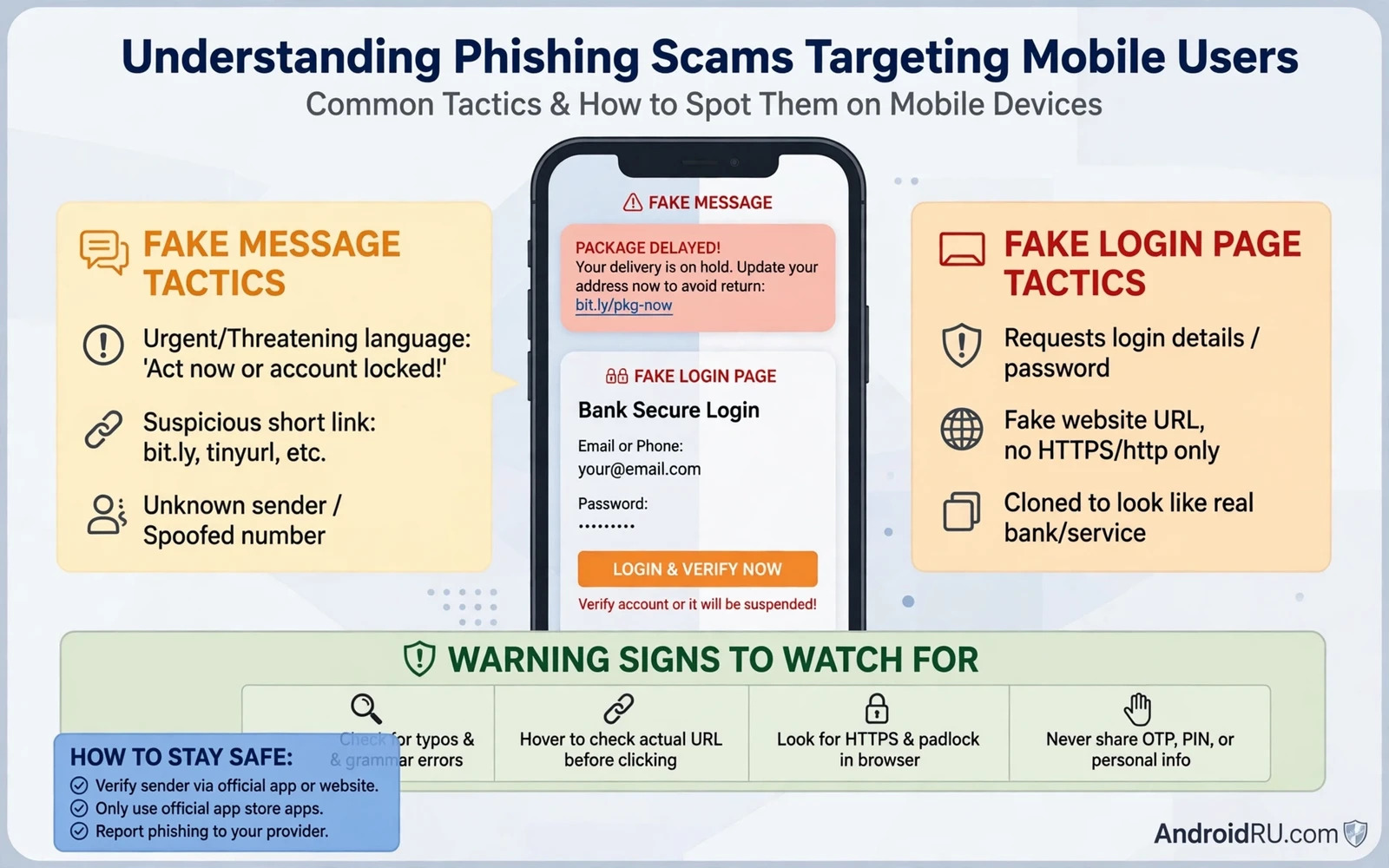
Phishing is a trick that asks you to hand over your own secrets willingly. A fake message pretends to come from a bank or a delivery service or a familiar app and it urges you to tap a link or call a number or enter a password. On a phone the trick works especially well because the screen is small and links are shortened and messages arrive mixed with real alerts from real services. The attacker does not need to break into your phone when you can be persuaded to open the door yourself. Understanding that psychology is the first defence because every phishing attempt relies on urgency and trust and a moment of distraction.
The most common mobile form arrives as a text message that claims a parcel is delayed or an account will close or a payment failed. The message contains a link to a page that copies the look of a real login screen. A second form arrives as an email that looks like a security alert and warns that unusual activity was found on your account. A third form arrives as a call where a voice claims to be support staff and asks for a code that was sent to your phone. All three forms share the same goal which is to capture a password or a code or payment details. All three forms also share the same weakness which is that a real service will never ask you to prove your identity by tapping an unexpected link.
Spot The Signs Before You Tap Anything
Urgency is the clearest sign of a phishing attempt because legitimate services rarely threaten immediate closure in a first message. A message that says act now or lose access is trying to stop you from thinking carefully. A second sign is a sender address or a sender name that looks close to real but differs in a small detail. A bank name with an extra letter or a delivery brand with a changed domain should stop you cold. A third sign is a link that does not match the service it claims to represent when you press and hold it to preview the destination. Previewing a link without opening it is a safe habit that reveals many fakes in seconds.
Language clues also help even when a message looks polished. A generic greeting that never uses your name can signal a mass campaign rather than a personal alert from a service that knows you. Spelling slips and awkward phrasing still appear in many campaigns even though some modern fakes read smoothly. A request for a full password or a one time code or a payment card number inside a message is always a red flag because no legitimate support team needs those secrets in that form. A message that asks you to install an app from outside a trusted store is even more dangerous because that app may itself be the payload.
Small screens hide details that a larger screen would reveal so slow down deliberately when a message asks for action. Expand the sender details in your messaging app and read the full address rather than trusting the display name. Press and hold any link to see its true destination and compare that destination with the official domain you already know. Open the official app yourself through its icon rather than through a link when you need to check an account. That single habit of navigating yourself instead of following a supplied link defeats most phishing pages because the fake page never gets a chance to load.
Handle Messages Calls And Links Safely
When a suspicious message arrives do not reply and do not tap its link and do not call any number printed inside it. Delete the message after reporting it through the spam reporting option in your messaging app when that option is available. Blocking the sender prevents repeat messages from the same number but it does not stop a campaign that uses many numbers. Report the attempt to the impersonated service through its official app or its official support channel so that other users can be warned. Reporting takes a minute and it turns a personal near miss into protection for many other people.
Calls require a different response because a voice can sound convincing even when the story is false. Hang up calmly when a caller asks for a code or a password or remote access to your phone. Find the official number yourself through the service app or through a number you already trust and call that number back. Never use a callback number given by the suspicious caller because that number leads back to the same attacker. A real support team will accept that you want to verify identity through an official channel. An attacker will pressure you to stay on the line and that pressure itself is evidence of fraud.
Links inside social apps and email apps deserve the same caution as links inside text messages. A friend account that suddenly shares a strange link may itself have been compromised. A group message that promises a prize or a free service usually hides a login trap behind the excitement. A login page that appears after a link should always be checked against the address bar before any credential is typed. When doubt remains then close the page and open the service through its own app. That discipline protects accounts even when a phishing page looks perfect because a perfect copy still cannot survive a direct navigation check.
Strong account protection turns a single mistake into a recoverable event rather than a disaster. A password stolen through phishing still needs a second factor before an attacker can enter an account that uses strong authentication. That is why learning how enabling two-factor authentication across apps works is a natural companion to phishing awareness. Two factor protection does not excuse careless tapping but it gives you a safety net when a moment of distraction wins. Pair awareness with authentication and the attacker must defeat two defences instead of one.
Recover Quickly When A Tap Has Already Happened
If you tapped a link and entered a password then act fast and stay calm. Change that password immediately from the official app and change the same password anywhere else you reused it. Revoke active sessions in account security settings so that any session opened by the attacker ends at once. Turn on stronger authentication for that account and check recent activity for changes you did not make. Contact the service through its official support channel when money or payment details were involved so that transactions can be reviewed and cards can be replaced when needed.
If you entered payment details then contact your bank through its official number and explain that the details may be compromised. Ask about replacing the card and about monitoring for unusual transactions. Keep a record of the phishing message including the sender details and the link destination when you can capture them safely without tapping again. That record helps support teams and it also helps you recognise the same campaign if it returns under a new name. Speed matters here because an attacker may use stolen details quickly while a victim is still deciding what to do.
Prevention after a phishing attempt also means tightening the habits that made the attempt plausible. Review which services send you real alerts by message and consider turning off message alerts for services that also offer in app notifications. Teach family members the same pause and verify habit because phishing campaigns often target several people in one household. A shared rule that no link in a message ever leads directly to a login page protects everyone even when individual vigilance slips. That rule is simple to remember and it works because it removes the decision from a moment of pressure.
A final habit links phishing defence to device defence. When a phishing message tries to push an app install or a permission change then the danger moves from stolen credentials to device compromise. In that case a careful review of installed apps and permissions becomes essential. A helpful next step is learning how detecting hidden spyware on a phone works so that a suspicious install can be found and removed before it watches further activity. Phishing awareness plus device checks plus strong authentication forms a complete shield. You stop most attacks at the message and you catch the rest before they cause lasting harm.
End every suspicious encounter with a short mental review of what gave the attempt away. Was it urgency or a strange sender or a mismatched link or a request for a secret. Remembering that trigger makes the next attempt easier to spot because campaigns reuse the same psychological tricks even when names and designs change. Share that trigger with people close to you so that one person learning protects a wider circle. Phishing relies on isolation and speed. Awareness plus verification plus strong authentication removes both advantages and leaves the attacker with a message that nobody trusts and a link that nobody follows.
Report And Share What You Learned
Reporting a phishing attempt helps providers block the sender and warn other users who received the same message. Use the report spam option in your messaging app and forward the message to the reporting channel of the impersonated service when one is offered through its official app. Do not forward a phishing link to friends as a warning through a clickable message because an accidental tap could still lead them to the fake page. Describe the message in your own words instead and name the sender and the claimed service without including a live link. That description warns others without creating a new path to the trap.
A wider security routine makes phishing defence stronger because a phone with disciplined settings gives an attacker fewer openings. A useful place to strengthen that routine is reviewing how essential Android security settings protect a phone through lock strength and update habits and permission discipline. Those settings do not stop a phishing message from arriving but they limit what an attacker can do after a credential is stolen. Awareness stops the tap and settings limit the damage and authentication blocks the entry. All three layers deserve attention in that order.
Teach the pause and verify habit to people who share your household because phishing campaigns often target several members of one family with similar messages. Agree on a simple family rule that no login ever follows a link inside a message. That rule removes decision pressure in the moment and it protects members who are less confident with technology. When one person spots a new campaign then sharing a description in plain words protects the whole household without forwarding a dangerous link. Shared awareness turns an isolated defence into a household defence.

