

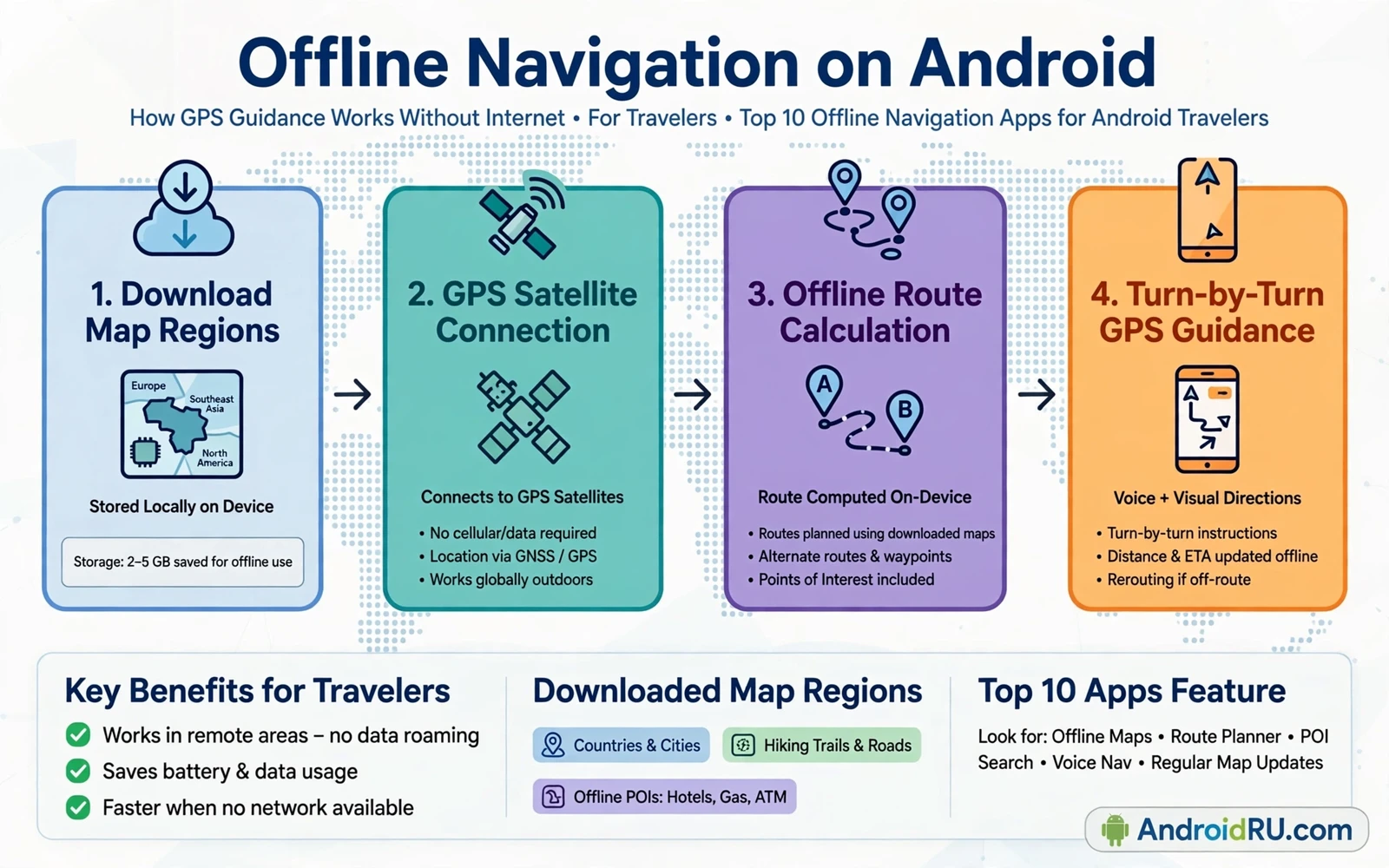
Offline navigation saves travelers when mobile data disappears in rural areas and in mountains and in foreign countries with expensive roaming. An offline map app downloads map data and routing data to the phone before departure. The app then guides with GPS alone without a live data connection. GPS works without mobile data because the phone receives satellite signals directly. Offline navigation therefore keeps working in a tunnel exit or a remote valley where a streaming map would show a blank screen.
Planning starts before the trip with region selection. Download maps for the whole region you will visit rather than only the destination city. Include surrounding areas for detours and alternative routes. Include maps for border crossings when a route passes near another region. Check the total download size against free storage before starting. Download over Wi-Fi at home rather than over hotel Wi-Fi under time pressure. Verify each download by opening the map in airplane mode before departure.
Routing quality varies between offline apps even when the underlying maps look similar. Some apps calculate fast routes that favor highways. Some apps calculate short routes that favor narrow roads. Some apps support walking and cycling and public transport routing offline. Some apps support only driving routes offline. Test routing on familiar roads before trusting the app on unfamiliar roads. A test route reveals whether voice guidance timing and turn icons match your driving style.
Maps Points Of Interest And Search Offline
Offline search depends on the data included in the download. A good offline package includes street names and addresses and points of interest such as fuel stations and hospitals and restaurants and hotels. A weak package may include roads only and fail to find a named hotel without data. Test search for a hotel and a fuel station and a hospital in airplane mode before departure. Save important places as favorites with clear names so they remain findable even when search behaves differently offline.
Points of interest data ages faster than road data. A restaurant may close and a fuel station may change hours. A hospital location rarely changes but its entrance may move after construction. Treat offline points of interest as a starting guide rather than a live directory. Confirm critical stops such as a remote fuel station through a second source when data becomes available. Save the phone number and address of critical stops in notes so they remain accessible without map search.
Map updates deserve a schedule because roads change with construction and new bypasses. Update downloaded maps before each major trip. Delete maps for regions you no longer visit to free storage. Keep maps for your home region updated for daily use. An outdated map may route through a closed road or miss a new highway that saves an hour. A ten minute update before departure prevents a frustrating detour on the road.
Voice Guidance Safety And Battery Use
Voice guidance should be clear at highway speed and in a noisy car. Test voice volume and language before departure. Choose a voice that pronounces local street names understandably. Set guidance to announce turns early enough for safe lane changes. Mute nonessential notifications during navigation so a message alert does not mask a turn instruction. Mount the phone where the screen is visible without blocking the road view. Never type a destination while driving. Pull over safely to change a route.
Battery use rises during navigation because GPS and screen and audio run together. Start a long drive with a full charge and a car charger connected. Lower screen brightness when voice guidance is sufficient. Lock the screen between turns on familiar stretches when the app supports voice only guidance. Carry a power bank for walking navigation in a city where no car charger exists. A dead phone in an unfamiliar city is worse than a slightly dim screen.
Safety rules matter more than arrival time. Follow road signs when they contradict the app because signs reflect current closures and local rules. Ignore a route that directs a car onto a pedestrian path or a clearly unsuitable track. Report map errors when data returns so future travelers benefit. Keep a paper backup or a saved screenshot of the route for areas with known map gaps. Navigation is an aid to judgment rather than a replacement for attention to the road.
Storage planning for maps overlaps with general phone hygiene and best file managers for Android in free and pro versions help you see which map regions consume the most space before a trip. Deleting an old region frees space for a new region without touching photos. A quick storage check before downloading prevents a partial download that fails halfway through a large region. Clean storage makes offline preparation reliable rather than rushed.
Walking Cycling And Public Transport Offline
Walking navigation needs different details from driving navigation. Pedestrian paths and shortcuts and stairways matter for walking routes. A driving route may send a walker along a busy highway without a sidewalk. Check whether the app offers a dedicated walking mode with pedestrian paths. Save walking destinations as favorites for a city visit. Download city maps at a detailed zoom level so small streets and alleys remain visible offline.
Cycling navigation needs elevation and surface awareness that car routing ignores. A cycling route should avoid highways and favor bike lanes and quiet roads. A cycling route should warn about steep climbs when elevation data exists. Test cycling routing on a familiar ride before a long tour. Carry water and repair tools regardless of app quality because a perfect route does not prevent a flat tire. Save alternative return routes in case weather or fatigue changes the plan.
Public transport offline is limited because timetables change frequently. Some apps store static timetables for major cities. Some apps need data for live departures. Save the main transit lines and station names for a city visit before departure. Screenshot timetable pages for critical connections when data is available. Ask station staff when live information conflicts with an offline timetable. Offline transit data helps planning while live data remains better for last minute changes.
Photo stops along a route also deserve planning because top photo editing apps for professional results on Android can turn travel shots into a clean album after the journey. Saving viewpoints as map favorites during the drive makes it easy to return to a good location later. A favorite with a short note about light direction helps the next visit. Navigation and photography share the same preparation habit of saving places before they are needed.
Roaming Costs And Emergency Preparation
Offline maps reduce roaming costs dramatically because the largest data cost in navigation is map tile downloads. Voice guidance and GPS positioning use minimal data once maps are local. Turn off automatic map downloads on mobile data to avoid surprise roaming charges. Turn off background app refresh for map apps on roaming networks. Keep a local SIM or an offline plan as a backup for emergencies even when offline maps cover routing. Emergency calls do not need a data plan but they do need network coverage.
Emergency preparation goes beyond maps. Save the address and phone number of your accommodation in notes and in map favorites. Save the location of the nearest hospital and embassy or consulate for international travel. Share your itinerary with a trusted contact before departure. Carry a charged power bank and a car charger. Keep identification and travel documents in a secure offline folder. Offline navigation helps you move while these preparations help you recover when plans break.
Customizing the phone for travel also includes the home screen because best custom launchers for Android customization enthusiasts let you place the navigation app and a translation app and a currency tool on one travel screen. A dedicated travel screen reduces hunting through folders at a busy station. A large navigation widget on that screen shows the next turn without opening the full app. The launcher turns a general phone into a focused travel device for the duration of a trip.
Offline navigation rewards preparation and punishes improvisation. Download full regions over Wi-Fi and verify them in airplane mode. Test routing and search and voice guidance before departure. Update maps regularly and delete old regions to free space. Follow road signs over app instructions and keep battery and emergency information ready. With those habits an offline map app becomes a dependable travel companion that works exactly where online maps fail.
- Download full regions over Wi-Fi before departure
- Verify maps in airplane mode before traveling
- Save hotels fuel stations and hospitals as favorites
- Update maps before each major trip
- Test voice guidance volume and timing early
- Start long drives with a car charger connected
- Follow road signs over app instructions
- Turn off map downloads on mobile roaming
A pre-trip navigation checklist turns preparation into a repeatable habit. Download the destination region and the home region and any transit region along the route. Save accommodation and fuel stops and hospitals as favorites with clear names. Test voice guidance on a familiar road and set the voice volume for highway noise. Charge a power bank and pack a car charger and a mount that holds the phone steady. Run the whole route in airplane mode once at home to confirm that maps and routing and favorites all work without data.
A backup navigation method protects against a single point of failure on the road. Save a screenshot of the full route with major turns visible. Write down the destination address on paper for a border crossing or a rental car handoff. Keep a second map app installed with a different map download as a fallback. A fallback that is never used costs only storage space. A fallback that is needed but missing can cost hours of detour in an unfamiliar region. Redundancy is cheap insurance for travel navigation.

