

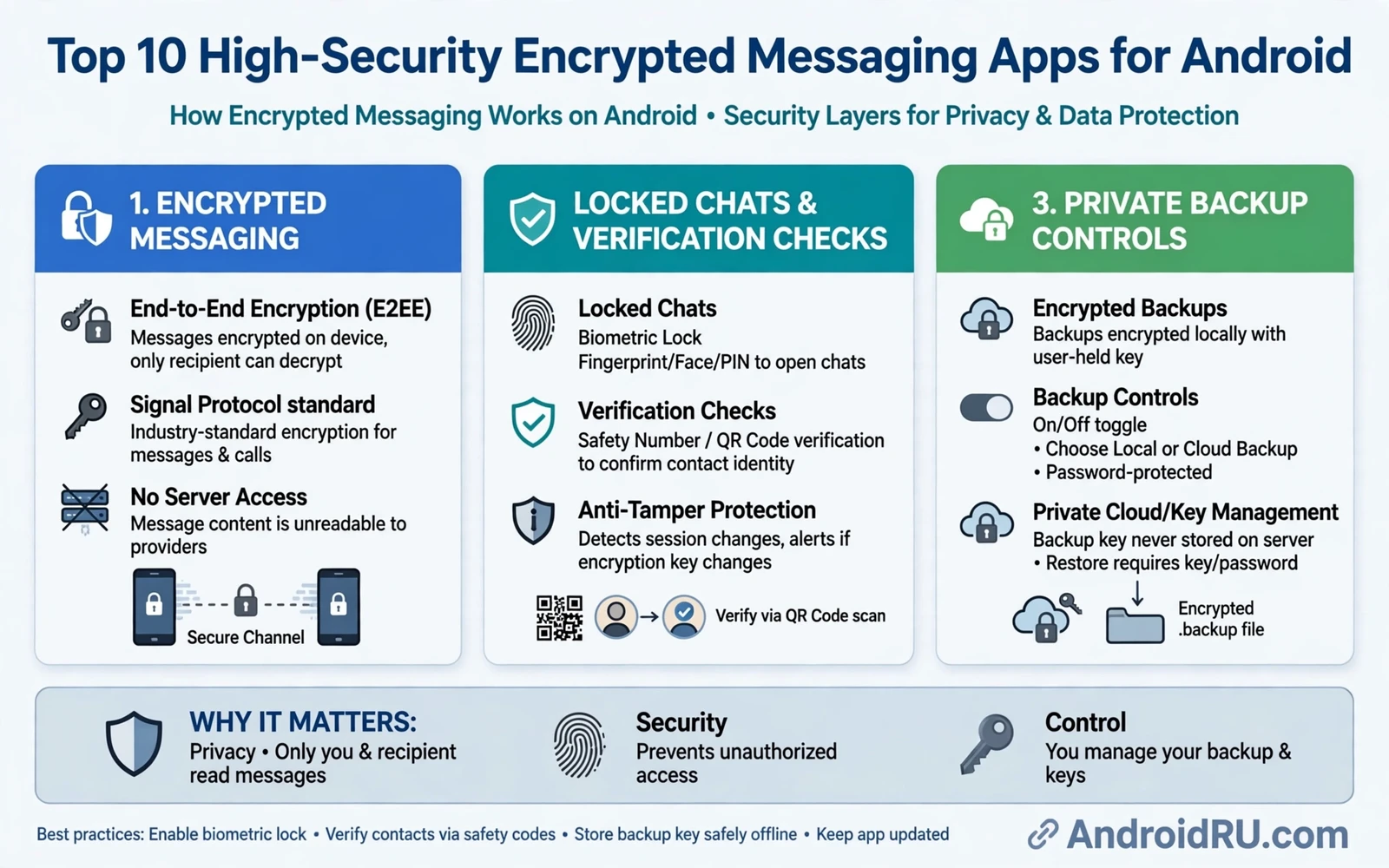
Encrypted messaging protects conversations by scrambling messages so that only the sender and the intended receiver can read them. Strong apps use end to end encryption by default for direct messages. Strong apps also protect metadata such as who messaged whom and when where possible. Weak apps may encrypt messages in transit only and store readable copies on a server. The difference matters most for sensitive topics such as health and finance and journalism and personal safety. Choosing an app with default end to end encryption removes the need to remember to turn protection on for each chat.
Security is not only about the encryption algorithm. Security includes how the app verifies contacts and how it handles backups and how it stores messages on the device. An app that lets you verify a contact safety number helps you detect a changed device or an impersonation attempt. An app that uploads unencrypted backups to cloud storage can undo encryption for old messages. An app that locks behind biometrics adds protection when the phone is borrowed or lost. Evaluate the whole system rather than trusting a single security claim on a store page.
Usability decides whether security survives daily use. An app that friends refuse to install protects nobody because conversations move to a less secure app instead. An app that drains battery or fails to deliver messages on time pushes users back to a default messenger. An app that works across Android and other platforms keeps group chats together without forcing everyone onto one device type. Choose the most secure app that your actual contacts will use consistently. A secure app with an active contact list beats a perfect app with no one to talk to.
What End To End Encryption Really Guarantees
End to end encryption means the message is locked on the sender device and unlocked only on the receiver device. The service provider that relays the message cannot read the content in transit. The provider may still see routing information needed to deliver the message. The provider may still see the size of the message and the time it was sent. The provider may still see account information used for registration. Understanding these limits prevents false confidence while still valuing the strong protection that content encryption provides.
Group chats add complexity because every member device must hold keys for the group. Adding a new member should trigger a clear notice so existing members know the group changed. Removing a member should stop that member receiving new messages. Forwarded messages and screenshots remain outside encryption control because a receiver can always copy content after decryption. No messaging app can prevent a trusted contact from sharing a message elsewhere. Treat encryption as protection against outside interception rather than protection against a contact who chooses to share.
Disappearing messages add a second layer by deleting content after a set time. Disappearing messages help when a phone is later inspected or borrowed. Disappearing messages do not guarantee deletion on every device because a receiver may screenshot or photograph the screen before deletion. Disappearing messages do not delete backups made before the timer expires unless the app controls backup behavior. Use disappearing messages for sensitive details and keep a separate secure record only when a record is truly needed for legal or medical reasons.
Verification Backups And Device Safety
Contact verification is a simple habit with real security value. Compare the safety number or QR code with a contact in person or through a second trusted channel when a security alert appears. A changed safety number can mean a new phone or a reinstalled app. A changed safety number can also mean an account takeover attempt. Do not ignore repeated verification alerts for a sensitive contact. Ask the contact directly through another channel before sharing confidential information after an alert.
Backups deserve careful settings because an encrypted chat can become readable through an unencrypted backup. Turn off cloud backup for messaging apps when the backup is not encrypted end to end. Use an encrypted local backup when the app supports it and store that backup in a protected location. Remember that a backup restored to a new phone brings old messages back to life even after disappearing messages deleted them on the old phone. Decide what should survive a device change and what should stay only on the current device.
Device lock and app lock work together to protect messages at rest. A strong screen lock delays access when the phone is lost. An app lock with biometrics adds a second barrier for messaging specifically. Remote find and wipe tools can lock or erase a lost phone before messages are explored. Turn on these tools before loss happens because setup after loss is often impossible. Keep the operating system updated so known vulnerabilities do not give an attacker an easy path past the lock screen.
When backup choices feel confusing then best cloud storage apps for Android compared with Google Drive and OneDrive clarify how encrypted backup and version history differ across services. A storage service that encrypts files in transit only is not the same as a service that encrypts backups end to end. The comparison helps you separate a convenient backup from a backup that actually preserves message privacy after upload.
Privacy Settings Worth Changing First
Default privacy settings in many apps favor discovery over protection. Review who can see your profile photo and status and last seen time. Limit profile visibility to contacts when the app allows it. Turn off read receipts only after considering whether contacts rely on them for urgent coordination. Disable automatic media download on mobile data and on unknown networks to avoid unwanted files filling storage. Review group invite permissions so strangers cannot add you to large groups without approval.
Permissions should match the job of a messaging app. A messaging app needs microphone access for voice messages and camera access for photos when you use those features. A messaging app does not need constant background location access for text chat. A messaging app does not need access to unrelated files or contacts beyond what you choose to share. Review permissions every few months and remove access that no longer matches your use. Permission hygiene protects against both malicious apps and careless updates that request more access than before.
Account recovery is a security decision that many users postpone until lockout. Use a strong unique password for the account behind the messaging app when a password exists. Turn on two step verification when the service supports it. Store recovery codes in a password manager rather than in a screenshot on the same phone. Test recovery on a secondary device before an emergency forces a rushed reset. A recovery plan that works under stress is worth more than a perfect password that nobody can recover.
Daily coordination also improves when secure chat sits beside a clear task system and top AI apps for Android that boost daily work can turn a long chat thread into a concise summary and action list. Summaries help when a group chat moves fast and decisions hide inside dozens of messages. The summary is only a helper and the original thread remains the record for sensitive agreements. Check any summary against the original messages before acting on a deadline or a payment detail.
Choosing For Groups Families And Work
Families need simple setup and clear controls more than advanced cryptographic options. Choose an app with easy contact discovery and simple group creation for family use. Teach family members to verify new contacts before sharing location or travel plans. Set disappearing messages for location sharing during trips so old locations do not linger in chat history. Keep one family group for logistics and a separate group for casual sharing so urgent messages do not drown in photos and jokes.
Work groups need admin controls and audit clarity alongside encryption. Admins should control who can add members and who can change group settings. Work groups should have a written rule for what may be shared in chat and what belongs in email or a document system. Sensitive files should move through an approved file channel rather than staying only inside chat history. Archive work groups when a project ends and remove members who no longer need access. Encryption protects content in transit while access discipline protects content after delivery.
Activist and journalist use demands stricter habits than casual use. Use a dedicated device or profile for sensitive contacts when risk is high. Avoid linking a sensitive account to a public phone number when the app allows an alternative registration method. Keep sensitive chats out of cloud backup entirely. Meet in person to verify contacts before exchanging high risk material. No app choice replaces operational discipline when an adversary can seize a device or pressure a contact. Plan for device seizure in advance rather than hoping it never happens.
Productivity tools can still support secure coordination without weakening chat privacy because top must-have Android apps for maximum productivity cover task lists and calendars that keep decisions visible outside a fast moving thread. A task list holds the agreed deadline while chat holds the discussion that led to it. Separating decisions from discussion makes it easier to find what was agreed weeks later. The separation also reduces the temptation to share sensitive files inside chat simply because chat is open.
High security messaging on Android is achievable without sacrificing daily usability. Choose an app with default end to end encryption and clear verification tools. Control backups and permissions and profile visibility from the first week. Teach contacts the habits that make encryption meaningful. Keep sensitive material out of unencrypted backups and out of careless group settings. Security grows from a system of good defaults and steady habits rather than from a single app logo or a single bold claim.
- Choose default end to end encryption for direct messages
- Verify safety numbers after a security alert appears
- Turn off unencrypted cloud backup for sensitive chats
- Limit profile and last seen visibility to contacts
- Review messaging permissions every few months
- Store recovery codes in a password manager
- Use disappearing messages for sensitive details
- Separate decisions into a task list outside chat

