

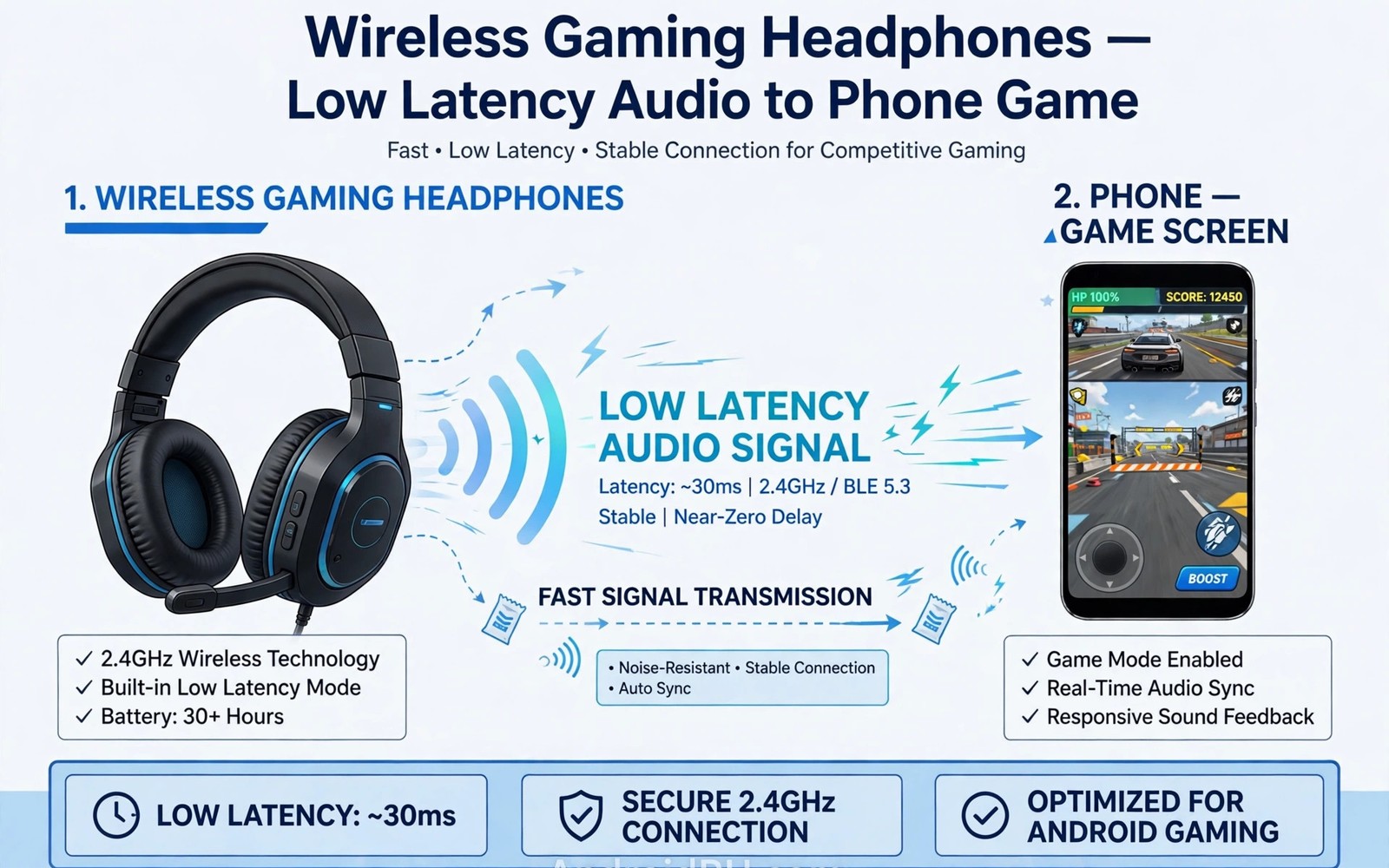
Many Android users meet low latency gaming modes in everyday listening. A commute or a workout or a long call can expose a weak point fast. The right knowledge turns a confusing feature into a useful tool. This guide explains low latency gaming modes in plain terms. It covers how the technology works and how to use it well. It also covers mistakes that waste money or comfort. Each section builds on the last one so results stay clear. You will finish with a practical routine for daily use.
Before changing any setting it helps to see a neighbouring topic such as water resistance ratings for sports earbuds because shared audio parts often explain more than one symptom at once.
What this technology does in practice
Bluetooth audio always carries some delay between screen and sound. The phone encodes audio and sends it over the air. Headphones decode it and play it through a buffer. That buffer smooths small link hiccups but adds time. Normal music mode uses a larger buffer for stability. A video may still look synced because players delay video to match. Games cannot delay gameplay the same way. A gunshot that arrives late breaks aim and timing. Low latency mode targets that gap directly.
Start with your own daily routine rather than a spec sheet. Note where you listen most and for how long each day. Note whether calls matter more than music for your use. Note whether outdoor awareness matters more than silence. Those three facts narrow the choice faster than any feature list. the Bluetooth link and the headphone audio buffer can behave in several ways that look identical at first. A clear picture of your routine helps you pick the right test first. It also helps you judge reviews that match your use.
How it works beneath the surface
Game mode cuts delay by shrinking buffers and simplifying processing. It may pick a faster codec or a lower latency link mode. It may also reduce retransmission attempts for lost packets. The trade is a higher chance of tiny dropouts on a weak link. Sound quality may drop slightly when the codec changes. Battery use can rise because the link works harder. Some headphones add a dedicated gaming dongle for lower delay. That dongle uses a separate radio link outside Bluetooth. Phone and headphone support must align for the best result.
The parts inside low latency gaming modes work as a chain rather than a single magic chip. A weak link in that chain limits the whole result. A strong driver cannot rescue a poor seal. A smart processor cannot rescue a blocked microphone. Checking each link in turn gives a fair diagnosis. That chain view also explains why two similar models can sound different. Tuning and fit and software all sit inside the chain. Test the chain in real places rather than trusting one demo.
Key factors that shape the result
- A Bluetooth link that adds delay by design.
- A large audio buffer that smooths drops but lags sound.
- Extra processing for ANC or spatial effects.
- Distance or interference that forces retransmission.
- A game that renders audio late regardless of headphones.
Work through factors from the simplest to the most complex. A simple factor often hides behind a dramatic symptom. Check fit and power and basic settings before suspecting hardware failure. Change only one variable at a time during testing. That discipline lets you credit the correct fix when quality returns. It also prevents a pile of changes that interact in confusing ways.
A related topic worth comparing is microphone call quality and wind noise fixes where a similar chain of parts decides the daily result.
Quick checks before deeper changes
- Check the delay with a video that shows a clear tap sound.
- Confirm the phone and headphones both support low latency.
- Test at your normal play distance rather than beside the phone.
- Check whether ANC adds delay on top of game mode.
- Note battery impact because game mode may drain faster.
Quick checks cost little time and they protect your settings. A restart clears temporary states without deleting saved data. A second location test tells you whether the place shapes the fault. A second device test tells you whether the fault follows the earbuds. Record each result in a few words. That record becomes your evidence for the next step.
Step-by-step routine
- Turn game mode on in the companion app or headphone control.
- Play a fast game and watch lip sync and gunshot timing.
- Move closer to the phone to cut link interference.
- Turn off extra audio processing that adds delay.
- Test voice chat separately because mic paths add delay.
- Keep game mode on only for games if battery drops fast.
Routine checklist for low latency gaming modes
1. Note your daily listening place and time
2. Check fit and battery before changing settings
3. Apply one change from the list above
4. Test with a fast action game with directional sound
5. Keep the change only if the test improves
6. Revert the change if the test shows no benefit
Follow the routine in order and test after each major change. A change that helps should show a clear improvement in the next test. A change that does nothing should be reverted so settings stay clean. game mode and low latency settings deserve special care because a wrong value can create a new fault. Read each option label fully before toggling it. If a label differs on your phone then match it by meaning rather than by exact wording.
Settings worth reviewing
Review settings that govern low latency gaming modes on a regular basis. Battery optimization can pause background audio work without a visible warning. Permissions can block discovery or companion app features in a quiet way. Saved device data can hold stale values after a firmware change. Each of these areas deserves a look when a fault resists restarts. Reset only the area that matches your evidence. Broad resets cost reconnection time and should stay a later option.
Another neighbouring topic is USB-C DAC amplifiers for modern phones which covers a setting that often interacts with this one.
Testing the result properly
A fair test uses a fast action game with directional sound in the place where you normally listen. Run the test for long enough to catch an intermittent fault. A ten minute test beats a ten second glance for drop problems. Repeat the test after moving to a second location. Compare results with the baseline you recorded before changes. A real improvement should show in both places or at least in the main place.
Real gaming delay depends on the whole chain at once. Game engine timing and display lag add to Bluetooth delay. A phone screen with slow response hides the audio gain. Voice chat adds a second path with its own delay. Competitive players notice small gains more than casual players. Casual story games rarely need the lowest possible delay. Testing with a fast action game shows the true benefit. If footsteps still lag then check distance and interference first. A clean short link often helps more than a new mode toggle.
Common mistakes to avoid
- Expecting zero delay from any wireless link.
- Leaving spatial processing on during competitive play.
- Testing latency only beside the phone.
- Blaming headphones for a game audio bug.
- Using game mode all day and draining the battery.
Mistakes usually come from rushing the first test. A shop demo rarely matches a commute or a gym session. A single track rarely reveals tuning across music styles. A single day rarely reveals battery or comfort problems. Slow testing across real places prevents most regret. Keep notes for a week before judging a new pair or a new setting.
Long-term care and value
Long-term value for low latency gaming modes depends on care as much as on launch quality. Keep firmware current because updates often fix audio and pairing bugs. Keep the earbuds and the case clean and dry after use. Keep the case charged enough for the next session. Review saved profiles and paired devices every few months. Remove entries you no longer use so stale data cannot interfere. Small habits protect sound quality for the full life of the pair.
Choosing the right option for your routine
Choice starts with a short list of needs rather than a long list of features. Write down the two places where you listen most each day. Write down whether calls or music or workouts dominate that time. Write down the longest session you need without a recharge. That short list filters most models fast. A model that fails one core need rarely redeems itself with extra features. A model that passes every core need deserves a longer trial. Keep the list beside you while you compare options.
Compare two finalists side by side in the same places. Use the same tracks and the same volume for both. Use the same call test in the same noisy room. Note comfort after one full hour for each pair. Note battery after a full day of normal use. A side by side test exposes tuning differences fast. It also exposes fit differences that specs hide. Pick the pair that wins on comfort and core needs. Extra features should break ties only after core needs match.
Budget discipline keeps the choice honest. Set a ceiling before you browse deals or reviews. A deal that pushes you past the ceiling needs a core need to justify it. A cheaper pair that passes every core need beats a costly pair with unused features. Remember tips and cases and spare parts in the total cost. A pair with cheap replacement tips costs less over two years. Judge total ownership cost rather than launch price alone.
Questions users ask most
Will low latency gaming modes suit every listener in the same way? No single answer fits every ear shape and routine. A design that suits a quiet office may fail on a windy run. A feature that helps calls may matter little for music only users. Testing in your own places gives the honest answer. Keep the return window in mind while you test.
How much should you spend to get good results from low latency gaming modes? Price helps but it never guarantees a good fit or tune. A mid price pair with a great seal can beat a costly loose pair. A costly pair with features you never use wastes money. Spend for the features your routine actually needs. Save the rest for tips or a spare case.
When should you replace rather than repair a pair affected by low latency gaming modes? Replace when battery life falls below your daily need despite good care. Replace when one side fails repeatedly after cleaning and resets. Repair or replace a case when it stops charging both buds evenly. Keep a working bud as a backup when only one side fails. A clear fault record helps support decide the right path.
If questions remain then compare your experience with transparency mode for safe outdoor use because a shared cause may point to fit or settings rather than a faulty pair.
Final verdict
The best approach to low latency gaming modes starts with fit and ends with honest testing. Features matter only when they serve your daily routine. Settings matter only when you test them one at a time. Care matters because small habits protect sound for years. Use the routine in this guide for a full week. That week of real use tells you more than any single demo. Keep what helps and revert what does not help.
The steps above follow the approach described in the official developer documentation for this platform. That guidance stresses testing one change at a time and checking results before moving on. It also notes that device menus vary by maker and software version. Use the menu names on your own phone when a label differs slightly. Keep a note of changes that helped so you can repeat them later.

