

Act Fast And Stay Calm
A deleted text message is not always gone forever. Many phones keep a backup copy in the cloud. Some messaging apps keep an archive or a trash folder. A carrier may hold message records for a short time. The odds of recovery fall as time passes and as new data overwrites old storage. Acting quickly matters more than any tool choice. Stop using the phone heavily for new photos and downloads until you have tried the backup routes. Heavy new writes reduce the chance of any deeper recovery.
Start with the honest expectation. A message backed up to a cloud account can return fully. A message deleted without any backup may not return at all. No app can promise recovery of an unbacked message on a modern phone with encrypted storage. Tools that promise guaranteed recovery deserve scepticism. This guide moves from reliable backup recovery to limited local options in that order.
Check Archive Trash And Spam First
Open the messaging app and look for Archive and Spam and blocked sections. A message you thought you deleted may sit archived instead. Archiving hides a conversation without deleting it. Unarchive it to restore it to the main list. Check the spam folder too because a thread can be moved there by a filter. Moving it back restores it fully with all messages intact.
Some messaging apps include a trash or recycle bin that holds deleted conversations for a short period. Open the app menu and look for Trash or Recently deleted. If the conversation appears there then restore it before the retention period ends. Retention periods are short so check this step immediately. A trash restore is the easiest full recovery available and it costs nothing.
Restore From Google Backup
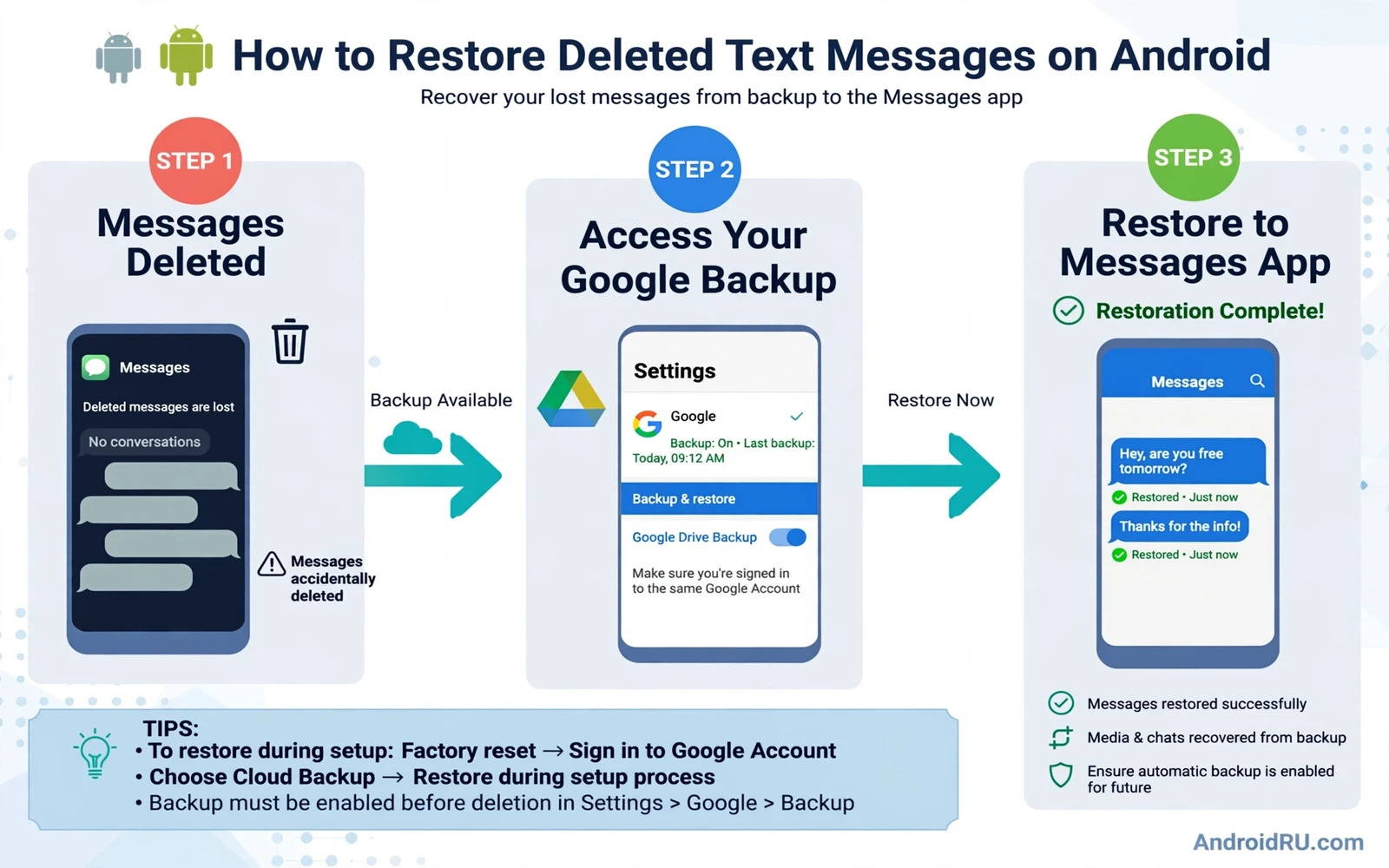
Android backup can include SMS messages when backup is enabled for the device. Open Settings and then System and then Backup and confirm that backup is on and that it covers messages. A backup restore usually happens during phone setup after a reset. That path restores messages as part of a full device restore. It is not a selective restore of one conversation. That limitation matters for planning.
Restoring a full backup means resetting the phone and choosing restore during setup. Back up current data first because a reset erases the current state. During setup choose the backup that predates the deletion. Wait for the restore to finish and then check Messages. If the deleted conversation returns then the backup held it. If it does not return then that backup predates the message or never included messages. A full restore is disruptive so use it only when the messages matter enough to justify a reset.
Restore From A Messaging App Backup
Some messaging apps offer their own backup. Open the app settings and look for backup or restore options. If the app backed up conversations to cloud storage then a restore inside the app may bring them back without a full phone reset. Follow the app restore flow carefully and use the same account that made the backup. A different account will show an empty backup and look like a failure when it is really an account mismatch.
Check the backup date before restoring. A backup made after the deletion cannot contain the deleted messages. A backup made before the deletion can. If the app allows selective restore then restore only the needed conversation to avoid overwriting newer messages. If the app restores everything then back up current conversations first where possible. A restore that overwrites newer messages trades one loss for another.
Ask The Other Person And Check Other Devices
The simplest recovery is often human. Ask the other person in the conversation to forward the messages or to screenshot them. The other phone still holds its copy of the conversation unless they also deleted it. A forwarded copy restores the content even if it does not restore the original thread perfectly. For business messages a forwarded copy with timestamps is usually enough.
Check other devices that may hold the same messages. A tablet or a web messaging session linked to the same account may still show the conversation. A linked device that has not synced the deletion yet can preserve the messages. Open it quickly before it syncs. Copy the important messages elsewhere as soon as you see them. A synced deletion can erase the other copy too once the devices connect.
Understand Local Recovery Limits
Local recovery tools claim to scan phone storage for deleted messages. On modern Android phones with file encryption and scoped storage those tools face strict limits. They often need a computer connection and broad permissions. They rarely recover messages that were never backed up. Some tools are outright scams that charge for a scan that finds nothing. Treat any tool that demands payment before showing results with great caution.
Never grant a recovery tool full device access without research. A tool with deep access can copy photos and contacts and messages while claiming to recover one thread. Read reviews from trusted sources and check the developer history. If a tool asks to disable security protections then stop. A deleted message is not worth weakening the whole phone. Accept an unrecoverable loss rather than risking a larger privacy breach.
Prevent Future Message Loss
Turn on device backup and confirm that it includes messages. Open backup settings monthly and confirm the last backup date is recent. A backup from months ago will not save yesterday messages. Use a messaging app with its own backup as a second layer when possible. Two backup layers protect against one layer failing silently.
Archive instead of deleting when you are unsure. Archiving hides a conversation without destroying it. You can unarchive later with one tap. Deleting should be a deliberate choice for conversations you truly do not need. For contacts tied to messages the guide to recovering lost contacts through Google sync covers the parallel recovery path for people records. Messages plus contacts together rebuild a full conversation history.
A Recovery Plan That Respects Reality
Deleted messages deserve a fast and honest attempt. Trash first and archive second and backup third and the other person fourth. That order moves from easiest to hardest and from most reliable to least. Each step takes minutes except a full backup restore. Stop when a step succeeds. Do not chase unbacked messages with risky tools after the reliable routes fail.
The best recovery is prevention. Backups on and archive habit in place and important messages forwarded to a safe place. With those habits a deleted message becomes a small inconvenience rather than a loss. Set up backups today while messages are still present. Future you will be grateful for a few minutes spent now.
Messages And Legal Records
Text messages sometimes serve as records for agreements and appointments. A message that proves a delivery time or a payment promise has value beyond chat. Preserve such messages deliberately. Screenshot them and store the screenshot in a safe folder. A screenshot survives app deletion even when the thread does not. A preserved record beats a recovered thread for legal purposes in many cases.
Do not edit screenshots of records. An edited screenshot loses credibility. Keep the original screenshot with timestamps visible. Store it alongside any related documents. A clean unedited record is far stronger than a polished one. Preservation discipline matters most for messages you may need months later.
Cloud Messaging And Sync
Some carriers and messaging services sync messages across devices through the cloud. A cloud sync copy can restore messages after a phone loss. Check whether your messaging service offers cloud sync and whether it is enabled. A sync that is off cannot help after deletion. A sync that is on may restore messages to a new phone during setup. Verify sync status before you need it.
Web messaging sessions also hold copies. A browser session linked to the phone may show messages until it syncs a deletion. Open a linked session quickly after an accidental deletion and copy important messages out. Speed matters because sync can erase the web copy too. A fast copy to a safe place beats a slow hope for automatic recovery.
Teaching Safe Deletion Habits
Teach household members to archive rather than delete. Archiving is reversible and deletion is often not. A family habit of archiving prevents most message loss before it happens. Show children and older relatives where the archive lives and how to restore from it. A shared habit protects everyone on a shared device.
Review message storage yearly. Delete threads that truly have no value and archive the rest. A yearly review keeps the app fast without risking important history. For the people side of recovery the guide to recovering lost contacts through Google sync and the guide to fixing MMS and text messages that fail to send complete the messaging toolkit. Recovery plus sending plus contacts together cover every message problem.
A Practical Checklist For Message Safety
Protect messages with a checklist that starts before deletion happens. Turn on device backup and confirm it includes messages. Confirm the last backup date monthly. Archive instead of deleting when unsure. Screenshot agreements and store them safely. Forward critical details to email as a second record. Know where the messaging app trash and archive live before you need them. A checklist followed in calm times makes recovery possible in stressful times. Recovery after deletion is always harder than preservation before deletion.
Respond to a deletion with a fast ordered routine. Check trash and archive and spam immediately. Check a linked device or web session before it syncs the deletion. Ask the other person for a forwarded copy. Check cloud backup date and decide whether a full restore is worth its disruption. Stop heavy phone use that could overwrite local data. Each step in order moves from easiest to hardest and from most reliable to least. A routine prevents panic steps that overwrite data or grant risky tools deep access.
Review message habits yearly. Delete threads with no value and archive the rest. Confirm backup coverage after switching messaging apps because a new app may back up differently. Teach family members the archive habit so shared devices lose fewer messages. A yearly review plus a backup habit plus an archive habit together make message loss rare and recovery straightforward. Messages are small files with large personal value and they deserve a safety routine proportionate to that value.

