

Google Pixel 6a Review: Display Quality, Speed and Daily Use
The Google Pixel 6a arrived in July 2022 as the smaller, cheaper member of the Pixel 6 family, and it kept the parts that made that family easy to recommend: the same Google Tensor G1 chip as the Pixel 6 and Pixel 6 Pro, the same clean version of Android, and the same computational photography that had turned Pixel phones into a reference point for point-and-shoot cameras. What it gave up was size, a faster refresh rate, and a few premium extras. For many buyers, that trade looked sensible on paper. The question this review answers is whether it still holds up in daily use, years after launch, when the phone is judged on its display quality, its speed, its cameras, its battery life, and the value it offers as a used or discounted handset.
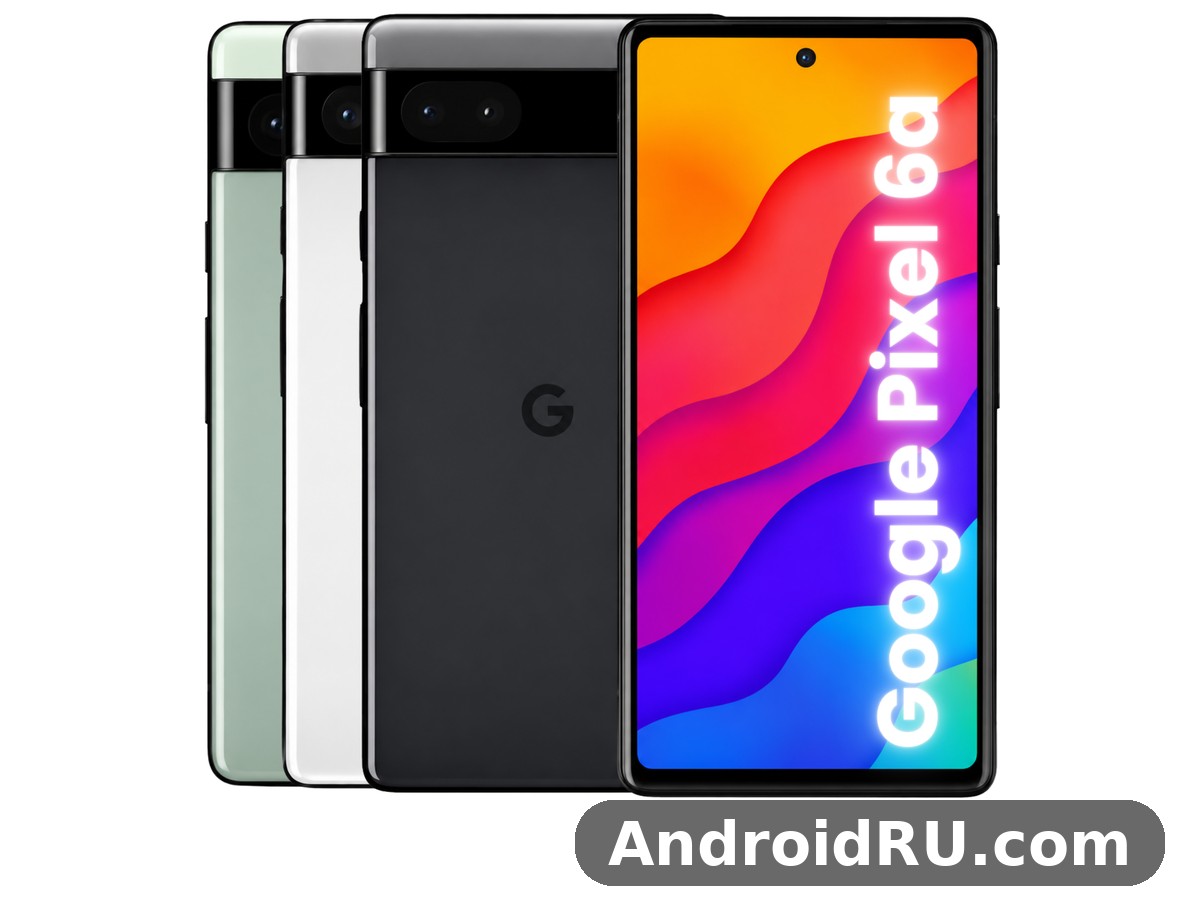
This is a phone for people who want a compact Android phone that takes excellent photos without fuss, stays fast enough for messaging, browsing, maps, banking, and social apps, and receives the clean Pixel software experience with regular security updates. It is not a phone for heavy mobile gamers who want a 120Hz screen, for buyers who need wireless charging, or for anyone who records long 4K video sessions and expects the phone to stay cool through them. The sections below work through each of those points in turn, with the full specification table and a direct comparison against the Pixel 7a and the Pixel 5a 5G, so you can see exactly where the Pixel 6a stands and decide whether it fits the way you actually use a phone.
If you are shopping in 2026, the Pixel 6a makes most sense as a budget Pixel: a second phone, a first Pixel for someone moving from an older Android handset, or a compact daily driver for a user who values camera quality and software simplicity over raw gaming power. Its 6.1-inch size is the first thing to notice. At 152.2 x 71.8 x 8.9 mm and 178 grams, it sits comfortably in one hand and in a jacket pocket, a clear contrast with the larger phones that dominate the market now. That compact size shapes everything that follows, from how the display feels to how long the battery lasts.
Google Pixel 6a Display Quality in Everyday Light
The Pixel 6a display is a 6.1-inch OLED panel with a resolution of 1080 x 2400 pixels, a 20:9 aspect ratio, and a standard 60Hz refresh rate. On paper, the 60Hz figure is the weakest number on the specification sheet, because many phones at this price now offer 90Hz or 120Hz. In practice, the panel itself is good: OLED contrast gives deep blacks, colours look rich without looking oversaturated in the default Natural colour mode, and text stays sharp at around 429 pixels per inch. Reading articles, scrolling through messages, and watching video all look clean and pleasant, and the smaller screen size means the panel is easy to reach across with one thumb.
Where the display shows its limits is in motion and in bright sunlight. Scrolling through a long feed at 60Hz is visibly less smooth than on a 90Hz or 120Hz phone, and once you have used a faster screen for a week, going back to 60Hz feels like a small step backwards. That is a real trade-off, and it is the single most obvious daily difference between the Pixel 6a and the Pixel 7a, which offers a 90Hz panel. Brightness is adequate for most outdoor use, though it does not reach the peak brightness of newer mid-range phones, so reading the screen in direct summer sun can require shading the display or turning brightness up to maximum. Corning Gorilla Glass 3 protects the front, which is an older generation of glass than the Victus glass on the Pixel 6, so a screen protector and a case remain sensible precautions.
Pixel 6a OLED Panel Colours and Sharpness
The OLED panel is the reason the Pixel 6a still looks good in 2026. Blacks are truly black because OLED pixels switch off, which makes video and dark mode look better than on an LCD panel of the same size. The Adaptive and Boosted colour modes add saturation for people who like a punchier look, while the Natural mode keeps skin tones and photos closer to how they were captured. At 1080p on a 6.1-inch screen, individual pixels are not visible at normal viewing distance, and small text in browsers and e-books stays crisp. HDR content from streaming apps plays back with noticeably better contrast than standard video, even though this is not a flagship HDR panel with very high peak brightness.
For photo viewing, the display matters more than it first seems. The Pixel 6a camera produces photos with strong dynamic range and accurate colour, and the OLED screen shows them well, which makes reviewing shots on the phone itself a pleasure. The always-on display shows the time, date, and notification icons without waking the full screen, and the Now Playing feature identifies songs playing nearby and shows the track name on the lock screen. Both features are small, but they are the kind of Pixel touches that make daily use feel considered rather than generic.
How the 6.1 Inch Screen Feels in One Hand
A 6.1-inch phone with slim bezels and a centred hole-punch camera is easy to hold, and the Pixel 6a benefits from that. The fingerprint sensor sits under the display, which keeps the back clean, though the optical sensor is slower and less forgiving than the capacitive sensor on the older Pixel 5a 5G. Registering the same finger twice, with slightly different angles, helps in practice. The phone is easy to use on a crowded train, easy to slip into a jeans pocket, and easy to hold for a long video call without hand fatigue. For buyers who find modern phones too large, this size is a genuine selling point rather than a compromise.
Pixel 6a 60Hz Refresh Rate and Scrolling Smoothness
The 60Hz refresh rate deserves an honest assessment, because it is the display feature most buyers ask about first. At 60Hz, the screen redraws 60 times per second, which is fine for reading, watching video at 24 or 30 frames per second, and tapping through menus. It is less smooth when scrolling quickly through social feeds, photo galleries, and long web pages, where a 90Hz panel shows visibly less judder. Some buyers will notice the difference in the first hour; others will stop noticing after a day, especially if they are coming from an older 60Hz phone. The honest way to frame it is this: the refresh rate is a downgrade from the Pixel 7a and from many 2024 and 2025 mid-range phones, but it does not make the phone slow, and it does not affect photo quality, call quality, or app loading times.
There is also a battery upside to the slower refresh rate. A 60Hz panel draws less power than a 90Hz or 120Hz panel at the same brightness, which helps the modest 4,410 mAh battery stretch through a day of moderate use. Google made a deliberate choice here, trading smoothness for battery life and price, and that choice is consistent with the rest of the phone: sensible, restrained, and aimed at buyers who value the camera and the software more than the specification sheet.
Pixel 6a Brightness Outdoors and Night Use
Outdoor brightness is good enough for maps, messages, and photos on a bright day, though it is not outstanding. The automatic brightness setting adapts quickly when you step from indoors to outdoors, and the high brightness mode lifts the panel further in strong light. At night, the OLED panel excels: minimum brightness goes low enough for comfortable reading in a dark room, and dark mode across Android and Google apps looks clean, with true blacks that also save a little power. Night Light tints the screen warmer in the evening, which many people find easier on the eyes before bed.
Google Pixel 6a Speed and Google Tensor G1 Performance
Speed is where the Pixel 6a punches above its price. The phone uses the Google Tensor G1 chipset, the same first-generation Tensor chip that powered the Pixel 6 and Pixel 6 Pro at launch, paired with 6GB of RAM and 128GB of storage. That matters because the Tensor G1 was designed around Google’s own workloads: computational photography, on-device speech recognition, live translation, and the Titan M2 security chip. In daily use, apps open quickly, switching between messaging, browser, maps, and camera feels responsive, and the Pixel software stays smooth because there is no heavy manufacturer skin on top of Android.
The 6GB of RAM is enough for normal multitasking, though it is the second number to watch after the 60Hz display. With six or seven apps open, the phone keeps them in memory well. With a dozen heavy apps, a browser with many tabs, and a game running in the background, Android will close background apps sooner than a phone with 8GB or 12GB of RAM would. That shows up as an app reloading when you return to it, rather than as a crash. Storage is fixed at 128GB with no microSD slot, so buyers who shoot a lot of video or keep large offline music and map collections should check how much free space they will need and use cloud backup for photos.
Google Tensor G1 Chipset in Daily Tasks
The Tensor G1 is built on a 5nm process with an octa-core CPU, a Mali-G78 MP20 GPU, and a dedicated Tensor Processing Unit for machine learning. In everyday tasks, the chip feels fast because the tasks people do most often — opening apps, typing, searching, taking photos, and using voice typing — are exactly the tasks Tensor was tuned for. Voice typing with the Google Assistant is accurate and fast, live captions work on video and audio without an internet connection, and the Magic Eraser feature in Google Photos removes unwanted objects from a photo on the device. These are features that depend on the Tensor chip, and they are part of why a Pixel 6a still feels like a Pixel rather than a generic Android phone.
Heat is the trade-off. The Tensor G1 runs warm under sustained load, and the Pixel 6a, with its compact body and no vapour chamber cooling, can get noticeably warm during long video recording, extended 5G downloads, or back-to-back gaming sessions. The phone manages heat by slowing the chip down, which protects the hardware but means performance drops during very long heavy sessions. For normal use — calls, messages, browsing, navigation, photography, and short gaming sessions — heat is rarely an issue, and the phone stays comfortable to hold.
Pixel 6a Gaming Performance and Frame Rates
For casual games and popular titles at medium settings, the Pixel 6a performs well. Games such as puzzle games, card games, and lighter action games run smoothly, and the stereo speakers are loud enough for casual play without headphones. For demanding 3D games at high graphics settings, the picture is more mixed: frame rates are playable, but sustained performance falls behind phones with newer Snapdragon chips, and the phone warms up faster. If mobile gaming is your main hobby, a phone with a newer chip and a faster display would serve you better. If gaming is an occasional pastime between calls, messages, and photos, the Pixel 6a is fast enough and the compact screen is comfortable for short sessions.
The 128GB of storage also shapes the gaming experience. Large games take several gigabytes each, so keeping three or four big titles installed alongside photos and offline maps can fill the phone quickly. Android will warn you before storage runs out, and Google Photos can free space by backing up photos and removing local copies, but there is no way to add storage later. Buyers should treat 128GB as a firm limit and plan around it.
Pixel 6a Multitasking With 6GB of RAM
Multitasking on the Pixel 6a is helped by clean software and hurt slightly by the 6GB RAM limit. Split-screen mode works well for pairing a video with notes, or maps with messaging, and picture-in-picture keeps a video call or a video floating while you check another app. The app switcher is fast, and the Pixel Launcher stays responsive even with widgets and a live wallpaper. The limit appears when you keep many apps open at once: the phone will reload the oldest app rather than keep it in memory. Most users will not hit that limit in a normal day, but power users who juggle a dozen apps should know it exists.
Pixel 6a Software Updates and Security Patches
At launch, the Pixel 6a shipped with Android 12 and was promised five years of security updates, with major Android version updates through Android 15 and security patches into 2027. That long support window is one of the strongest reasons to consider the phone in 2026: many phones at this price stop receiving updates after two or three years, while the Pixel 6a kept getting monthly security patches and new Android features for far longer. Buyers of a used Pixel 6a should check the installed Android version and the date of the latest security patch in Settings, because a phone that has not been updated will miss both security fixes and newer Pixel features.
Google Pixel 6a Camera Quality for Photos and Video
The camera is the Pixel 6a’s strongest reason to exist. The rear system pairs a 12.2MP main camera with optical image stabilisation and an f/1.7 aperture with a 12MP ultrawide camera with a 114-degree field of view. The front camera is an 8MP unit with an f/2.0 aperture. Those numbers look modest next to phones that advertise 50MP or 108MP sensors, but the Pixel approach has always been different: a proven sensor, fast processing, and computational photography that handles exposure, colour, and detail in software. In daylight, the main camera produces sharp, well-exposed photos with accurate colours and a wide dynamic range. In low light, Night Sight takes several frames and combines them into a brighter, cleaner image than a single exposure could produce.
What stands out in daily use is consistency. Point the phone at a scene, tap the shutter, and the result is usually a good photo without adjusting settings. Portraits have natural skin tones and a pleasing background blur, food photos look appetising without oversaturated colours, and landscapes keep detail in both sky and shadow. The ultrawide camera is useful for buildings, interiors, and group photos, though its image quality drops in low light compared with the main camera. There is no telephoto lens, so zoom beyond 2x is digital and loses detail quickly — a real difference from the Pixel 6 Pro, and a point to weigh if you photograph distant subjects often.
Pixel 6a Main Camera Daylight and Night Sight Photos
In daylight, the 12.2MP main camera is excellent for its class. Detail is strong across the frame, colours are balanced, and the phone handles tricky light — a bright sky over a shaded street, a window behind a person, a sunset with strong contrast — better than most phones at this price. The dual-pixel autofocus is fast and reliable, locking onto faces and moving subjects quickly, and optical image stabilisation helps keep shots sharp when your hand moves slightly. For social media, messaging, and printing at normal sizes, the results need no editing.
Night Sight is where the Pixel 6a earns its reputation. In a dim restaurant, a street at night, or a living room lit by a single lamp, Night Sight brightens the scene without turning it into a washed-out, noisy mess. Colours stay believable, faces stay recognisable, and noise is controlled well for a phone of this age. It takes a couple of seconds to capture, so it is not ideal for fast-moving subjects in the dark, but for still scenes it transforms photos that would be unusable on many other phones. Astrophotography mode, which appears when the phone is held still in very dark conditions, can capture stars and night skies that are genuinely impressive for a phone camera.
Pixel 6a Portrait Mode and Magic Eraser Features
Portrait mode on the Pixel 6a uses the main camera and machine learning to separate the subject from the background, and the results are good for people and pets. Edge detection around hair and glasses is usually accurate, and the blur looks natural rather than painted on. Magic Eraser, built into Google Photos, lets you remove a stranger, a bin, or a stray object from a photo with a tap, and Camouflage can tone down a distracting bright object so it blends into the scene. These tools run on the device and work on older photos too, including shots taken on other phones and backed up to Google Photos. They are practical, everyday tools, not gimmicks, and they save photos that would otherwise be deleted.
Pixel 6a Ultrawide Camera and Front Camera
The 12MP ultrawide camera covers a 114-degree field of view, which is wide enough for architecture, landscapes, and tight indoor spaces where stepping back is not possible. In good light, ultrawide photos are sharp in the centre with some softening at the edges, which is normal for this type of lens. In low light, the ultrawide is noticeably weaker than the main camera, with more noise and less detail, so switching to the main camera is better when light is poor and you can step back instead. The ultrawide also handles video well in daylight, giving a stable, wide view for walking shots.
The 8MP front camera is good for video calls and selfies in good light, with natural skin tones and a wide enough field of view for a group selfie. In low light, selfies get noisier and softer, and the fixed-focus lens means you need to hold the phone at a sensible distance for the sharpest result. Video calls on the front camera look clear, and the phone’s microphones pick up voice well in a quiet room. For creators who film themselves often, the rear camera with the phone propped up will always give a better result than the front camera.
Pixel 6a Video Recording Quality and Stabilisation
Video recording tops out at 4K at 30 or 60 frames per second on the rear camera, with 1080p options for smaller files and longer clips. Stabilisation is strong, with a combination of optical stabilisation and electronic stabilisation that keeps walking footage smooth, and the dedicated video stabilisation modes help further for action shots. Colours and exposure in video match the stills, which makes the phone reliable for family videos, travel clips, and short social videos. Audio recording is clear, with good wind noise reduction for outdoor clips.
The limits are heat and the lack of a telephoto lens. Recording 4K video for a long stretch, especially in warm weather, warms the phone and can lead to the camera app warning about temperature. Short clips and 1080p recording are far less demanding. Slow-motion video at 1080p and 120 or 240 frames per second works well for action moments, though quality drops at the highest slow-motion setting. For most people, the video quality is more than enough for memories and social sharing; for serious video creators, a phone with better cooling and a telephoto lens would be a better tool.
Google Pixel 6a Battery Life and 18W Charging
The Pixel 6a battery is a 4,410 mAh battery, which is modest by modern standards, where 5,000 mAh is common even in budget phones. In practice, battery life depends heavily on how you use the phone. With moderate use — messaging, browsing, some social media, maps, and a few photos — the phone lasts a full day, typically from morning to bedtime, with some charge left. With heavy use — long 5G streaming, navigation with the screen on for hours, gaming, or long video recording — the battery drains faster, and you may need a top-up in the late afternoon. The 60Hz display and the efficient Tensor chip help, but the smaller battery is a real limit.
Charging is wired only, at up to 18W with a compatible USB Power Delivery charger. There is no wireless charging, which is a clear omission compared with the Pixel 6 and a difference that matters if you already own wireless chargers or a car mount with wireless charging built in. A full charge from empty takes around 90 minutes to two hours with an 18W charger, and the phone supports Adaptive Charging, which slows overnight charging to protect long-term battery health. The phone ships without a charger in the box in most markets, so buyers need a USB-C Power Delivery charger and a USB-C cable, or they can use a charger they already own.
Pixel 6a Battery Life in Real Daily Use
Daily battery life on the Pixel 6a is best understood through typical days rather than lab numbers. A light day — mostly Wi-Fi, messaging, email, and reading — can end with 30 to 40 percent remaining. A normal day with a mix of Wi-Fi and mobile data, an hour of streaming, and some camera use ends with 15 to 25 percent remaining. A heavy day with navigation, 5G, and video will need charging before bedtime. Screen-on time is typically around five to six hours for mixed use, which is respectable for a 4,410 mAh battery, but it is not the two-day battery life that some larger phones offer.
Battery health matters more for a used Pixel 6a than for a new one. A battery that has been through hundreds of charge cycles holds less charge than a fresh one, so a used phone may last noticeably less than the figures above. Buyers of a used handset should check battery health where possible, look at how the phone behaves over a full day, and factor in the cost of a battery replacement if the phone is several years old. Adaptive Battery in Android learns which apps you use most and limits background activity for apps you rarely open, which helps stretch each charge.
Pixel 6a Charging Speed and No Wireless Charging
At 18W, charging is slow by 2026 standards, where 25W, 30W, and faster charging are common. A 30-minute charge from empty adds roughly a third of a charge, which is enough for a few hours of light use but not a full day. That makes overnight charging the sensible routine, with Adaptive Charging protecting the battery by finishing the charge just before you wake up. The lack of wireless charging is a practical loss for people who charge on a desk stand or in a car, and it is worth checking your own charging habits before buying: if every charger you own is wireless, the Pixel 6a will force a change.
On the positive side, the USB-C port is standard, cables are cheap and widely available, and the phone works with the same chargers as most modern Android phones and laptops. Battery Saver mode, and the more aggressive Extreme Battery Saver, can extend the phone well past a day when you need it, by pausing most apps and limiting background work. Those modes are genuinely useful on a travel day or when a charger is out of reach.
Full Specifications of the Google Pixel 6a
The table below brings together the full specification of the Pixel 6a in one place. It is the reference to check against when comparing this phone with the Pixel 7a, the Pixel 5a 5G, or any other mid-range Android phone. The numbers are the launch specifications for the model released in July 2022, running Android 12 at launch, with the Google Tensor G1 chip, 6GB of RAM, and 128GB of storage. Later software updates added features and changed some behaviour, but the hardware numbers in the table stayed the same.
| Specification | Google Pixel 6a |
|---|---|
| Launch date | July 2022, Android 12 at launch |
| Display | 6.1 inch OLED, 1080 x 2400 pixels, 20:9, 60Hz, Gorilla Glass 3 |
| Chipset | Google Tensor G1, 5nm, octa-core, Mali-G78 MP20 GPU |
| RAM | 6GB LPDDR5 |
| Storage | 128GB UFS 3.1, no microSD slot |
| Rear cameras | 12.2MP main, f/1.7, OIS, dual-pixel autofocus; 12MP ultrawide, f/2.2, 114 degree field of view |
| Front camera | 8MP, f/2.0, fixed focus, 84 degree field of view |
| Video | 4K at 30 or 60 frames per second, 1080p at 30, 60, 120 or 240 frames per second |
| Battery | 4,410 mAh, 18W wired charging, no wireless charging |
| Water and dust resistance | IP67, dust tight and protected against immersion up to 1 metre for 30 minutes |
| Security | Under-display optical fingerprint sensor, Titan M2 security chip, face unlock not included at launch |
| Connectivity | 5G sub-6GHz and mmWave in some regions, Wi-Fi 6E, Bluetooth 5.2, NFC, USB-C 3.1, GPS, dual SIM with nano-SIM and eSIM |
| Dimensions | 152.2 x 71.8 x 8.9 mm |
| Weight | 178 grams |
| Colours | Sage, Chalk, Charcoal |
| Build | Aluminium frame, plastic back, Gorilla Glass 3 front |
| Audio | Stereo speakers, no 3.5mm headphone jack, USB-C audio |
| Sensors | Accelerometer, gyroscope, proximity, ambient light, compass, barometer |
Pixel 6a Design Build Quality and IP67 Rating
The Pixel 6a design follows the Pixel 6 family, with the distinctive horizontal camera bar across the back, a two-tone finish, and a compact, rounded body. The aluminium frame feels solid, the plastic back keeps weight down to 178 grams, and the three colours — Sage, Chalk, and Charcoal — look understated rather than flashy. The phone is easy to grip without a case, and the camera bar stops the phone rocking on a table, which is a small but welcome detail. The IP67 dust and water resistance rating means the phone is dust-tight and can survive immersion in up to 1 metre of water for 30 minutes, which covers rain, splashes, and an accidental drop in a sink, though it is not a rating for swimming or for use in salt water.
Build quality is good for the price, with tight tolerances and no creaks, though the plastic back and Gorilla Glass 3 front are less premium than the glass back and Victus glass on the Pixel 6. The under-display fingerprint sensor is the weakest part of the hardware: it is slower than a capacitive sensor and can struggle with wet fingers or a thick screen protector. Face unlock was not included at launch, so the fingerprint sensor and PIN are the main ways to unlock the phone. The stereo speakers are clear and loud enough for video and calls, and the haptics are precise, giving a satisfying tap feedback when typing.
Pixel 6a Connectivity 5G Wi-Fi and Storage Options
Connectivity on the Pixel 6a is modern for a 2022 phone and still adequate in 2026. 5G covers sub-6GHz bands widely, with mmWave in some regions and on some carrier models, Wi-Fi 6E gives fast wireless speeds on a compatible router, Bluetooth 5.2 handles headphones and wearables reliably, and NFC supports contactless payments through Google Wallet. Dual SIM works through one nano-SIM and one eSIM, which is useful for travel or for keeping a work and a personal number on one phone. The USB-C 3.1 port supports fast data transfer and DisplayPort output for a wired display connection, though that is a feature most buyers will rarely use.
Storage is the one connectivity-adjacent limit to plan around: 128GB only, with no microSD expansion and no 256GB option for this model. That is enough for most users if photos are backed up to the cloud and large games are managed carefully, but it is tight for anyone who keeps a large offline music library, downloads whole seasons of video, or records a lot of 4K footage. Checking current storage use in Settings before buying a used phone, and clearing cached data and unused apps, helps make the most of the space available.
Google Pixel 6a vs Pixel 7a vs Pixel 5a 5G Comparison
The Pixel 6a sits between two close relatives, and the comparison below shows why each one appeals to a different buyer. The Pixel 5a 5G came before it, with a larger screen, a bigger battery, and a headphone jack, but an older chip and a shorter update window. The Pixel 7a came after it, with a faster display, a newer chip, a higher-resolution main camera, and wireless charging, at a higher launch price. The table compares the three on the criteria that matter most in daily use, so you can see the trade-offs without reading three separate reviews.
For a buyer choosing between the Pixel 6a and the Pixel 7a, the decision usually comes down to price and display. The Google Pixel 7a Review: Screen Quality, Cameras and Charging covers a phone with a 90Hz display, a 64MP main camera, wireless charging, and the newer Tensor G2 chip, which makes it the better choice if those features matter to you and the price difference is small. The Pixel 6a remains the cheaper option, and for buyers who do not notice the refresh rate difference and do not need wireless charging, the saving is real money for a very similar daily experience.
| Feature | Pixel 6a | Pixel 7a | Pixel 5a 5G |
|---|---|---|---|
| Display | 6.1 inch OLED, 60Hz | 6.1 inch OLED, 90Hz | 6.34 inch OLED, 60Hz |
| Chipset | Google Tensor G1 | Google Tensor G2 | Qualcomm Snapdragon 765G |
| RAM and storage | 6GB, 128GB | 8GB, 128GB | 6GB, 128GB |
| Main camera | 12.2MP, OIS | 64MP, OIS | 12.2MP, OIS |
| Ultrawide camera | 12MP, 114 degrees | 13MP, 120 degrees | 16MP, 117 degrees |
| Battery | 4,410 mAh, 18W wired | 4,385 mAh, 18W wired, 7.5W wireless | 4,680 mAh, 18W wired |
| Water resistance | IP67 | IP67 | IP67 |
| Headphone jack | No | No | Yes |
| Launch Android | Android 12 | Android 13 | Android 11 |
| Size and weight | 152.2 x 71.8 x 8.9 mm, 178g | 152.4 x 72.9 x 9.0 mm, 193.5g | 156.2 x 73.2 x 8.8 mm, 183g |
Pixel 6a vs Pixel 7a Which Is Better Value
Against the Pixel 7a, the Pixel 6a loses on paper in almost every category: a slower display, an older chip, a lower-resolution camera, less RAM, and no wireless charging. In daily use, the gap is smaller than the specification sheet suggests. Photos from the two phones look close in good light, because both rely on the same computational photography approach, and the Tensor G1 still handles normal apps well. The differences you will feel every day are the 90Hz display, which makes scrolling smoother, and the extra 2GB of RAM, which keeps more apps in memory. If you can find a Pixel 7a for only a little more than a Pixel 6a, the 7a is the better buy. If the price gap is large, the 6a gives you most of the Pixel experience for less money, and that is a fair trade.
Pixel 6a vs Pixel 5a 5G Upgrade or Sideways Move
Against the Pixel 5a 5G, the Pixel 6a is a genuine upgrade in the areas that matter most, even though the battery is smaller and the headphone jack is gone. The Google Pixel 5a 5G Review: Camera Quality, Battery and Value describes a phone with a larger 4,680 mAh battery and a 6.34-inch screen, which some buyers still prefer, but the Snapdragon 765G chip is a clear step behind the Tensor G1 for photography features, voice typing, and on-device machine learning. The Pixel 6a also has a more modern design, a smaller and lighter body, and a longer software support window, since it launched a year later. For a Pixel 5a 5G owner, the 6a is a sensible upgrade if the camera and software matter more than battery size and the headphone jack; for a buyer choosing between the two used, the 6a is usually the better choice unless the headphone jack is essential.
Pixel 6a vs Newer Pixel A Series Phones
The newer A-series phones, including the Pixel 8a and the Pixel 9a, move the range further forward with newer Tensor chips, brighter displays, longer update promises, and better battery life. The Google Pixel 8a Review: Display, Audio and Overall Experience covers a phone with a 120Hz display and the Tensor G3 chip, which is a clear step up in smoothness and sustained performance. The Google Pixel 9a Review: Gaming, Multitasking and Battery Life covers a still newer model with a larger battery and the Tensor G4 chip. Both cost more than a used Pixel 6a, and both are better phones on paper. The Pixel 6a still makes sense when the budget is tight and the buyer wants the core Pixel strengths — camera, clean software, and compact size — without paying for the newest hardware. The older Pixel 4a 5G shows the same pattern from the other direction: the Google Pixel 4a 5G Review: Gaming, Multitasking and Battery Life describes a phone that was good in its day but now has an older chip, a shorter update window, and weaker low-light photography than the 6a, so the 6a is the better used buy of the two.
Pros and Cons of the Google Pixel 6a
No phone is perfect, and the Pixel 6a is honest about its compromises. The list below weighs the strengths that still matter in 2026 against the weaknesses that buyers should accept with open eyes before spending money. The balance is positive for the right buyer and negative for the wrong one, which is why the “who it is for” section after this one matters as much as the list itself.
Pixel 6a Pros
- Excellent main camera with Night Sight, Portrait mode, and Magic Eraser, producing reliable photos in daylight and low light without manual settings.
- Google Tensor G1 chip with on-device machine learning, fast voice typing, live captions, and the clean Pixel software experience with long security update support.
- Compact and light 6.1-inch design at 178 grams, comfortable for one-handed use and easy to carry, with IP67 dust and water resistance.
- Sharp OLED display with deep blacks and good colour, plus stereo speakers and 5G, Wi-Fi 6E, and NFC for contactless payments.
- Good value as a used or discounted phone, offering the core Pixel camera and software strengths for much less than a new Pixel.
Pixel 6a Cons
- 60Hz display feels less smooth than 90Hz and 120Hz phones, and outdoor brightness is only adequate rather than outstanding.
- 4,410 mAh battery is modest, lasting a day of moderate use but needing a top-up on heavy days, with slow 18W wired charging and no wireless charging.
- 6GB of RAM and fixed 128GB storage with no microSD slot limit heavy multitasking and large game or media collections.
- Under-display fingerprint sensor is slower and less reliable than a capacitive sensor, and the phone can run warm during long 4K video recording or sustained gaming.
- No telephoto lens, so zoom beyond 2x is digital and loses detail, and the ultrawide camera is noticeably weaker in low light than the main camera.
Frequently Asked Questions About the Google Pixel 6a
Is the Google Pixel 6a still worth buying in 2026?
Yes, for the right buyer and at the right price. As a budget Pixel, the 6a still offers an excellent camera, clean software, and a compact size, and it received security updates into 2027. It is worth buying if you want those Pixel strengths and you accept the 60Hz display, the modest battery, and the lack of wireless charging. It is not worth buying at a price close to a Pixel 7a or Pixel 8a, because those phones fix the display and add newer chips and longer support. Check the battery health, the Android version, and the latest security patch date before buying a used handset, and compare the price with the newer A-series models on sale at the same time.
Does the Google Pixel 6a support wireless charging?
No, the Pixel 6a does not support wireless charging. Charging is wired only, through USB-C at up to 18W with a compatible USB Power Delivery charger. That is a deliberate omission that separates the 6a from the Pixel 6 and the Pixel 7a, which both support wireless charging. If you rely on a wireless charging stand at your desk or in your car, you will need to switch to a cable with the 6a, or choose the Pixel 7a instead. A full wired charge takes around 90 minutes to two hours, and Adaptive Charging slows overnight charging to protect the battery.
How long does the Google Pixel 6a battery last?
With moderate use — messaging, browsing, social media, maps, and some photos — the 4,410 mAh battery lasts a full day, usually ending with 15 to 25 percent remaining. Light days on Wi-Fi can end with more charge left, while heavy days with 5G streaming, navigation, and gaming may need a top-up before bedtime. Screen-on time is typically around five to six hours for mixed use. Battery life on a used phone depends on battery health, so a handset that has been charged hundreds of times may last noticeably less than a fresh one, and buyers should test a full day of use where possible.
Does the Google Pixel 6a have a headphone jack?
No, the Pixel 6a has no 3.5mm headphone jack. Audio goes through the USB-C port with a wired adapter or headphones, or wirelessly through Bluetooth 5.2 headphones and earbuds. The stereo speakers are clear for video and calls, and Bluetooth audio is reliable for music and podcasts. Buyers who still use wired headphones daily should keep a USB-C to 3.5mm adapter with the phone, or consider the older Pixel 5a 5G, which was the last Pixel A-series phone with a headphone jack.
What Android version does the Google Pixel 6a run?
The Pixel 6a launched with Android 12 in July 2022 and received major Android updates through Android 15, with monthly security patches promised for five years from launch, into 2027. That long support window kept the phone current far longer than most phones at its price. A used Pixel 6a should be updated to the latest available version in Settings, under System and then System update, and buyers should check that the security patch date is recent. Features added through later updates include newer Pixel camera tools, improved privacy controls, and the Material You design refinements that arrived after launch.
More About the Pixel 6a: Price, Specs and Everyday Questions
These extra answers cover the questions readers ask most about the Pixel 6a, from price and specifications to the camera, battery life and everyday use.
Pixel 6a Price, Release Date and Specifications
The Pixel 6a price at launch was $449 for the base model, and it has since fallen at many retailers during sale events. The Pixel 6a specs cover a Tensor G1 chipset, 6GB of RAM and a 4,410 mAh battery, which we cover in detail in the specifications section above. Questions about the Pixel 6a release date come up often, because this model launched alongside the rest of its Pixel generation. The Pixel 6a storage is 128GB, with no larger option offered, so cloud backup matters more on this model. The Pixel 6a RAM is 6GB, which is enough for smooth multitasking and keeping apps open in the background. The Pixel 6a storage options are limited to 128GB, with no larger tier offered.
A Pixel 6a trade in can cut the cost of your next phone, and the value depends on the phone’s condition and storage size. The Pixel 6a price in USA started at $449 for the base model at launch. The Pixel 6a full specifications are listed in the specifications section above, from the display and chipset to the cameras and battery. The Pixel 6a price and specifications together explain the value case: you pay for the camera and the clean software, so buy at a low used price. The Pixel 6a specifications and price are both covered above, so compare them with the previous Pixel before deciding. The Pixel 6a price in India varies by retailer and storage option, so check local listings for the current street price.
Pixel 6a Camera, Display and Performance
The Pixel 6a night mode, known as Night Sight, brightens low-light photos without a flash and keeps detail in the shadows. The Pixel 6a zoom is digital only, using the main sensor and software to crop in, so quality drops at high magnification. A Pixel 6a camera test in low light shows the Night Sight processing keeping detail without harsh noise. This Pixel 6a performance review finds everyday speed smooth, with the chipset only showing its limits in long gaming sessions. This Pixel 6a camera review finds the main sensor reliable in most light, with the supporting lenses adding real flexibility.
The Pixel 6a astrophotography mode works best on a tripod, capturing stars and the night sky over several minutes. The Pixel 6a night sight photos keep detail in dark scenes without a flash, which is where this phone beats many rivals. The Pixel 6a magic eraser how to use guide is simple: open the photo in Google Photos, tap Edit, then remove the unwanted object. The Pixel 6a call screen feature screens unknown callers for you and shows a live transcript before you answer.
Pixel 6a Battery Life and Charging
The Pixel 6a overheating reports mostly involve long gaming sessions or hot weather, and the phone slows down to protect itself. In a Pixel 6a battery life test with mixed use, browsing, video and messaging, the phone gets through a full day with charge to spare. This Pixel 6a battery review finds a full day of use realistic, with heavier days needing an evening top-up. A Pixel 6a battery drain overnight fix starts with checking battery use in Settings, then turning off background data for the worst apps. A Pixel 6a overheating problem fix starts with closing heavy apps and moving out of direct sun, then checking for a software update. A Pixel 6a battery health check starts in Settings, under Battery, where usage by app shows what is draining the phone. How long does Pixel 6a battery last? Most owners get a full day from the 4,410 mAh cell, with lighter use stretching into a second day.
Pixel 6a SIM, Security and Everyday Use
The Pixel 6a eSIM support lets you add a second line without a physical SIM card, which is handy for travel. The Pixel 6a IP67 rating means the phone is protected against dust and immersion in water up to 1 metre for 30 minutes. The Pixel 6a software update support runs for 5 years from launch, covering security patches and feature drops. The Pixel 6a fingerprint sensor sits under the display and unlocks the phone quickly once your finger is registered. The Pixel 6a dual SIM setup pairs a physical nano-SIM with an eSIM, so you can keep two numbers on one phone. To learn how to take a screenshot on Pixel 6a, press the power and volume-down buttons together, then find the image in Photos.
The Pixel 6a fingerprint sensor not working usually means a dirty sensor or a poorly registered finger, so clean the area and re-register your finger. The Pixel 6a eSIM setup runs through Settings, then Network and internet, then SIMs, where you can add a plan by scanning a QR code. The Pixel 6a dual SIM support combines a nano-SIM with an eSIM, so two numbers can share one phone. Does Pixel 6a support 5G? Yes, on most carriers, using sub-6GHz and mmWave bands where they are available. Is Pixel 6a waterproof? Not fully, no phone is truly waterproof, but the IP67 rating covers rain, splashes and brief immersion.
Pixel 6a Accessories, Repairs and Buying Advice
A Pixel 6a screen protector is worth fitting, because it guards the display against scratches and small drops. A Pixel 6a case adds grip and drop protection, and clear cases show off the phone’s colour. The Pixel 6a accessories worth considering are a case, a screen protector and a USB-C charger, since the box has no charger. Is Pixel 6a worth buying? For most buyers the answer is yes only as a cheap used phone, because the camera still holds up even though software support has ended or is nearly over. The Pixel 6a pros and cons are simple: the camera and software are strong, while charging speed and gaming power lag behind rivals. This Pixel 6a full review covers the camera, display, performance, battery and software, so you can judge the whole phone. The Pixel 6a screen replacement cost varies by repair shop and region, so get a quote before booking a repair.
Is the Google Pixel 6a Still Worth Buying in 2026?
The Pixel 6a is a phone of clear priorities. It chose a great camera, a smart chip, clean software, and a compact body over a fast display, a big battery, and wireless charging, and that choice still reads well in 2026 for buyers who share those priorities. The display is sharp and pleasant even at 60Hz, the Tensor G1 chip keeps daily tasks fast, the main camera produces photos that hold up against newer mid-range phones, and the IP67 rating and long update support give the phone a durability that many budget phones lack. Its weaknesses are real and easy to name, but they are also easy to live with if you charge overnight, back up photos to the cloud, and do not expect flagship gaming performance.
Who should buy it? A first-time Pixel buyer on a tight budget, a user moving from an older Android phone who wants better photos without a large phone, a parent or student who needs a reliable daily driver for calls, messages, maps, and photos, and anyone who wants a compact second phone will all find the 6a fits. Who should skip it? Heavy gamers, long-form video creators, buyers who need two-day battery life, and anyone who already owns wireless chargers they want to keep using should look at the Pixel 7a or Pixel 8a instead. The price is the deciding factor: at a good used or discounted price, the 6a is a smart buy; at a price close to its successor, the successor wins.
Pixel 6a Final Verdict and Next Steps
Start by checking the price against a Pixel 7a and a Pixel 8a on the same day, because the gap changes with sales and used listings. Next, check the phone itself: confirm the Android version and security patch date in Settings, test the under-display fingerprint sensor with your own finger, take a photo in low light and check Night Sight, and run the phone for a full day to see how the battery holds up. If the price is right and the battery is healthy, buy a case and a screen protector, set up Google Photos backup so the 128GB storage stays manageable, and turn on Adaptive Battery and Adaptive Charging in Settings. Those four steps — compare, check, protect, and set up backup — turn a good used Pixel 6a into a reliable daily phone that will serve you well until you are ready for your next upgrade.

