

Google Pixel 7 Review: Design, Software and Camera Quality
The Pixel 7 arrived in October 2022 as the smaller, cheaper half of Google’s flagship pair, and it made an unusual promise for a phone at its price: the same processor, the same main camera and the same clean software as its bigger Pro sibling, in a body that fits one hand more easily. I spent extended time with this phone as a daily driver, carrying it as my only handset through workdays, weekend trips and a lot of low-light photography, and the picture that emerged is consistent. This is a camera-first phone with honest compromises, not a cut-down flagship pretending to be something else.
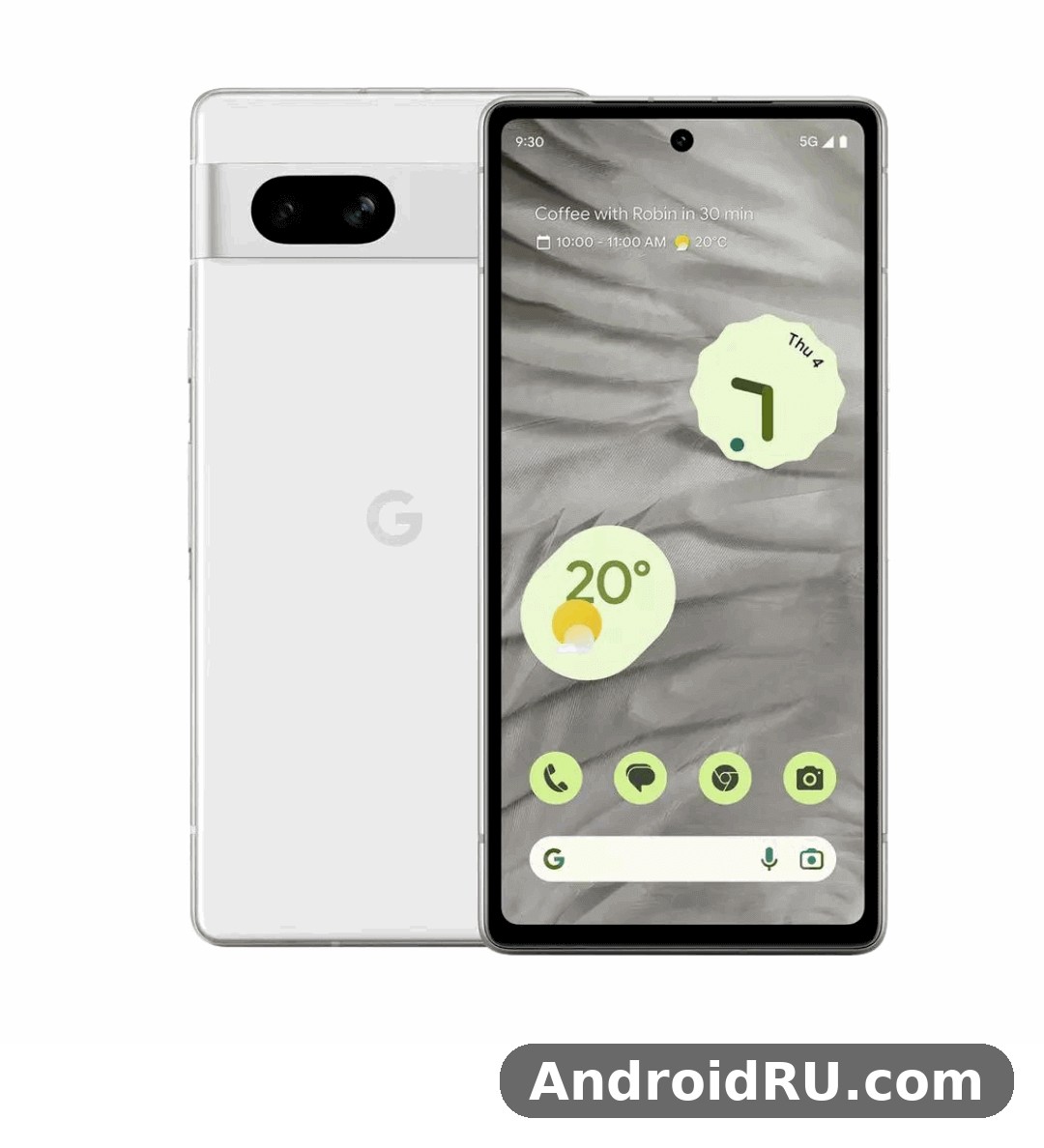
This review covers the three things the title promises — design, software and camera quality — and then goes further, because a buying decision in 2026 needs the full picture: Tensor G2 performance in real apps, the 90Hz OLED screen, battery life from the 4355mAh cell, 20W wired charging, and the complete specification sheet. If you are comparing the Pixel 7 against the Pixel 7 Pro, the Pixel 6 family or the newer Pixel 8, you will find direct comparisons near the end, plus a full specifications table and answers to the questions people actually ask before buying one used or refurbished.
Short version for readers in a hurry: the Pixel 7 still takes photos that embarrass phones costing twice as much, its software stays clean and supported, and its size is genuinely pleasant. The trade-offs are charging speed that feels slow next to 2026 rivals, a chip that warms up under sustained load, and no telephoto lens. Whether that balance works depends on what you photograph, how you charge, and how much you pay for it now.
Google Pixel 7 Design and Build Quality: Aluminium Frame and Glass Back
Pick up the Pixel 7 and the first thing you notice is the camera bar. Google kept the horizontal visor from the Pixel 6 but rebuilt it in polished aluminium, so it reads as one continuous piece of metal running across the back rather than a glass strip stuck on top. The bar houses the two rear lenses, sits flush enough that the phone barely rocks on a table, and gives the phone an identity you can recognise from across a room. After months of use, the aluminium bar also proved practical: it does not crack the way a glass camera island can, and it wipes clean with a sleeve.
The rest of the body follows the same restrained logic. A polished aluminium frame wraps the edges, Gorilla Glass Victus covers the front and back, and the whole phone carries an IP68 rating, so dust and a dunk in shallow water are non-events rather than emergencies. At 155.6 mm tall, 73.2 mm wide, 8.7 mm thick and 197 grams, the Pixel 7 is a comfortable one-hand phone by flagship standards. It is not small in an absolute sense — the 6.3-inch screen guarantees that — but the narrow width and the rounded frame make it far easier to reach the top of the screen than the taller Pro model, and it slips into a jeans pocket without the top corner digging in.
The camera bar and aluminium frame
The camera bar is the design decision that defines this phone, and it works better in daily life than it looks in photos. Because the bar spans the full width, the phone sits almost flat on a desk, which matters when you type with it lying down or use it as a bedside clock. The polished aluminium picks up fingerprints and fine scratches over time, especially on the darker colour, but it hides wear better than the glossy glass backs on some rivals. One honest gripe: the polished frame is slippery when your hands are dry, and the phone benefits from a thin case if you use it without one for long stretches. With a case on, the bar’s shape still leaves the lenses protected, since the case lip sits around the bar rather than over it.
Colours, size and in-hand feel
Google sold the Pixel 7 in three colours: Obsidian, a near-black; Snow, a clean white with a silver frame; and Lemongrass, a pale yellow-green that is the most distinctive of the three and the one that photographs best. In hand, the weight distribution is even, with no top-heavy pull from the camera bar, and the power button and volume rocker sit on the right edge where a right-handed thumb lands naturally. The buttons have a firm click with little wobble. The USB-C port sits on the bottom edge next to the speaker grille and the microphone, and there is no headphone jack — wireless earbuds or a USB-C adapter are the only routes to wired listening.
Lemongrass, Snow and Obsidian colour options
Choosing between the three Pixel 7 colours is mostly a matter of taste, with one practical note. Lemongrass shows fingerprints least and looks the most distinctive, which helps if you use the phone bare. Snow looks sharp in photos and pairs well with light cases, but the white glass shows scuffs on the frame sooner. Obsidian is the safe choice and the easiest to find used, though it is also the one that shows dust and smudges most. All three share the same glass, the same frame and the same IP68 sealing, so the choice changes nothing about durability or performance.
What is in the box and what is missing
The retail box contains the phone, a USB-C to USB-C cable and a Quick Switch Adapter for moving data from an old phone. There is no charger in the box and no case, which is standard practice now but worth knowing before the phone arrives. Budget for a USB-C PD charger of 30W if you want the fastest wired charging this phone supports, and a case if you plan to carry it without one. The Quick Switch Adapter deserves a mention: moving apps, photos and messages from an old Android phone or an iPhone through a cable took under half an hour in my move, with most app logins still needing to be re-entered by hand.
Google Pixel 7 Display: 6.3-inch OLED Screen with 90Hz Refresh Rate
The Pixel 7 display is a 6.3-inch OLED panel at 1080 x 2400 resolution, running at up to 90Hz with a pixel density around 416 ppi. On paper that reads as a step behind the 120Hz panels on the Pro model and on many rivals, and in a side-by-side scroll test you can feel the difference if you look for it. In normal use, though, the 90Hz panel is smooth where it matters: scrolling through feeds, swiping between home screens and flicking through photos all feel fluid, and the jump from 60Hz to 90Hz is the jump that actually changes how a phone feels. The step from 90Hz to 120Hz is real but smaller, and most buyers will stop noticing it after a day.
Colour and brightness are the stronger story. The panel covers the wide colour range used by photos and video, whites stay neutral rather than drifting blue, and HDR video on streaming apps shows the contrast OLED is known for — deep blacks next to bright highlights, with no grey wash over dark scenes. Outdoor brightness reaches around 1000 nits in HDR content and peaks near 1400 nits, which kept the screen readable in direct sunlight on a bright afternoon, though at full brightness the panel does warm the phone slightly. The flat screen, rather than a curved edge, is a quiet advantage: no accidental edge touches, no colour shift at the sides, and screen protectors fit without the lifting edges that curved glass causes.
90Hz OLED panel in daily use
In daily use the 90Hz refresh rate holds up well. The phone switches between 60Hz and 90Hz depending on what is on screen, which saves battery when you are reading a static page and keeps motion smooth when you scroll. I noticed the panel drops to 60Hz for video playback, which is correct behaviour since most video is shot at 24 or 30 frames per second, and the switch is invisible. Gaming at 90Hz works on titles that support it, though the Tensor G2 chip — covered in the next section — is the limiting factor there, not the screen. One small quirk: the auto-brightness can be slow to react when you step from a dark room into sunlight, taking a second or two to ramp up, so manual adjustment is sometimes faster.
Brightness, always-on display and fingerprint reader
The always-on display shows the time, date, weather and notification icons in a dim, low-power mode, and it pairs well with At a Glance, which surfaces calendar events and boarding passes on the lock screen without opening an app. Now Playing listens for music around you and names the song on the lock screen, a small feature that becomes oddly hard to give up once you have used it for a few weeks. The optical under-display fingerprint reader sits near the bottom of the screen and works reliably with dry, clean fingers, though it is slower than the ultrasonic readers on some Samsung phones and can struggle with damp hands or a thick screen protector. Face Unlock is present and fast for unlocking the phone, but it cannot authorise payments or banking apps — the fingerprint reader handles those, so keep a finger enrolled even if you mostly unlock with your face.
Optical fingerprint sensor tips
If the fingerprint reader frustrates you, three steps fix most cases. First, re-enrol the same finger twice, once with the phone flat on a table and once holding it normally, since the angle changes how your fingertip lands. Second, turn on the screen protector mode in display settings if you use a tempered glass protector, because it raises the touch sensitivity. Third, press and hold for a beat longer than feels natural instead of tapping quickly — the optical sensor needs a moment to read. After those steps my unlock success rate went from roughly four in five attempts to nearly every time, with the remaining misses mostly coming from wet hands after washing up.
Google Pixel 7 Tensor G2 Performance and Daily Speed
The Pixel 7 runs on the Tensor G2 chip, Google’s second-generation custom processor, built on a 4 nm process with two high-performance Cortex-X1 cores, two mid-range Cortex-A78 cores and four efficient Cortex-A55 cores, plus a Mali-G710 graphics processor and a dedicated Titan M2 security chip. Paired with 8GB of RAM and 128GB or 256GB of fast UFS 3.1 storage, the combination is tuned for the things Google cares about — photography, voice processing and on-device AI — rather than for winning benchmark charts. That tuning shows up in daily use: apps open quickly, the camera processes Night Sight shots in seconds, and live transcription and translation run on the device without a network round trip.
For everyday tasks the Pixel 7 feels fast. Social apps, messaging, maps, email and the browser all run without stutter, and switching between a dozen open apps rarely forces a reload thanks to the 8GB of RAM. The phone handles photo editing in the built-in tools smoothly, including Magic Eraser and Photo Unblur, which lean on the chip’s AI cores. Where the Tensor G2 shows its limits is sustained heavy load: long gaming sessions and back-to-back 4K video recording warm the phone, and the chip throttles to protect itself, so frame rates in demanding games dip after 20 to 30 minutes. Short bursts of performance are fine; marathon sessions are not this phone’s strength.
Tensor G2 vs Tensor G1 and Snapdragon rivals
Compared with the original Tensor in the Pixel 6, the Tensor G2 is a refinement rather than a revolution: roughly the same CPU layout with higher clocks, a faster GPU and a more capable AI engine. In practice that means noticeably quicker photo processing — Night Sight and Portrait mode finish sooner — and better efficiency in AI tasks like live translation and voice typing. Against Snapdragon flagships of the same year, the Tensor G2 trades blows: it matches them in everyday responsiveness and beats them in on-device AI features, but it trails in raw graphics power and in sustained performance under load. For a buyer in 2026, the honest comparison is not against a new Snapdragon flagship but against other phones at the Pixel 7’s current used price, where the Tensor G2 still holds up well for everything except the most demanding games.
Gaming, heat and sustained performance
Casual games run without complaint on the Pixel 7, and popular titles at medium settings hold steady frame rates. Push a demanding 3D game to high settings for half an hour and the story changes: the upper half of the phone, near the camera bar, gets warm to the touch, and frame rates step down as the chip sheds heat. This is normal behaviour for the Tensor G2 and not a defect, but it is worth knowing if mobile gaming is a daily habit — a phone with a Snapdragon 8 Gen 2 or newer will sustain high frame rates for longer. Practical steps help: remove a thick case during long sessions, lower the graphics preset one notch, and avoid charging while gaming, since charging adds heat on top of the chip’s own. For everything else — streaming, browsing, photography, navigation — heat is a non-issue, and the phone stays comfortable in the hand.
Google Pixel 7 Camera Quality: 50MP Main and 12MP Ultrawide Results
The camera is the reason to buy a Pixel 7, and it is the section of this review that matters most. The rear system pairs a 50MP main camera with a 12MP ultrawide, and the front camera is a 10.8MP unit with a wide field of view. Those numbers sound modest next to phones advertising 200MP sensors, but Pixel cameras have never been about the megapixel count. The 50MP sensor uses pixel binning to produce 12.5MP images with large effective pixels, and Google’s computational photography does the heavy lifting: merging multiple frames, balancing highlights and shadows, and sharpening detail without the waxy over-processing that cheaper phones apply. The result is a camera that is consistent — and consistency is what separates a good phone camera from a frustrating one.
In daylight, the main camera produces photos with accurate colours, strong dynamic range and fine detail that holds up when you crop in. Skies keep their blue instead of blowing out to white, foliage stays green instead of turning muddy, and skin tones look natural across a range of lighting — the Real Tone processing Google built for diverse skin tones is visible in portraits, where faces keep their warmth instead of being washed pale. Indoors, the camera holds detail well at moderate light levels, and the optical image stabilisation keeps shots sharp at slower shutter speeds. This is the camera I reached for on family trips and evening walks, and it rarely gave me a shot I had to delete.
50MP main camera in daylight and low light
Low light is where the Pixel 7 pulls away from most phones near its current price. Night Sight takes a few seconds to capture and merge frames, and the result is a bright, detailed photo from a scene your eyes could barely read — street signs legible, faces recognisable, colours intact rather than smeared orange by streetlights. Handheld Night Sight works well up to a few seconds; prop the phone against a wall or set it on a ledge and Astrophotography mode kicks in for star shots, capturing the Milky Way faintly on a clear dark night. The trade-off is motion: a moving subject in Night Sight blurs, so for people in dim bars or concerts, a regular shot with the flash off and a steady hand sometimes beats Night Sight. The main camera also handles mixed lighting — a bright window behind a person, a lamp beside a face — better than most, thanks to the multi-frame HDR that balances the two extremes.
12MP ultrawide and Macro Focus
The 12MP ultrawide covers a 114-degree field of view, wide enough for building interiors, landscapes and group shots where stepping back is not an option. Image quality holds up well in daylight, with good corner sharpness for an ultrawide, though it softens noticeably in low light compared with the main camera — a normal trade-off, since the smaller sensor gathers less light. The ultrawide also doubles as the macro camera through Macro Focus, which switches automatically when you move close to a subject and focuses down to about 3 cm. Flowers, food, jewellery and small objects come out sharp with a soft background, and the automatic switch is quick enough that you rarely notice it happening. One tip: tap to focus on the exact detail you want in macro mode, because the depth of field is shallow and the camera sometimes locks onto the background instead.
10.8MP front camera, video and Night Sight
The 10.8MP front camera has a wide 92.8-degree field of view, so group selfies fit without a selfie stick, and it records 4K video at 30 frames per second. Selfies are sharp with natural skin tones and a portrait mode that cuts out hair and glasses edges cleanly. Video from the rear camera reaches 4K at 60 frames per second with 10-bit HDR, and the stabilisation — standard, locked and active modes — keeps walking footage smooth without a gimbal. Cinematic Blur adds a shallow depth-of-field effect to video, blurring the background behind a subject, and it works best with a single person in good light. Audio recording is clear, with wind noise reduction that helps outdoors. The 8x Super Res Zoom, a digital zoom built on the main sensor, is genuinely usable up to about 4x and acceptable at 8x in good light, but there is no dedicated telephoto lens, so distant subjects will never match a phone with real optical zoom — that is the Pro model’s territory.
Google Pixel 7 Battery Life and 20W Wired Charging
The Pixel 7 carries a 4355mAh battery, and the honest answer to how long it lasts is that it depends on how you use it. On a normal day of messaging, browsing, maps, photos and an hour of streaming, I consistently ended the day with 20 to 30 percent left — comfortable, but not the two-day endurance some larger phones offer. Heavy days with lots of camera use, navigation and 5G in a weak-signal area drained it faster, sometimes reaching the low teens by bedtime. The 90Hz display and the Tensor G2 chip are efficient enough for a full day, but the battery is not oversized, and the phone’s smaller body leaves no room for a bigger cell.
Adaptive Battery learns your usage patterns over the first week or two and trims power to apps you rarely open, which improves endurance once it settles in — the first few days after setup are not representative, since the phone is still indexing and syncing. Extreme Battery Saver, which limits the phone to essential apps, can stretch a nearly empty battery for hours when you need it. Screen-on time typically lands between five and seven hours depending on brightness and network conditions, which is respectable for a 4355mAh cell but behind the seven-plus hours that phones with 5000mAh batteries routinely deliver.
4355mAh battery in a normal day
To get the most from the battery, keep the 90Hz refresh rate on — the difference it makes to battery life is small, and the smoothness is worth it — and let Adaptive Battery do its job instead of force-stopping apps, which usually costs more power than it saves. Dark mode on the OLED screen saves a little power with dark interfaces, and turning off 5G in favour of 4G in areas with weak 5G signal can make a visible difference, since a hunting modem drains the battery fast. Battery health after years of use is a real consideration when buying used: check the battery health in settings or with a diagnostic app, and budget for a battery replacement if the phone has been through several hundred charge cycles.
20W wired charging and wireless charging
Wired charging tops out at 20W, which is slow by 2026 standards. With a 30W USB-C PD charger, the phone reaches roughly half charge in about 30 minutes and a full charge in around an hour and forty minutes — fine overnight, less fine when you need a quick top-up before heading out. Wireless charging runs at up to 20W with the second-generation Pixel Stand and 12W with standard Qi chargers, and Battery Share lets the phone wirelessly charge earbuds or a watch from its own battery. The slow wired speed is the Pixel 7’s clearest hardware weakness, and it is the one compromise most likely to annoy you daily. If fast top-ups matter to you, this phone will frustrate you; if you charge overnight, you will rarely notice.
Google Pixel 7 Software: Android 13, Pixel Features and Updates
The Pixel 7 launched with Android 13, and software is where a Pixel earns its keep. The interface is clean Android with no duplicate apps, no heavy skin and no advertising baked into system apps — what you see is Google’s own design, with Material You theming that pulls accent colours from your wallpaper and applies them across menus, widgets and icons. That cleanliness is not just cosmetic: it means the phone stays responsive over years, since there is no third-party launcher or bundle of pre-installed apps fighting for resources in the background.
Google promised three years of operating system updates and five years of security patches for the Pixel 7, which takes the OS to Android 16 and security coverage to October 2027. Pixel Feature Drops arrive every few months with new capabilities — camera features, call tools, safety additions — so the phone genuinely improves after purchase instead of freezing on launch-day software. That update record is a large part of the Pixel 7’s value in 2026: many Android phones from 2022 have already stopped receiving updates, while the Pixel 7 is still covered. Before buying used, check the security patch date in settings to confirm the phone is current.
Android 13 at launch and update promise
Android 13 on the Pixel 7 brought per-app language settings, a redesigned media player on the lock screen, and tighter notification permissions, so apps must ask before they can send you alerts. Later updates added the features Pixel owners expect: a photo picker that shares only the images you choose, better tablet and foldable support that does not affect this phone directly, and steady refinements to the camera app. The update path itself is painless — background A/B updates install while you use the phone and apply on the next restart, so you are never stuck watching a progress bar for twenty minutes. One practical note: major OS updates can temporarily cost battery life for a day or two while the system re-optimises apps, so do not judge battery on update day.
Pixel-exclusive features worth using
Several Pixel-only features are genuinely useful rather than demo fodder. Call Screen answers unknown callers with the Google Assistant and shows you a live transcript, so spam calls rarely reach you. Hold for Me waits on hold in your place and alerts you when a human picks up. Direct My Call shows a phone menu’s options as tappable buttons before you even listen to the recording. The Recorder app transcribes speech on the device and lets you search the text, which is handy for meetings and lectures. Magic Eraser removes unwanted people and objects from photos, Photo Unblur sharpens blurry faces from old shots, and Live Translate translates conversations and signs in real time. None of these need a subscription, and all of them run largely on the device thanks to the Tensor G2 chip.
Google Pixel 7 Full Specifications
This section gathers the complete Pixel 7 specification sheet in one place, so you can check any number without hunting through the review. All figures below are the launch specifications for the standard Pixel 7; regional variants differ slightly in 5G bands, and the two storage options share every other specification. Where a figure depends on the charger or the region — charging speed, for example — the table says so rather than pretending a single number covers every case.
| Specification | Google Pixel 7 |
|---|---|
| Display | 6.3-inch OLED, 1080 x 2400, 90Hz, HDR, up to 1400 nits peak brightness, Gorilla Glass Victus |
| Processor | Google Tensor G2, 4 nm, octa-core (2x Cortex-X1, 2x Cortex-A78, 4x Cortex-A55), Mali-G710 MC10 GPU, Titan M2 security chip |
| RAM | 8GB LPDDR5 |
| Storage | 128GB or 256GB UFS 3.1, no microSD slot |
| Rear cameras | 50MP main, f/1.85, OIS, 1/1.31-inch sensor; 12MP ultrawide, f/2.2, 114-degree field of view, Macro Focus |
| Front camera | 10.8MP, f/2.2, 92.8-degree field of view, 4K video at 30fps |
| Video | Rear 4K at 60fps, 10-bit HDR video, Cinematic Blur, Super Res Zoom up to 8x |
| Battery | 4355mAh, non-removable |
| Charging | 20W wired (USB-C PD), up to 20W wireless with Pixel Stand 2nd gen, 12W Qi wireless, Battery Share reverse wireless charging |
| Operating system | Android 13 at launch, 3 years of OS updates, 5 years of security updates to October 2027 |
| Dimensions and weight | 155.6 x 73.2 x 8.7 mm, 197 g |
| Build | Gorilla Glass Victus front and back, polished aluminium frame and camera bar, IP68 dust and water resistance |
| Colours | Obsidian, Snow, Lemongrass |
| Connectivity | 5G (sub-6 and mmWave on US models), Wi-Fi 6E, Bluetooth 5.2, NFC, USB-C 3.2 Gen 2, GPS, dual-band GNSS |
| SIM | Nano-SIM plus eSIM, dual SIM dual standby |
| Security | Under-display optical fingerprint sensor, Face Unlock (not for payments), Titan M2 chip |
| Audio | Stereo speakers, no 3.5 mm headphone jack, USB-C audio |
| Launch price | From $599 for 128GB at launch in October 2022 |
Display, processor, memory and storage specs
The headline numbers in the table deserve a short read. The 6.3-inch OLED at 1080 x 2400 and 90Hz is a deliberate middle ground: sharp enough that individual pixels disappear at normal viewing distance, smooth enough for daily scrolling, and efficient enough to keep the 4355mAh battery through a day. The Tensor G2 with 8GB of RAM is the same chip and memory configuration as the Pixel 7 Pro, so the cheaper phone loses nothing in daily speed or AI features — the differences between the two models sit in the screen, the cameras and the battery, not in the processor. Storage comes in 128GB or 256GB, and the 256GB option is the one to choose if you shoot a lot of 4K video, since there is no microSD slot to add space later. The 128GB model is fine for most users, but check how much space your current phone uses before deciding.
Camera, battery and connectivity specs
The camera numbers explain the photo results in the earlier sections: a large 50MP main sensor with optical stabilisation, a 12MP ultrawide with Macro Focus, and a 10.8MP front camera that records 4K. The 4355mAh battery and 20W wired charging are the modest numbers in the sheet — every other flagship figure here is competitive, while charging is the clear weak point. Connectivity is complete for a 2022 flagship: 5G including mmWave on US models, Wi-Fi 6E, Bluetooth 5.2 and NFC for contactless payments, plus dual SIM through a nano-SIM and an eSIM. The IP68 rating, Gorilla Glass Victus on both sides and the Titan M2 security chip round out a specification sheet that has aged well, with charging speed as the single number that feels dated.
Google Pixel 7 Pros and Cons: Who Should Buy It
No phone is right for everyone, and the Pixel 7 is easier to judge once its strengths and weaknesses sit side by side. The pattern is consistent with everything above: photography and software are the strengths, charging and sustained gaming performance are the weaknesses, and the size sits in the middle as a quiet advantage. Read the two lists below against your own habits — the phone that fits a heavy photographer is not the phone that fits a heavy gamer, even at the same price.
What the Pixel 7 does best
-
Camera consistency: the 50MP main camera and Night Sight deliver reliable, natural-looking photos in daylight and low light, with accurate skin tones and strong dynamic range.
-
Clean software and long support: Android 13 at launch with updates to Android 16 and security patches to October 2027, plus regular Feature Drops that add new tools.
-
Pixel-only AI features: Call Screen, Hold for Me, Magic Eraser, Photo Unblur, live transcription and translation, all included without a subscription.
-
Comfortable size: the 6.3-inch body and 197-gram weight suit one-hand use better than the larger Pro model, and the flat display avoids accidental edge touches.
-
Value at its current price: as a used or discounted phone, it offers flagship camera quality and clean software for well under half its $599 launch price — check current listings before you buy.
Where it falls short
-
Slow charging: 20W wired charging takes around an hour and forty minutes for a full charge, which feels slow next to rivals that charge in half the time.
-
No telephoto lens: the 8x Super Res Zoom is digital, so distant subjects lose detail compared with phones that carry a real optical zoom lens.
-
Heat under sustained load: the Tensor G2 chip warms up and throttles during long gaming sessions, so frame rates dip after 20 to 30 minutes of demanding play.
-
Average battery endurance: the 4355mAh cell gets through a normal day, but heavy camera and navigation use can leave you hunting for a charger by evening.
-
Fingerprint reader quirks: the optical sensor is slower than ultrasonic rivals and can struggle with damp fingers or thick screen protectors.
The Pixel 7 fits photographers, clean-Android fans and anyone who wants a comfortable phone with a great camera at a modest price. It fits less well for mobile gamers who play demanding titles for hours, for people who need a fast top-up before leaving the house, and for anyone who photographs distant subjects regularly — the missing telephoto is a real gap for sports and wildlife. If you charge overnight, shoot mostly people and places, and value software support, the Pixel 7 is an easy recommendation. If any of the three weaknesses above is a daily deal-breaker for you, look at the alternatives in the next section.
Google Pixel 7 Price, Value and Final Verdict
The Pixel 7 launched at $599 for the 128GB model in October 2022, with the 256GB version at $699, and its value case has only improved since. New stock is scarce in 2026, but used and refurbished examples are widely available, and the price you pay now buys you a camera that still ranks among the best at its price, software support that runs to October 2027, and a clean Android experience with no ads in system apps. Before buying used, check the battery health, confirm the security patch date is current, and verify the phone is not carrier-locked or reported lost — a quick IMEI check with the seller covers the last two, and a look at the battery settings covers the first.
Value also depends on what you compare it with. The Pixel 7 makes most sense when it is clearly cheaper than the Pixel 8 while still doing the things you care about — photography, clean software and a comfortable size. If the price gap to a newer Pixel is small, the newer phone’s faster charging, cooler-running chip and longer support window are worth the extra money. If the gap is large, the Pixel 7 is the smarter buy, since its camera and software are close enough that most people will not feel the difference day to day.
Pixel 7 vs Pixel 7 Pro: which one fits you
The Pixel 7 Pro shares the Tensor G2 chip and the 50MP main camera, so the choice between the two comes down to screen, zoom and battery. The Pro adds a 6.7-inch 120Hz display, a 48MP telephoto lens with 5x optical zoom, a larger battery and more RAM, and it costs more and feels bigger in the hand. If you photograph distant subjects, want the smoothest screen or need the extra battery, the Pro earns its premium — read the Google Pixel 7 Pro Review: Build Quality, Software and Daily Speed for the full picture. If you prefer a smaller phone, rarely zoom past 4x and charge overnight, the standard Pixel 7 gives you the same processor, the same main camera and the same software for less money, and it is the better fit for most buyers.
Pixel 7 vs Pixel 6 and Pixel 6 Pro
The Pixel 7 is a refinement of the Pixel 6 rather than a reinvention: the same design language and camera philosophy, with a faster Tensor G2 chip, a brighter display, a better front camera and a more polished build. The Pixel 6 remains a capable phone and is cheaper still on the used market, but it has a shorter support window and a slower, warmer first-generation Tensor chip. The Google Pixel 6 Pro Review: Daily Performance and Key Features covers the larger older model with its telephoto lens and curved screen, while the Google Pixel 6 Review: Photo Quality, Video and Performance covers the direct predecessor to this phone. As a rule, pick the Pixel 7 over the Pixel 6 when the price gap is modest, because the longer support and the cooler, quicker chip are worth paying for; pick the Pixel 6 only when the saving is large enough to matter more than those two things.
Pixel 7 vs Pixel 8 and Pixel 8 Pro
The Pixel 8 family moved the line forward with the Tensor G3 chip, a brighter display, faster charging and a much longer promise of seven years of updates. The Google Pixel 8 Review: Cameras, Performance and Battery Life shows a phone that fixes the Pixel 7’s two clearest weaknesses — charging speed and sustained performance — while keeping the same camera-first character, and the Google Pixel 8 Pro Review: Photo Quality, Video and Performance adds a telephoto lens, a temperature sensor and the best camera hardware Google had made to that point. If you plan to keep the phone for four or five years, the Pixel 8’s longer support window is a strong argument for spending more. If you plan to keep it for two or three years and the Pixel 7 is much cheaper, the older phone remains the better value, since its camera quality and software experience are close to the newer model in everyday use.
More About the Pixel 7: Price, Specs and Everyday Questions
These extra answers cover the questions readers ask most about the Pixel 7, from price and specifications to the camera, battery life and everyday use.
Pixel 7 Price, Release Date and Specifications
The Pixel 7 specs cover a Tensor G2 chipset, 8GB of RAM and a 4,355 mAh battery, which we cover in detail in the specifications section above. Questions about the Pixel 7 release date come up often, because this model launched alongside the rest of its Pixel generation. The Pixel 7 storage starts at 128GB, with larger options available for buyers who keep a lot of photos and video on the phone. The Pixel 7 RAM is 8GB, which is enough for smooth multitasking and keeping apps open in the background. The Pixel 7 processor is the Tensor G2 chipset, which handles everyday apps and photography well. The Pixel 7 storage options are 128GB and 256GB.
A Pixel 7 trade in can cut the cost of your next phone, and the value depends on the phone’s condition and storage size. Questions about the Pixel 7 launch date are common, since this model arrived with the rest of its Pixel generation. The Pixel 7 price and specifications together make the value case: you pay for the camera, the clean software and the long update window. The Pixel 7 specifications and price are both covered above, so compare them with the previous Pixel before deciding. The Pixel 7 price in India varies by retailer and storage option, so check local listings for the current street price. The Pixel 7 price in USA started at $599 for the base model at launch.
Pixel 7 Camera, Display and Performance
The Pixel 7 night mode, known as Night Sight, brightens low-light photos without a flash and keeps detail in the shadows. The Pixel 7 video recording reaches 4K, with stabilization that keeps handheld clips smooth. A Pixel 7 camera test in low light shows the Night Sight processing keeping detail without harsh noise. The Pixel 7 display quality is strong for its class, with good brightness outdoors and accurate colours. This Pixel 7 performance review finds everyday speed smooth, with the chipset only showing its limits in long gaming sessions.
This Pixel 7 camera review finds the main sensor reliable in most light, with the supporting lenses adding real flexibility. The Pixel 7 astrophotography mode works best on a tripod, capturing stars and the night sky over several minutes. The Pixel 7 night sight photos keep detail in dark scenes without a flash, which is where this phone beats many rivals. The Pixel 7 magic eraser how to use guide is simple: open the photo in Google Photos, tap Edit, then remove the unwanted object. The Pixel 7 call screen feature screens unknown callers for you and shows a live transcript before you answer.
Pixel 7 Battery Life and Charging
The Pixel 7 wireless charging works with Qi chargers, so you can top up by placing the phone on a pad. The Pixel 7 overheating reports mostly involve long gaming sessions or hot weather, and the phone slows down to protect itself. In a Pixel 7 battery life test with mixed use, browsing, video and messaging, the phone gets through a full day with charge to spare. This Pixel 7 battery review finds a full day of use realistic, with heavier days needing an evening top-up. The Pixel 7 wireless charging speed is slower than wired charging, so use a pad overnight and a cable when you are in a hurry. A Pixel 7 battery drain overnight fix starts with checking battery use in Settings, then turning off background data for the worst apps. A Pixel 7 overheating problem fix starts with closing heavy apps and moving out of direct sun, then checking for a software update. Does Pixel 7 have wireless charging? Yes, it works with standard Qi chargers and pads.
Pixel 7 SIM, Security and Everyday Use
The Pixel 7 eSIM support lets you add a second line without a physical SIM card, which is handy for travel. The Pixel 7 IP68 rating means the phone is protected against dust and immersion in water up to 1.5 metres for 30 minutes. The Pixel 7 software update support runs for 5 years from launch, covering security patches and feature drops. The Pixel 7 face unlock is a quick way to unlock the phone without reaching for the fingerprint sensor. The Pixel 7 fingerprint sensor sits under the display and unlocks the phone quickly once your finger is registered. The Pixel 7 dual SIM setup pairs a physical nano-SIM with an eSIM, so you can keep two numbers on one phone.
To learn how to take a screenshot on Pixel 7, press the power and volume-down buttons together, then find the image in Photos. The Pixel 7 fingerprint sensor not working usually means a dirty sensor or a poorly registered finger, so clean the area and re-register your finger. The Pixel 7 eSIM setup runs through Settings, then Network and internet, then SIMs, where you can add a plan by scanning a QR code. The Pixel 7 dual SIM support combines a nano-SIM with an eSIM, so two numbers can share one phone. Does Pixel 7 support 5G? Yes, on most carriers, using sub-6GHz and mmWave bands where they are available. Is Pixel 7 waterproof? Not fully, no phone is truly waterproof, but the IP68 rating covers rain, splashes and brief immersion.
Pixel 7 Accessories, Repairs and Buying Advice
A Pixel 7 screen protector is worth fitting, because it guards the display against scratches and small drops. A Pixel 7 case adds grip and drop protection, and clear cases show off the phone’s colour. The Pixel 7 accessories worth considering are a case, a screen protector and a USB-C charger, since the box has no charger. Is Pixel 7 worth buying? For most buyers the answer is yes at the right price, because the camera and clean software still hold up. This Pixel 7 full review covers the camera, display, performance, battery and software, so you can judge the whole phone. The Pixel 7 screen replacement cost varies by repair shop and region, so get a quote before booking a repair.
Google Pixel 7 Frequently Asked Questions
Is the Google Pixel 7 still worth buying in 2026?
Yes, at the right price. The Pixel 7 still takes photos that compete with much newer phones, its software is supported with security patches to October 2027, and its clean Android experience has no ads in system apps. The case weakens only if the price is close to a Pixel 8, which charges faster, runs cooler and promises seven years of updates, or if you need a telephoto lens. Buy used or refurbished from a seller with a return window, check the battery health and the security patch date first, and the Pixel 7 remains one of the best value camera phones you can buy.
Does the Google Pixel 7 support wireless charging?
Yes. The Pixel 7 supports wireless charging at up to 20W with the second-generation Pixel Stand and 12W with standard Qi chargers, and it also offers Battery Share, which lets the phone wirelessly charge earbuds, a watch or another phone from its own battery. Wired charging tops out at 20W over USB-C PD, reaching roughly half charge in about 30 minutes with a 30W charger and a full charge in around an hour and forty minutes. There is no charger in the box, so you will need your own USB-C PD charger or a wireless pad.
How long will the Google Pixel 7 get software updates?
Google promised three years of operating system updates and five years of security patches for the Pixel 7, taking the OS to Android 16 and security coverage to October 2027. Pixel Feature Drops continue to arrive every few months with new camera, call and safety features. After October 2027 the phone will keep working, but it will stop receiving security patches, so that date is the practical end of its recommended life as a daily phone carrying banking apps and personal data.
Is the Pixel 7 camera better than the Pixel 6 camera?
Yes, in the ways that matter day to day. The Pixel 7 keeps the 50MP main sensor but pairs it with the Tensor G2 chip, which processes Night Sight and Portrait shots faster, and it adds a much better 10.8MP front camera, Macro Focus on the ultrawide, and features like Photo Unblur and Cinematic Blur. Low-light photos are cleaner, selfies are sharper and more detailed, and close-up shots are possible without an add-on lens. The Pixel 6 camera is still good, but the Pixel 7 is the better camera phone in almost every situation, and its longer support window makes it the safer buy as well.
Does the Pixel 7 have a headphone jack or a microSD slot?
No to both. The Pixel 7 has no 3.5 mm headphone jack, so wired listening needs USB-C earphones or an adapter, and there is no microSD slot, so the 128GB or 256GB of built-in storage is all you get. If you shoot a lot of 4K video or keep a large offline music library, choose the 256GB model or use cloud storage for photos and video. The phone does support dual SIM through a nano-SIM and an eSIM, and it carries an IP68 rating, stereo speakers and NFC for contactless payments.
The Pixel 7 is a phone that knows what it is. It puts its effort into the camera, the software and the size, and it accepts honest compromises on charging speed, sustained gaming performance and zoom range. Three years after launch, that balance still works for the buyer it was built for: someone who photographs people and places, values clean software with long support, and wants a phone that fits one hand. Check the battery health, confirm the patch date, compare the price against the Pixel 8, and if the numbers favour the Pixel 7, buy it with confidence — then spend your first weekend shooting Night Sight photos, because that is where this phone earns its keep.

