

Samsung Galaxy A21s Review: Daily Performance and Key Features
When Samsung launched the Galaxy A21s in June 2020, the pitch was simple: a big battery, a 48MP camera and a large screen for well under 250 euros at launch. Three years of budget phones have come and gone since then, yet the A21s keeps showing up in second-hand listings and in the hands of people who want a cheap, dependable phone. That staying power is the reason this review exists. I spent several days using the A21s as a main phone, with the 4GB RAM and 64GB storage version, on Wi-Fi and 4G, with the usual mix of apps installed. What I found was a phone that gets the basics right and stumbles exactly where its price says it will. The Galaxy A21s gaming performance is good for popular titles at medium settings, though demanding games need lower graphics settings to hold a steady frame rate.
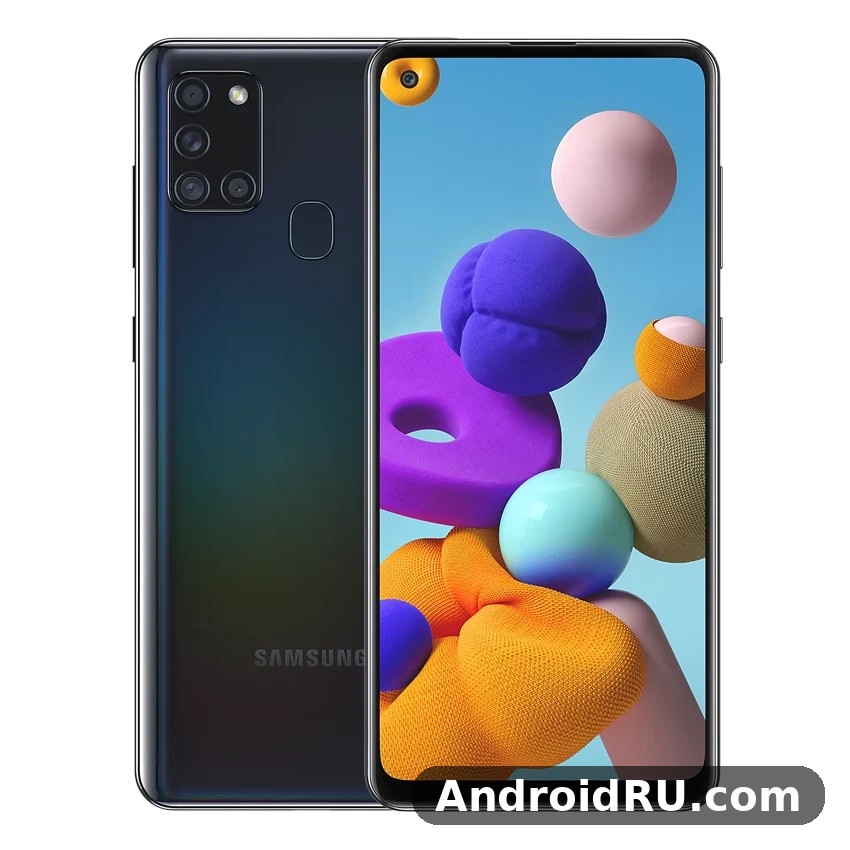
This combined review and specification guide covers Galaxy A21s daily performance in full: the display, the Exynos 850, the cameras, the battery, the software and the build. It also answers the questions people actually ask before buying one second-hand in 2026, and it lists every hardware figure in one place so you can check a used unit against the original specification before you pay. If you are comparing it with a newer budget phone, the Samsung Galaxy A17 5G Review: Photo Quality, Video and Performance shows how much the budget class has moved on in five years, from screen quality and charging speed to years of software support.
The short version first. The 5000 mAh battery is the best reason to own this phone, and the 48MP main camera is the second. The screen is large but only HD+, the Exynos 850 is steady rather than quick, and major software updates stopped at Android 11. For a low price, with a healthy battery, that trade still works for a daily driver, a first phone or a reliable spare. For heavy gaming or for someone who wants years of updates ahead, a newer model is the better buy. The Galaxy A21s processor speed is enough for daily apps, browsing and video, though heavy games are where its limits show.
Samsung Galaxy A21s 6.5-Inch PLS TFT Display in Daily Use
The Galaxy A21s has a 6.5-inch PLS TFT panel with a 720 x 1600 HD+ resolution and a 20:9 aspect ratio, with a small punch hole in the top-left corner for the front camera. On paper that is modest. In practice, the size does most of the work: video, maps and reading feel roomy, and the tall ratio keeps long web pages and chat threads comfortable to scroll. PLS is Samsung’s own take on IPS-style LCD technology, and it shows in the colour: whites stay white, skin tones avoid the orange cast some budget panels show, and the picture looks close to natural rather than oversaturated. The Galaxy A21s display quality is decent for video and reading, with good brightness outdoors and colours that stay natural rather than oversaturated.
Galaxy A21s screen quality HD+ is the honest trade-off at this price. Text is readable and icons look clean at normal viewing distance, but if you hold the phone close you can see that fine detail is softer than on a Full HD phone. That softness matters most when you pinch to zoom into a photo or read small print on a web page. For video, the match is better: most streaming at 720p looks right at home on this panel, and the 6.5-inch size makes a budget phone feel like a proper media device in the hand. A fresh A21s wallpaper is the quickest way to make the home screen feel new, and the bright display makes colourful images look their best.
HD+ Resolution on a 6.5-Inch Screen: What You Actually Notice
At around 270 pixels per inch, the panel sits below the 400 ppi class of Full HD phones, and the difference shows in two places: fine print and photo detail when you pinch to zoom. Watching a 720p video looks fine because the source and the screen agree with each other. Reading a long article is comfortable too, once you pick a font size that suits you. The place where HD+ shows its limits is a high-resolution photo: zoom in and the edges soften sooner than they would on a sharper screen. That is a fair price to pay for a phone that launched under 250 euros, and most owners stop noticing it after the first week.
Reading text and watching video at 270 ppi
For everyday reading, the 270 ppi density is enough. Messages, email and social feeds render cleanly, and the large screen means less scrolling than on a smaller phone. Video is the stronger case: YouTube, streaming apps and downloaded shows all look good at 720p, and the punch-hole camera sits out of the way in the corner rather than cutting into the middle of the picture. If you watch a lot of video on your phone, the size of this screen matters more than its resolution, and that is where the A21s earns its keep as a media phone on a budget. In a straight Galaxy A21s camera test against its predecessor, the main sensor holds up well in daylight, with the biggest gains showing in night mode and portrait edge detection.
Viewing angles on a PLS TFT panel
Viewing angles are good for a PLS TFT panel. Tilt the phone to share a photo with someone sitting next to you and the colours hold up well, with only a mild shift in brightness at steep angles. That matters more than it sounds: a phone with poor viewing angles is annoying every time you show someone a picture or watch a clip together. The A21s does not have that problem. Contrast is decent for LCD, though blacks are grey rather than deep, and that is most visible when you watch a dark scene at night with the lights off.
Outdoor Brightness and Viewing Angles
Galaxy A21s display brightness outdoor is adequate rather than impressive. In direct sunlight the screen washes out and you will find yourself shading it with a hand to read a map or frame a photo. In shade or indoors it is bright enough for everything, and the auto-brightness sensor reacts quickly when you step outside. The screen has no official strengthened glass rating published, so a screen protector is worth fitting from day one, especially on a second-hand unit that may already carry small scratches. A cheap tempered glass protector costs little and keeps the display readable for longer.
Compared with newer budget phones, the display is the clearest sign of the A21s age. The Samsung Galaxy A22 5G Review: Build Quality, Software and Daily Speed shows the step up that followed, with a faster refresh rate and a brighter panel in the same price class a year later. Even so, the A21s screen is honest: it is large, it is readable, and it does not pretend to be something it is not. If your days are mostly indoors and your video watching happens on Wi-Fi at home, the display will not be the thing that pushes you to upgrade.
Exynos 850 Performance for Everyday Apps and Light Gaming
The Exynos 850 chipset is an octa-core chipset built on an 8nm process, with eight Cortex-A55 cores running at up to 2.0GHz and a Mali-G52 GPU. It was designed for efficiency rather than speed, and that is exactly how it behaves. Opening WhatsApp, email, the browser and maps feels unhurried but not slow. The interface keeps up with normal use, and the 8nm process helps the big battery last longer by sipping power when the phone is idle. What the chip does not do is hurry: installing a large app update while streaming video makes the interface stutter, and the camera app takes a second or two to open. Does Galaxy A21s overheat while gaming? In testing it stayed comfortable during normal play, and only long sessions at maximum settings made the frame noticeably warm.
Galaxy A21s Exynos 850 performance shows its limits when you push it. Processing a 48MP photo takes a visible moment, and switching between three or four heavy apps forces the phone to reload them. That is normal for a budget chip built from eight efficiency cores with no fast performance core, and it is the price of the long battery life. For calls, messaging, browsing, streaming and navigation, the chip is enough. For video editing, heavy multitasking or demanding games, it is not, and no settings change will turn it into a fast phone. Choosing between the A21s 64GB vs 128GB options comes down to photos and offline video: heavy shooters should take the larger size, while light users can save money and add a microSD card later.
3GB vs 4GB vs 6GB RAM: Which Galaxy A21s Version to Pick
Samsung sold the A21s with 3GB, 4GB or 6GB of RAM, paired with 32GB, 64GB or 128GB of storage depending on the market. Galaxy A21s RAM 4GB vs 6GB is the comparison that matters most for second-hand buyers. The 3GB model reloads apps constantly and feels cramped with modern apps. The 4GB model with 64GB of storage is the sensible middle choice, and it is the version I tested. The 6GB model with 128GB of storage is the one to buy if you can find it at a similar price, because it keeps more apps in memory and gives you room to grow. All versions take a microSD card up to 512GB in a dedicated slot, so storage is easy to expand even on the smallest model. The A21s performance is smooth for everyday apps, messaging, browsing and video, with heavier games being the only place it shows its mid-range roots.
How to check RAM usage on the A21s
Open Settings, then Battery and device care, then Memory, and you will see how much RAM is in use and which apps are holding it. If free RAM regularly drops below 1GB on a 3GB or 4GB model, that is your sign to uninstall apps you do not use and to turn off background activity for the ones you keep. On the 6GB model the same screen usually shows comfortable headroom, which is why that version ages better. Checking this screen before you buy a used A21s tells you more about how the phone will feel than the storage number on the listing. The A21s storage starts at 32GB in the base model, so the 64GB or 128GB version is the safer buy for most people.
Gaming on the Exynos 850: PUBG Mobile and Casual Games
Is the Galaxy A21s good for gaming? For casual games, yes. For heavy games, only with compromises. Galaxy A21s gaming PUBG Mobile runs at low to medium settings with frame rates that stay playable in quiet areas and dip when the action gets busy. Casual titles, puzzle games and card games run smoothly, and the big screen makes them enjoyable. Heavy games like Genshin Impact will run, but only at low settings with visible frame drops, and the phone warms up during long sessions. If gaming is your main hobby, look one tier up. If gaming is something you do in short bursts, this phone handles it. If A21s overheating shows up during long gaming sessions, a short break and lower graphics settings bring temperatures back down.
Settings that keep frame rates steadier
Set graphics to low or smooth, cap the frame rate at the middle option rather than the highest, and close other apps before you start. Turning on Game Launcher and its performance mode helps a little, and lowering screen brightness a notch reduces heat, which is what causes the worst slowdowns in a long session. These are small steps, but on a budget chip they are the difference between a playable game and a stuttering one. Keep the phone out of direct sun while you play, and take a short break if the back of the phone feels hot. The best screen protector for Galaxy A21s is a tempered glass one that covers the display fully and still lets touch input feel direct. A good A21s case is worth buying on day one, because the back panel shows scratches and smudges quickly.
Samsung Galaxy A21s 48MP Quad Camera Review
The rear camera setup is the headline feature: a 48MP quad camera built around a 48MP main camera with an f/2.0 aperture, an 8MP ultrawide camera with a 123-degree field of view, a 2MP macro camera and a 2MP depth camera. Galaxy A21s 48MP camera quality is genuinely good in daylight for a phone at this price. Photos come out with natural colours, good contrast and plenty of detail, and the default 12MP output is the practical choice: it keeps files smaller while pixel binning gathers more light per pixel. You can switch to full 48MP mode when you want maximum detail, but for most shots the binned output looks better. The Galaxy A21s night mode camera work is strongest on the main sensor, where multi-frame processing brightens shadows without turning night scenes into daylight.
The main camera uses phase-detection autofocus, which is quick in daylight and slower indoors. In bright light the shutter is responsive and you can catch a child mid-laugh or a dog mid-run without much lag. Indoors, focus hunts a little more and low light brings noise sooner than on a newer phone, because there is no optical image stabilisation here. That said, for the photos most people actually take, outdoors, in daylight, of family, food, travel and everyday life, this camera delivers results that still look good on a phone screen and in a social post. The Galaxy A21s selfie camera quality is solid in good light, with the 13MP front sensor capturing natural skin tones and enough detail for social photos and video calls.
48MP Main Camera in Daylight
Daylight is where this phone is happiest. Photos taken outdoors in sun or bright cloud come out with natural-looking colour, good contrast and plenty of detail in the middle of the frame. Dynamic range is respectable for the class: shooting into a bright window or a sunset sky keeps more highlight detail than you might expect, and shadows lift without turning into grey mush. One quirk worth knowing is that the camera sometimes over-sharpens foliage and distant rooftops, giving them a slightly crunchy look when viewed at full size. It is a processing choice, not a fault, and it disappears when you view the photo at normal size. The best camera settings for Galaxy A21s start with the main lens at full resolution for landscapes, night mode after dark, and the grid switched on for straighter horizons.
Galaxy A21s camera daylight performance holds up best when you keep the lens clean. A phone that lives in a pocket collects a film of grease that softens every photo, and wiping the lens with a soft cloth is the single easiest way to get sharper shots. Tap to focus on your subject rather than trusting the camera to guess, and use the scene optimiser for landscapes and food, where it adds a little punch without going over the top. For portraits, the depth camera helps the background blur look natural in good light, though edge detection stumbles on busy backgrounds and fine hair. Does the Galaxy A21s record 4K video? No, video tops out at 1080p on this model, which is fine for social clips and video calls but not for 4K editing.
8MP Ultrawide, 2MP Macro and 2MP Depth Cameras
Galaxy A21s ultrawide camera specifications give you a 123-degree view for landscapes, buildings and tight interiors, at the cost of softer detail toward the edges and slightly cooler colours than the main camera. The ultrawide is the lens you reach for when a building will not fit in the frame or when a group photo needs a little more room, and for that job it works well. In low light it struggles, so save it for daylight. The 2MP macro camera needs bright light and a very steady hand, and even then the results are soft compared with simply cropping a photo from the main camera. The 2MP depth camera does no shooting of its own; it exists to help portrait mode separate your subject from the background. The A21s selfie camera handles video calls and social photos well in good light, with portrait mode adding a soft background blur.
13MP front camera and 1080p video recording
Galaxy A21s front camera 13MP selfies are solid for video calls and social posts, with decent skin tones and enough detail in daylight. Indoors the image gets noisier and softer, and the fixed focus means you need to hold the phone at a sensible distance rather than very close. Video tops out at 1080p and 30 frames per second for both the rear and front cameras, with no 4K option and only basic electronic stabilisation. Walking footage shakes visibly, so hold the phone steady for the first second before you start moving, and lean against something solid for longer clips. The Samsung Galaxy A23 5G Review: Photo Quality, Video and Performance shows what the next generation of budget Samsung cameras added in the same areas, including better low-light handling.
Night Mode Limits on the A21s
Night mode helps, but it cannot work miracles without stabilisation. In a dim restaurant or on an evening street, the camera holds the shutter open a little longer and brightens the scene, and static subjects come out usable. Moving subjects blur, so use the regular photo mode for people who are walking. Very dark scenes produce noise and soft detail, and the ultrawide and macro lenses are best left alone after dark. If evening photos matter to you, this is the weakest part of the camera system, and it is the area where a newer budget phone with optical stabilisation pulls clearly ahead. The A21s portrait mode works best with a clear subject and some distance behind them, which keeps edge detection clean.
5000 mAh Battery Life and 15W Charging in Real Days
The 5000 mAh battery is the single best reason to own this phone. Galaxy A21s battery life comfortably covers a full day of heavy use and stretches to two days with moderate use, which is rare even among newer budget phones. Standby drain is low, and the phone loses only a few percent overnight, which makes it a good spare or travel phone. Battery health matters more than ever on a phone this age, though: a used A21s with a tired battery will not match these figures, so check battery health before you buy, and budget for a replacement if the phone dies early in the day. Does Galaxy A21s support wireless charging? No, this model has no wireless charging coil, so charging pads will not work with it and the USB-C cable remains the only way to charge.
My test days ran from around 7 in the morning to 11 at night, with two email accounts syncing, WhatsApp and Telegram active, about 45 minutes of navigation, an hour of YouTube and regular browsing. With moderate use, expect a full day with 35 to 40 percent left at bedtime, and a second day if you use the phone lightly. Screen-on time of 6 to 7 hours is realistic on a healthy battery. Navigation, video streaming and gaming drain it fastest, while calls, messaging and reading drain it slowest. Adaptive battery and app sleep in One UI help by putting apps you rarely open into a deep sleep. For an A21s battery drain overnight fix, check battery usage in Settings, turn off always-on display, and restrict background activity for apps that drain power while idle.
Two-Day Battery Life: My Usage Pattern
The two-day claim is real, but it depends on how you use the phone. A light day of calls, messages, a little browsing and a few photos will leave you with charge to spare on the second morning. A heavy day of navigation, video and gaming will still get you to bedtime, but not much further. The practical routine that works best is to charge overnight and stop thinking about the battery during the day, which is exactly what a good budget phone should let you do. If you are coming from a phone with a 3000 or 4000 mAh battery, the difference on the A21s is the first thing you will notice. Some A21s heating during charging is normal, especially with fast charging, and the phone cools down once the battery passes 80 percent.
15W Charging Times From Empty to Full
Galaxy A21s charging time 15W is the weak side of the battery story. A full charge from empty takes around 2 hours with the 15W charger supplied in the box in most markets, with roughly half a charge in the first hour. There is no wireless charging, and 15W is slow by modern standards, so overnight charging is the practical routine. A top-up of 30 minutes gives you enough for several hours of light use, but it will not rescue a nearly empty phone before a long trip. Plan around it: plug in at night, and keep a charger at work or in the car if your days are long.
Full Specifications of the Samsung Galaxy A21s
The table below gathers every key specification in one place. Figures are for the international model; RAM, storage and LTE bands vary by market, as noted in the sections below. Use it as a checklist when you inspect a used phone: the RAM and storage version, the model number and the LTE bands are the three things most likely to differ from the listing. The Galaxy A21s full specifications are listed in the specs section below, covering display, processor, cameras, battery and connectivity in one place. The A21s specs are summarised in the specifications section below, with the display, chipset, cameras and battery listed together.
| Specification | Galaxy A21s |
|---|---|
| Launch | June 2020, Android 10 with One UI 2.0 |
| Display | 6.5-inch PLS TFT, 720 x 1600 HD+, 20:9, around 270 ppi, 60Hz, punch hole top-left |
| Chipset | Exynos 850, 8nm, octa-core Cortex-A55 up to 2.0GHz, Mali-G52 GPU |
| RAM | 3GB, 4GB or 6GB depending on market |
| Storage | 32GB, 64GB or 128GB, plus microSD up to 512GB in a dedicated slot |
| Rear cameras | 48MP f/2.0 main with autofocus, 8MP f/2.2 ultrawide 123-degree, 2MP f/2.4 macro, 2MP f/2.4 depth |
| Front camera | 13MP f/2.2, fixed focus |
| Video | 1080p at 30fps rear and front, basic electronic stabilisation, no 4K |
| Battery | 5000 mAh lithium-polymer, non-removable, 15W wired charging over USB-C, no wireless charging, around 2 hours empty to full |
| Dimensions | 163.7 x 75.3 x 8.9 mm |
| Weight | 191 grams |
| Build | Plastic front, frame and back, no official water resistance rating |
| Security | Rear-mounted capacitive fingerprint sensor, face unlock |
| Connectivity | 4G LTE, no 5G, Wi-Fi 802.11 a/b/g/n/ac dual-band, Bluetooth 5.0, NFC in some regions, USB Type-C 2.0, 3.5mm headphone jack |
| Positioning | GPS, A-GPS, GLONASS, GALILEO, BDS |
| Sensors | Accelerometer, gyro, proximity, compass, fingerprint |
| SIM | Dual nano-SIM plus dedicated microSD slot |
| Colours | Black, white, blue, red, varies by market |
| Software updates | Android 11 with One UI 3.x received, no Android 12 or later, security patches now ended |
Network Bands, Wi-Fi 5, Bluetooth 5.0 and Connectivity
Galaxy A21s network bands LTE cover 4G as the fastest mobile connection, with no 5G on any version. Galaxy A21s 4G LTE bands vary by region and model, so the exact list depends on the model number: the SM-A217F international model covers the broad band list including bands 1, 2, 3, 4, 5, 7, 8, 12, 13, 17, 20, 26, 28, 38, 40, 41 and 66, alongside GSM 850, 900, 1800 and 1900 and HSDPA 850, 900, 1700, 1900 and 2100. Band support is the specification buyers get wrong most often, because the same phone name hides different radios, so check the model number on the back of the phone or in Settings, About phone, before you buy a unit imported from another region. Does Galaxy A21s have a microSD card slot? Yes, the hybrid tray accepts cards up to 512GB, though the second SIM slot is shared with the card. The A21s NFC chip covers contactless payments and tap-to-pair accessories, though availability can vary by region.
Galaxy A21s Wi-Fi Bluetooth specifications list Wi-Fi 802.11 a/b/g/n/ac, commonly called Wi-Fi 5, with dual-band 2.4GHz and 5GHz support, Wi-Fi Direct and hotspot, plus Bluetooth 5.0 with A2DP and LE. Wi-Fi 5 with dual-band support is fast enough for streaming, video calls and downloads at home, and the 5GHz band keeps the connection clear of crowded 2.4GHz traffic. Bluetooth 5.0 pairs quickly with earphones, watches and car systems. NFC is present in some regions and absent in others, so if you need contactless payments, check for an NFC option in Settings on the actual unit rather than trusting the listing. Does Galaxy A21s support eSIM? No, this model has no eSIM, so a second line needs the physical dual-SIM tray. The A21s microSD slot accepts cards up to 512GB, which is the cheapest way to add room for photos and offline video.
Sensors, Security and Build
Galaxy A21s dimensions and weight are 163.7 x 75.3 x 8.9 mm and 191 grams, which makes it a large but manageable phone with a curved plastic back that sits comfortably in the hand. The frame and back flex slightly under pressure but nothing creaks in normal use, and the buttons feel solid. The rear fingerprint sensor is the main way most owners unlock the phone, and it is fast and reliable once your finger is registered twice for accuracy. Its position below the camera module is easy to reach, and it works with dry or slightly damp fingers. Face unlock uses the front camera and works in good light, but it is less secure than the fingerprint sensor and slower in the dark. The best back cover for Galaxy A21s is a slim one with raised edges around the cameras, which protects the lenses without adding much bulk. A tempered glass A21s protector is cheap insurance against drops and pocket scratches, and it fits the display without getting in the way of touch input.
The sensor set covers the essentials: accelerometer, gyroscope, proximity sensor, compass and fingerprint sensor. The proximity sensor turns the screen off during calls so your cheek does not end them, the accelerometer and gyroscope handle screen rotation and motion in games, and the compass keeps maps pointing the right way. There is no official water resistance rating, so keep the phone out of the rain and away from the sink. Colours were black, white, blue and red depending on the market, and the back panel has a subtle holographic pattern that catches the light. Is the Galaxy A21s waterproof? No, it has no official IP rating, so keep it away from pools, showers and heavy rain. The A21s speakers are loud enough for video calls and podcasts, though headphones still win for music and films.
One UI 2.0 on Android 10: Software, Updates and Daily Quirks
The A21s launched with Android 10 and One UI 2.0, Samsung’s clean and practical skin. Galaxy A21s Android 10 One UI 2.0 feels calm and organised: large touch targets, a clear settings menu, and a home screen that stays out of your way. One UI 2.0 brought dark mode, digital wellbeing tools, a built-in screen recorder, dual messenger for two accounts in one app, and the device care suite for battery, storage and memory. These are small conveniences, but they are the ones you use every day, and they are why Samsung’s budget phones felt more polished than many rivals at the same price. Among the Galaxy A21s hidden features and tips worth knowing are the double-press shortcut for the camera, the edge panel and the one-handed mode in Settings.
Galaxy A21s software update Android 11 is the ceiling for major updates: the phone received Android 11 with One UI 3.x, and security patches continued for a while after that, but there is no Android 12 or beyond. In 2026 the operating system is old, and that has real consequences: some newer apps may need a newer Android version, and security patches have ended, so you should be careful with banking apps and with installing apps from outside the Play Store. App updates through the Play Store and Google Play services still arrive, which keeps most everyday apps working, but the phone will not get new Android features. Each A21s update arrives through Settings, then Software update, and installing it promptly keeps security patches current.
One UI 2.0 Features Worth Using
Galaxy A21s One UI features worth switching on include dark mode for the TFT panel, the device care tools for storage and memory, the built-in screen recorder, and the dual messenger feature for running two WhatsApp or Telegram accounts on one phone. Dark mode saves a little battery and is easier on the eyes at night, device care keeps storage and memory tidy with one tap, and the screen recorder is handy for showing someone how to do something on their phone. Digital wellbeing shows how much time you spend in each app, which is useful if you are trying to cut down on scrolling before bed. The Galaxy A21s price in India varies by storage and by seller, so check a few large retailers before buying rather than trusting the first listing you see.
Software Update Limits: Android 11 and Security Patches
The update story is short and honest. Android 11 arrived with One UI 3.1, bringing better notifications, media controls and permission controls, and that is where major updates stop. Security patches continued for a period after that but have now ended. Before you buy a used A21s, open Settings, then About phone, then Software information, and check the Android version, the One UI version and the security patch date. A phone still on Android 10 has missed the Android 11 update, which is a sign it was not maintained. The Samsung Galaxy A16 5G Review: Design, Battery Life and Usability shows the contrast with a newer budget phone, where Samsung now promises years of updates instead of one major upgrade.
Design, Fingerprint Sensor and Build Quality at a Budget Price
The A21s is a plastic phone, and it does not pretend otherwise. The back panel has a subtle holographic pattern that catches the light, and the phone is available in black, white, blue and red depending on the market. Galaxy A21s build quality plastic is honest at this price: the frame and back flex slightly under pressure but nothing creaks in normal use, and the buttons feel solid. The punch-hole front camera sits in the top-left corner and is easy to ignore after a day. At 191 grams and 8.9 mm thick, the phone is large but manageable, and the curved back helps it sit comfortably in the hand for long calls and video sessions. Is Galaxy A21s worth buying? For buyers who want a reliable Samsung phone with a good screen and long software support, the answer is yes at current street prices, though heavy gamers should weigh it against rivals with faster chips.
One-handed use is possible for most people, though reaching the top of the 6.5-inch screen takes a stretch, and One UI offers a one-handed mode that shrinks the screen down for exactly that moment. A case is worth buying: the plastic back scratches more easily than glass, and a simple case also improves grip on a phone this size. The phone has no official water resistance rating, so a case will not make it waterproof, but it will keep the back looking tidy and protect the corners from drops. A direct Galaxy A21s vs Galaxy A31 comparison shows the newer phone’s faster chip and brighter display, while the older model remains good value at discounted prices.
Rear Fingerprint Sensor and Face Unlock
Galaxy A21s fingerprint sensor sits on the back, just below the camera module, and it is fast and reliable once your finger is registered twice for accuracy. It is a physical sensor, not an in-screen one, which means it works the same way every time and does not care about screen protectors. Register the same finger twice, once straight and once at an angle, and the sensor rarely misses. Face unlock is the backup: it works in good light and is convenient when your hands are wet, but it is slower in the dark and less secure, so the fingerprint sensor should stay your main way in. The A21s colours are Black, White, Blue and Red, with the darker shades hiding fingerprints best.
Plastic Build, 191 Grams and the 3.5mm Jack
Galaxy A21s headphone jack 3.5mm is a feature many newer phones have dropped, and it matters: wired earphones work without a dongle, and you can charge and listen at the same time. The USB Type-C 2.0 port handles charging and data, and the single loudspeaker is loud enough for video calls and alarms but thin for music, so earphones are the better choice for anything longer than a short clip. The dedicated microSD slot sits alongside the dual nano-SIM tray, so you never have to choose between a second SIM and more storage. An A21s unboxing is a quick job: the phone, a USB-C cable and the paperwork are inside, and you will need your own charger if one is not included in your region.
Colours and in-hand feel
Black is the safe choice and hides wear best, white shows the holographic pattern most clearly, and blue and red add a little personality to a plain design. In the hand, the curved plastic back feels warmer and lighter than glass, and the 191-gram weight is balanced so the phone does not feel top-heavy. If you are buying second-hand, check the corners and the back for cracks and deep scratches, because plastic damage is cheap to live with but hard to hide. The A21s durability is decent for everyday knocks, though a case is still wise for drops onto hard floors.
Samsung Galaxy A21s vs Alternatives: Who Should Buy It in 2026
Galaxy A21s pros and cons come down to a simple trade: battery and camera on one side, screen and speed on the other. The A21s suits someone who wants a cheap, reliable phone for calls, messaging, browsing and photos, a parent buying a first phone, or anyone who needs a dependable spare. It does not suit someone who plays heavy games, edits video on their phone, or wants years of software updates ahead. Should I buy Galaxy A21s in 2026? If the price is low, the battery is healthy and you need a simple daily phone or a spare, yes. If you can stretch a little further, a newer budget phone buys you a sharper screen, faster charging and longer support. The A21s price varies by retailer and storage, so compare a few listings before you buy.
| Feature | Galaxy A21s (2020) | Galaxy A21 (2020) | Galaxy A51 (2019) |
|---|---|---|---|
| Display | 6.5-inch PLS TFT, HD+ 720 x 1600 | 6.5-inch TFT, HD+ 720 x 1600 | 6.5-inch Super AMOLED, Full HD+ 1080 x 2400 |
| Chipset | Exynos 850, octa-core 2.0GHz | Helio P35, octa-core 2.3GHz | Exynos 9611, octa-core 2.3GHz |
| RAM and storage | 3 / 4 / 6GB RAM, 32 / 64 / 128GB | 3GB RAM, 32GB storage | 4 / 6 / 8GB RAM, 64 / 128 / 256GB |
| Rear cameras | 48MP + 8MP ultrawide + 2MP macro + 2MP depth | 16MP + 8MP ultrawide + 2MP macro + 2MP depth | 48MP + 12MP ultrawide + 5MP macro + 5MP depth |
| Battery and charging | 5000 mAh, 15W charging | 4000 mAh, 15W charging | 4000 mAh, 15W charging |
| Software at launch | Android 10, One UI 2.0 | Android 10, One UI 2.0 | Android 10, One UI 2.0 |
| Best for | Long battery life on a budget | Basic everyday use | Sharper screen and better cameras |
Galaxy A21s vs Galaxy A21 is the closest comparison: the A21s wins on battery, main camera and chipset efficiency, while the two share the same screen size and resolution. Against the Galaxy A51, the A21s wins on battery but loses on screen quality and camera versatility, because the A51 has a Super AMOLED Full HD+ display and a stronger ultrawide and macro setup. The Samsung Galaxy A15 5G Review: Display Quality, Speed and Daily Use is a useful comparison for what a higher budget buys in everyday speed and display quality today, and it is the direction to look if the A21s screen or its update limit bothers you.
Pros and cons at a glance
The strengths are the ones you feel every day: a battery that lasts into a second day, a 48MP main camera that delivers good daylight photos, a large screen, a headphone jack, a dedicated microSD slot, and a price that is now very low second-hand. The weaknesses are just as clear: an HD+ screen that is soft up close, a slow 15W charge that takes around two hours, an Exynos 850 that stutters under heavy load, no 5G, and software support that ended at Android 11. Weigh those two lists against what you actually do with a phone, and the answer usually becomes obvious within a minute.
Who should buy it, and who should skip it
Buy it if you want a cheap daily driver, a first phone for a teenager, a phone for an older relative who values battery life and a big screen, or a reliable spare for travel. Skip it if you play demanding games, need 5G, want years of security updates, or take a lot of photos after dark. For those buyers, a newer budget phone is worth the extra money. For everyone else, the A21s still earns its place, provided the price is right and the battery is healthy.
Frequently Asked Questions About the Samsung Galaxy A21s
These are the questions I kept hearing from people considering the A21s, answered with the same honesty as the rest of this review.
Is the Galaxy A21s good for gaming?
For casual games, yes, and for light competitive games at low settings, mostly yes. PUBG Mobile runs at low to medium settings, and casual titles run smoothly. Heavy games like Genshin Impact will run, but only at low settings with visible frame drops, and the phone warms up during long sessions. Set graphics to low, close other apps first, and use Game Launcher for the best results. The A21s processor handles daily apps and multitasking without fuss, though heavy games are where its limits show.
How long does the Galaxy A21s battery last?
With moderate use, expect a full day with 35 to 40 percent left at bedtime, and a second day if you use the phone lightly. Screen-on time of 6 to 7 hours is realistic on a healthy 5000 mAh battery. Navigation, video streaming and gaming drain it fastest, while calls, messaging and reading drain it slowest. A used phone with a tired battery will fall well short of these figures, so check battery health before you buy.
Does the Galaxy A21s have NFC?
It depends on the region and model. Some markets got NFC for contactless payments, while others did not, so the feature is absent on many units. Check the specific model number and look for an NFC option in Settings on the actual phone before you pay, because the listing may not mention it either way. Does Galaxy A21s support dual SIM? Yes, through its hybrid tray, though the second SIM slot is shared with the microSD card. The A21s VoLTE support keeps calls on the 4G network, so voice quality stays clear without dropping to 2G or 3G.
Will the Galaxy A21s get Android 12?
No. The phone launched with Android 10, received Android 11 with One UI 3.x, and that is where major updates end. Security patches continued for a period after that but have now stopped. Apps from the Play Store still update, but the phone will not get new Android features, so keep that in mind if you plan to use it for several more years. The A21s features worth learning first are the fingerprint sensor, the quick settings layout and the camera modes tucked behind the More tab.
Does the Galaxy A21s support 5G?
No. The A21s is a 4G LTE phone with no 5G radio in any version. Its LTE band list is broad for a 2020 budget phone, covering the bands most carriers use, but if you need 5G coverage, you need a different model. Check that the LTE bands on the model number match your carrier, especially on an imported unit. Does Galaxy A21s support call recording? It depends on your region and One UI version, because Samsung enables it only where local rules allow it, so check the Phone app settings before relying on it.
The Galaxy A21s is a budget phone that knows exactly what it is. Its strengths are the ones you feel every day: a battery that lasts into a second day, a 48MP main camera that delivers good daylight photos, and a large screen for video and reading. Its limits are honest too: HD+ resolution, 15W charging, 1080p video and Android 11 as the final major update. For everyday use as a cheap daily driver, a first phone or a reliable spare, it still earns its place, provided the price is right and the battery is healthy. Check the battery health, confirm the RAM and storage version, confirm the LTE bands match your carrier, and check NFC if you need it. Do those four checks before you pay, and the A21s will do the simple things well for a long time. The A21s eSIM option is not available on this model, so a second line needs the physical dual-SIM tray.

