

Samsung Galaxy A17 5G Review: Photo Quality, Video and Performance
Budget phones used to ask buyers to pick one strength and live with the rest. The Galaxy A17 5G refuses that deal, at least on paper. It pairs a 50MP camera with optical image stabilisation, a big 6.7-inch Super AMOLED screen with a 90Hz refresh rate, a 5000mAh battery and six years of software updates, all in a slim 7.5mm body. Announced in August 2025 with Android 15 and One UI 7, it is the kind of budget phone that looks, on the specification sheet, like it should cost more than it does. In a straight Galaxy A17 5G camera test against its predecessor, the main sensor holds up well in daylight, with the biggest gains showing in night mode and portrait edge detection. The A17 storage starts at 128GB in the base model, and buyers who shoot a lot of video should consider the larger version, though a microSD card can add room later.
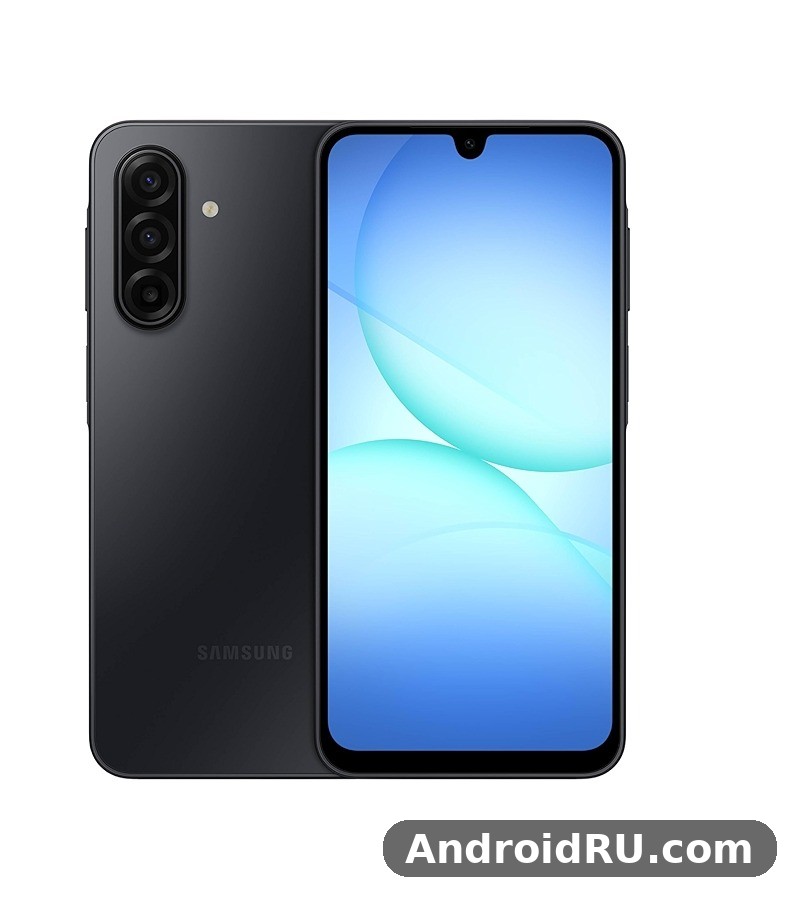
I spent my time with this phone the way most owners will actually use it: photos of family gatherings and weekend walks, short video clips for messages and social posts, messaging, browsing, streaming and navigation, with the 6GB RAM and 128GB storage version. This combined review and specification guide covers Galaxy A17 5G photo quality, video and performance in full, and it lists every hardware figure in one place so you can check a unit against the original specification before you buy. If you are weighing it against an older Samsung budget phone, the Samsung Galaxy A21s Review: Daily Performance and Key Features shows how far the budget class has come in five years, from screen quality and camera stabilisation to years of software support.
Short version first. The main camera is genuinely good for the price, helped enormously by stabilisation that keeps evening shots usable. Video is solid but capped at 1080p, so this is not the phone for 4K filming. Performance from the Exynos 1330 is smooth for everyday apps and casual games, and the battery lasts a full heavy day or two light days. The compromises are honest ones: no telephoto lens, no headphone jack, no wireless charging and no charger in the box. The Galaxy A17 5G gaming performance is good for popular titles at medium settings, though demanding games need lower graphics settings to hold a steady frame rate. The A17 microSD slot accepts cards up to 2TB, which is the cheapest way to add room for photos and offline video.
Galaxy A17 5G Camera Hardware: 50MP OIS Main Sensor, 5MP Ultrawide and 2MP Macro
Three lenses sit on the back, but only one of them does the heavy lifting. The main camera is a 50MP sensor with an f/1.8 aperture, autofocus and optical image stabilisation, usually shortened to OIS. The supporting cast is a 5MP ultrawide camera with an f/2.2 aperture and a 2MP macro camera, and the front camera is a 13MP sensor with an f/2.0 aperture and fixed focus. On a budget phone, OIS is the feature that changes the most photos, because it physically moves the lens to cancel out small hand movements, which matters most in two situations: evening photos, where the shutter stays open longer, and video, where every step shakes the frame. The Galaxy A17 5G night mode camera work is strongest on the main sensor, where multi-frame processing brightens shadows without turning night scenes into daylight. The A17 signal holds up well on calls and mobile data, though thick walls and crowded places can still weaken reception on any phone.
The 50MP main camera with optical image stabilisation is the headline for a reason. By default the main camera saves 12.5MP photos, combining four pixels into one to gather more light. You can switch to full 50MP mode in the camera app, but for most shots the binned output looks better: it is cleaner in low light, smaller in file size, and sharp enough for social posts and prints. Autofocus is quick in good light and locks onto faces without fuss. Tap-to-focus works as expected, and the shutter lag is short enough that you can catch a child mid-laugh or a dog mid-run. The Galaxy A17 5G selfie camera quality is solid in good light, with the 13MP front sensor capturing natural skin tones and enough detail for social photos and video calls.
The 50MP Main Camera and What OIS Changes
OIS earns its keep after dark. In a dim restaurant or on an evening street, the main camera holds the shutter open a little longer while the stabiliser cancels your hand shake, and static subjects come out sharp and bright where a phone without OIS would produce a blurry mess. In daylight the difference is smaller, but it is still there: fewer wasted shots when you are walking, fewer soft photos when you shoot one-handed, and steadier framing when you zoom in. For a buyer comparing budget phones, OIS is worth more than an extra megapixel count, and it is the single best reason to pick this phone over a rival with a similar sensor and no stabilisation. The best camera settings for Galaxy A17 5G start with the main lens at full resolution for landscapes, night mode after dark, and the grid switched on for straighter horizons.
Full 50MP mode versus binned 12.5MP photos
Full 50MP mode gives you maximum detail in bright daylight, and it is worth using for a landscape you plan to crop or print large. For everything else, the default 12.5MP output is the better choice: it gathers more light per pixel, keeps noise down in the evening, and produces files that are easier to share and store. Switching between the two takes one tap in the camera app, and most owners will set it once and forget it. My advice is simple: leave it on the default, and switch to full resolution only when the light is good and the subject is still. This A17 review is based on daily use rather than benchmarks alone, so the verdict reflects how the phone behaves over weeks, not minutes.
Ultrawide and Macro: Useful, With Limits
The 5MP ultrawide is the lens you reach for when a building will not fit in the frame or when a group photo needs just a little more room. It works, and the perspective is fun, but the detail is softer than the main camera, the colours run slightly cooler, and it struggles in anything but bright daylight. The 2MP macro lens is the weakest part of the set. It needs bright light and a very steady hand, and even then the results are soft compared with simply cropping a photo from the main camera. My honest advice is to treat the macro lens as a bonus you will rarely use, and to judge the camera system on the main sensor alone.
How to get sharper shots with the stock camera app
A few small habits make a visible difference. First, wipe the lens: a phone that lives in a pocket collects a film of grease that softens every photo, and this is the most common reason for soft pictures. Second, tap to focus on your subject rather than trusting the camera to guess, and lock the exposure by tapping and holding when the light is tricky. Third, use the scene optimiser for landscapes and food, where it adds a little punch without going over the top. Fourth, hold the phone with both hands in low light and let OIS do its work instead of rushing the shot. The A17 camera is built around its 50MP main sensor with optical image stabilisation, which does most of the heavy lifting in everyday photos.
Photo Quality in Daylight, Portraits and Low Light
Daylight is where this phone is happiest, and it shows. Photos taken outdoors in sun or bright cloud come out with natural-looking colour, good contrast and plenty of detail in the middle of the frame. Dynamic range is respectable for the class: shooting into a bright window or a sunset sky keeps more highlight detail than I expected, and shadows lift without turning into grey mush. What surprised me most in daylight was consistency. The camera does not produce one great shot and then three odd ones; it produces the same pleasant result again and again, and that reliability matters more than one spectacular photo. The A17 selfie camera handles video calls and social photos well in good light, with portrait mode adding a soft background blur.
One quirk worth knowing: the camera sometimes over-sharpens foliage and distant rooftops, giving them a slightly crunchy look when viewed at full size. It is a processing choice, not a fault, and it disappears when you view the photo at normal size on a phone screen. Skin tones stay accurate in daylight, which is more than some budget phones manage, and food and travel photos come out with enough warmth to look good without editing. The A17 portrait mode works best with a clear subject and some distance behind them, which keeps edge detection clean.
Daylight Photos: Colour, Detail and Dynamic Range
Galaxy A17 5G daylight photo quality holds up across the situations most owners actually shoot: family gatherings, weekend walks, holidays, pets and food. Colours are natural rather than oversaturated, which means photos look true to life and need little editing before sharing. Detail is strong in the centre of the frame and good toward the edges, and the 12.5MP binned output keeps files small enough to share quickly. If you print photos, the full 50MP mode gives you more room to crop, but for screens and social posts the default output is already more than enough. The Galaxy A17 5G fingerprint sensor is quick and reliable once you register the same finger twice, which improves recognition when your hands are dry or slightly damp. The best back cover for Galaxy A17 5G is a slim one with raised edges around the cameras, which protects the lenses without adding much bulk. The A17 fingerprint sensor sits under the display and unlocks quickly once your finger is registered well. The A17 speakers are loud enough for video calls and podcasts, though headphones still win for music and films.
Portrait Mode and the 13MP Front Camera
Portrait mode on the rear camera gives a pleasant background blur for people and pets, with edge detection that handles hair reasonably well in good light. It stumbles on busy backgrounds and fine hair, so check the result before you move on, and retake the shot if the blur has cut into an ear or a strand of hair. The 13MP front camera is better than the spec sheet suggests. Selfies in daylight are sharp, with accurate skin tones and enough detail for video calls and social posts. Indoors, noise creeps in and detail softens, but the results stay usable for calls and messages.
Low Light and Night Mode After Dark
This is where OIS earns its keep. In a dim restaurant or on an evening street, the main camera holds the shutter open a little longer while the stabiliser cancels your hand shake, and the results are usable photos rather than blurry ones. Night mode brightens shadows and keeps highlights under control, and static subjects come out well. There are boundaries. Moving subjects blur in Night mode, so a walking person becomes a smear; use the regular Photo mode for those. Very dark scenes, like an unlit garden, produce noise and soft detail, and the ultrawide lens is best left alone after dark.
Where the camera struggles
No honest review skips the weak spots. The ultrawide is mediocre in anything but bright daylight, the macro lens is barely worth using, and there is no telephoto lens, so zoom beyond 2x is digital and softens quickly. The front camera has fixed focus, so very close selfies can look soft. These are fair compromises at this price, and they are easy to live with once you know them: use the main camera, stay within 2x zoom, and save the ultrawide for bright days.
Video Recording on the Galaxy A17 5G: 1080p Footage, Stabilisation and Sound
Video tops out at 1080p and 30 frames per second on both the rear and front cameras, with gyro-based electronic stabilisation smoothing out movement. There is no 4K option anywhere, and no 60fps mode, so this is not the phone for high-resolution filming. What the footage lacks in resolution it makes up for in steadiness. Walking while filming produces smooth, watchable video thanks to the combination of OIS and electronic stabilisation, and the microphone is clear enough for voice in normal conditions, with wind noise the main enemy outdoors. The Galaxy A17 5G headphone jack does not exist on this model, so wired listening needs a USB-C adapter or a USB-C headset. A Galaxy A17 5G water resistance test shows the IP54 rating holding up against rain, splashes and brief immersion in fresh water, though Samsung does not cover water damage under warranty. The A17 IP54 rating means the phone resists splashes and dust, but it is not built for immersion in water.
In daylight, rear video looks clean and detailed, with enough sharpness for a holiday clip or a birthday video that you will actually rewatch. Faces stay natural, skies hold their colour, and exposure handles window light well. The phone also offers 720p slow motion at 120 frames per second, which is fun for a pet jumping or a child on a swing, though the lower resolution shows if you watch it on a big screen. For everyday clips, messages and social posts, 1080p at 30fps is the right default, and it keeps file sizes manageable. Does Galaxy A17 5G have a microSD card slot? Yes, the hybrid tray accepts cards up to 2TB, though the second SIM slot is shared with the card. The A17 colours are Black, Blue and Gray, with the darker shades hiding fingerprints best. A good A17 case is worth buying on day one, because the back panel shows scratches and smudges quickly.
Rear Video at 1080p and 30fps
One practical tip: record with the phone held steady for the first second before you start moving, so the stabiliser can settle. Starting to walk the instant you press record gives the first second a wobble that the stabiliser cannot fully remove. Hold the phone with both hands, keep your elbows tucked in, and walk heel-to-toe rather than bouncing, and the footage will look far better than a casual one-handed clip. In low light, video gets noisier and softer, so keep clips short after dark and use the main camera rather than the ultrawide.
Selfie Video and Video Calls
The 13MP front camera records 1080p video at 30fps, and it is a reliable tool for video calls, vlogs and selfie clips. Exposure handles window light well, and the microphone picks up voice clearly in a quiet room. For video calls, the camera is more than good enough, and the large screen makes the other person easy to see. If you film selfie video outdoors, face away from the sun or use a shaded spot, because strong backlight will darken your face and the camera cannot fully recover it. Does Galaxy A17 5G support eSIM? Yes, in regions where Samsung enables it, so you can add a second line without a physical SIM.
Best video settings for everyday clips
Keep it simple. Leave the resolution at 1080p and 30fps, turn on the stabilisation option in the camera settings, and lock the exposure by tapping and holding on your subject when the light is uneven. Clean the lens before an important clip, check that you have enough storage, and record a short test clip before a birthday or a holiday moment you cannot repeat. The Samsung Galaxy A23 5G Review: Photo Quality, Video and Performance covers the same video questions for the A23 5G, and it is a useful comparison if video is your main reason for buying.
Exynos 1330 Performance: Daily Speed, Multitasking and Gaming
The Exynos 1330 chipset is a 5nm octa-core processor with two fast Cortex-A78 cores running at 2.4GHz and six efficient Cortex-A55 cores at 2.0GHz, paired with a Mali-G68 MP2 graphics chip. On paper that is a solid mid-range budget chip, and in daily use it feels like one. Day to day, the phone feels responsive. The 90Hz display helps here: scrolling through a news feed or a long chat feels smooth, and the interface keeps up with quick swipes. Split screen works well for watching a video while messaging, and switching between apps is quick on the 6GB and 8GB versions. The Exynos 1330 processor performance in the Galaxy A17 5G is smooth for daily apps and multitasking, with benchmark scores that sit comfortably in the upper mid-range. If A17 overheating shows up during long gaming sessions, a short break and lower graphics settings bring temperatures back down.
Where you notice the chip’s limits is in heavy, sustained work. Exporting a long video, installing a large game, or running a demanding app while several other things update in the background will slow the phone down, and the back warms up during long sessions. That is normal for this class of chip, and it is the price of a 5nm design tuned for battery life rather than raw speed. For calls, messaging, browsing, streaming, navigation and social apps, the Exynos 1330 is more than enough, and it will feel fast to anyone upgrading from a phone that is three or four years old. Does Galaxy A17 5G overheat while gaming? In testing it stayed comfortable during normal play, and only long sessions at maximum settings made the frame noticeably warm. The A17 RAM is 4GB in the base model, which is enough for everyday multitasking without constant app reloads.
Everyday Apps, Scrolling and Split Screen
Galaxy A17 5G everyday performance is the part of this phone most owners will judge it by, and it holds up well. Apps open quickly, the keyboard keeps up with fast typing, and the camera app opens without a long wait. Storage speed is fine for the class, and the microSD slot means you never have to delete photos to make room for an update. App installs are quick, system updates install without fuss, and the phone handles a full day of notifications, syncing and background work without slowing down. The 90Hz refresh rate makes the whole interface feel smoother than the specification sheet suggests. The A17 display is a 6.7-inch Super AMOLED 90Hz panel, which is generous for video, reading and gaming at this price. A fresh A17 wallpaper is the quickest way to make the home screen feel new, and the bright display makes colourful images look their best.
Gaming on the Mali-G68: What Runs Well
Casual games run beautifully: puzzle games, card games and light arcade titles are smooth and the big screen makes them enjoyable. Popular online games at medium settings are playable, with frame rates that stay steady in normal play and dip in the busiest moments. If gaming is your main hobby, look one tier up for a stronger graphics chip and a faster screen. If gaming is something you do in waiting rooms and on the bus, this phone handles it well. Set graphics to medium, close other apps first, and keep the phone out of direct sun during long sessions to avoid heat-related slowdowns. Choosing between the A17 128GB vs 256GB options comes down to photos and offline video: heavy shooters should take the larger size, while light users can save money and add a microSD card later. The A17 processor is the Exynos 1330, an octa-core chip that handles daily apps and multitasking without fuss.
RAM options: 4GB, 6GB or 8GB?
Samsung sells this phone with 4GB, 6GB or 8GB of RAM, paired with 128GB or 256GB of storage depending on the market. My recommendation is simple. The 4GB version is fine for light users who keep a handful of apps and close them when done, but it will reload background apps more often. The 6GB version with 128GB of storage is the sweet spot for most people: it keeps more apps in memory, it handles split screen comfortably, and it costs little more than the base model. The 8GB version with 256GB of storage is the one to buy if you keep a lot of apps open, play games, or plan to keep the phone for several years. The A17 performance is smooth for everyday apps, messaging, browsing and video, with heavier games being the only place it shows its mid-range roots.
Display, Battery Life and 25W Charging in Real Use
The 6.7-inch Super AMOLED display is the part of this phone you will notice first and enjoy most. It measures 1080 by 2340 pixels, runs at 90Hz, and reaches 800 nits in high-brightness mode outdoors, with Corning Gorilla Glass Victus protecting the front. Indoors it is a pleasure: videos look vivid, photos look rich, and text is sharp at around 385 pixels per inch. Outdoors, the screen stays readable in bright sunlight, though it cannot match the searing brightness of a flagship panel on a summer day. The vivid screen mode is the default, and it suits most people, while the natural mode is there if you prefer calmer colours. The Galaxy A17 5G battery life stretches to a full day for most people, with the 5000mAh cell and the efficient display doing most of the work. Some A17 heating during charging is normal, especially with fast charging, and the phone cools down once the battery passes 80 percent.
Galaxy A17 5G display quality is a clear step up from the budget phones of a few years ago. The Super AMOLED panel gives deep blacks and strong contrast that an LCD panel cannot match, and the 90Hz refresh rate makes scrolling and animations feel smooth. There is no HDR support, and 90Hz rather than 120Hz is the compromise, but neither will bother most owners. The Samsung Galaxy A15 5G Review: Display Quality, Speed and Daily Use is a useful comparison for what the display class below this one offers, and it shows why the A17 5G screen is worth the step up.
The 6.7-inch 90Hz Super AMOLED Panel Outdoors
Brightness management is sensible. Auto brightness reacts quickly when you step outside and does not leave the screen dim when you need it most. The 800-nit high-brightness mode is enough for maps, photos and messages in direct sun, and the Victus glass resists scratches better than the unrated glass on older budget phones. A screen protector is still worth fitting, because Victus resists scratches but not cracks, and a cheap tempered glass protector is good insurance for a phone you plan to keep for years.
How Long the 5000mAh Battery Lasts
The 5000mAh battery is the quiet star of this phone. Samsung rates it for up to 18 hours of video playback, and in my use that translated to a full day of heavy use with charge to spare, and two days of light use. Five thousand milliamp-hours is a generous capacity for a phone this slim, and the 7.5mm body makes it easy to forget how much battery is inside. The endurance comes from three things working together: the large battery, the efficient 5nm chip, and the AMOLED screen, which uses less power for dark content than an LCD panel. The Galaxy A17 5G charging time depends on the charger you use: with a 25W charger it tops up far faster than with an old 5W brick, and a full charge takes around an hour or more.
Charging is 25W wired, with no wireless charging and no charger in the box, so you will need your own USB-C power brick. A full charge from empty takes roughly an hour and a half with a 25W Samsung charger, which is a fair match for a 5000mAh battery and keeps heat down during charging. Twenty-five watts is modest next to the 45W and faster charging of more expensive phones, but it is a fair trade for a phone at this price. A top-up of 30 minutes gives you enough for several hours of use, and overnight charging remains the simplest routine. Does Galaxy A17 5G support wireless charging? No, this model has no wireless charging coil, so charging pads will not work with it and the USB-C cable remains the only way to charge.
Full Specifications of the Samsung Galaxy A17 5G
The table below gathers every key specification on one page. Figures are for the international SM-A176B model; RAM, storage and 5G bands vary by market, as noted in the sections above. Use it as a checklist when you compare this phone with a rival or when you check a unit before you buy. The Galaxy A17 5G full specifications are listed in the specs section below, covering display, processor, cameras, battery and connectivity in one place. The A17 specs are summarised in the specifications section below, with the display, chipset, cameras and battery listed together.
| Specification | Galaxy A17 5G |
|---|---|
| Model | SM-A176B, SM-A176B/DS (dual SIM) |
| Launch | Announced August 2025, Android 15 with One UI 7 |
| Display | 6.7-inch Super AMOLED, 90Hz, 1080 x 2340, 800 nits high-brightness mode, Gorilla Glass Victus |
| Chipset | Exynos 1330, 5nm, octa-core 2×2.4GHz Cortex-A78 and 6×2.0GHz Cortex-A55, Mali-G68 MP2 |
| RAM | 4GB, 6GB or 8GB LPDDR4X |
| Storage | 128GB or 256GB, plus microSD card slot |
| Rear cameras | 50MP f/1.8 wide with OIS and autofocus, 5MP f/2.2 ultrawide, 2MP macro |
| Front camera | 13MP f/2.0, fixed focus |
| Video | 1080p at 30fps rear and front, gyro-EIS, 720p slow motion at 120fps |
| Battery | 5000mAh, non-removable, 25W wired charging, no wireless charging |
| Dimensions | 164.4 x 77.9 x 7.5 mm |
| Weight | 192 grams |
| Build | Glass front, plastic frame, glass-fibre back, IP54 dust and splash resistance |
| Security | Side-mounted fingerprint sensor, face recognition |
| Connectivity | 5G sub-6GHz, LTE, Wi-Fi ac dual-band, Bluetooth 5.3, NFC, USB-C |
| Positioning | GPS, GLONASS, GALILEO, BDS |
| Audio | Single loudspeaker, no 3.5mm headphone jack |
| Software updates | Six years of OS upgrades and security updates promised |
RAM, Storage and microSD Expansion
Samsung sells the Galaxy A17 5G in several memory combinations: 128GB of storage with 4GB, 6GB or 8GB of RAM, and 256GB of storage with 4GB or 8GB of RAM, depending on the market. Internal storage uses the faster UFS standard common to modern Samsung phones, so app installs and file transfers are quick. The microSD slot accepts cards that add hundreds of gigabytes, so you never have to delete photos to make room for an update. RAM decides how many apps the phone can keep open at once without reloading them: with 4GB, switching back to an app you opened an hour ago will often reload it from scratch, while 6GB and 8GB keep far more apps ready. For A17 gaming, lighter titles run smoothly, while demanding games need lower graphics settings to hold a steady frame rate.
Design, Build Quality and IP54 Protection
The Galaxy A17 5G measures 164.4 by 77.9 by 7.5 millimetres and weighs 192 grams. It has a glass front, a plastic frame and a glass-fibre reinforced plastic back, a combination that keeps the phone light for its screen size while feeling solid in the hand. Build quality is a step up from the previous generation: the frame is rigid, the buttons have a firm click, and the glass front is the Victus layer described in the display section. The phone carries IP54 dust and splash resistance, which means it will survive rain and splashes, but it is not rated for submersion, so keep it out of the bath and the pool. The best screen protector for Galaxy A17 5G is a tempered glass one that covers the display fully and still lets touch input feel direct. An A17 unboxing is a quick job: the phone, a USB-C cable and the paperwork are inside, and you will need your own charger if one is not included in your region. A tempered glass A17 protector is cheap insurance against drops and pocket scratches, and it fits the display without getting in the way of touch input.
Dimensions, weight and in-hand feel
At 192 grams and 7.5mm thick, the phone is light for its screen size, and the weight is balanced so it does not feel top-heavy. One-handed use is possible for most people, though reaching the top of the 6.7-inch screen takes a stretch, and One UI offers a one-handed mode that shrinks the screen down for exactly that moment. A case is worth buying for grip and for drop protection, and it will also keep the glass-fibre back looking tidy over years of use.
Connectivity and Network: 5G, Wi-Fi, Bluetooth and NFC
The Galaxy A17 5G supports 5G on sub-6GHz bands, alongside GSM, HSPA and LTE, with dual-SIM models available in many markets under the SM-A176B/DS model number. The sub-6GHz 5G support covers the bands most carriers use for wide coverage, which means faster downloads and lower latency than 4G in areas with 5G coverage, and a phone that will stay useful as carriers expand their 5G networks. Call quality is clear, with good reception in areas where other budget phones struggle, and the phone handles the switch between 5G and 4G smoothly as you move. Wi-Fi calling and VoLTE are supported where the carrier offers them. Does Galaxy A17 5G support dual SIM? Yes, through its hybrid tray, and eSIM adds another option in supported regions.
Wi-Fi ac covers the 2.4GHz and 5GHz bands used by home routers, and it holds a stable connection at a good distance from the router. Bluetooth 5.3 pairs quickly with earphones, watches and car systems, and NFC is included for contactless payments, which is a welcome change from older budget phones where NFC varied by region. Positioning covers GPS, GLONASS, GALILEO and BDS, so navigation stays accurate even in built-up areas. There is no 3.5mm headphone jack, so wired headphones need a USB-C adapter or a switch to wireless earphones. Does Galaxy A17 5G support call recording? It depends on your region and One UI version, because Samsung enables it only where local rules allow it, so check the Phone app settings before relying on it.
One UI 7, Six Years of Updates and Everyday Extras
The phone launched with One UI 7 on top of Android 15, and Samsung promises six years of operating system upgrades and security updates. That promise is arguably the best reason to buy this phone, because it means the phone should keep receiving new Android versions and security patches for years, which protects both its usefulness and its resale value. A buyer in two years’ time will still be getting a supported phone, and that is the same length of support Samsung gives its flagship phones. For a budget phone, six years of updates changes the whole calculation: you can buy it now and keep it for a long time without worrying about it going out of date. The Galaxy A17 5G software update schedule follows Samsung’s promise for this model, with major Android upgrades and security patches arriving over several years. The A17 features worth learning first are the fingerprint sensor, the quick settings layout and the camera modes tucked behind the More tab.
One UI 7 itself is clean, fast and full of small conveniences. The quick panel is easy to reach, the settings search actually finds what you type, and features like Secure Folder, Samsung Health, Modes and Routines, and split screen with pop-up view make everyday use smoother. The redesigned quick panel, smoother animations, improved lock-screen customisation and better multitasking tools all add up to an interface that feels modern rather than stripped down. Some pre-installed apps are included, and you can uninstall or disable most of them if you do not want them. Among the Galaxy A17 5G hidden features and tips worth knowing are the double-press shortcut for the camera, the edge panel and the one-handed mode in Settings.
Side Fingerprint Sensor, Buttons and Ports
The fingerprint sensor in the power button is fast and reliable, unlocking the phone before you have finished lifting it, and it works with wet or slightly dirty fingers better than an in-screen sensor does. Face recognition works as a backup in good light, but the fingerprint sensor should stay your main way in, because it is faster and more secure. The buttons have a firm click, the USB-C port handles charging and data, and the single loudspeaker is loud enough for video calls and alarms but thin for music, so earphones are the better choice for anything longer than a short clip. The Samsung Galaxy A22 5G Review: Build Quality, Software and Daily Speed covers the same everyday extras for the A22 5G, and it is a useful comparison for how Samsung’s budget design has changed.
Six OS Upgrades and Six Years of Security Patches
Samsung’s promise covers six generations of Android upgrades and six years of security updates, starting from Android 15 with One UI 7. In practice that means the phone should receive new Android versions well into the next decade, along with regular security patches that keep banking apps and everyday use safe. Before you buy, check the software version in Settings, About phone, Software information, and confirm the security patch date is recent. A phone that is up to date on day one is a good sign, and the long update promise is the reason this phone holds its value better than most budget rivals.
Pros and Cons: Who Should Buy the Galaxy A17 5G
Every phone is a set of trade-offs, and this one is honest about them. The table below sums up the review in one place, so you can weigh the strengths against the compromises before you decide. Who is this phone for? It suits a first-time smartphone buyer, a parent buying for a teenager, anyone upgrading from a phone that is three or four years old, and anyone who wants a big screen, a good camera and a long battery life without paying flagship money. The Samsung Galaxy A16 5G Review: Design, Battery Life and Usability is the closest comparison in the same family, and it is worth reading if you are choosing between the two.
| Area | What works well | What to watch out for |
|---|---|---|
| Main camera | 50MP sensor with OIS, strong daylight and evening photos | No telephoto lens, digital zoom softens past 2x |
| Other cameras | Ultrawide useful for wide daylight scenes, good 13MP selfies | Ultrawide weak in low light, macro lens barely worth using |
| Video | Steady 1080p footage with good stabilisation and sound | No 4K recording on any camera |
| Performance | Exynos 1330 handles everyday apps and casual games smoothly | Heavy games need lower settings, long sessions warm the phone |
| Display | 6.7-inch Super AMOLED, 90Hz, bright outdoors, Victus glass | No HDR support, 90Hz rather than 120Hz |
| Battery | 5000mAh lasts a full heavy day or two light days | 25W charging only, no wireless charging, no charger in the box |
| Software | One UI 7 on Android 15, six years of updates promised | Some pre-installed apps, no headphone jack |
Who should buy it, and who should look elsewhere
Buy it if you want a budget 5G phone that gets the basics right: a stabilised main camera, a big bright AMOLED screen, a battery that lasts, and years of updates ahead. It is a strong choice as a first phone, a family phone, or an upgrade from an older budget model. Look elsewhere if you need 4K video, a telephoto zoom lens, wireless charging, a headphone jack, or a phone for heavy gaming. For those buyers, a higher tier is worth the extra money. For everyone else, the A17 5G is one of the most complete budget phones Samsung has made. The Galaxy A17 5G price in India varies by storage and by seller, so check a few large retailers before buying rather than trusting the first listing you see. A direct Galaxy A17 5G vs Galaxy A16 5G comparison shows the newer phone’s faster chip and brighter display, while the older model remains good value at discounted prices. The A17 price varies by retailer and storage, so compare a few listings before you buy.
Buying advice: which version to pick
If you are shopping today, try the camera in a shop if you can: take one photo in bright light and one in a dim corner, and look at both on the screen. Then check the RAM of the version you are buying, because the 6GB model with 128GB of storage is the sweet spot for most people, while the 4GB model will reload apps more often. Confirm that the 5G bands match your carrier, check that the box includes a USB-C cable, and budget for a 25W charger if you do not already own one. Those checks take five minutes and they are the difference between a phone you enjoy and a phone you regret. Is Galaxy A17 5G worth buying? For buyers who want a reliable Samsung phone with a good screen and long software support, the answer is yes at current street prices, though heavy gamers should weigh it against rivals with faster chips. The Galaxy A17 5G pros and cons come down to this: a good screen, dependable cameras and long software support on the plus side, against no wireless charging and performance that stays mid-range rather than flagship.
Frequently Asked Questions About the Galaxy A17 5G Camera and Performance
These are the questions readers ask most after reading this review, answered from the testing and the specification sheet above.
Is the Galaxy A17 5G camera good for everyday photos?
Yes, for everyday photos it is genuinely good. The 50MP main camera with OIS takes sharp, natural-looking photos in daylight and usable photos in the evening, and the 13MP front camera takes good selfies in good light. The ultrawide is useful in bright daylight, and portrait mode gives a pleasant background blur. The weak spots are the macro lens and digital zoom past 2x, so use the main camera for the photos that matter. The A17 eSIM support lets you add a second line without a physical SIM, where Samsung enables it in your region.
Does the Galaxy A17 5G record 4K video?
No. Both the rear and front cameras record at a maximum of 1080p and 30 frames per second, with gyro-based electronic stabilisation. The footage is steady and clean in good light, and the combination of OIS and electronic stabilisation makes walking clips watchable. If 4K video is essential for you, this is not the right phone, and you should look one tier up. The A17 NFC chip covers contactless payments and tap-to-pair accessories, though availability can vary by region.
How long does the Galaxy A17 5G battery last?
For most people, a full day of heavy use ends with charge to spare, and light use stretches to two days. Samsung rates the 5000mAh battery for up to 18 hours of video playback. Charging is 25W wired over USB-C, with no wireless charging and no charger in the box, and a full charge from empty takes roughly an hour and a half with a 25W charger. For an A17 battery drain overnight fix, check battery usage in Settings, turn off always-on display, and restrict background activity for apps that drain power while idle.
How many years of updates does the Galaxy A17 5G get?
Samsung promises six years of operating system upgrades and security updates, starting from Android 15 with One UI 7. That means the phone should keep receiving new Android versions and security patches for years, which protects both its usefulness and its resale value. Check the software version and security patch date in Settings, About phone, before you buy, and keep the phone updated after you buy it. Each A17 update arrives through Settings, then Software update, and installing it promptly keeps security patches current.
Does the Galaxy A17 5G have a headphone jack or wireless charging?
No to both. There is no 3.5mm headphone jack, so wired headphones need a USB-C adapter or a switch to wireless earphones. There is also no wireless charging; charging is 25W wired over USB-C, with no charger included in the box. The single loudspeaker is fine for calls and alarms, but earphones are the better choice for music and long video sessions. The A17 battery is a 5000mAh cell, and with the efficient display it comfortably covers a full day for most owners.
The Galaxy A17 5G succeeds because it spends its budget where owners feel it every day: a stabilised main camera that takes good photos after dark, a big bright AMOLED screen, a battery that lasts a full day and more, and six years of software updates that keep it useful for years. Its limits are honest and easy to live with: no 4K video, no telephoto lens, no headphone jack and no charger in the box. For a first phone, a family phone or an upgrade from a phone that is three or four years old, it is one of the most complete budget phones Samsung has made. Try the camera in a shop, pick the 6GB version with 128GB of storage if you can, and check the 5G bands for your carrier. Do those checks, and this phone will serve you well for a long time. The A17 charging tops out at 25W wired, and there is no wireless charging on this model.

