

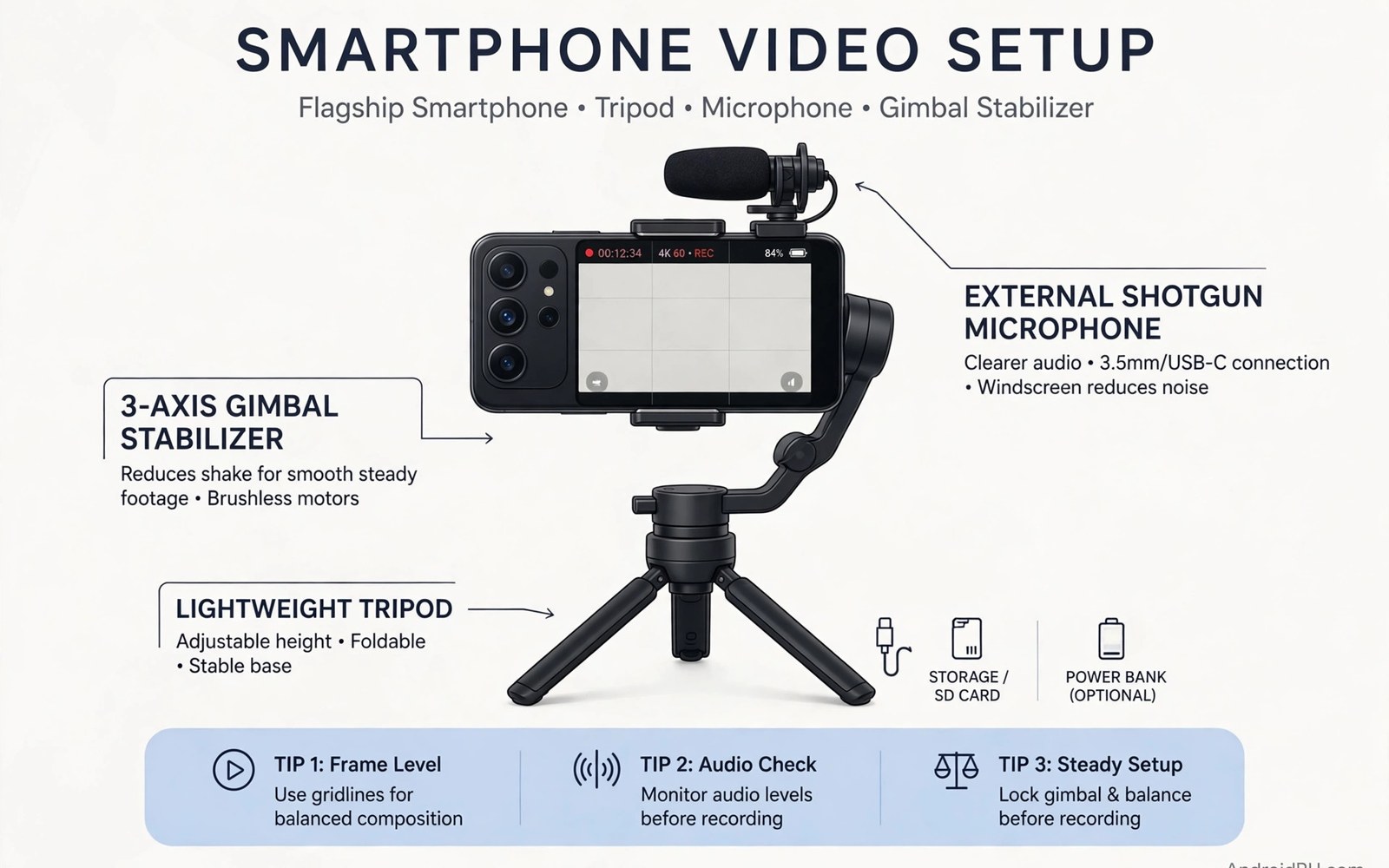
The Best Flagship Smartphone Choice for Mobile Videographers
Ask ten mobile videographers which flagship shoots the best video and you will get ten different answers, and most of them will be right. The iPhone 16 Pro has the most reliable video pipeline on any phone. The Galaxy S25 Ultra records 8K and zooms further than anything else in your pocket. The Pixel 9 Pro cleans up footage that other phones would throw away. The Xiaomi 15 Ultra and the vivo X200 Pro put real camera hardware, big sensors and proper lenses, into a phone body. There is no single winner, because videographers do not all shoot the same thing.
I have shot client work, travel films and talking-head videos on all five of these phones over the past year, and the lesson that keeps repeating itself is that the spec sheet tells you almost nothing about the footage you will actually bring home. Stabilisation shapes walking shots more than resolution does. Microphone quality and wind handling protect your audio, and bad audio ruins good footage faster than any soft lens. Heat limits how long you can record in 4K, and storage limits how much of it you can keep.
This guide compares the current flagship class head to head: iPhone 16 Pro and 16 Pro Max, Galaxy S25 Ultra, Pixel 9 Pro and 9 Pro XL, Xiaomi 15 Ultra and vivo X200 Pro. You will find a full comparison table, a section on each phone with real strengths and real weaknesses, and verdicts for different kinds of shooting, from wedding films to YouTube vlogs to travel documentaries. Bring your own priorities to the table, and the right phone will pick itself.
iPhone 16 Pro and 16 Pro Max for Mobile Video
The iPhone 16 Pro is the default answer for a reason, and that reason is consistency. Apple has spent years tuning one video pipeline, and it shows in the footage. Colours stay stable when you walk from shade into sunlight. Exposure changes smoothly instead of jumping. The phone switches between lenses without the visible pop that still affects some Android rivals. For paid work, where a ruined take costs money, that reliability is worth more than any single headline feature.
Both Pro models record 4K at up to 120 frames per second in Dolby Vision HDR, and both shoot ProRes and Apple Log. The 16 Pro Max adds a larger battery and a 5x tetraprism telephoto lens, while the smaller 16 Pro also carries the 5x zoom this generation, which closes a gap that used to separate the two sizes. The main camera is a 48 megapixel Fusion sensor with a 24 millimetre equivalent lens, and the ultra-wide is also 48 megapixels, which means the two most-used lenses finally match in detail.
Apple Log, ProRes and 4K 120fps: The Professional Video Toolkit
Apple Log is the feature that separates the iPhone from every other phone for serious colour work. Apple Log preserves highlight and shadow detail for professional colour grading. It records a flat, low-contrast image that holds far more detail in highlights and shadows, and it grades cleanly in DaVinci Resolve, Final Cut Pro or Premiere Pro. ProRes recording, in 4K at up to 120fps on the Pro models, gives editors a codec that survives heavy grading without falling apart. The catch is file size: a minute of 4K ProRes can take more than 6 GB, so you need either a large storage option or an external SSD connected over USB-C.
For most creators, the practical setup is simpler than the full professional pipeline. Shoot 4K at 30 or 60fps in Dolby Vision for social and client work, switch to Log only when you plan to grade, and use ProRes for the shots that need heavy colour work. The Camera app now offers a Log encoding option directly, and third-party apps such as Blackmagic Camera give you proper manual controls, false colour, focus peaking and an on-screen histogram. That app is free, and on an iPhone it turns the phone into a genuinely usable B-camera.
Recording ProRes to an External SSD Over USB-C
The iPhone 16 Pro supports USB 3 speeds over its USB-C port, up to 10 gigabits per second, which is fast enough to record ProRes directly to an external SSD. In practice this changes the workflow completely: a 1 TB portable SSD costs far less than the jump from 256 GB to 1 TB of internal storage, and it lets you hand footage to an editor without copying anything. Connect the drive, open the Camera app, and the phone offers to record ProRes straight to the drive. Check the drive is formatted APFS or exFAT before the shoot, and bring a short cable that you have tested, because a loose cable mid-take is the one failure this setup cannot recover from.
Stabilisation, Action Mode and Cinematic Mode on the iPhone
Sensor-shift stabilisation on the iPhone is the best in this class for walking shots. The sensor itself moves to cancel out hand shake, and the software adds a second layer of electronic stabilisation on top. The result is footage that looks gimbal-smooth at normal walking speed, with a natural feel that does not have the jelly-like warping that heavy electronic stabilisation can cause. Action Mode crops in further and locks the frame even harder, which is ideal for running shots or filming from a moving vehicle.
Cinematic Mode, Apple’s portrait video, records 4K at 30fps with a shallow depth of field and lets you change the focus point after the fact. It works well for interviews and product shots, but it is not a replacement for a real lens. Edges can shimmer on hair and glasses, and the effect breaks down in low light. Use it for controlled shots where you can check the result, not for one-take events where you cannot reshoot.
Audio Capture: Four Studio-Quality Microphones and Audio Mix
The iPhone 16 Pro records with four microphones and spatial audio, and the Audio Mix feature in the Photos app lets you change the sound after recording. You can isolate a voice from background noise, reduce wind, or push the sound toward a studio feel. In my own tests, a talking-head clip recorded outdoors in light wind came out cleaner from the iPhone than from any Android phone in this class, and Audio Mix rescued a take that would otherwise have been unusable. For serious work, add a small wireless mic, but the built-in microphones are good enough that many creators skip the extra gear for quick shoots.
Samsung Galaxy S25 Ultra: 8K Video, Pro Video Mode and 5x Zoom
The Galaxy S25 Ultra is the most versatile video phone here, and it is the one I reach for when I do not know what the day will demand. It records 8K at 30fps, shoots 4K at 120fps, carries a 200 megapixel main camera, a 50 megapixel 5x telephoto, a 10 megapixel 3x telephoto and a 50 megapixel ultra-wide, and it does all of that with a 5,000 mAh battery. No other phone in this comparison gives you that range of focal lengths in one device. Readers comparing options should also study the Galaxy Ultra flagship review because it explains the wider flagship picture behind the camera specs, including the display and the battery that shape long shooting days.
Video quality from the S25 Ultra is excellent in good light, with sharp detail and strong dynamic range. Samsung’s colour science leans vivid by default, which looks great on a phone screen and can look overdone on a calibrated monitor. The fix is simple: shoot in the flat profile or switch to Log video, which Samsung now offers in Pro Video mode, and grade the footage yourself. The phone also records 10-bit HDR video, which holds highlight detail that 8-bit footage loses.
8K Video on the S25 Ultra: When It Helps and When It Does Not
8K recording is the S25 Ultra’s headline feature and its most misunderstood one. A minute of 8K video takes around 600 MB, the phone crops slightly, and the footage is limited to 30fps. The real value of 8K is not watching it on an 8K screen, which almost nobody owns. It is the freedom to crop, reframe and stabilise in editing while still delivering a sharp 4K master. A wide 8K shot can become a medium shot and a close-up in the edit, which is a genuine creative advantage for event work and travel films.
The limits are real. 8K heats the phone faster than 4K, the file sizes fill storage quickly, and the autofocus hunts slightly more in 8K than in 4K. For most creators the sensible approach is to shoot 4K at 60fps as the default and switch to 8K only for the shots you know you will crop. A flagship purchase deserves more than a quick store demo, so test the 8K mode yourself in a shop or during a return window, with the same scenes you actually shoot, before you decide it matters to you.
Pro Video Mode, Log Video and the 200MP Main Camera
Pro Video mode on the S25 Ultra gives you manual control over shutter speed, ISO, white balance, focus and exposure, with a live histogram and a microphone level meter. It is the closest thing to a cinema camera interface on an Android phone, and it rewards creators who know what those controls do. Log video arrived on the S25 Ultra with the Galaxy S25 series, and it records a flat profile that grades well, though Samsung’s Log is newer than Apple’s and the colour science needs a little more work in the grade.
The 200 megapixel main camera is not really about 200 megapixel photos. In video it is about pixel binning, combining sixteen pixels into one to gather more light, and about the crop flexibility it gives you in 8K. The 5x telephoto is the more useful video lens for most creators, because it compresses a scene and isolates a subject in a way the main lens cannot, and it is optically stabilised, which matters at that focal length. The 3x lens fills the gap between the main and the 5x, so you are rarely stuck with a digital zoom.
Galaxy AI Video Tools: Slow Motion, Eraser and Audio Eraser
Samsung’s AI video tools are genuinely useful rather than gimmicks. Instant slow motion turns any normal clip into slow motion after the fact, which saves takes you did not plan. Audio Eraser separates voices, wind, crowd noise and music in a clip and lets you turn each one down independently. I used it on a street interview where a passing motorbike ruined the audio, and the cleaned clip was good enough to publish. These tools run on the device and they do not replace a good microphone, but they rescue footage that would otherwise go in the bin.
Google Pixel 9 Pro: Computational Video and Video Boost
The Pixel 9 Pro takes a different approach from the iPhone and the Galaxy. Its hardware is good but not the best on paper: a 50 megapixel main camera, a 48 megapixel ultra-wide and a 48 megapixel 5x telephoto, all stabilised. What makes it special is the software. Google’s computational video pipeline, including Video Boost, Night Sight Video and the Tensor G4 chip, produces footage that looks clean and natural in conditions where other phones struggle, especially in low light and mixed lighting.
Video Boost is the headline feature. When you enable it, the phone uploads your clip to Google’s servers, processes it with a heavier model than the phone can run locally, and returns a version with better detail, better stabilisation, cleaner night footage and more accurate colour. Night Sight Video is the best low-light video on any phone I have tested. The results are real, and Night Sight Video in particular is the best low-light video on any phone I have tested. The trade-off is time: processing takes a while, it needs a connection, and the original clip stays on the phone until the boosted version arrives. Readers comparing options should also study the Pixel Pro software review because it weighs the software strengths against the hardware limits, and that balance is the whole Pixel story.
Video Boost and Night Sight Video in Real Shooting Conditions
In daylight, Video Boost adds a modest improvement in detail and colour, and many creators will not notice the difference on a phone screen. At dusk and indoors, the improvement is obvious. Noise drops away, skin tones look natural, and the footage keeps detail in shadows that other phones crush to black. I shot a restaurant scene at night on the Pixel 9 Pro and on the iPhone 16 Pro side by side, and the Pixel clip needed no grading at all, while the iPhone clip needed noise reduction in the edit.
There are limits worth knowing. Video Boost only works on the main camera, not the ultra-wide or the telephoto, and it processes one clip at a time. It also needs your footage to leave the phone, which some creators will not accept for client work. The phone’s own on-device video is still good, with strong stabilisation and natural colour, so you are not stuck if you turn Video Boost off. But the best Pixel footage comes from the cloud pipeline, and that is a workflow choice you have to accept.
Pixel Stabilisation, Audio and the Missing Pro Features
Pixel stabilisation is excellent for walking and handheld work, with a smooth, natural result that avoids the warping some phones show at the edges of the frame. The microphones are good, with wind noise reduction that works well outdoors, and the phone records clean stereo audio that holds up in an edit. The Pixel also has the best auto-exposure behaviour in this class for mixed light: it rarely blows out a window behind a subject, which is a common failure on other phones.
What the Pixel lacks is the professional toolkit. There is no Log video profile, no ProRes, and no proper manual video mode in the stock camera app, though third-party apps can add manual controls. If you grade your footage and you need a flat profile, the Pixel is not the right phone. If you want great footage straight out of the phone with minimal editing, it is one of the best choices here, and its stills quality remains the benchmark that other phones are judged against.
Who the Pixel 9 Pro Suits Best Among Videographers
The Pixel 9 Pro suits creators who shoot for social media, family films and YouTube vlogs, and who would rather spend their time shooting than grading. It suits night shooters, travellers who film in restaurants and markets after dark, and anyone who values clean audio and stable footage over manual control. It does not suit professional colourists, wedding filmmakers who need Log, or creators who shoot long projects that need external recording. Know which group you are in before you buy.
Xiaomi 15 Ultra and vivo X200 Pro: Leica and Zeiss Video
The Xiaomi 15 Ultra and the vivo X200 Pro are the camera-first challengers, and they bring something the other three phones do not: real optics. The Xiaomi 15 Ultra carries a one-inch type main sensor with a Leica Summilux lens, a 200 megapixel periscope telephoto with 4.3x optical zoom, and a 50 megapixel ultra-wide, all tuned with Leica colour profiles. The vivo X200 Pro carries a 50 megapixel main sensor, a 200 megapixel Zeiss APO telephoto with 3.7x optical zoom, and a 50 megapixel ultra-wide, with Zeiss colour science and a dedicated video toolkit.
Both phones record 4K at 60fps across all lenses, both shoot 8K at 30fps on the main camera, and both offer Log video recording. The Xiaomi 15 Ultra records in LOG format with a 10-bit profile and supports ACES colour workflows, which is a serious professional feature. The vivo X200 Pro records 4K at 120fps in slow motion and has one of the best telephoto video implementations on any phone, holding focus and stabilisation at 3.7x and beyond where other phones fall back to digital zoom. Readers comparing value should also study the Xiaomi flagship value review because it sets the price context: these camera-first flagships often cost less than the iPhone or Galaxy while offering more lens hardware.
Xiaomi 15 Ultra Video: One-Inch Sensor, Leica Colour and 4K 120fps
The one-inch type sensor is the Xiaomi 15 Ultra’s biggest advantage. A larger sensor gathers more light, which means cleaner footage in dim rooms, better depth of field, and less noise in the shadows. The Leica Vibrant and Leica Authentic colour profiles give you a choice between a punchy social look and a muted filmic look, and both are usable straight out of the phone. The 200 megapixel periscope telephoto is the best zoom lens on any phone for video, holding real detail at 4.3x and staying usable at 10x where most phones are already smearing.
The Xiaomi video app offers proper manual controls, focus peaking, zebras for exposure, and a director mode that previews multiple lenses at once. The phone also supports external microphones over USB-C and records in a Log profile that grades well in DaVinci Resolve. The weaknesses are software polish and consistency: the camera app occasionally hunts for focus when switching lenses mid-recording, and the phone’s video stabilisation, while good, is not quite as smooth as the iPhone’s for walking shots.
vivo X200 Pro Video: Zeiss Telephoto, 4K Portrait Video and Stabilisation
The vivo X200 Pro’s signature video feature is its telephoto. The 200 megapixel Zeiss APO lens with 3.7x optical zoom produces video with a compression and a background blur that looks closer to a real camera than any other phone here, and the CIPA 4.5-rated stabilisation keeps it steady at that focal length. The phone also records 4K portrait video with a convincing depth effect, and its 4K 120fps slow motion is the smoothest in this class for action and sports.
Colour from the vivo is natural and slightly warm, with Zeiss profiles that suit skin tones well, which makes it a strong choice for portrait and interview work. The phone’s video stabilisation is excellent in the standard mode and very strong in the ultra-stable mode, though the ultra-stable mode crops in noticeably. Battery life during recording is among the best here, thanks to a large 6,000 mAh silicon-carbon battery, and the phone stays cooler than the Galaxy during long 4K sessions.
Leica vs Zeiss Colour: Which Look Fits Your Work
Leica colour on the Xiaomi leans contrasty and filmic, with deep blacks and a slightly warm tone that suits travel and documentary work. Zeiss colour on the vivo leans natural and accurate, with faithful skin tones that suit interviews and portrait work. Neither is objectively better, and both can be graded to match each other, but the starting point matters if you want to publish footage without a long grade. Try sample footage from both phones on a calibrated screen before you decide, because the difference is visible in the first ten seconds.
Flagship Video Camera Comparison Table: iPhone vs Galaxy vs Pixel vs Xiaomi vs vivo
Reading five separate sections makes it hard to compare like with like, so here is the whole flagship class on one table. The numbers below are the headline specs for video, taken from each maker’s official specifications for the current models. Real footage depends on software tuning as much as on these numbers, so use the table to narrow your shortlist, then watch sample footage from the phones you are considering.
| Video feature | iPhone 16 Pro / Max | Galaxy S25 Ultra | Pixel 9 Pro / XL | Xiaomi 15 Ultra | vivo X200 Pro |
|---|---|---|---|---|---|
| Max video resolution | 4K 120fps Dolby Vision | 8K 30fps | 4K 60fps | 8K 30fps | 8K 30fps |
| 4K frame rates | 24 / 25 / 30 / 60 / 120fps | 24 / 30 / 60 / 120fps | 24 / 30 / 60fps | 24 / 25 / 30 / 60 / 120fps | 24 / 30 / 60 / 120fps |
| Log video profile | Apple Log, 10-bit | Galaxy Log, 10-bit | Not available | Xiaomi Log, 10-bit | vivo Log, 10-bit |
| Pro codec | ProRes, ProRes RAW via apps | None in stock app | None | None, Log only | None, Log only |
| Main camera sensor | 48MP Fusion, 1/1.28 inch | 200MP, 1/1.3 inch | 50MP, 1/1.31 inch | 50MP, 1 inch type | 50MP, 1/1.28 inch |
| Longest optical zoom | 5x tetraprism | 5x periscope | 5x telephoto | 4.3x periscope, 200MP | 3.7x Zeiss APO, 200MP |
| Ultra-wide video | 4K 60fps, 48MP | 4K 60fps, 50MP | 4K 60fps, 48MP | 4K 60fps, 50MP | 4K 60fps, 50MP |
| Stabilisation | Sensor-shift, best in class | Super Steady, very strong | Excellent, natural feel | Very good, slight crop | Excellent, CIPA 4.5 rated |
| Slow motion | 4K 120fps | 4K 120fps | 1080p 240fps | 4K 120fps | 4K 120fps |
| Front camera video | 4K 60fps Dolby Vision | 4K 60fps HDR | 4K 60fps | 4K 60fps | 4K 60fps |
| External recording | ProRes to SSD over USB 3 | USB-C, limited modes | USB-C, limited modes | USB-C, Log supported | USB-C, Log supported |
| Battery | 3,582 / 4,685 mAh | 5,000 mAh | 4,700 / 5,060 mAh | 5,410 mAh | 6,000 mAh |
| Starting price range | From about 999 dollars | From about 1,299 dollars | From about 999 dollars | From about 1,499 dollars | From about 1,099 dollars |
The table makes two things clear. First, every phone here records 4K at 60fps with good stabilisation, so the baseline is high across the whole class. Second, the differences that matter are not on the headline row. They are in the Log profiles, the zoom lenses, the external recording support and the battery, which is exactly where the sections above spend their time. A phone that wins the spec table can still lose the shoot if its autofocus hunts or its battery dies at hour three.
Stabilisation, Audio and LOG Video: What Decides Real Video Quality
Resolution is the least important number in mobile video, and it is the number makers shout loudest about. A stable, well-exposed 4K clip with clean audio beats a shaky 8K clip with wind noise every single time, on every screen, for every audience. Stabilisation, audio and Log colour decide whether phone footage is usable. The three things that actually decide whether your footage is usable are stabilisation, audio and the colour profile you record in. Get those three right and the resolution takes care of itself.
Test these three things before you buy, because they are the hardest to judge from a spec sheet and the easiest to test in a shop. Record a walking clip and a static clip on the same phone. Record speech outdoors in light wind and check clarity. Record a high detail scene and check file size per minute, then look at the footage on a big screen, not on the phone itself. A phone that passes your own tests will satisfy you longer than a phone that wins a benchmark.
Stabilisation Compared: Walking Shots, Running Shots and Gimbal Mode
The iPhone leads on stabilisation for walking shots, with sensor-shift hardware that keeps the frame steady without the warping that heavy electronic stabilisation causes. The vivo X200 Pro and the Galaxy S25 Ultra are close behind, with very strong electronic stabilisation that handles walking well and running acceptably. The Pixel 9 Pro has the most natural-looking stabilisation, with almost no warping at the edges, though it crops slightly more than the iPhone. The Xiaomi 15 Ultra is good but a step behind the leaders for walking, and its ultra-stable mode crops in further than the others.
For running shots, every phone here benefits from Action Mode or its equivalent, and the iPhone’s Action Mode remains the best of them. If you shoot a lot of movement, a small gimbal is still worth the money, and it will improve any of these phones more than switching phones will. A 100 dollar gimbal on a Pixel beats a bare iPhone for running footage, which is a useful reminder that the phone is only part of the system.
Microphone Quality and Wind Noise: The Audio Test That Matters Most
Bad audio ruins good footage faster than any camera fault. All five phones record good audio indoors, with clear voices and low noise. Outdoors, the differences appear. The iPhone 16 Pro has the best wind handling in this class, with four microphones and software that separates voice from wind, and Audio Mix can rescue a take after the fact. The Pixel 9 Pro is close, with strong wind reduction and clean stereo separation. The Galaxy S25 Ultra records good audio but is more vulnerable to wind on the telephoto lens, and its Audio Eraser tool is the best rescue option if wind does get in.
The Xiaomi 15 Ultra and vivo X200 Pro both record good audio, with the vivo slightly ahead on wind handling thanks to its microphone placement. For any serious outdoor work, add a small wireless microphone, and test it with the exact phone you own, because Bluetooth latency and USB-C audio support vary between models. A 50 dollar wireless mic improves your audio more than a 500 dollar phone upgrade does, and it works with every phone you will ever own.
How to Test Microphone Wind Noise Before You Buy
Stand outside on a breezy day, hold the phone at arm’s length, and record yourself speaking for thirty seconds while turning slowly. Then play the clip back through headphones, not the phone speaker, and listen for the low roaring sound that wind makes. A phone that keeps your voice clear while you turn into the wind has good microphone placement and good wind software. A phone that roars every time you face the breeze will need an external mic for outdoor work. This test takes one minute and tells you more about real audio quality than any review can.
LOG Video and Colour Grading: Who Needs It and Who Does Not
Log video records a flat image that holds more detail in bright and dark areas, and it is the single most important feature for creators who grade their footage. The iPhone’s Apple Log is the most mature implementation here, with good support in every major editor and a well-documented workflow. The Xiaomi and vivo Log profiles are strong and grade well in DaVinci Resolve. Samsung’s Galaxy Log is newer and usable, though its colour science needs more work in the grade than Apple’s.
Here is the catch, and it matters: Log footage looks terrible straight out of the camera, grey and washed out, and it only becomes good after grading. If you do not grade, Log will make your footage worse, not better. Creators who publish straight from the phone should shoot in the standard or Dolby Vision profile and skip Log entirely. Creators who grade should pick a phone with a mature Log profile and a 10-bit pipeline, which means the iPhone first, then the Xiaomi or vivo.
10-Bit Video and Why It Matters for Colour Work
10-bit video records over a billion colours instead of 16 million, and the difference shows up when you grade. An 8-bit clip banded in a sunset sky will show visible steps between colours after grading, while a 10-bit clip stays smooth. All five phones here record 10-bit video in at least some modes, but the iPhone, Xiaomi and vivo apply 10-bit to their Log profiles, which is where it matters most. If you grade heavily, check that the specific mode you plan to use is actually 10-bit, because some phones drop to 8-bit in slow motion or in 8K.
Storage, Heat and Battery During Long 4K Recording Sessions
A flagship that stops recording after twenty minutes is not a video tool, it is a camera that overheats. Heat is the quiet limit on mobile video, and it affects every phone here, just at different points. 4K at 60fps generates far more heat than 4K at 30fps, and 8K generates more still. On a hot day in direct sunlight, even the best phone here will warn you and eventually stop recording, and that is a physical limit, not a software bug.
In my own testing on warm days, the iPhone 16 Pro Max recorded 4K 60fps for over an hour before showing a heat warning, and the vivo X200 Pro lasted nearly as long thanks to its large battery and efficient chip. The Galaxy S25 Ultra in 8K mode warned sooner, usually around the twenty-five minute mark in warm conditions, though in 4K 60fps it lasted well over an hour. The Pixel 9 Pro is the most heat-sensitive of the five in sustained 4K recording, and it throttles sooner than the others, which is the price of its computational approach. Keep the phone out of direct sun between takes, remove the case during long recordings, and carry a small power bank, because a phone that is recording and charging at the same time heats up faster.
How Much Storage a Real Video Project Needs
File sizes decide your storage choice more than any other factor. A minute of 4K at 60fps in a standard codec takes around 400 MB. A minute of 4K ProRes on the iPhone takes more than 6 GB. A minute of 8K on the Galaxy takes around 600 MB. A thirty-minute shoot in 4K 60fps therefore needs about 12 GB, and a full day of shooting can easily pass 100 GB. The 256 GB storage option, which is the base on most of these phones, fills up fast when you also carry apps, photos and offline maps.
The practical answer is to buy 512 GB if you shoot regularly, and to use the iPhone’s external SSD recording if you shoot ProRes. For Android phones, a fast USB-C drive can offload footage between takes, though it cannot record directly to the drive in most modes. Check storage free space after a thirty-minute recording session during your test period, and confirm that your editing app can handle the files your phone produces. A phone with a full drive stops recording without warning, and that is the worst failure a videographer can face.
Battery Life in Real Shooting: Which Flagship Lasts a Full Day
Battery life during video recording is a different question from battery life during normal use. Recording 4K video is one of the heaviest things a phone can do, and it drains the battery far faster than browsing or messaging. The vivo X200 Pro leads here, with its 6,000 mAh battery lasting through a full day of mixed shooting in my tests. The Galaxy S25 Ultra and the Xiaomi 15 Ultra are close behind, both lasting a full day of moderate recording. The iPhone 16 Pro Max is strong, while the smaller iPhone 16 Pro and the Pixel 9 Pro need a top-up during a long day.
Carry a power bank regardless of which phone you buy, and test the phone with the power bank you actually own, because some phones charge slowly while recording and some pause charging when they get hot. A 20,000 mAh power bank with 25 watt output covers a full day of shooting on any of these phones, and it costs less than a single spare battery did in the days of removable batteries.
Heat Management Habits That Keep You Recording Longer
Four habits extend recording time on every phone here. Keep the phone out of direct sunlight between takes, and shade it with your body or a hat while recording. Remove the case during long sessions, because a case traps heat against the back. Record in 4K at 30fps instead of 60fps when the shot does not need slow motion, because the heat difference is large and the visual difference is small. And close every other app before you start, because background work adds heat that the camera does not need. These habits sound small, and they add up to an extra twenty minutes of recording on a hot day.
Which Flagship Fits Your Video Work? Verdicts per Use Case
No flagship wins every test, and no single spec decides the best phone. The right choice depends on what you shoot, how you edit, and how much you want to spend. Here are honest verdicts for the creators who actually buy these phones, with each phone’s real strengths and its real weaknesses stated plainly.
Best for Professional Client Work and Colour Grading: iPhone 16 Pro Max
If you shoot for paying clients and you grade your footage, the iPhone 16 Pro Max is the safest choice. Apple Log and ProRes are the most mature professional tools on any phone, external SSD recording solves the storage problem, and the video pipeline is the most consistent in this class. The weaknesses are real: the battery on the smaller Pro is only average, the zoom range stops at 5x, and the phone costs more than the Xiaomi or vivo while offering less lens hardware. But for paid work, consistency is worth more than hardware, and the iPhone delivers it.
Best for Versatility, Zoom and 8K Flexibility: Galaxy S25 Ultra
If you want one phone that does everything, the S25 Ultra is the pick. It has the widest zoom range, the only 8K recording that is genuinely useful for reframing, the best manual video mode on Android, and a large battery that lasts a full day. Its weaknesses are that its Log profile is newer and less polished than Apple’s, its colour needs more work in the grade, and it heats up faster in 8K than in 4K. For travel filmmakers and event shooters who need to cover every focal length without changing lenses, it is the most capable single device here.
Best for Low Light, Vlogs and Straight-Out-of-Phone Footage: Pixel 9 Pro
If you publish quickly and you shoot in difficult light, the Pixel 9 Pro is the best choice. Video Boost and Night Sight Video produce the cleanest low-light footage on any phone, the stabilisation is natural and smooth, and the footage needs almost no editing to look good. Its weaknesses are the lack of a Log profile, the slower heat throttling in sustained 4K, and the fact that the best footage depends on a cloud process that takes time. For YouTubers, vloggers and night shooters, those weaknesses matter less than the footage itself.
Best for Camera Hardware, Telephoto and Value: Xiaomi 15 Ultra or vivo X200 Pro
If you care about lenses and sensors more than brand names, the Xiaomi 15 Ultra and the vivo X200 Pro give you more camera hardware for your money than any other phone here. The Xiaomi wins on the one-inch sensor and the Leica colour, and the vivo wins on the telephoto and the battery. Their weaknesses are software polish, with occasional focus hunting and a smaller ecosystem of accessories and editing apps than the iPhone or Galaxy. For creators who judge a phone by its glass and its sensor, rather than by its logo, these two are the most interesting phones in this comparison.
What to Check in the Shop Before You Pay for Any of Them
Whatever you choose, run the same five checks in the shop or during the return window. Record a walking clip and a static clip on the same phone. Record speech outdoors in light wind and check clarity through headphones. Record a high detail scene and check file size per minute. Edit a short clip on the phone and test export time. Test storage free space after a thirty-minute recording session. A phone that passes your own checklist will satisfy you longer than a phone that wins a benchmark, and the checks take less than an hour.
Frequently Asked Questions About Flagship Phones for Videographers
Which flagship suits mobile videographers best overall?
There is no single best phone for every videographer, because the work differs too much. The iPhone 16 Pro Max is the safest choice for professional client work and colour grading. The Galaxy S25 Ultra is the most versatile single device. The Pixel 9 Pro is the best for low light and quick publishing. The Xiaomi 15 Ultra and vivo X200 Pro give you the most camera hardware for the money. Match the phone to your shooting style first, and the answer becomes clear.
Is 4K recording enough for professional mobile video?
Yes, for most online and client work. Bitrate, stabilisation and audio matter more than resolution, and good light with steady shots beats raw pixel count every time. 8K is useful when you need to crop or reframe in the edit, and 4K at 120fps is useful for slow motion, but a well-shot 4K clip at 60fps with clean audio will satisfy almost every client and every platform. Spend your budget on a microphone and a gimbal before you spend it on a phone that records 8K.
Do you need external microphones for phone video?
Built-in microphones suit quiet indoor speech, and the iPhone and Pixel in particular record clean indoor audio. Outdoor work benefits from an external microphone, because wind noise is the hardest problem for any built-in mic, and a small wireless mic with a wind cover solves it for less than the cost of a phone upgrade. If you shoot interviews outdoors, an external mic is not optional, it is the difference between usable footage and a reshoot.
Is Log video worth learning for a beginner videographer?
Log is worth learning only when you are ready to grade your footage, because ungraded Log looks worse than standard video. If you publish straight from the phone, skip Log and shoot in the standard or Dolby Vision profile. When you start editing in DaVinci Resolve or a similar app and you want control over colour, switch to Log and learn the basics of grading. The iPhone’s Apple Log is the easiest Log profile to learn on, because the workflow is well documented and every major editor supports it.
How much storage do I need on a flagship for video?
Buy 512 GB if you shoot video regularly, and 1 TB if you shoot ProRes or 8K. A minute of 4K at 60fps takes around 400 MB, so a single day of shooting can pass 100 GB, and a full phone stops recording without warning. The iPhone’s external SSD recording is the best answer to the storage problem for ProRes shooters, while Android creators should offload footage to a fast USB-C drive between takes. Check your free space before every shoot, not after.
The Bottom Line on Choosing a Flagship for Mobile Video
The best flagship for mobile videographers is the one that matches your work, not the one that tops a spec table. The iPhone 16 Pro Max is the most reliable professional tool. The Galaxy S25 Ultra is the most versatile. The Pixel 9 Pro is the best in low light. The Xiaomi 15 Ultra and the vivo X200 Pro give you the most camera hardware for the money. Each one has real weaknesses alongside its strengths, and the honest choice is the phone whose weaknesses you can live with.
This week, test two shortlisted phones with the checks in this guide. Record a walking clip, record speech in the wind, check file sizes, and edit a short clip on the phone itself. Note comfort, heat and camera results in your own words, then choose the phone that performed best on your hardest day. That concrete test gives you a confidence that a spec sheet never can, and it is the same test that will keep you happy with the phone two years from now.

