

Single SIM vs Dual SIM vs Hybrid SIM Slot Explained
Pick up almost any Android phone and you will find a small tray on its edge, yet that tray decides more about your daily life than most buyers realise. It decides whether you can carry a work number and a personal number on one handset, whether a trip abroad means swapping cards in an airport, and whether your photo library can grow with a memory card.
What a SIM Tray Really Does on an Android Phone
A SIM tray is a small drawer, usually opened with a pin, that slides into the side or top of the phone. Inside it sit the tiny cards that identify your phone to a mobile network. A nano-SIM, the size used by almost every current Android phone, carries your number, your carrier plan and the keys that let the network trust your device. Without a working card seated correctly, the phone can still use Wi-Fi, but calls, texts and mobile data stop.
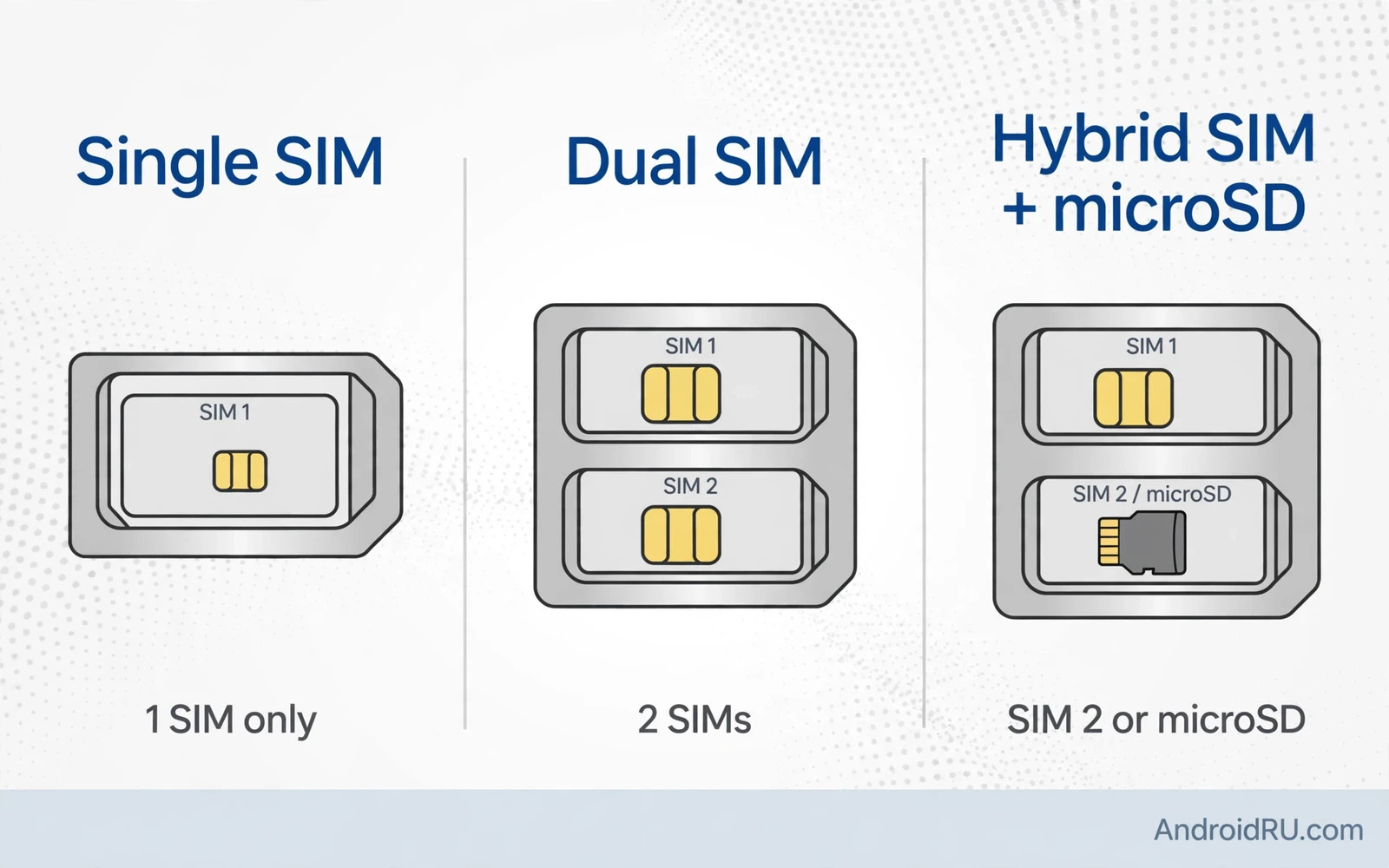
Open the tray itself if the phone is already in your hand. One card-shaped cutout sits in a single tray. Two cutouts of the same size sit in a dual tray. A hybrid tray has one full cutout and a second cutout that fits either a nano-SIM or a microSD card, usually with the memory card shape marked beside it. Take a photo of the tray before you remove it, so you can see which way each card sat.
Single SIM Phones: One Line, One Tray, Zero Confusion
A single SIM phone holds one physical card and keeps life simple. There is one number, one carrier plan, one set of call settings and one data line to manage. Nothing about the second line can go wrong, because there is no second line. Battery behaviour is a touch simpler too, since the phone keeps one network registration alive rather than two. For a reader with one number and one carrier, that simplicity is a genuine feature, not a missing one.
Dual SIM Phones: Two Numbers on One Android Device
A dual SIM phone holds two physical cards at once and keeps both numbers reachable on one device. Your work number and your personal number can ring the same handset. Your home number and a local travel number can sit side by side. Android lets you label each line, pick a default for calls, a default for messages and a default for mobile data, and see which line an incoming call is using before you answer. Set those labels on day one, because an unlabelled second line is where expensive mistakes begin.
How Android Manages Two Lines at Once
Android keeps both cards registered on their networks for incoming calls, and it shows signal bars for each line in the status area. Each line can have its own ringtone, its own voicemail behaviour and its own name and colour in settings. The names matter more than the colours: “Work” and “Personal” beat “SIM 1” and “SIM 2” every time, because a year from now you will not remember which number was SIM 2. Rename the lines the day you insert the cards.
Single SIM vs Dual SIM vs Hybrid SIM: Side-by-Side Comparison
Reading the three designs side by side makes the trade-offs plain. No design wins on every row. The right choice depends on which rows matter most to your life: a second number, extra storage, simplicity, or the freedom to have both at once.
| Feature | Single SIM | Dual SIM | Hybrid SIM |
|---|---|---|---|
| Physical SIM cards held | 1 | 2 | 1 or 2 |
| Memory card at the same time | Only with a separate slot | Only with a separate slot | No, second slot is shared |
| Two numbers at once | Only with eSIM | Yes, both physical | Yes, if no memory card is fitted |
| Setup complexity | Lowest | Medium, needs labels and defaults | Medium, needs a slot-role choice |
| Best for travellers | Fair, card swap needed | Excellent, home plus local | Good, if storage is not needed |
| Best for work plus personal | Weak without eSIM | Excellent | Good, with the storage trade-off |
| Internal storage pressure | Low if a card slot exists | Low if a card slot exists | High, card may be sacrificed |
| Typical price range | All ranges, often flagships | Common in mid-range and global models | Very common in mid-range phones |
Hybrid SIM Slots: One Shared Slot, Two Competing Jobs
A hybrid SIM slot is a shared second position in the tray. Fit a second nano-SIM and you have two numbers. A microSD card in that same position gives you one number plus extra storage instead. Trying to fit both at once will not work, because the position accepts one card at a time. The design is clever engineering and a daily compromise at the same time, and buyers should understand the compromise before they pay.
When the Hybrid Trade-Off Hurts Most
The trade-off hurts when both needs are permanent rather than seasonal. A photographer who stores photos on a memory card and needs a work number cannot satisfy both needs on a hybrid phone. A parent who keeps a huge offline music library on a card and carries a second number for a side business faces the same wall. In those cases the answer is not a bigger memory card, because the card has nowhere to sit while the second SIM occupies its slot. The answer is a different phone: one with a dedicated memory slot plus dual SIM, or one with large internal storage plus dual SIM, so the card becomes optional rather than essential.
Dual SIM Standby vs Dual SIM Dual Active: What Actually Happens During a Call
Most Android phones use dual SIM standby, often shortened to DSDS. Both cards stay registered on their networks, so both numbers can receive calls. When you answer a call on one line, the other line goes quiet for the length of that call, and a caller to the second line may hear it as busy or unreachable. Only one data connection runs at a time in most DSDS designs. For most readers this is fine, because few people need to talk on two lines at once.
Dual SIM dual active, or DSDA, is the rarer design. Both lines stay fully active for calls at the same time, so a call on one line does not block the other, and you can put one call on hold to answer the other. DSDA needs more radio hardware and more power, which is why it appears in fewer models and usually costs more. Do not assume a phone is dual active just because it is dual SIM. Check the exact behaviour in the specification sheet or the maker support pages for your model.
Does Standby or Active Change Your Battery and Data?
Standby uses less power than dual active, because only one radio chain works hard during a call. The battery difference between a single SIM phone and a dual standby phone is small in practice, a few percent across a day, and it shrinks further when the second line sits in an area with strong signal. Weak signal is the real battery drain: a line hunting for a network in a basement or a rural area works harder than a line resting on a strong tower. If battery life matters, the signal strength of your second carrier matters more than the standby label.
eSIM and Dual eSIM: How Digital Lines Change the Tray Maths
An eSIM is a digital SIM profile downloaded to a chip inside the phone, rather than a physical card you slide into a tray. It does not occupy a physical slot at all, which is why it changes the hybrid maths so helpfully. A hybrid phone with eSIM can hold a physical SIM, a downloaded eSIM profile and a memory card at the same time in some designs, giving you two numbers plus storage expansion without a dedicated dual tray. That combination is the quiet reason eSIM has become the most important tray feature for frequent travellers.
Carrier freedom shapes all of this. Guidance on carrier locked versus unlocked Android phones applies directly to tray choice, because a phone tied to one carrier may block a second carrier card or a rival eSIM profile until that tie ends. A SIM-free phone gives you full freedom to mix carriers across both slots and across eSIM profiles. A carrier-tied phone may allow only the tying carrier on both slots. Confirm the carrier-free status and the dual carrier support of the exact model before you rely on a second slot for a rival network.
Setting Up eSIM Beside a Physical SIM
Most carriers issue an eSIM through a QR code, an app, or a code you type into settings. Open Settings, then Network and internet, then SIMs, then Add SIM or Add eSIM, and follow the scan or entry steps while you have a stable connection. The download takes a minute or two, and the phone asks you to label the new line and pick its roles, just as it does for a physical card. Test a call and a message on the new line before you depend on it, and keep the QR code or activation details somewhere safe in case you need to move the profile to a new phone.
Setting Up Dual SIM and Hybrid SIM Phones Step by Step
Label each line next, then set the defaults. Open Settings, then Network and internet, then SIMs, and tap each line to give it a clear name such as Work and Personal. Pick a preferred SIM for data, a default for calls and a default for messages. The data choice deserves the most thought, because it decides which plan pays for every download, map tile and video you watch on mobile data. Test a call on each line, send a message from each line, and load a page on the chosen data line before you call the job done.
Setup Steps for a Hybrid Phone
Moving to a new dual SIM phone also means moving your data, and the SIM tray is only one part of that move. Contacts, photos and apps travel through accounts and backups, not through the cards themselves. Restore your data first, then set the SIM roles, so a half-restored contact list does not confuse your tests. Helpful detail sits in a step by step guide to transferring data from iPhone to Android, which pairs well with SIM setup because a new dual SIM phone needs both restored data and correctly labelled lines before it can replace an old phone fully. Finish both jobs on the same calm day with a stable connection available.
Back Up the Memory Card Before Any Swap
Copy photos and offline files off the card before you remove it for a second SIM, because a card in a drawer is easy to forget and hard to replace. A quick backup to internal storage or a computer takes minutes and saves files that cannot be downloaded again.
Test Each Line Before You Put the Old Phone Away
Make one call and send one message on each line, and load a page on the chosen data line, while the old phone is still in your hand. A line that fails in this test is a settings problem you can fix in minutes, not a surprise you discover after the old phone is wiped.
Troubleshooting SIM, Signal and Memory Card Problems
A card the phone cannot see usually points to seating, orientation or a dirty contact rather than a dead phone. Power off, remove the tray, reseat the card carefully, wipe the gold contacts gently with a dry soft cloth if dust is visible, and push the tray fully home. Restart and wait a full minute for registration. Try the card in the other slot on a dual tray to separate a faulty slot from a faulty card, and try the card in another phone if you can. A card that fails everywhere is a card problem, and your carrier can replace it while keeping your number.
Accessory and connection problems share the same calm method: change one thing, test, then change the next. The guide with fixes for Bluetooth pairing failures on Android accessories is about a different part of the phone, yet it shows the same pattern, because reseating, restarting and isolating the faulty part solves many accessory problems too. Random setting changes hide the cause, while one change at a time finds it. Keep notes on what you tried, so you do not repeat a step under stress.
Connection stability matters during setup itself, because eSIM profile downloads, account restores and carrier updates all need a steady link while you test the lines. A dropping connection can make a good SIM look faulty, and a failed profile download can look like a tray problem. The advice in fixes for Wi-Fi dropping frequently on mobile is worth reading before a setup session, because fixing the connection first removes a common false alarm. Test the SIM lines again only after the connection holds steady for several minutes.
Which SIM Slot Setup Fits Your Life? Verdict by Use Case
Choose single SIM when you have one number and you value simplicity above all else. The phone stays easy to manage, the settings stay short, and nothing about a second line can surprise you. Add eSIM if your model supports it, and you gain a travel line without giving up that simplicity. This is the right call for readers whose life genuinely runs on one number, and there is no shame in picking the simple option when it fits.
Choose dual SIM when work and personal numbers must live on one device, or when home and travel numbers must coexist without card swaps. This is the liberating option, and once you have lived with two labelled lines, carrying two phones feels like a chore from another era. Buy the dual model with a dedicated memory slot if you also need storage expansion, because that combination removes the only real compromise.
SIM Slot Questions Readers Ask Most
Can I use two SIM cards and a memory card at the same time on a hybrid phone?
No, not on a true hybrid tray, because the shared second position accepts one card at a time. You can have two numbers, or one number plus a memory card, but not both together. The exception is a hybrid phone with eSIM: the digital profile holds the second number while the physical tray holds one card plus the memory card.
Does dual SIM drain the battery much faster than single SIM?
The difference is small on modern phones, usually a few percent across a day, because the second line mostly rests in standby. Weak signal drains more power than the second registration itself, so a second line hunting for a network in a basement costs more than a second line resting on a strong tower.
How do I stop mobile data from using the wrong SIM?
Open Settings, then Network and internet, then SIMs, and set the preferred line for mobile data to the plan with the generous allowance. Give each line a clear name, review the setting after every trip, and check data use per line after the first week.
Is eSIM better than a second physical SIM for travel?
For many travellers it is, because you can buy and install a travel profile before you leave, keep your home number active for calls and texts, and switch profiles in settings without opening the tray. A physical local card still wins where carriers do not issue eSIM profiles, where a local shop sells only physical cards, or where you need to move the line to another phone quickly.
Pick the Tray That Matches Your Numbers and Your Storage
Single SIM is simple and sufficient for a one-number life. Dual SIM is liberating for a two-number life. Hybrid is flexible yet it forces a choice between a second number and extra storage on the same day. eSIM softens that choice on modern phones, and a dedicated memory slot removes it entirely. The best tray is the one that matches your numbers and your storage needs on the same day, not the one with the longest specification line.

