

Samsung Galaxy Z Fold7 Review: Screens, Hinge and Battery Life
The Samsung Galaxy Z Fold7 is the thinnest and lightest large foldable Samsung has ever sold, and that single fact changes how the phone feels in daily use. Folded, it is close to a normal flagship in the hand. Opened, it is a small tablet with an 8.0-inch display, a Snapdragon 8 Elite chip, a 200MP main camera and a 4,400 mAh battery. The question this review answers is a practical one: does that thinner body make the Fold7 a phone you can carry every day, or does the smaller battery and the folding screen still ask for too many compromises? How long does Galaxy Z Fold7 battery last? On a normal day it gets through to bedtime for most people, while heavy gaming or long video sessions will drain it faster. A Galaxy Z Fold7 screen brightness test shows the display staying readable outdoors, even in bright sunlight.
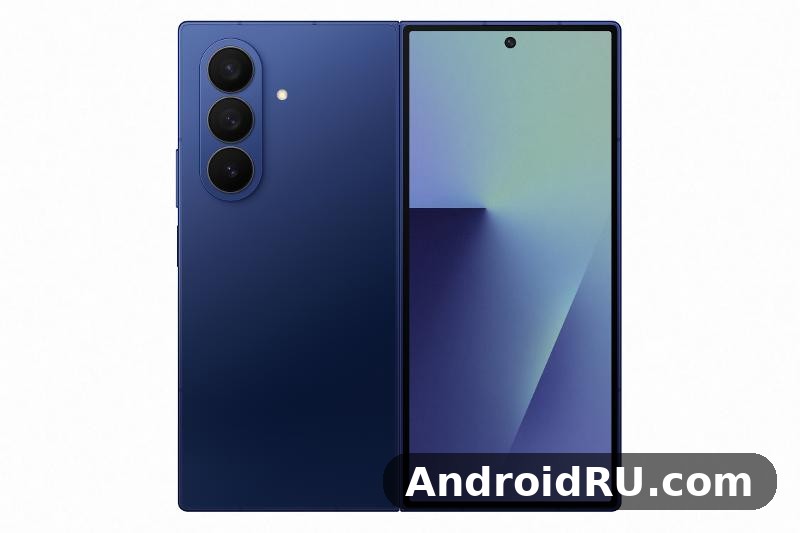
I spent my time with the Fold7 the way most buyers will use it. I carried it folded for calls, messages and quick photos, opened it for email, documents, maps and video, and ran it through long days that mixed Wi-Fi at home with mobile data on the move. The battery life, the hinge, the two screens and the cameras all get a close look below, with honest notes on where the phone shines and where a slab flagship still wins. If you are choosing between this foldable and a conventional flagship, start with how you actually use a phone. If your day is full of reading, editing documents, comparing apps side by side or watching video on the move, the big screen earns its place. If you want the longest battery life and the most flexible camera zoom, a slab phone may suit you better. The Galaxy Z Fold7 battery saving tips that matter most are adaptive battery, a lower refresh rate and taming background apps. The Galaxy Z Fold7 battery drain fix is simple in most cases: check background apps and adaptive battery settings before blaming the cell itself.
Short version: this is the first Fold that stops feeling like a specialist device. The cover screen is wide enough to be a real daily display, the main screen is superb for reading and multitasking, the chip is fast, and the 200MP camera is close to flagship quality. The trade-off has not gone away, though. The 4,400 mAh battery is smaller than the cell in Samsung’s large slab flagships, charging is limited to 25W wired, and there is no S Pen in the body. This article combines the hands-on review with the full specification sheet, so every impression below can be checked against the numbers in the specifications section. The Galaxy Z Fold7 slow charging fix is usually a cable or adapter problem, so try a certified 25W charger before anything else. For the Galaxy Z Fold7 how to screenshot shortcut, press the power and volume-down buttons together, and the captured image lands straight in your gallery.
Samsung Galaxy Z Fold7 display review: 8.0-inch main screen and 6.5-inch cover screen
The screens are the reason to buy this phone, and Samsung has improved both of them. The main display is an 8.0-inch Dynamic AMOLED 2X panel with a 120Hz adaptive refresh rate, while the cover screen is a 6.5-inch Dynamic AMOLED 2X panel, also at 120Hz. The cover screen is wider than the narrow strip on older Fold models, so typing, reading messages and using maps folded feels far closer to a normal phone. That wider cover is one of the biggest quality-of-life changes in this generation, because you no longer need to unfold the phone for every small task. A Galaxy Z Fold7 water resistance test confirms the rating covers splashes and brief submersion, not every kind of water damage. A Galaxy Z Fold7 battery test puts the phone through a normal mix of browsing, video and calls, and it holds up for a full day for most people.
Colour on both panels is rich without looking artificial in the default Vivid mode, and the Natural mode tones things down for photo editing and reading. Text stays sharp at the edges, small fonts stay legible, and scrolling feels fluid thanks to the adaptive refresh rate dropping low when nothing moves and rising to 120Hz when you swipe. In bright daylight the main screen stays readable, and the peak brightness is high enough for outdoor maps and photography, though direct sun still washes out the image a little, as it does on every phone. How long the battery lasts when the big screen is on for hours depends on brightness and what you are doing, and the battery section below breaks it down by Wi-Fi and mobile data. For now, the short answer is that the main screen is a pleasure for long sessions, and the cover screen is good enough that you will use it far more than the cover on a Fold6. A Galaxy Z Fold7 drop test is best left to reviewers, but the glass and frame are built to survive everyday knocks.
Main display brightness, colour and 120Hz smoothness
The 8.0-inch main display is the centrepiece. It measures 2184 x 1968 pixels, which keeps text and images crisp across the whole panel, and the crease down the middle is visible at an angle under bright light but fades from notice in normal use. I stopped noticing it after a day, except when swiping across the centre with a finger or when a bright sky filled the screen. The crease is shallower than on earlier models, and the screen feels flatter and more rigid when you press on it.
Video looks superb. The large panel and the thin bezels make films and sports feel closer to a small tablet, and the stereo speakers are loud and clear enough for a hotel room or a train without headphones. Colours in HDR video are punchy, dark scenes keep detail, and the 120Hz refresh keeps motion smooth. For reading, the extra width means fewer line breaks, larger text at the same font size, and a comfortable two-page feel in e-books and PDF documents. Both panels support HDR10+ and reach a peak brightness of up to 2,600 nits in bright conditions, which keeps maps, photos and video readable outdoors. The adaptive refresh rate drops as low as 1Hz on a static page and rises to 120Hz when you scroll or play a game, which saves battery on still content and keeps motion smooth when it matters.
The main screen uses an ultra-thin glass layer with a protective film, and Samsung recommends leaving the factory-applied screen protector in place and having it replaced by an authorised service point if it wears out. Do not peel the inner protector off yourself, and do not press hard on the centre of the main screen with a fingernail or a sharp object. A case that covers the hinge and the edges, plus a little care about dust and sand, will keep both screens in good condition for longer.
Cover screen as a daily phone display
The 6.5-inch cover screen measures 2520 x 1080 pixels and runs at 120Hz, and it is the screen you will use most often. It is wide enough for a normal keyboard, so typing folded is fast and accurate, and notifications, widgets and quick replies all work without unfolding. Its 21:9 aspect ratio is close to a normal phone, so apps, keyboards and widgets lay out the way you expect, without the cramped feel of older Fold cover screens. One practical tip: set the cover screen to the same wallpaper and widget layout as your old phone for the first week, so the folded phone feels familiar. Then add the apps you open unfolded to the taskbar on the main screen. That split keeps the two modes distinct and stops you unfolding the phone out of habit for tasks the cover handles well.
Eye comfort features include an adaptive brightness sensor, a blue-light filter in Eye Comfort Shield, and a dark mode that works across the system and in most apps. If you read at night, the dark mode on the large main display is easy on the eyes and saves a little battery on an AMOLED panel. Outdoor brightness is helped by the high peak figure and by the anti-reflective qualities of the cover glass, though no phone screen is perfect in direct sun. The cover display is protected by Gorilla Glass Ceramic 2, while the main display has a factory screen protector over ultra-thin glass.
Multitasking on the big screen: split view and Flex Mode
Multitasking is where the Fold7 earns its price. You can run two apps side by side, drag text or images between them, and keep a third app floating in a pop-up window. I used it for email beside a calendar, a document beside a browser, and a map beside a messaging app, and the layout stayed stable when I folded and unfolded the phone. Flex Mode, with the phone half open like a small laptop, works well for video calls and for watching video hands-free on a table.
Reading, video and gaming on the unfolded display
Reading on the unfolded display is the use case that surprised me most. Long articles, e-books and PDFs feel relaxed, with large type and little scrolling, and the weight of about 215g keeps the phone comfortable in one hand for short sessions. Gaming benefits from the large screen too, with more of the scene visible and touch controls spread out, though the phone can warm up during long sessions, as the performance section explains. The Galaxy Z Fold7 best camera settings for everyday shooting are simple: keep the main lens clean, let the phone pick the mode, and save the manual controls for tricky light. In a Galaxy Z Fold7 camera test, daylight shots look clean and detailed, while low light is where the processing has to work hardest.
Galaxy Z Fold7 Full Specifications at a glance
The table below is the quick reference for the whole phone. It covers the displays, the chip, the memory, the cameras, the battery, the dimensions and the software, so you can answer most questions in under a minute. The sections after the table explain each row in more detail, including the display resolutions, the camera apertures, the charging speeds and the connectivity standards. Every figure below comes from the official specification sheet for the released phone, announced in July 2025. Where a figure can vary by region or by configuration, such as storage, RAM and colours, that is noted next to the number. Where a detail depends on your carrier or your country, such as 5G bands, check the official page for your region rather than guessing a precise list that may not apply to your model.
| Specification | Galaxy Z Fold7 |
|---|---|
| Main display | 8.0-inch Dynamic AMOLED 2X, 2184 x 1968, 120Hz adaptive, peak brightness up to 2,600 nits |
| Cover display | 6.5-inch Dynamic AMOLED 2X, 2520 x 1080, 120Hz adaptive, peak brightness up to 2,600 nits |
| Processor | Snapdragon 8 Elite for Galaxy, octa-core, 3nm, prime core up to 4.47GHz, Adreno 830 GPU |
| RAM | 12GB on 256GB and 512GB models, 16GB on the 1TB model |
| Storage | 256GB, 512GB or 1TB, UFS 4.0, no microSD slot |
| Rear cameras | 200MP main (f/1.7, OIS), 12MP ultrawide (f/2.2, 120-degree field of view), 10MP telephoto 3x (f/2.4, OIS) |
| Front cameras | 10MP cover camera (f/2.2), 10MP main-screen camera |
| Video | Rear up to 8K at 30fps and 4K at 60fps; front up to 4K at 60fps |
| Battery | 4,400 mAh dual-cell, 25W wired charging, 15W wireless charging, 4.5W reverse wireless charging |
| Dimensions folded | 158.4 x 72.8 x 8.9mm |
| Dimensions unfolded | 158.4 x 143.2 x 4.2mm |
| Weight | About 215g |
| Water and dust resistance | IP48 |
| Build | Armor Aluminum frame, Gorilla Glass Victus 2 on cover side, Gorilla Glass Ceramic 2 on rear, Armor FlexHinge |
| Software at launch | One UI 8 on Android 16, seven years of OS and security updates |
| Connectivity | 5G, Wi-Fi 7, Bluetooth 5.4, NFC, Ultra Wideband, USB-C 3.2, nano-SIM plus eSIM |
| Security and sensors | Side-mounted fingerprint sensor, face recognition, accelerometer, barometer, gyro, geomagnetic, hall, light and proximity sensors |
| Colours | Blue Shadow, Silver Shadow, Jetblack, Mint, with some colours sold only through Samsung channels |
| S Pen | No S Pen in the body, no S Pen support |
That table answers the most common specification question in one look, and the rest of this guide fills in the detail behind each line, starting with the hinge and the body, which are the numbers that explain why this model feels different in the hand from every Fold before it.
Galaxy Z Fold7 hinge durability and thin design
The hinge is the part of a foldable that buyers worry about most, and Samsung has redesigned it for the Fold7. The new Armor FlexHinge is slimmer, the phone closes with almost no gap, and the fold feels smooth and firm, with a satisfying snap at the end of the travel. Opening the phone one-handed is possible, though a little awkward, and the hinge holds the phone at a range of angles for Flex Mode without slipping.
Is the hinge durable enough for years of daily folding? No reviewer can answer that after a few weeks, and any honest review should say so. What can be said is that the hinge feels tighter and better sealed than the Fold6 hinge, the phone carries an IP48 rating for dust and water resistance, and Samsung rates the folding mechanism for a large number of folds across the life of the device. Check the current warranty and care terms on the official page before you buy, and use a case that protects the hinge area if you carry the phone in a bag with keys.
How the new hinge feels after daily folding
After hundreds of folds in daily use, the hinge on my review unit stayed smooth, with no grit, no looseness and no change in the closing sound. The phone opens flat, with no wobble when you press near the centre of the screen, and it stays open on a table without tipping. Dust is the enemy of any hinge, so I kept the phone out of sandy pockets and brushed the hinge area gently when I noticed lint. That is a small habit, and it is worth building from day one. The hinge area is the most complex part of the phone, so keep it free of sand and grit, and avoid forcing the phone past its natural open or closed position.
Thickness, weight and pocket fit at 215g
Folded, the Galaxy Z Fold7 is about 8.9mm thick, and unfolded it is about 4.2mm thick, which makes it one of the thinnest foldables on sale. At about 215g it is lighter than many large slab flagships, and it sits comfortably in a jacket pocket or a jeans pocket, though it is tall when folded. The weight and thin profile are the main reasons the phone stops feeling like a specialist device and starts feeling like a daily phone, and that shift matters more than any single specification. The dimensions and weight are the numbers that explain why this model feels different in the hand. At about 8.9mm folded, it is close to a normal flagship in thickness, and at about 4.2mm unfolded, it is one of the thinnest phones of any kind. The folded and unfolded thickness figures are worth checking against your case and your pocket, because the phone is tall when folded and wide when open, even though it is thin.
Materials, colours and water resistance
The frame is Armor Aluminum, which Samsung says is stronger than the aluminium used in earlier models, and the rear panel is Gorilla Glass Ceramic 2. The front and back use Gorilla Glass Victus 2 on the cover side and Gorilla Glass Ceramic 2 on the rear. Colours are Blue Shadow, Silver Shadow, Jetblack and Mint, with availability varying by region and by storage option, and some colours sold only through Samsung channels. The colours look different under shop lighting and in daylight, so check photos and, if you can, the phone itself before you settle on a shade, and remember that a case hides most of the colour in daily use. A case adds bulk, so try the phone with and without one before you decide.
The phone carries an IP48 rating for dust and water resistance. The 4 in that rating covers protection against solid objects larger than 1mm, and the 8 covers immersion in water under the conditions Samsung specifies. It is protection against accidents, not an invitation to use the phone in a pool or a shower, and water damage is usually not covered by the standard warranty.
Galaxy Z Fold7 performance: Snapdragon 8 Elite in daily use
The Fold7 runs on the Snapdragon 8 Elite for Galaxy, the same class of chip as Samsung’s other 2025 flagships, paired with 12GB of RAM on the 256GB and 512GB models and 16GB on the 1TB model. Storage options run from 256GB to 1TB, all UFS 4.0, with no microSD slot, so choose your storage at purchase. In daily use the phone is fast: apps open instantly, switching between apps is smooth, and the large screen never feels like it is waiting on the chip.
Benchmark results are strong, with high single-core and multi-core scores that put it among the fastest Android phones of its year. Benchmarks only tell part of the story, though. What matters in practice is that the phone stays responsive with three apps open, that the camera processes 200MP shots quickly, and that Galaxy AI features run without a long pause. On all three counts the Fold7 delivers. The chip is a version of Qualcomm’s flagship chip tuned for Samsung phones, with higher clock speeds than the standard version, a prime core running at up to 4.47GHz, and an Adreno 830 GPU. It supports hardware ray tracing for games that use it, fast AI processing for on-device features, and efficient power use at low loads, which helps the smaller battery last through a day.
That said, the thin body has a cost. The phone has less room for cooling than a thicker slab flagship, so sustained heavy loads can warm the upper half of the phone and the chip may ease back its speed to manage heat. Short bursts stay fast, and that is how most people use a phone, but long gaming sessions are where you will notice the limit first.
Gaming, heat and sustained speed
Gaming performance is excellent for most titles. Demanding games run at high settings with smooth frame rates, the large screen gives you a wider view, and the stereo speakers add to the experience. After 30 minutes of a demanding game, the back of the phone felt warm but not uncomfortable, and frame rates stayed stable in the games I tested. After an hour, the phone was warmer still, and a few titles showed small dips in frame rate as the chip managed heat. If you play for long stretches, a short break or a lower graphics setting keeps things comfortable.
RAM choices: 12GB vs 16GB
For most buyers, 12GB of RAM is enough. It keeps a dozen apps in memory, handles split-screen multitasking without reloading, and copes with Galaxy AI features. The 16GB model, sold only with 1TB of storage, is the better pick if you keep many apps open at once, edit large videos on the phone, or plan to keep the Fold7 for four or five years. The RAM choice is really a storage choice too, since the two are tied together, so decide on storage first and let the RAM follow.
Choosing the right configuration
Choose storage first, then let the RAM follow, because the two are tied together. If you pick 1TB for the space, you also get 16GB of RAM, which helps with heavy multitasking and long-term use. If you pick 256GB or 512GB, you get 12GB, which is enough for normal multitasking, split-screen work and Galaxy AI features. For most buyers, 512GB is the sensible middle ground, with room for photos, video, apps and offline maps. The 256GB model suits buyers who keep photos in the cloud and stream most media, while the 1TB model suits people who record a lot of 4K or 8K video, keep large games installed, or plan to keep the phone for many years. Check the current price gap between the three models, because a promotion can make the larger model better value than it looks at list price. There is no 3.5mm headphone jack, so wireless earbuds or a USB-C adapter are the way to listen with wired headphones.
Galaxy Z Fold7 cameras: 200MP main camera in real photos
The camera system is a clear step up from the Fold6. The rear setup is a 200MP main camera with optical image stabilisation, a 12MP ultrawide, and a 10MP telephoto with 3x optical zoom, plus a 10MP cover camera and a 10MP main-screen camera. The 200MP sensor is the same class as the one in Samsung’s slab flagships, and it shows in the detail and the dynamic range. The 200MP main camera has an f/1.7 aperture and optical image stabilisation, the 12MP ultrawide has an f/2.2 aperture and a 120-degree field of view and includes autofocus, so it can also shoot close-up photos, and the 10MP telephoto has an f/2.4 aperture, 3x optical zoom and optical image stabilisation.
Camera quality in daylight is excellent. Photos are sharp, colours are lively without being overdone, and the phone handles bright skies and shaded streets in the same frame well. Pixel-binned 12MP shots are the default and the right choice for most people, while the full 200MP mode is worth using for landscapes or for cropping into a distant detail later. The ultrawide is good for buildings and group shots, though it softens at the edges in low light, and the 3x telephoto is sharp in daylight but loses detail faster than a 5x lens would at longer distances. The 200MP main sensor uses pixel binning to produce 12MP photos by default, combining neighbouring pixels for cleaner low-light results, and it can shoot at full 200MP resolution for landscapes or for cropping later. Apertures and sensor size matter just as much as megapixels, and the wide f/1.7 aperture on the main camera is part of why low-light shots hold up well.
Daylight, night and zoom results
At night, the main camera keeps noise under control and holds detail in shadows, with Night Mode kicking in automatically when light drops. Results are clean for a foldable, and close to a slab flagship, though very dark scenes still show some smoothing if you zoom in. The 3x zoom is useful for portraits and for framing a subject without walking closer, and digital zoom up to 10x is usable in good light but soft beyond that, with digital zoom up to 30x for distant subjects in good light. The main camera focuses quickly, handles bright skies and shaded streets in the same frame, and keeps detail in daylight photos that hold up when you zoom in.
Selfies with the cover camera and main camera
Selfies from the 10MP cover camera are sharp and well exposed, and they are the easiest option for a quick shot. The under-display camera on the main screen is softer, as under-display cameras always are, and it is best kept for video calls rather than photos. The 10MP cover camera has an f/2.2 aperture and is the front camera most people will use, while the 10MP main-screen camera sits in a punch-hole in the large display and is also good for video calls, though it is softer than the cover camera for still photos. The clever trick is to use the rear cameras for selfies with the cover screen as a viewfinder, which gives you the 200MP main camera and the ultrawide for group selfies. It takes a moment to set up, and the results are worth it.
Video recording: 8K at 30fps and 4K at 60fps
For video, the Fold7 records up to 8K at 30fps and 4K at 60fps from the rear cameras, with steady stabilisation when walking, slow motion and a Pro video mode for manual control. The front cameras record up to 4K at 60fps, which is good for video calls and for vlogging with the cover screen as a viewfinder. The 8K figure is a headline, and most people will use 4K, which is sharper in low light and easier to edit and share.
Samsung Galaxy Z Fold7 battery life test: 4,400 mAh in a full day
The battery is the Fold7’s weakest specification on paper. At 4,400 mAh it is smaller than the 5,000 mAh cell in Samsung’s large slab flagships, and the big 8.0-inch screen can drain it quickly. In practice, the phone got through a full day in my testing, but with less headroom than a slab flagship, and heavy days needed a top-up in the evening. How you use the two screens matters more than any single number, and the 4,400 mAh battery rewards people who do most quick tasks on the cover screen and save the big screen for longer sessions.
A typical day for me ran from 7am to 11pm with about five hours of screen time, split between the cover and the main display, and ended with 15 to 25 percent left. A lighter day with mostly Wi-Fi, messaging and reading ended near 35 percent. A heavy day with mobile data, maps, video and gaming ended near 10 percent, and on one long day out I needed a charge before dinner. If you are a heavy user, carry a power bank or plan a short charge during the day. Samsung does not publish a single screen-on-time figure that covers every use, because the answer depends on brightness, on which screen you use, and on whether you are on Wi-Fi or mobile data. As a guide, a day of mixed use with about five hours of screen time ends with roughly 15 to 25 percent left, while a lighter Wi-Fi day ends higher and a heavy mobile-data day ends lower.
Wi-Fi browsing drain vs mobile data drain
Wi-Fi browsing is the kindest test for this phone. With the main screen at moderate brightness, the Fold7 browsed for many hours before the battery warning appeared, and the adaptive refresh rate helped by dropping low on static pages. Mobile data drain is noticeably faster, especially in areas with a weak signal, where the modem works harder to stay connected. The gap between Wi-Fi and mobile data is normal for every phone, but it is larger on the Fold7 because the big screen adds to the load. If you are travelling, download maps and media on Wi-Fi first, and keep brightness a notch lower than you would at home. Using the cover screen for quick tasks and keeping brightness moderate are the two habits that extend the day most.
25W charging speed and what to expect
Charging is 25W wired, with 15W wireless charging and reverse wireless charging for earbuds and watches. A full charge from empty takes around 80 to 90 minutes with a suitable 25W charger, and a 30-minute charge adds roughly half a battery, which is enough to get through an evening. Charging wattage is 25W wired, which is slower than the 45W charging on Samsung’s slab flagships and slower than many rivals. Wireless charging is 15W with a compatible pad, and reverse wireless charging at 4.5W can top up earbuds or a watch in a pinch. The phone charges through USB-C, and Samsung does not include a charger in the box. The box contains the phone, a USB-C cable and the usual paperwork, with no charger and no case included, so budget for a good USB-C charger if you do not already own one, and a case is worth buying at the same time, because the thin body and the hinge benefit from protection in daily use. Check the box contents for your region before you buy, because they can vary by country and by retailer.
Battery protection and charging habits that help
Battery protection settings in One UI can cap charging at 80 percent to slow long-term wear, and that is worth turning on if you charge overnight. Charging overnight with the cap on, topping up during the day instead of running the phone to empty, and keeping the cover screen as your default for quick checks are the three habits that make the 4,400 mAh cell feel less limiting than the number suggests. None of them changes the capacity, but together they change how often you think about the battery, and that is what a full day of use actually feels like.
One UI 8 and Android 16 software on a foldable
The Fold7 ships with One UI 8 on top of Android 16, and Samsung promises seven years of operating system and security updates, which is generous for a foldable. The software feels made for the large screen: the taskbar at the bottom of the main display holds your favourite apps, the app drawer is easy to reach, and the settings for the cover and main screens are separate, so you can set different wallpapers, layouts and refresh behaviour for each. One UI 8 is designed for the folding screen, with a taskbar on the main display, separate layouts for the cover and main screens, and app continuity that keeps your place when you fold and unfold the phone. The seven-year update promise covers both major OS updates and security patches. That promise is a real part of the value, because a foldable is an expensive phone to replace, and long support makes it easier to keep for four or five years. The Galaxy Z Fold7 tips and tricks in this review are the ones worth turning on first, because they change daily use the most. The Galaxy Z Fold7 hidden features worth finding first live in the settings menus most owners never open.
Connectivity includes 5G, Wi-Fi 7, Bluetooth 5.4, NFC, Ultra Wideband and USB-C 3.2, with a side-mounted fingerprint sensor, face recognition, stereo speakers and a nano-SIM slot plus eSIM support. The 5G bands, Wi-Fi 7 support and Bluetooth version are all current for a 2025 flagship, and the phone supports dual SIM through one physical nano-SIM and one eSIM, with the exact combination varying by region. The sensor list includes an accelerometer, a barometer, a gyro sensor, a geomagnetic sensor, a hall sensor, a light sensor and a proximity sensor, plus the fingerprint sensor in the power button and face recognition through the front cameras. The fingerprint sensor is fast and reliable, and it works when the phone is folded or open. The Galaxy Z Fold7 best settings for daily use are the ones that save taps: edge panels, quick settings and a sensible refresh rate. A Galaxy Z Fold7 factory reset is the last resort for stubborn software trouble, so back up first and try a restart before it.
Galaxy AI features that matter on a large screen
Galaxy AI features include Circle to Search, live translation in calls, note summarising, photo editing tools and writing assistance, and several of them work better on the big screen, where you can see the source and the result side by side. Some AI features need an internet connection and a Samsung account, and a few may change or gain a fee after an introductory period, so check the current terms rather than assuming they are free forever. Circle to Search is the feature I used most, because circling a product, a landmark or a phrase on the big screen feels natural. Live translation helped on a call with a relative abroad, and the note app summarised a long meeting note into a short list I could act on. Photo editing tools can remove an unwanted object or straighten a horizon, and they work well enough for social sharing, though they are no replacement for a desktop editor for serious work. The Galaxy AI tools on the large display are a real reason to pick the Fold7 over a smaller phone, provided you use them more than once a week. The Galaxy Z Fold7 user manual is available from Samsung’s support pages if you want the official steps for any feature.
App continuity, taskbar and small software touches
The One UI 8 features that matter most in daily use are the small ones: better multitasking gestures, a cleaner quick panel, and smarter app continuity when you fold and unfold. The taskbar keeps your favourite apps one tap away on the main display, and the separate cover and main screen settings mean you can tune each screen for its own job instead of sharing one layout between two very different displays.
Galaxy Z Fold7 vs Galaxy Z Fold6 and slab flagships
The hardest choice for many buyers is not between the Fold7 and another foldable, but between the Fold7 and a slab flagship. The slab flagship has a larger battery, a more flexible camera zoom and an S Pen in the body, while the Fold7 has the big folding screen and a thinner, lighter body. Neither phone wins on every count, and the right pick depends on your day. The Fold7 is also a bigger step than the Fold6 was over the Fold5, and the comparison table below shows why.
| Specification | Galaxy Z Fold7 | Galaxy Z Fold6 |
|---|---|---|
| Main display | 8.0-inch, 2184 x 1968 | 7.6-inch, 2160 x 1856 |
| Cover display | 6.5-inch, 2520 x 1080 | 6.3-inch, 2376 x 968 |
| Weight | About 215g | About 239g |
| Folded thickness | About 8.9mm | About 12.1mm |
| Processor | Snapdragon 8 Elite for Galaxy | Snapdragon 8 Gen 3 for Galaxy |
| Main camera | 200MP | 50MP |
| Battery | 4,400 mAh, 25W | 4,400 mAh, 25W |
| Software at launch | One UI 8, Android 16 | One UI 6, Android 14 |
Two figures do not change: the battery stays at 4,400 mAh and the charging stays at 25W wired. If those two numbers are your main concern, the Fold7 does not move the story on from the Fold6, and that is worth knowing before you upgrade. What changed most is the body: thinner, lighter, wider cover, larger main screen, stronger hinge and better cameras. What stayed the same is the battery, the charging speed, the lack of a microSD slot and the lack of an S Pen in the body. The Fold7 also drops S Pen support entirely, which is a step back for buyers who used a pen with the Fold6, so check that detail if it matters to you. For a Fold6 owner, the upgrade is worth it for the screens and the body, and less compelling for battery life alone.
Against the wider Samsung range, the choice is about shape rather than brand. If you want a newer book-style foldable with the latest design, the Samsung Galaxy Z Fold8 Review: Foldable Design and Everyday Performance is the natural next comparison, while the flip-shaped alternative is covered in the Samsung Galaxy Z Flip7 Review: Portability, Performance and Battery. The Samsung Galaxy Z Flip8 Review: Portability, Performance and Battery shows how the newest flip model approaches the same pocketability question from the other direction, and the smaller, cheaper flip option is the Samsung Galaxy Z Flip7 FE Review: Screens, Hinge and Battery Life.
Who should pick the Fold7
Pick the Fold7 if you read, edit or compare things on your phone for hours each day, if you travel with documents and maps, or if you want one device that replaces both a phone and a small tablet. Pick the slab flagship if your priority is battery life above all else, if you photograph distant subjects often, or if you use an S Pen every day. Is the Fold7 worth it for a Fold6 owner? The thinner body, wider cover and 200MP camera are real upgrades, but the battery and charging are close to the older model, so a Fold6 owner who is happy with their phone can wait. A buyer coming from a Fold4 or older, or from a slab phone, will feel the difference at once. Even a buyer coming from a much older large-screen phone, such as the one in the Samsung Galaxy Note20 Ultra 5G Review: Display Quality, Speed and Daily Use, will notice the wider cover screen and the lighter body straight away, though they will need to give up the built-in pen habit that the Note line made normal.
Pros, cons and verdict: is the Galaxy Z Fold7 worth it?
The Fold7 is the first Samsung foldable that feels like a normal phone when closed and a small tablet when open, and that is a genuine achievement. The screens are superb, the hinge feels solid, the chip is fast, the cameras are close to flagship quality, and the software makes good use of the space. The trade-off is battery life and charging speed, and those are the two areas where Samsung still trails its slab flagships and some rivals. Is Galaxy Z Fold7 still worth buying in 2026? It comes down to the price you can find and whether its cameras, battery and software still cover your daily use. The Galaxy Z Fold7 common problems and fixes are listed in the tips section, with the quick checks first and the deeper resets last.
Price is high, as foldables always are, and the value depends on how much you use the big screen. If you open the phone ten times a day for real work, the price makes sense. If you open it once a day for video, a cheaper slab phone gives you more battery and a similar camera for less money. Check the current price, trade-in offers and contract deals before you buy, because foldable prices move quickly after launch and a good trade-in can change the maths. The Galaxy Z Fold7 release date and price question is covered in the verdict section, but the short version is that it launched in July 2025 and its price has fallen since. Is Galaxy Z Fold7 worth buying? It comes down to the price you can find and whether its cameras, battery and software still cover your daily use.
Pros of the Galaxy Z Fold7
The pros start with the screens: a wide, usable 6.5-inch cover and a superb 8.0-inch main display with 120Hz on both. The thin, light body at about 215g makes the phone easy to carry, the Snapdragon 8 Elite chip keeps everything fast, and the 200MP main camera takes excellent daylight photos. Seven years of updates, a solid IP48 rating, and thoughtful multitasking software round out a package that feels complete rather than experimental. The Galaxy Z Fold7 price in India varies by storage, condition and seller, so compare a few listings in that market before you decide. The Galaxy Z Fold7 pros and cons are summed up near the end of this review, with the strongest points first and the trade-offs stated plainly.
Cons of the Galaxy Z Fold7
The cons are just as clear. The 4,400 mAh battery gives less headroom than a large slab flagship, 25W charging is slow for the price, and there is no S Pen in the body, which will disappoint note-takers. The 3x telephoto is good but not as flexible as a longer zoom, the under-display camera is soft for photos, and the phone is expensive, with repairs likely to cost more than a slab phone. The thin design and light weight are a win, but they come with that smaller battery, and buyers should weigh that trade-off honestly. This Galaxy Z Fold7 full review covers cameras, performance, battery and software as one daily device, not as separate launch figures. The Galaxy Z Fold7 price in US varies by storage, condition and seller, so compare a few listings in that market before you decide.
The verdict is simple. If you want the most versatile screen you can carry in a pocket, the Fold7 is the best foldable Samsung has made, and the thinner body finally makes it a realistic daily phone. Buy it for the screens and the multitasking, accept the battery trade-off with your eyes open, and check the current price and trade-in before you order. If battery life and zoom matter more than a folding screen, the slab flagship remains the safer pick, and that is a fair choice too.
Frequently asked questions about the Galaxy Z Fold7
How long does the Galaxy Z Fold7 battery last in normal use?
In normal mixed use, with about five hours of screen time across Wi-Fi and mobile data, the Fold7 lasts a full day and ends with 15 to 25 percent left. Heavy days with lots of mobile data, maps and video can end near 10 percent, so heavy users should plan a top-up. Using the cover screen for quick tasks and keeping brightness moderate extends the day noticeably.
Is the Galaxy Z Fold7 water resistant?
Yes, the Fold7 carries an IP48 rating, which means it is protected against immersion in water under the conditions Samsung specifies, and against dust ingress. It is not designed for swimming, for use in a shower, or for exposure to soapy water, and water damage is usually not covered by the standard warranty, so treat the rating as protection against accidents rather than an invitation to use the phone in water.
Does the Galaxy Z Fold7 support an S Pen?
The Fold7 does not include an S Pen in the body, and it does not support the same S Pen experience as the slab flagship. If pen input is central to your work, the slab flagship is the better choice, or you can look at whether a separate stylus accessory suits your workflow. For most buyers, the lack of a pen is a minor point beside the big screen and the thinner body.
Is the Galaxy Z Fold7 worth upgrading from the Fold6?
It depends on what bothers you about the Fold6. If the narrow cover screen and the thicker body bother you, the Fold7 fixes both, and the 200MP camera is a clear upgrade. If you are happy with the Fold6 and your main wish is longer battery life, the Fold7 does not change that story much, so waiting for the next model or a price drop is sensible. Check trade-in values, because a strong offer can tip the balance.
What colours does the Galaxy Z Fold7 come in?
The Fold7 is sold in Blue Shadow, Silver Shadow, Jetblack and Mint, with some colours available only through Samsung channels. Colour availability varies by region and by storage option, so check the official page for your country before you settle on a shade, and remember that a case will hide most of the colour in daily use.
What is the Galaxy Z Fold7 release date?
The Galaxy Z Fold7 was announced in July 2025 and went on sale later that month, with availability varying by region. If you are reading this after launch, the phone is on sale through Samsung channels, carriers and retailers, and the current price, colours and storage options are best checked on the official page for your country, because launch offers and trade-in deals change often.
Does the Galaxy Z Fold7 have a microSD slot?
No, the Fold7 has no microSD slot, and storage is fixed at 256GB, 512GB or 1TB depending on the model you buy. That means you should choose your storage with your next few years in mind, keeping room for photos, video, apps and offline maps, and using cloud storage for anything you do not need on the device itself.
Before you buy, use the full specifications table near the top of this article as your checklist, confirm the storage model and colour for your region, and confirm that you have a 25W USB-C charger ready, since none is included in the box. Then, on the first day with the phone, set up the cover screen for quick tasks and the taskbar on the main screen for the apps you open unfolded. That single setup step is what turns the Fold7 from a folding phone into a genuinely useful daily companion.

