

Samsung Galaxy Note20 Ultra 5G Review: Display Quality, Speed and Daily Use
When the Galaxy Note20 Ultra 5G arrived in August 2020, it was the most complete phone Samsung had ever made. It combined the biggest screen in the Note line, a 108MP camera, the fastest S Pen Samsung had shipped, and a processor built for heavy multitasking. I have lived with this phone for long stretches since then, using it as a daily driver, a note-taking tool, a camera on trips, and a second handset for testing, so this review is based on real use rather than a single afternoon with a demo unit. The short version is that the hardware still holds up well years later, while the software support window and the battery are the parts that show their age first. A Galaxy Note20 Ultra 5G screen brightness test shows the display staying readable outdoors, even in bright sunlight. A Galaxy Note20 Ultra 5G water resistance test confirms the rating covers splashes and brief submersion, not every kind of water damage.
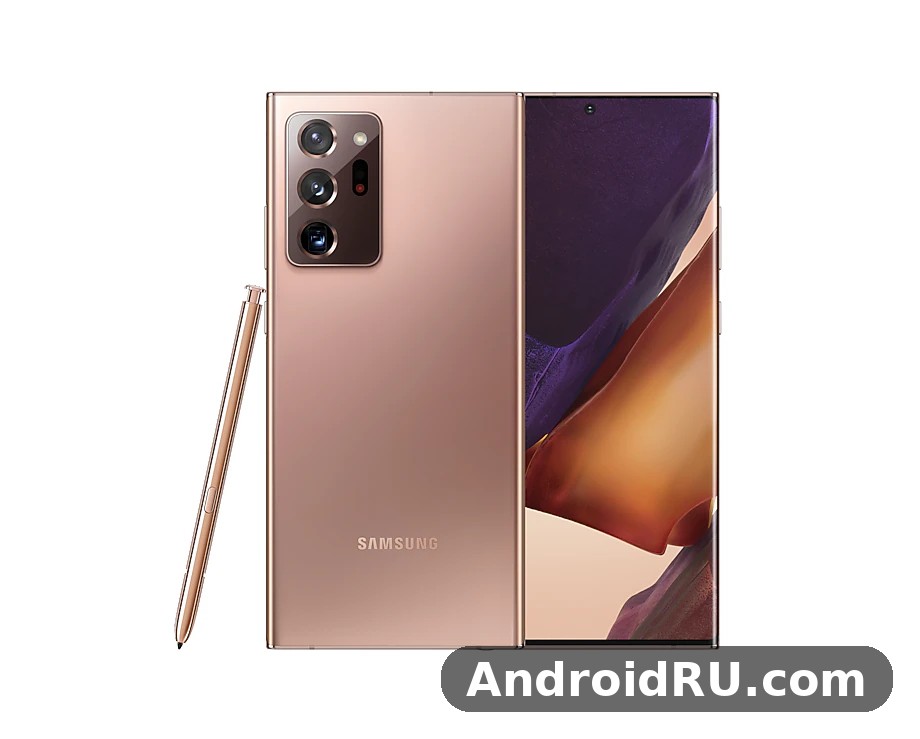
What makes this handset interesting in 2026 is not one single feature. It is the way the parts fit together. The large screen makes the S Pen useful, the S Pen makes the large screen useful, and the fast chip keeps both of them moving without stutter. This article combines the hands-on review with the full specification sheet, so the display, speed, cameras, battery and pen are covered from real use first, and every number behind them is listed in the specifications section that follows. Compared with the Samsung Galaxy Note10+ Review: Screen Quality, Cameras and Charging, the Note20 Ultra adds a 120Hz display, a 108MP camera and 5G, which is the simplest way to see how one generation changed the Note line.
If you are weighing a used Note20 Ultra against a newer mid-range phone, the question is not whether the older flagship is still fast. It is whether the things it does well match the things you actually do every day. Check the chip version, the battery health and the S Pen on the actual handset before you pay, and use the specification tables in this article to confirm the model you are looking at. The Galaxy Note20 Ultra 5G outdoor visibility holds up well, with the display staying readable even in bright sunlight. For the Galaxy Note20 Ultra 5G how to screenshot shortcut, press the power and volume-down buttons together, and the captured image lands straight in your gallery.
Galaxy Note20 Ultra 5G display: 6.9-inch Dynamic AMOLED 2X at 120Hz
The screen is the first thing you notice, and it is still the best reason to pick this phone. The 6.9-inch Dynamic AMOLED 2X panel measures 1440 x 3088 pixels, which works out to around 496 pixels per inch, and it supports HDR10+ video. Colours are rich without looking cartoonish once you switch the screen mode to Natural, and the panel gets bright enough to read outdoors in direct sunlight. Text stays sharp at every size, photos look vivid, and video looks closer to a small television than to a phone screen. Watching a film on this display, with the stereo speakers turned up, is a genuinely pleasant experience rather than a compromise you tolerate while travelling. A Galaxy Note20 Ultra 5G drop test is best left to reviewers, but the glass and frame are built to survive everyday knocks.
The headline feature is the 120Hz adaptive refresh rate, which makes scrolling, swiping, and handwriting feel fluid in a way a 60Hz panel never quite matches. Once you have used 120Hz for a week, going back to a slower screen feels sluggish, even when the slower phone is technically fast enough. That said, there is a trade-off worth knowing before you buy. The 120Hz mode only runs at Full HD+ resolution, not at the full QHD+ resolution. In practice I kept the phone at 120Hz and Full HD+ most of the time, because the smoothness was visible every minute while the resolution difference was hard to spot at normal viewing distance.
Adaptive refresh and how it saves battery
The refresh rate is adaptive, which means the phone lowers it when nothing is moving on screen and raises it when you scroll or play a game. A static page, a photo, or a paused video does not need 120 frames per second, so the phone does not waste energy drawing them. This is one of the reasons the battery lasts as well as it does despite the huge, bright panel. You can also force 60Hz in the settings if you want maximum battery life, and the difference in smoothness is obvious the moment you switch back. How long does Galaxy Note20 Ultra 5G battery last? On a normal day it gets through to bedtime for most people, while heavy gaming or long video sessions will drain it faster. The Galaxy Note20 Ultra 5G battery saving tips that matter most are adaptive battery, a lower refresh rate and taming background apps.
QHD+ sharpness against Full HD+ smoothness
At QHD+, small text in documents and web pages is crisper, and fine detail in photos is easier to see when you pinch to zoom. At Full HD+ with 120Hz, motion is smoother and the phone feels faster, even though the processor is doing the same work. Neither setting is wrong. My rule was simple: QHD+ at 60Hz for reading long documents and editing photos, and Full HD+ at 120Hz for everything else. The phone remembers the setting, so you are not fiddling with it every day. The Galaxy Note20 Ultra 5G battery drain fix is simple in most cases: check background apps and adaptive battery settings before blaming the cell itself. The Galaxy Note20 Ultra 5G slow charging fix is usually a cable or adapter problem, so try a certified 25W charger before anything else.
Outdoor visibility and HDR10+ video
Outdoors, the panel holds up well. Brightness is high enough that maps, messages, and the camera viewfinder stay readable in sunlight, and the anti-reflective quality of the glass helps more than the raw brightness number suggests. HDR10+ video on a supported service shows a wider range between bright highlights and deep shadows, and the difference is clearest in dark scenes where cheaper panels crush detail into black. If you watch a lot of video on your phone, this screen is still one of the better ones you can buy at used prices. The Galaxy Note20 Ultra 5G best camera settings for everyday shooting are simple: keep the main lens clean, let the phone pick the mode, and save the manual controls for tricky light. A Galaxy Note20 Ultra 5G battery test puts the phone through a normal mix of browsing, video and calls, and it holds up for a full day for most people.
Snapdragon 865 Plus versus Exynos 990 performance in daily use
Two versions of this phone exist, and the chip inside yours matters. Phones sold in the United States and some other markets use the Qualcomm Snapdragon 865 Plus, while many international versions use Samsung’s own Exynos 990. Both are paired with 12GB of RAM, and both feel fast in normal use, but the Snapdragon version runs cooler under sustained load and holds its peak speed for longer in games. The Exynos version is still quick for everyday tasks, yet it warms up sooner when you record long 4K video or play a demanding game for an hour, and the phone then trims performance to keep temperatures in check. In a Galaxy Note20 Ultra 5G camera test, daylight shots look clean and detailed, while low light is where the processing has to work hardest. For a Galaxy Note20 Ultra 5G gaming test, the phone stays smooth in popular titles at sensible settings, though long sessions will warm it up.
In daily use, either chip opens apps quickly, switches between a dozen open apps without reloading them, and handles split-screen multitasking with ease. I regularly ran a browser with many tabs, a notes app, a messaging app, and a music player at the same time, and the phone kept all of them alive in memory. The 12GB of RAM is a big part of that. Where the two chips diverge is in long gaming sessions and in video recording, so if you buy used, it is worth checking which chip the listing has before you pay.
Galaxy Note20 Ultra 5G gaming performance and heat
For gaming, the Snapdragon 865 Plus version is the safer pick. It sustains high frame rates in popular 3D titles for longer, and the phone stays cooler in the hand. The Exynos version still plays the same games well, but after twenty or thirty minutes of heavy play you may notice the frame rate dip or the back of the phone grow warm. Neither version is a gaming phone with a fan or a dedicated cooling system, so very long sessions will always involve some heat. Lowering the graphics setting one notch solves most of the problem on either chip.
Multitasking with 12GB of RAM and split screen
The 12GB of RAM is generous even by current standards, and it shows in the way the phone juggles apps. You can leave a video paused, answer a message, check a map, and return to the video without the app restarting. Split screen works well on the large display, with two usable apps side by side instead of two cramped windows. Samsung’s Edge Panel gives quick access to app pairs, so a combination you use often, such as a browser and a notes app, can be opened with one tap. This is the kind of multitasking that a smaller phone simply cannot match.
S Pen with 9ms latency: notes, sketches and remote control
The S Pen is what separates this phone from every other large Samsung handset, and the Note20 Ultra version is the best one Samsung had made at the time. Latency dropped to 9ms, down from 42ms on the previous Note, and the difference is immediately obvious when you write. The ink appears under the tip almost as fast as your hand moves, with far less of the lag that made older styluses feel like drawing through treacle. Handwriting feels close to pen on paper, and quick sketches feel natural rather than technical.
The pen lives in a slot in the bottom of the phone, so it is always with you, and it charges while it sits in the slot. Pulling it out opens a menu of pen actions, and the phone recognises when the pen is out and offers the tools you are most likely to want. Samsung Notes syncs across Samsung devices, converts handwriting to text with reasonable accuracy, and lets you annotate PDFs directly. For students, for people who take meeting notes, and for anyone who sketches ideas before they forget them, this is a real working tool rather than a gimmick.
Handwriting, Samsung Notes and PDF annotation
Samsung Notes is the heart of the pen experience. You can write, draw, highlight, and add audio notes to a page, and the app keeps your pages organised by notebook. Handwriting-to-text conversion works best with neat writing, and it struggles with rushed scrawl, but even an imperfect conversion is useful because you can search your notes afterwards. Annotating a PDF is simple: open the file, write on it, save it, and send it on. I used this for marking up documents on the move, and it replaced carrying a printed copy and a pen.
Air actions and remote control with the S Pen
The pen also works as a remote control over Bluetooth. A click takes a photo from a distance, which is handy for group shots and for tripod work. Gestures in the air, such as a flick left or right, can change slides, skip tracks, or switch camera modes. These air actions are fun and occasionally useful, but they are not the reason to buy the phone. The reason is the writing itself, and the remote shutter is a welcome bonus on top of it.
Screen off memo for quick notes
One of the most useful pen features is also the simplest. Pull the pen out while the screen is off and you can write a note straight onto the black screen, without waking the phone to the home screen. The note is saved to Samsung Notes when you put the pen back. I used this for phone numbers, shopping lists, and ideas that arrived while walking, and it is the kind of feature you miss the moment it is gone.
Galaxy Note20 Ultra 5G cameras: 108MP main, 5x optical zoom and laser autofocus
The rear camera system has three lenses: a 108MP main camera, a 12MP periscope telephoto with 5x optical zoom, and a 12MP ultrawide camera. The main camera uses pixel binning, combining several pixels into one, so most photos are saved at 12MP with better light gathering and less noise. You can switch to the full 108MP mode for scenes with a lot of fine detail, such as a landscape or a building facade, but the file sizes are large and the benefit only shows when you crop in or print large. For everyday shots, the binned 12MP mode is the better choice, and it is the mode the phone uses by default. For a comparison with a closely related camera from the same era, the Samsung Galaxy S20 5G Review: Photo Quality, Video and Performance covers photo quality, video and performance on the Galaxy S20 5G.
Daylight photos are detailed, with accurate colours and a wide dynamic range that keeps both sky and shadow in the same shot. The phone handles high-contrast scenes well, and the HDR processing is restrained enough that photos still look like the scene you saw. In low light, Night Mode takes several frames and merges them, pulling out detail that a single exposure would miss. The results are good for a phone of this age, though the newest flagships have moved ahead in very dark conditions. The 10MP front camera handles selfies and video calls cleanly, with natural skin tones and a wide enough field of view for a small group.
The 108MP main camera and pixel binning explained
Pixel binning is the key to understanding the 108MP sensor. Nine pixels are combined into one larger effective pixel, which gathers more light and produces a cleaner 12MP image. This is why the phone performs well in dim rooms and at dusk, where a plain high-resolution sensor would produce noisy results. The full 108MP mode is there when you need maximum detail, but it is a specialist tool rather than an everyday setting. Think of it as a zoom lens for detail: useful when you need it, wasteful when you do not.
Periscope telephoto: 5x optical zoom and 50x Space Zoom
The 5x optical zoom is the most useful zoom on the phone. It uses a folded periscope lens to reach five times magnification without losing detail, which makes it ideal for wildlife, for details on buildings, and for portraits where you want to stand back from your subject. Digital zoom extends to 50x, branded as Space Zoom, and the results at the extreme end are soft and noisy. At 10x, photos are still usable, especially in good light. At 30x and beyond, you are mostly reading text or identifying a distant object rather than taking a photo you would want to keep.
Ultrawide camera and laser autofocus
The 12MP ultrawide camera covers a 120-degree field of view, which is wide enough for landscapes, interiors, and large groups without stepping backwards. Edge distortion is visible if you look for it, but the phone corrects much of it, and the results are good in daylight. Laser autofocus replaces the time-of-flight sensor used on the previous model, and it focuses faster and more reliably, especially in low light. The earlier focus hunting that annoyed some owners of the previous generation is largely gone here, and the camera locks onto a subject quickly whether you tap to focus or let the phone choose.
Video recording: 8K at 24fps and 4K at 60fps
Video is a strong point. The phone records 8K video at 24 frames per second, which is impressive on paper, though the files are huge and most people will never need it. The more practical setting is 4K at 60 frames per second, which looks smooth and detailed, with good stabilisation when you walk. Pro Video mode gives manual control over exposure, focus, and audio levels, and the stereo microphones capture clean sound. If you record a lot of video, keep an eye on the chip version, because long 4K sessions warm the Exynos model sooner than the Snapdragon one.
Galaxy Note20 Ultra 5G battery life and 25W charging
The 4500mAh battery is smaller than the 5000mAh cell in the Galaxy S20 Ultra, which surprised some buyers at launch, yet the Note20 Ultra still gets through a full day for most people. The more efficient screen, the adaptive refresh rate, and the processor all help, and the phone idles well overnight, losing only a few percent while you sleep. A typical day of messaging, browsing, maps, photos, and some video leaves a comfortable margin in the evening. A heavy day of gaming, 5G use, and long video recording will drain it faster, and on those days a top-up in the afternoon is sensible. If battery life matters more than a pen, the Samsung Galaxy S20 FE 5G Review: Design, Battery Life and Usability is worth reading, because it covers a Samsung phone built around battery life and usability.
Charging is 25W wired over USB-C, which takes the phone from empty to roughly half full in about half an hour, and to full in around eighty minutes, depending on the charger and the temperature. The phone does not ship with the fastest possible charger in every market, so check what is in the box when you buy used. Wireless charging runs at up to 15W, and reverse wireless charging at 4.5W can top up earbuds or a watch in a pinch, though it is slow and best used for small accessories rather than another phone.
How long the battery lasts in practice
Battery life depends on how you use the phone, and the screen settings matter more than anything else. Running 120Hz all day costs more than 60Hz, and 5G costs more than Wi-Fi, so a day on mobile data with the screen at full brightness will end earlier than a day at home on Wi-Fi. After several years, the battery in a used handset will have lost some of its original capacity. That is normal for any phone, and it is the single most important thing to check when buying second hand. Ask the seller about battery health, or budget for a replacement if the phone is old and the price is low.
25W wired charging and wireless charging options
The 25W wired charger is fast enough for most people, and the phone does not get uncomfortably hot while charging at that rate. Wireless charging is slower but convenient on a desk or a bedside table, and the phone works with standard Qi chargers, so you do not need a Samsung-branded pad. Reverse wireless charging, called Wireless PowerShare, turns the back of the phone into a charging pad for earbuds and watches. It drains the phone while it works, so use it for a quick top-up rather than a full charge.
One UI software, updates and wireless DeX on the Note20 Ultra 5G
The phone launched with Android 10 and Samsung’s One UI 2.5, and Samsung later updated it through Android 13 with One UI 5.1. That update history matters, because it means the phone received three major Android versions and several years of security patches. By 2026 the phone is past its promised update window, so it will not receive new Android versions, and security patches have ended or are close to ending depending on the region. That does not make the phone unusable, but it does mean you should be careful with apps that handle money or sensitive data, and you should keep the apps themselves updated even when the system is not. The Galaxy Note20 Ultra 5G tips and tricks in this review are the ones worth turning on first, because they change daily use the most. The Galaxy Note20 Ultra 5G hidden features worth finding first live in the settings menus most owners never open.
One UI itself is a strong point. It is clean, consistent, and full of useful features without feeling cluttered. The large screen is put to work with split-screen multitasking, pop-up windows, and the Edge Panel, and the settings app is well organised. Samsung DeX turns the phone into a desktop-style experience on a monitor or a television, either wired or wirelessly, and it works well enough for documents, email, and browsing. Samsung Pay, Secure Folder, and the built-in health and device care tools round out a software package that is more complete than most rivals offered at the time. The Galaxy Note20 Ultra 5G best settings for daily use are the ones that save taps: edge panels, quick settings and a sensible refresh rate. A Galaxy Note20 Ultra 5G factory reset is the last resort for stubborn software trouble, so back up first and try a restart before it.
Wireless DeX and turning the phone into a desktop
Wireless DeX is one of the more surprising features. Connect the phone to a compatible television or monitor over Wi-Fi, and you get a desktop with windows, a taskbar, and keyboard and mouse support. It is not a replacement for a laptop, but it is good enough for writing, for spreadsheets, and for presenting slides, and it runs from the phone you already carry. The wired version, over USB-C to HDMI, is more stable for long sessions, and it charges the phone while you work. The Galaxy Note20 Ultra 5G user manual is available from Samsung’s support pages if you want the official steps for any feature.
Secure Folder, Samsung Pay and everyday software
Secure Folder creates a separate, locked space on the phone for private apps and files, protected by the fingerprint sensor or a PIN. Samsung Pay works with NFC terminals and, in some markets, with older magnetic stripe terminals as well, so it is accepted in more places than many rival payment apps. The phone also includes a full set of accessibility options, a one-handed mode that shrinks the screen for thumb reach, and a dark mode that suits the AMOLED panel and saves a little battery. These are small features on their own, but together they make the phone easier to live with every day.
Galaxy Note20 Ultra 5G design, build quality and IP68 protection
The Note20 Ultra looks and feels like a flagship. The front and back are Gorilla Glass Victus, the frame is stainless steel, and the camera housing is a large, confident rectangle that makes the phone instantly recognisable. At around 208 grams and 164.8mm tall, it is a big, heavy phone, and you will feel it in a pocket and in one hand. That is the price of the 6.9-inch screen and the S Pen, and most owners get used to it within a week. The Mystic Bronze finish, with its matte texture, was the launch colour and still looks good, because it hides fingerprints far better than a glossy back. If a folding screen appeals to you more than a pen, the Samsung Galaxy Z Fold8 Review: Foldable Design and Everyday Performance looks at Samsung’s later foldable flagship and how it handles everyday use.
The phone is rated IP68, which means it can survive immersion in fresh water up to 1.5 metres for up to 30 minutes, in laboratory conditions. That is a safety net for rain and accidents, not an invitation to take the phone swimming, and water damage is not covered by the warranty. The ultrasonic in-display fingerprint sensor is fast and accurate once you register the same finger twice, and face recognition works as a backup, though it is less secure than the fingerprint. There is no headphone jack, so wired headphones need a USB-C adapter or a Bluetooth connection, and the stereo speakers, tuned by AKG, are loud and clear for a phone.
IP68 water resistance and what it really covers
IP68 is a useful rating, but it is easy to misunderstand. It protects against accidental splashes, rain, and a brief drop in a sink or a puddle. It does not protect against seawater, soapy water, or high-pressure jets, and the seals can wear over time, especially on a used phone. Treat the rating as insurance against accidents, keep the phone out of the pool, and dry the charging port before you plug in a cable after the phone gets wet.
In-display fingerprint sensor and face recognition
The ultrasonic fingerprint sensor reads your print through the glass, and it works with dry or slightly damp fingers, which is an advantage over optical sensors. Registering the same finger twice, once at a normal angle and once at a slight tilt, improves recognition noticeably. Face recognition is quicker in good light but can be fooled more easily and struggles in the dark, so it is best used as a convenience for opening the screen rather than for payments. For banking apps, the fingerprint is the safer choice. The Galaxy Note20 Ultra 5G common problems and fixes are listed in the tips section, with the quick checks first and the deeper resets last. The Galaxy Note20 Ultra 5G release date and price question is covered in the verdict section, but the short version is that it launched in August 2020 and its price has fallen since.
Galaxy Note20 Ultra 5G full specifications
Galaxy Note20 Ultra 5G specifications at a glance
| Category | Specification |
|---|---|
| Display | 6.9-inch Dynamic AMOLED 2X, 1440 x 3088, 120Hz adaptive, HDR10+ |
| Processor | Snapdragon 865 Plus (US and selected markets) or Exynos 990 (international) |
| RAM | 12GB LPDDR5 |
| Storage | 128GB, 256GB, or 512GB UFS 3.1, microSD up to 1TB |
| Rear cameras | 108MP main, 12MP periscope telephoto 5x optical, 12MP ultrawide |
| Front camera | 10MP, f/2.2 |
| Battery | 4500mAh, 25W wired, 15W wireless, 4.5W reverse wireless |
| S Pen | Bluetooth S Pen, 9ms latency, 4096 pressure levels |
| Networks | 5G, 4G LTE, Wi-Fi 6, Bluetooth 5.0, NFC, UWB |
| Build | Gorilla Glass Victus front and back, stainless steel frame, IP68 |
| Dimensions | Around 164.8 x 77.2 x 8.1mm, around 208 grams |
| Software | Android 10 with One UI 2.5 at launch, updated to Android 13 with One UI 5.1 |
| Security | Ultrasonic in-display fingerprint sensor, face recognition |
That table is the short version. The sections below explain each line, what it means for the way the phone behaves, and which details to check when you compare two listings or two models. Is Galaxy Note20 Ultra 5G still worth buying? It comes down to the price you can find and whether its cameras, battery and software still cover your daily use. Is Galaxy Note20 Ultra 5G worth buying? It comes down to the price you can find and whether its cameras, battery and software still cover your daily use.
Display specifications: 6.9-inch Dynamic AMOLED 2X, 120Hz and HDR10+
The display measures 6.9 inches diagonally, with a resolution of 1440 x 3088 pixels and a pixel density of around 496 pixels per inch. The panel is a Dynamic AMOLED 2X display, which is Samsung’s name for its top-tier OLED technology, with deep blacks, vivid colours, and high brightness. It supports HDR10+ video, so films and shows that carry HDR10+ metadata show a wider range of brightness and colour than standard video, with more detail in both bright highlights and dark shadows. The Galaxy Note20 Ultra 5G price in India varies by storage, condition and seller, so compare a few listings in that market before you decide. The Galaxy Note20 Ultra 5G pros and cons are summed up near the end of this review, with the strongest points first and the trade-offs stated plainly.
Processor: Snapdragon 865 Plus and Exynos 990 explained
The processor is the one specification that changes by region. The Snapdragon 865 Plus is an octa-core chip built on a 7nm process, with a prime core running at up to 3.1GHz, three performance cores, and four efficiency cores, paired with the Adreno 650 graphics processor. The Exynos 990 is also octa-core, with two custom Mongoose cores, two Cortex-A76 cores, and four Cortex-A55 cores, paired with the Mali-G77 MP11 graphics processor. Both chips were flagship parts in 2020, and both handle everyday tasks, multitasking, and most games without trouble. The Galaxy Note20 Ultra 5G where to buy question comes down to trusted sellers and warranty, not just the lowest number on a listing. This Galaxy Note20 Ultra 5G full review covers cameras, performance, battery and software as one daily device, not as separate launch figures.
RAM and storage: 12GB of LPDDR5 RAM and 128GB to 512GB options
Every version of the Note20 Ultra 5G ships with 12GB of LPDDR5 RAM, which was generous at launch and remains generous now. LPDDR5 is faster and more power-efficient than the LPDDR4 memory used in many older phones, and 12GB is enough to keep a dozen apps alive in memory at once. You can switch between a browser with many tabs, a notes app, a messaging app, and a music player without the phone reloading them, and split-screen multitasking works well because both apps stay resident. For most people, RAM will never be the bottleneck on this phone. The Galaxy Note20 Ultra 5G price in US varies by storage, condition and seller, so compare a few listings in that market before you decide. The Galaxy Note20 Ultra 5G best price question comes down to trusted sellers and warranty, not just the lowest number on a listing.
Networks: 5G, 4G LTE, Wi-Fi 6, Bluetooth and UWB
Network support is where the model number matters most, because 5G bands vary by region and by variant. The phone supports sub-6GHz and mmWave 5G in the variants that carry both, though the exact bands depend on the model sold in each market. Sub-6GHz 5G is the common form, offering wider coverage and better indoor reach, while mmWave offers very high speeds over short distances in dense urban areas where it is deployed. A phone bought in one country may not support every 5G band in another, so check the model number against your carrier’s published bands before you buy, especially if you are importing the handset.
Camera specifications: 108MP main, 5x optical zoom and laser autofocus
| Camera | Specification | Key detail |
|---|---|---|
| Main rear | 108MP, f/1.8, 0.8 micrometre pixels, optical image stabilisation | Pixel binning to 12MP for most photos |
| Telephoto | 12MP periscope, f/3.0, 5x optical zoom, optical image stabilisation | Up to 50x digital Space Zoom |
| Ultrawide | 12MP, f/2.2, 120-degree field of view | Super Steady video support |
| Front | 10MP, f/2.2, autofocus | 4K video at 30 or 60 frames per second |
| Video | 8K at 24fps, 4K at 60fps, 1080p at up to 240fps slow motion | Pro Video mode with manual controls |
| Focus | Laser autofocus on the rear cameras | Faster focus than the previous time-of-flight system |
The 108MP main sensor is the headline, but the way it works matters more than the number. Most photos are saved at 12MP, because the sensor combines nine pixels into one larger effective pixel, gathering more light and producing a cleaner image. The full 108MP mode is available for scenes with fine detail, such as landscapes and architecture, where you may want to crop in later. The periscope telephoto reaches 5x optical zoom without losing detail, which is the most useful zoom on the phone, while digital zoom extends to 50x, with soft results at the extreme end. The ultrawide camera covers 120 degrees, which is wide enough for landscapes and interiors without stepping back.
Battery and charging: 4500mAh, 25W wired and 15W wireless
The battery is a 4500mAh lithium-ion cell, which is smaller than the 5000mAh battery in the Galaxy S20 Ultra, a difference that surprised buyers at launch. In practice, the Note20 Ultra still lasts a full day for most people, because the adaptive refresh rate, the efficient display, and the processor all help, and the phone idles well overnight. A typical day of messaging, browsing, maps, photos, and some video leaves a margin in the evening, while a heavy day of gaming, 5G streaming, or long video recording will drain it faster. Screen settings matter more than anything else: 120Hz costs more than 60Hz, and 5G costs more than Wi-Fi.
S Pen and sensors: 9ms latency, 4096 pressure levels and full sensor set
The S Pen is the defining feature of the Note line, and the Note20 Ultra version is the fastest Samsung had shipped at launch. Latency is 9ms, down from 42ms on the previous model, which makes handwriting feel close to pen on paper, with the ink appearing under the tip almost as fast as your hand moves. The pen supports 4096 levels of pressure sensitivity, so a light stroke is thin and a firm stroke is thick, and it works over Bluetooth as a remote control, with a click taking a photo from a distance and air gestures changing slides, tracks, or camera modes.
Dimensions, build, colours and water resistance
The phone measures around 164.8 x 77.2 x 8.1mm and weighs around 208 grams, which makes it one of the largest and heaviest phones Samsung sold in 2020. The size is the price of the 6.9-inch screen and the S Pen, and the phone is best used with two hands or with a case that adds grip. The front and back are Gorilla Glass Victus, the frame is stainless steel, and the camera housing is a large rectangle that makes the phone instantly recognisable. The Mystic Bronze finish, with its matte texture, was the launch colour and hides fingerprints well, while Mystic Black and Mystic White were the other launch options in most markets.
Galaxy Note20 Ultra 5G pros, cons and who should buy it in 2026
The Note20 Ultra is a phone of clear strengths and clear limits, and the right decision depends on which side of that balance matters to you. The screen, the S Pen, and the camera system are still genuinely good, and the build quality feels like a flagship even now. The limits are the battery capacity, the age of the software support, and the fact that the 120Hz mode does not run at full QHD+ resolution. None of those limits is fatal, but all of them are worth weighing against the price you pay.
| Area | What is good | What to watch |
|---|---|---|
| Display | 6.9-inch Dynamic AMOLED 2X, 120Hz, HDR10+, very bright | 120Hz only at Full HD+, not QHD+ |
| Performance | Snapdragon 865 Plus or Exynos 990, 12GB RAM, fast multitasking | Exynos version warms up sooner under sustained load |
| S Pen | 9ms latency, Screen off memo, remote shutter, Samsung Notes | Pen is small and easy to lose if you are careless |
| Cameras | 108MP main, 5x optical zoom, laser autofocus, 8K video | Night photos trail newer flagships; 50x zoom is soft |
| Battery | 4500mAh lasts a full day for most people, 25W charging | Smaller than the S20 Ultra cell; used batteries may be worn |
| Software | One UI, DeX, Secure Folder, updated to Android 13 | Major updates have ended; check the security patch date |
Pros of the Galaxy Note20 Ultra 5G
The strengths start with the display, which remains one of the best screens on a used phone at this price, and continue with the S Pen, which no other phone in this price range matches. The camera system is versatile, with a genuinely useful 5x optical zoom, and the 12GB of RAM keeps multitasking smooth. The build quality is excellent, the stereo speakers are loud, and the phone supports 5G, Wi-Fi 6, wireless charging, and reverse wireless charging. For a buyer who wants a big-screen phone for notes, photos, and media, the package is hard to beat at second-hand prices.
Cons of the Galaxy Note20 Ultra 5G
The weaknesses are the battery, which is smaller than the rival S20 Ultra and will have degraded in a used handset, and the software support, which has reached the end of its promised window. The phone is large and heavy, which makes one-handed use awkward, and there is no headphone jack. The Exynos version runs warmer than the Snapdragon version, and the 120Hz mode forces a drop to Full HD+ resolution. If any of those points is a deal-breaker for you, a newer phone is the better choice, even if it costs more.
Who the Note20 Ultra 5G is for
This phone suits people who write, sketch, or annotate documents by hand, people who want a large screen for reading and video, and photographers who value the 5x optical zoom. It also suits buyers who want flagship build quality at a used price and who are comfortable with a phone that will not receive new Android versions. It does not suit people who need the longest possible software support, the best possible night photography, or the lightest phone in their pocket.
Buy it with your eyes open: check the battery, confirm the chip, and accept that software updates have ended. If those checks pass and the price is right, this is a phone that will serve you well for another year or two of daily use. For a smaller folding alternative, the Samsung Galaxy Z Flip8 Review: Portability, Performance and Battery looks at a phone that trades the pen and the huge screen for portability, which is the right trade for some buyers and the wrong one for note-takers. The next step is simple: test the pen, the cameras, and the fingerprint sensor on the actual handset before you pay, and compare its price against a newer phone before you commit.
Frequently asked questions about the Note20 Ultra 5G
Is the Samsung Galaxy Note20 Ultra 5G still worth buying in 2026?
It is worth buying at the right price, for the right person. The screen, the S Pen, and the cameras are still good, and the phone handles everyday tasks without trouble. It is not worth buying at a price close to a newer mid-range phone, because the newer phone will have longer software support, a fresher battery, and better night photography. Check the battery health, confirm the chip version, and make sure the S Pen and the fingerprint sensor work before you pay.
Does the Note20 Ultra 5G support 5G networks?
Yes, the phone supports 5G, with the exact bands depending on the model and the region it was sold in. Sub-6GHz 5G is widely supported, while mmWave support depends on the specific variant, so a phone bought in one country may not support every 5G band in another. Check the model number against your carrier’s bands before you buy, especially if you are importing the phone, and confirm that your plan includes 5G access.
How good is the S Pen on the Note20 Ultra 5G?
The S Pen is the best version Samsung had shipped at launch, with latency down to 9ms, which makes handwriting feel close to pen on paper. It supports pressure sensitivity, Screen off memo, handwriting-to-text conversion in Samsung Notes, PDF annotation, and a Bluetooth remote shutter for the camera. If you take notes by hand every day, the pen alone can justify choosing this phone over a similar handset without one.
Can the Note20 Ultra 5G run at 120Hz and QHD+ at the same time?
No, the phone forces a choice. The 120Hz refresh rate only runs at Full HD+ resolution, while the full QHD+ resolution runs at 60Hz. You can switch between the two in the display settings, and most owners settle on 120Hz at Full HD+ because the smoothness is visible all day, while the resolution difference is hard to notice at normal viewing distance.
How long does the battery last on the Note20 Ultra 5G?
For most people, the 4500mAh battery lasts a full day of normal use, including messaging, browsing, maps, photos, and some video. Heavy use, such as long gaming sessions, 5G streaming, or extended 4K video recording, will drain it faster, and a used phone with a worn battery will last less than a new one did. A 25W wired charger takes the phone from empty to roughly half full in about half an hour, so a short top-up during the day covers most heavy-use scenarios.
What processor does the Samsung Galaxy Note20 Ultra 5G have?
It depends on the region. Phones sold in the United States and some other markets use the Qualcomm Snapdragon 865 Plus, while many international versions use Samsung’s Exynos 990. Both are paired with 12GB of RAM, and both handle everyday tasks well, but the Snapdragon version runs cooler under sustained load and holds its peak speed for longer in games and in long video recording sessions. Check the model number to confirm which chip a specific handset has.
How much RAM and storage does the Note20 Ultra 5G have?
Every version ships with 12GB of LPDDR5 RAM and a choice of 128GB, 256GB, or 512GB of UFS 3.1 internal storage. The storage can be expanded with a microSD card of up to 1TB, though the card slot is shared with the second SIM in dual-SIM models. The 256GB model is the sensible middle ground for most buyers, because 128GB fills up fast with 4K and 8K video, while 512GB suits people who keep large offline libraries.
Does the Note20 Ultra 5G support 5G, Wi-Fi 6 and wireless charging?
Yes to all three, with a note on 5G bands. The phone supports 5G, with sub-6GHz and mmWave availability depending on the model and the region, plus Wi-Fi 6, Bluetooth 5.0, NFC, and Ultra Wideband. Wired charging runs at 25W, wireless charging at up to 15W, and reverse wireless charging at 4.5W for earbuds and watches. Check the model number against your carrier’s 5G bands before you buy, especially if you are importing the phone.
What are the camera specifications of the Note20 Ultra 5G?
The rear system has a 108MP main camera with optical image stabilisation, a 12MP periscope telephoto with 5x optical zoom, and a 12MP ultrawide camera with a 120-degree field of view, plus laser autofocus. The front camera is 10MP with autofocus. Video recording reaches 8K at 24 frames per second and 4K at 60 frames per second, with Pro Video mode for manual control. Most photos are saved at 12MP through pixel binning, which combines nine pixels into one for cleaner results in low light.

