

Samsung Galaxy M51 Review: Everyday Speed, Cameras and Value
The Galaxy M51 arrived in September 2020 with a very clear pitch: a huge battery, a large bright screen, and a capable quad camera, all at a price that sat well below the flagship range. I spent time with this phone as a daily driver, using it for messaging, maps, video, photography, and long days away from a charger, and the experience kept coming back to the same point. This is a phone built for people who want stamina first and everything else to work without fuss. It does not try to be the fastest phone on the market, and it does not pretend to be a camera flagship, but it covers the everyday basics with unusual confidence for its class. Many buyers ask, is Galaxy M51 worth buying? For buyers who want a 7,000mAh battery that lasts two days, the answer is yes. The Galaxy M51 NFC supports contactless payments in markets where the feature is included.
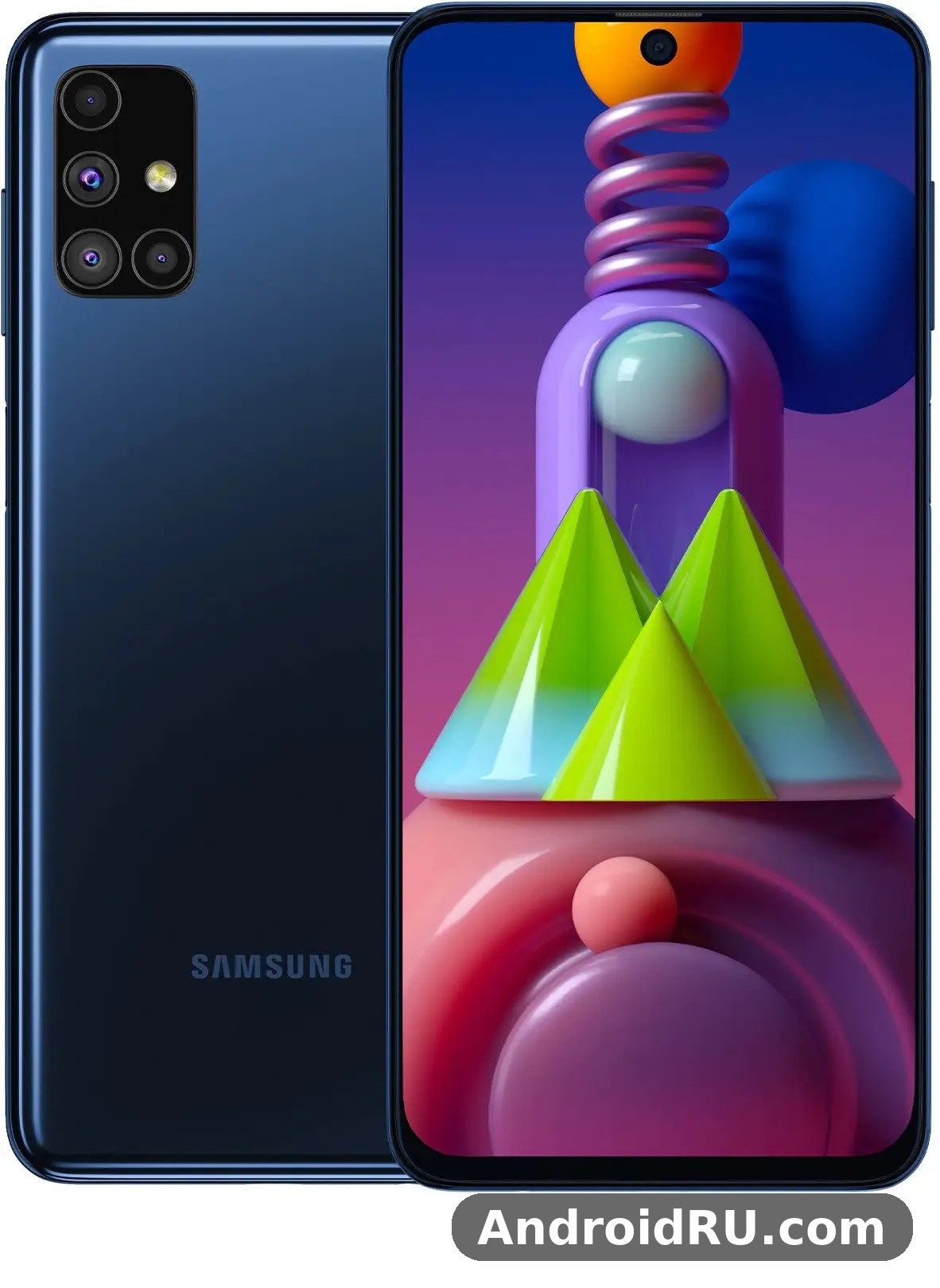
If you are shopping for a used or refurbished M51 today, or you already own one and want to know whether it still holds up, this guide looks at the parts that matter in daily use. I cover speed with the Snapdragon 730G, the 6.7-inch Super AMOLED Plus display, the 64MP quad camera setup, the famous 7000mAh battery, the software experience on One UI 2.1, and the build. I also compare it with newer Samsung models where that helps you decide, and I finish with honest pros and cons so you can judge whether this older mid-range phone still fits your routine. This Galaxy M51 used phone buying guide is written for real buyers, not for a spec sheet alone, and every figure below comes from the full hardware record for this model. In a Galaxy M51 camera test, daylight shots come out clear and well exposed, while low light shows noise sooner than on newer phones. The Galaxy M51 dual SIM support covers two nano-SIM cards in most regions.
That said, the question most readers ask first is simple: is the Galaxy M51 still worth buying in 2026? The short answer is that it can be, at the right used price, when the battery is still healthy and when battery life, a large screen, and a flexible camera matter more to you than 5G and the latest software. The longer answer is in the sections below, where I test each part of the phone against the way people actually use it, from morning messages to late-night video. A Galaxy M51 battery life test with mixed use shows it reaches into a second day. The Galaxy M51 water resistant claims are limited: there is no official IP rating, so keep it away from water.
Samsung Galaxy M51 everyday speed with Snapdragon 730G
Day-to-day speed is where the M51 earns its keep. The Snapdragon 730G is an octa-core chip built for upper mid-range phones, paired here with 6GB or 8GB of RAM and 128GB of storage, and in normal use it feels smooth and responsive. Apps open quickly, switching between a browser, a messaging app, and a map feels natural, and scrolling through long feeds stays fluid most of the time. I never felt I was waiting on the phone during ordinary tasks, which is the real test for a device like this. Galaxy M51 Snapdragon 730G gaming performance is solid for the class too, because the 730G carries the G suffix for a reason: it handles popular titles at sensible settings without constant stutter, and the large screen makes games and video more enjoyable than on a compact handset. The Galaxy M51 full specifications run from the Snapdragon 730G chip and 7,000 mAh battery to the 64MP camera and 6.7-inch Super AMOLED display. The Galaxy M51 fingerprint sensor sits under the display and unlocks the phone quickly once you register the same finger twice.
Demanding games at maximum graphics will push it, and you may see the frame rate dip or the back warm up during a long session, but at medium settings the phone stays playable and steady. That is a fair trade for a phone that was never priced as a gaming flagship. Storage speed and multitasking also deserve a mention. With 128GB of storage with microSD expansion you have room for apps, offline maps, music, and a healthy photo library before you need to think about a card, and the card slot is there if you do. The 6GB version handles everyday multitasking well, while the 8GB version gives you a little more headroom when you keep many apps open. If you are comparing mid-range Samsung phones from later years, the newer models have faster chips, yet the M51 still feels usable for calls, chat, browsing, streaming, and light gaming, which is what most buyers actually do with it. For a closer look at the next model in the family, the Samsung Galaxy M52 5G Review: Build Quality, Battery and Daily Use shows how Samsung moved the M series forward after the M51.
How the Snapdragon 730G handles apps and multitasking
In practice, the chip divides its work sensibly: two performance cores handle bursts such as opening the camera or loading a heavy web page, while efficiency cores keep background tasks ticking over without draining the battery. I noticed this most when jumping between apps. A messaging app stayed ready in the background, a browser tab did not need to reload every time, and the camera opened fast enough to catch a moment rather than miss it. Heavy users who edit video on the phone or run many apps at once will feel the age of the chip sooner, but for a typical day of mixed use it holds its own. Galaxy M51 split screen multitasking works well on the tall display, and keeping a video or a note open beside a browser is genuinely useful when you are planning a trip or following a recipe. The Galaxy M51 price and specifications together make it a strong budget option, with the screen and battery leading the list. The Galaxy M51 microSD slot takes cards up to 1TB, which is the easy way to add room for photos and offline video.
App loading times on the Galaxy M51 in daily use
App loading times stay short for the apps people open most: social apps, banking apps, email, and maps all launch in a couple of seconds. Larger games take longer on first load, as they do on most phones, but once loaded they run without the constant hitching that makes a phone feel slow. Keeping the software tidy helps here too, so I recommend clearing out apps you no longer use and restarting the phone occasionally if you notice it getting sluggish after weeks of heavy use. That habit matters more on an older phone than on a new one, and it costs nothing. In a Galaxy M51 vs Galaxy M52 5G comparison, the deciding factors are battery size, age and price. The Galaxy M51 overheating reports are rare in normal use, and the phone stays comfortable during long video sessions.
Galaxy M51 gaming performance at medium settings
At medium graphics settings, popular games run well enough to enjoy, with stable frame rates and touch response that feels direct. The large display helps you see more of the game, and the big battery means a gaming session does not leave you hunting for a charger an hour later. If you play competitively and want the highest frame rates, a newer phone with a faster chip will serve you better, but casual and regular players will find the M51 perfectly playable. Turn the graphics down one step from maximum, keep the phone out of direct sun while you play, and the experience stays steady. How long does Galaxy M51 battery last? With mixed use it reaches into a second day. A Galaxy M51 screen protector is a cheap add-on that keeps the display free of scratches.
Samsung Galaxy M51 6.7-inch Super AMOLED Plus display for streaming and reading
The display is one of the best reasons to pick this phone. The 6.7-inch Super AMOLED Plus panel produces deep blacks, strong contrast, and colours that look vivid without turning cartoonish. Video looks rich, photos look punchy, and text stays sharp at the Full HD+ resolution. Outdoors, brightness is good enough to read messages and check maps in daylight, though like most phones it struggles a little under harsh direct sun. Galaxy M51 Super AMOLED Plus display review notes keep returning to the same strengths: contrast, colour, and size. Size matters here as well. A 6.7-inch screen makes reading long articles, watching video, and using split-screen multitasking genuinely comfortable, and the tall display gives each app enough room to stay usable. A Galaxy M51 performance test shows the Snapdragon 730G handling everyday apps smoothly, with only heavy games asking for lower settings. The Galaxy M51 128GB price is the one most buyers compare, since that is the standard storage option.
The trade-off is one-handed use: reaching the top corner takes a stretch, and the phone feels large in a small pocket. Samsung includes one-handed mode in One UI, which shrinks the screen down temporarily, and that helps when you are carrying something in the other hand. Galaxy M51 one-handed mode is easy to turn on, and once you learn the gesture it becomes second nature. For streaming, the combination of the AMOLED panel and the huge battery is hard to beat at this price point. You can watch several episodes of a show, browse between them, and still have plenty of charge left, which is exactly the kind of use this phone was designed for. Readers will also like the screen: the contrast makes text easy on the eyes, and the dark mode in One UI pairs well with an AMOLED panel because black pixels draw very little power. The Galaxy M51 display quality stands out for the price, with strong colours and good outdoor visibility. The Galaxy M51 used price depends on condition and battery health, so check the screen and charging port before paying.
Watching video and reading on the large AMOLED screen
Video playback is where the panel shows its strengths. Dark scenes keep detail instead of turning grey, skin tones look natural, and the wide screen fills your view nicely. I watched video over Wi-Fi and on mobile data, and the phone stayed cool and comfortable to hold for long sessions. Galaxy M51 screen for streaming and reading is a genuine strength, not a marketing line. For reading, the sharp text and adjustable brightness make long sessions easy, and the blue light filter in the settings helps in the evening. The Super AMOLED Plus display also makes photos look their best, which matters when you are reviewing shots you just took with the quad camera.
Samsung Galaxy M51 quad camera review with 64MP main camera
The rear camera setup pairs a 64MP main camera with a 12MP ultrawide camera, a 5MP depth camera, and a 5MP macro camera, while the front camera uses a 32MP sensor. In good light the main camera takes detailed, colourful photos that look great on the phone screen and hold up well when shared online. Daylight shots of streets, food, and people come out sharp, with Samsung’s familiar warm and vivid colour style, and the 64MP mode captures extra detail when you want to crop into a shot. Galaxy M51 64MP camera photo quality is at its best in daylight, where detail in buildings, foliage, and fabric stays crisp and colours look lively without going over the top. The Galaxy M51 camera quality at night is modest, with night mode helping a little but noise showing in dark areas. A Galaxy M51 battery replacement is a repair-shop job, and it is worth pricing before you decide to keep an old phone.
The 12MP ultrawide camera is genuinely useful for landscapes, group photos, and tight indoor scenes where you cannot step back. It trades a little sharpness at the edges for a much wider view, which is a fair exchange, and it gives your photos a different look without needing a second device. The 5MP macro camera lets you get close to small subjects such as flowers or textures, though you need steady hands and good light to get the best from it. The depth camera supports portrait mode, helping the phone separate a person from the background for a pleasing blur. Low light is where you see the limits of a mid-range camera from 2020. Galaxy M51 low light camera performance is usable, especially with Night mode, but night shots show more noise and softer detail than a newer flagship or a newer mid-range phone. That said, for social sharing and everyday memories the camera is more than good enough, and in daylight it regularly produces shots I was happy to keep. Video recording covers everyday needs too, with stable footage in good light for clips, vlogs, and family moments. Should I buy Galaxy M51 or wait for a sale? If you want a 7,000mAh battery that lasts two days, it is an easy recommendation. The Galaxy M51 screen replacement cost varies by repair shop, so get two quotes before booking a repair.
64MP main camera daylight photos and detail
In daylight, the main camera is at its best. Photos show strong detail in buildings, foliage, and fabric, and colours look lively without going over the top. I found the standard photo mode the most reliable for everyday shooting, saving the full 64MP mode for scenes where I wanted to crop later, such as a distant sign or a detail in a landscape. Autofocus is quick in good light, and the shutter responds fast enough for candid shots. The 64MP quad camera gives you real variety, and learning when to use each lens is the fastest way to improve your results.
Galaxy M51 ultrawide and macro camera tips
For the ultrawide camera, keep the horizon straight and avoid placing important subjects right at the edges, where distortion is strongest. Galaxy M51 ultrawide camera tips like that sound small, but they make a visible difference in a landscape or a group photo. For macro shots, hold the phone very still, tap to focus on your subject, and use plenty of light; a small movement makes a big difference at close range. Galaxy M51 macro camera tips follow the same rule: light and a steady hand matter more than any setting. These two lenses reward a little patience, and they add variety to your photos that a single camera cannot match. This Galaxy M51 honest review keeps the trade-offs in view: the screen and battery impress, while the phone is several years old and the software is no longer updated. The Galaxy M51 best price usually shows up during sales events, so wait for a promotion if you are not in a hurry.
32MP front camera selfies and video calls
The 32MP front camera takes sharp selfies with good detail in daylight, and it handles video calls well, which matters if you work or study from your phone. Galaxy M51 selfie camera 32MP performance is a strong point in good light, and portrait mode on the front camera softens the background nicely for profile photos. In dim indoor light, selfies get softer and noisier, so moving near a window or a lamp makes a visible difference. For everyday selfies and calls, though, the front camera is a strong point of this phone. The Galaxy M51 charging time from empty is two hours with a 25W charger, so overnight charging is the easy routine. The Galaxy M51 weight feels balanced in the hand for a phone with a large screen, and a case adds only a little.
Samsung Galaxy M51 7000mAh battery life and 25W charging in real use
The 7000mAh battery is the headline feature, and it lives up to the promise. This was one of the largest batteries fitted to a Samsung phone in its class, and in real use it translates into two days of moderate use for many people, or a very long single day of heavy use without worry. I used the phone for navigation, streaming, messaging, and photography across a full day and still ended the evening with charge to spare, which changes how you use a phone: you stop rationing the battery and simply use it. Galaxy M51 7000mAh battery life test results in daily use match that picture, with light users stretching to two days or more between charges, especially with dark mode on the AMOLED screen and adaptive battery features doing their work. A Galaxy M51 gaming test shows casual games running smoothly, while demanding titles need medium settings to stay stable.
Heavy users will notice the difference most. Long video sessions, hours of maps on a road trip, and a day of photography barely dent the battery the way they would on a phone with a 4000mAh cell. Galaxy M51 dark mode battery saving helps here, because black pixels on an AMOLED panel draw very little power. Battery health matters on a used phone, of course, so check the battery condition before buying second hand, because a worn battery will not deliver the same stamina as a fresh one. Galaxy M51 battery health check before buying should be part of every used purchase: ask the seller about it, look at the battery settings, and use a diagnostic app where possible. The Galaxy M51 unboxing covers the phone, a USB-C cable and the paperwork, so check what your retailer includes before you buy.
Charging uses 25W fast charging over USB-C, which is sensible for a battery this large. Galaxy M51 25W charging time is longer than on a phone with a smaller cell, because a full charge from empty takes a while, yet a short top-up gives you enough for hours of use, and overnight charging covers a full day easily. The phone does not support wireless charging, which is a trade-off to know about before you buy, but for most owners the wired charging speed and the sheer capacity matter far more than wireless convenience. If you want to see how a newer M-series phone balances a big battery with newer hardware, the Samsung Galaxy M35 5G Review: Display, Cameras and Budget Trade-Offs is a useful comparison, because it trades some capacity for 5G and a faster screen.
How long the 7000mAh battery lasts for streaming and travel
How long does the Galaxy M51 battery last? For streaming, expect many hours of video playback from a full charge, enough for a long flight or a full day of watching without a power bank. For travel, the battery removes one of the biggest worries on the road: maps, photos, and messaging all day, with charge left for the evening. I found that carrying a charger became optional rather than essential on ordinary days, which is rare for a smartphone and genuinely liberating. The two-day battery life is the reason many buyers chose this phone in the first place, and it is still the reason it appeals to used buyers today.
Samsung Galaxy M51 One UI 2.1 software and Android 10 daily experience
Out of the box, the M51 ran One UI 2.1 on top of Android 10, and Samsung later updated it through further Android versions, so the exact software on a used phone depends on its update history. Galaxy M51 Android version and software updates are therefore something to check on the device itself, in Settings, before you pay. One UI is clean, practical, and easy to learn, with large touch targets, a clear settings layout, and useful features such as dark mode, digital wellbeing tools, and Samsung’s own apps alongside Google’s. Daily navigation feels logical, and the software rarely gets in the way of what you want to do. A Galaxy M51 battery drain overnight fix usually starts with battery saver and a check for apps running in the background.
As a phone from 2020, software support is now limited, so you should check which Android version and security patch a used M51 is running before you buy it. For everyday apps, banking, messaging, and browsing, the phone still works well, but you will not get the newest Android features or the longest future update window that a new Samsung phone offers. That is the honest trade-off of buying an older model: you save money and gain battery life, but you accept a shorter software future. If you need the latest security updates for years to come, a newer model is the safer choice. The software story is also a useful yardstick when you read the Samsung Galaxy M53 5G Review: Daily Use, Software and Battery Life, which shows how a later M-series phone handles daily software and battery life with newer updates behind it.
One UI features that help in everyday use
Useful One UI touches include Edge panels for quick access to favourite apps, a system-wide dark mode that suits the AMOLED screen, and a game launcher that keeps notifications quiet while you play. The settings search makes it easy to find a specific option without digging through menus, and the digital wellbeing dashboard shows where your screen time actually goes. These small features add up to a phone that feels thoughtful rather than bare, and they are the kind of detail that makes a daily driver pleasant rather than merely functional. For a Galaxy M51 fingerprint sensor not working problem, re-register the same finger twice and clean the sensor area first.
Samsung Galaxy M51 design build quality and fingerprint sensor placement
The design is practical rather than flashy. The phone has a plastic back and frame with a glossy finish, a centred punch-hole front camera, and a side-mounted fingerprint sensor built into the power button. Galaxy M51 plastic build no water resistance is the honest summary: the plastic build keeps the weight reasonable despite the huge battery, and the phone feels solid in the hand without the fragility of a glass back, but it does not carry an official water resistance rating, so treat it with the same care you would give any phone near water. Galaxy M51 dimensions and weight are 163.9 mm tall, 76.3 mm wide, 9.5 mm thick, and 213 grams, which puts it firmly in large-phone territory. A Galaxy M51 screen flickering issue is rare, and a restart or a software update usually clears it.
Galaxy M51 side fingerprint sensor placement is one of the best details of the design. The sensor is fast and reliable in daily use, and its position falls naturally under your thumb or finger when you pick the phone up. Face recognition is also available, though the fingerprint sensor is the more secure and consistent option. The phone keeps a headphone jack, which many buyers still value, and the USB-C port handles charging and data. Galaxy M51 headphone jack and microSD support together make it a practical choice for buyers who want wired headphones and expandable storage without adapters, a combination that is increasingly rare on newer phones. Wondering how to take a screenshot on Galaxy M51? Press power and volume down together, or use a palm swipe.
Galaxy M51 size weight and handling with one hand
At 6.7 inches, this is a large phone, and the big battery adds to its presence in the hand and pocket. Two-handed use feels natural for typing and gaming, while one-handed use works for simple tasks with the help of one-handed mode. A slim case adds grip without much bulk, and I recommend one, because the glossy back can feel slippery. The overall impression is a phone built for endurance rather than for showing off, and that suits its character well. If you are weighing size against a smaller M-series option, the Samsung Galaxy M34 5G Review: App Performance and Camera Quality gives you a useful sense of how a later, slightly smaller-feeling M phone handles apps and cameras in daily use.
Full Specifications
The tables below list the full hardware record for the Galaxy M51 in one place, from dimensions and display to chipset, cameras, sensors, battery, and connectivity. Where a detail varied by region or by RAM version, the table says so plainly rather than guessing a single figure for every market. Use these tables as a quick reference, and read the sections around them for the context that numbers alone do not give you: what the Snapdragon 730G means in daily use, how the 64MP quad camera behaves, which sensors are fitted, and what the LTE-only connectivity means for buyers who need the fastest mobile networks. This is how to factory reset Galaxy M51 safely: back up first, then use Settings, General management, Reset.
Galaxy M51 display specifications: Super AMOLED Plus, 6.7 inch
The display is a 6.7-inch Super AMOLED Plus panel with a resolution of 1080 x 2400 pixels, giving a Full HD+ picture at around 385 pixels per inch. It uses a 20:9 aspect ratio, so it is tall as well as wide, which suits video, reading, and split-screen apps. AMOLED technology delivers deep blacks and strong contrast, because black pixels draw very little power, and that pairs well with dark mode and with the huge battery. Does Galaxy M51 have a headphone jack? Yes, the 3.5mm port on the edge takes wired earphones.
| Display detail | Specification |
|---|---|
| Size | 6.7 inches |
| Panel type | Super AMOLED Plus |
| Resolution | 1080 x 2400 pixels, Full HD+ |
| Pixel density | About 385 ppi |
| Aspect ratio | 20:9 |
| Refresh rate | 60Hz |
| Front camera cut-out | Centred punch-hole |
What the 60Hz refresh rate means in daily use
The panel supports a standard 60Hz refresh rate rather than the high refresh rates found on newer Samsung phones. In daily use the screen still feels smooth for scrolling and video, though fast scrolling looks a little less fluid than on a 90Hz or 120Hz display. Brightness is good for indoor use and for most outdoor use, with a peak that handles daylight reading, though direct sunlight remains a challenge, as it is on most phones of this era. Does Galaxy M51 support microSD card expansion? Yes, the slot takes cards up to 1TB.
Galaxy M51 chipset processor RAM and storage specifications
At the heart of the phone sits the Qualcomm Snapdragon 730G, an octa-core chipset built on an 8nm process. It pairs two Kryo 470 Gold performance cores running at up to 2.2GHz with six Kryo 470 Silver efficiency cores at up to 1.8GHz, and it uses the Adreno 618 graphics processor. That combination was aimed at the upper mid-range when the phone launched, and it still handles everyday apps, browsing, streaming, and medium-setting games well today. The Galaxy M51 best settings for battery life are adaptive brightness and battery saver overnight.
| Performance detail | Specification |
|---|---|
| Chipset | Qualcomm Snapdragon 730G, 8nm |
| CPU | Octa-core: 2 x 2.2GHz Kryo 470 Gold + 6 x 1.8GHz Kryo 470 Silver |
| GPU | Adreno 618 |
| RAM | 6GB or 8GB, depending on market |
| Internal storage | 128GB |
| Expandable storage | microSD card supported |
| Operating system at launch | Android 10 with One UI 2.1 |
Galaxy M51 RAM and storage options by market
Galaxy M51 128GB storage and RAM options were 6GB of RAM with 128GB of storage, or 8GB of RAM with 128GB of storage, depending on the market. The 6GB version suits everyday use, messaging, browsing, and streaming, while the 8GB version gives more headroom for multitasking and for keeping many apps open at once. Both versions share the same 128GB of storage, so the choice between them comes down to how heavily you multitask. When buying used, confirm the RAM version in the settings or on the listing, because sellers do not always state it clearly. The Galaxy M51 hidden features include one-handed mode, edge panels and routines that automate daily tasks.
Galaxy M51 camera specifications: 64MP quad rear camera
The rear camera system has four lenses: a 64MP main camera with an f/1.8 aperture, a 12MP ultrawide camera with an f/2.2 aperture and a 123-degree field of view, a 5MP depth camera with an f/2.4 aperture, and a 5MP macro camera with an f/2.4 aperture. The main camera uses phase detection autofocus and supports features such as panorama and HDR, while the phone records video at up to 4K at 30 frames per second from the rear camera. A single LED flash sits beside the camera module. The front camera uses a 32MP sensor with an f/2.2 aperture, housed in the centred punch-hole, and it records video at up to 1080p at 30 frames per second. A Galaxy M51 overheating while gaming fix is to lower the graphics settings and take the case off during long sessions.
| Camera detail | Specification |
|---|---|
| Rear main camera | 64MP, f/1.8, phase detection autofocus |
| Rear ultrawide camera | 12MP, f/2.2, 123-degree field of view |
| Rear depth camera | 5MP, f/2.4 |
| Rear macro camera | 5MP, f/2.4 |
| Rear video | Up to 4K at 30fps |
| Rear flash | Single LED flash |
| Front camera | 32MP, f/2.2 |
| Front video | Up to 1080p at 30fps |
Galaxy M51 video recording details
Galaxy M51 video recording 4K 30fps from the rear camera covers everyday needs, with stable footage in good light for clips, vlogs, and family moments. The front camera tops out at 1080p at 30fps, which is enough for calls and for everyday clips. As with most mid-range cameras from 2020, low-light shots show more noise than daylight shots, so the camera is at its best in good light. Use the main camera in daylight, the ultrawide camera when you cannot step back, and the macro camera in bright light with a steady hand. A Galaxy M51 camera blurry photos fix is to clean the lens, tap to focus, and hold the phone steady for a second longer.
Galaxy M51 battery specifications: 7000mAh and 25W charging
The 7000mAh battery is the largest single reason many buyers chose this phone. It is a non-removable lithium-polymer cell, charged over USB-C with 25W fast charging, and it supports reverse charging over a cable, so the phone can share charge with another device in a pinch. In real use, the battery commonly delivers two days of moderate use, or a very long day of heavy use, with video playback running for many hours from a full charge. Charging time reflects the size of the cell: a full charge from empty takes longer than on a phone with a smaller battery, even with 25W charging, so overnight charging or a long top-up is the practical routine. There is no wireless charging on this model, which is worth knowing before you buy accessories. Battery health on a used phone matters a great deal, because a worn cell will not deliver the same stamina, so ask about battery condition or check it with a diagnostic app where possible. The Galaxy M51 software update problems are uncommon, and a restart after installing usually clears a stuck update.
| Battery detail | Specification |
|---|---|
| Capacity | 7000mAh, non-removable lithium-polymer |
| Wired charging | 25W fast charging over USB-C |
| Wireless charging | Not supported |
| Reverse charging | Supported over cable |
| Typical use | Two days moderate use, or a long day of heavy use |
Galaxy M51 dimensions weight and build specifications
The Galaxy M51 is a big phone, and its size is a direct result of its two defining choices: a 6.7-inch display and a 7000mAh battery. The plastic back and frame keep the weight lower than a glass-and-metal phone of the same size would be, and the glossy finish looks smart, though it can feel slippery without a case. There is no official water or dust resistance rating on this model, so do not treat it as waterproof. The front uses a centred punch-hole cut-out for the selfie camera, which keeps the bezels slim without a notch, and the fingerprint sensor sits on the side, built into the power button. Colours at launch included black and white finishes, with availability varying by market, so check the exact colour and finish on any used listing before you buy. To learn how to turn off 5G on Galaxy M51, open Settings, Connections, Mobile networks, and pick 4G.
| Build detail | Specification |
|---|---|
| Height | 163.9 mm |
| Width | 76.3 mm |
| Thickness | 9.5 mm |
| Weight | 213 g |
| Body materials | Plastic back and frame, glass front |
| SIM | Dual Nano-SIM, or Nano-SIM plus microSD depending on market |
| Water resistance | No official IP rating |
| Colours | Black and white, availability varies by market |
Galaxy M51 sensors connectivity and network specifications
The sensor set covers the essentials for daily use: a side-mounted fingerprint sensor, an accelerometer, a gyroscope, a proximity sensor, a compass, and a light sensor. The fingerprint sensor is the main biometric method, and it is fast and reliable in practice. There is no in-display fingerprint sensor on this model, and face recognition is available as a secondary option. Connectivity is LTE-only, which is the most important network fact about this phone: it does not support 5G, so its fastest mobile data comes over LTE bands that vary by market. Galaxy M51 LTE only no 5G is a limit you should accept consciously, not discover after you buy. A Galaxy M51 slow charging fix is to use a 25W USB-C PD charger and a good cable, since old low-wattage chargers charge slowly.
| Connectivity and sensor detail | Specification |
|---|---|
| Mobile networks | GSM, HSPA, LTE; no 5G support |
| Wi-Fi | 802.11 a/b/g/n/ac, dual-band, Wi-Fi Direct, hotspot |
| Bluetooth | 5.0 with A2DP and LE |
| NFC | Available in some markets, check the exact model |
| Positioning | GPS, A-GPS, GLONASS, GALILEO, BDS |
| USB | USB Type-C 2.0, OTG supported |
| Audio | 3.5mm headphone jack, loudspeaker |
| Fingerprint sensor | Side-mounted, in the power button |
| Other sensors | Accelerometer, gyroscope, proximity, compass, light sensor |
Because LTE bands vary by region, a phone bought in one market may not support every LTE band in another, so check the band list for the exact model number if you plan to use it abroad or on a different carrier. Wi-Fi supports dual-band 802.11 a/b/g/n/ac with Wi-Fi Direct and hotspot, Bluetooth is version 5.0, and NFC availability varies by market, so check the exact model if contactless payment matters to you. Positioning uses GPS with A-GPS, GLONASS, GALILEO, and BDS, and the phone includes a USB-C port and a 3.5mm headphone jack. Software at launch was Android 10 with One UI 2.1, and later updates moved the phone through further Android versions. Audio comes from a single loudspeaker plus the headphone jack, and the phone supports common audio and video formats for playback and streaming. Extra features include Samsung Pay in markets where it was supported, the Knox security platform, and the usual Samsung account and cloud features. There is no FM radio listed for most markets, so do not assume it is present. Is Galaxy M51 good for students? With a battery that lasts two days and a price that fits a student budget, it is a sensible pick.
Samsung Galaxy M51 pros and cons who should buy it
Every phone is a set of trade-offs, and the M51 is no exception. Galaxy M51 pros and cons are easy to name honestly, and naming both sides is the only fair way to judge it. Its strengths are outstanding battery life, a large vivid display, a versatile quad camera, and a fair price for what you get. Its weaknesses are equally clear: no 5G support, since LTE is the fastest network it supports, a plastic build without water resistance, and software support that has now run its course. Galaxy M51 vs newer Samsung phones is a useful comparison here, because newer models fix the 5G and software gaps while giving up the huge battery, so the choice depends on which trade-off you feel every day. The Galaxy M51 specs cover the essentials: Snapdragon 730G, 7,000 mAh battery, 64MP main camera and a 6.7-inch Super AMOLED display.
Galaxy M51 pros: what this phone does best
First, the 7000mAh battery life gives you two-day stamina that few phones in this class can match. Second, the 6.7-inch Super AMOLED Plus display makes video, reading, and gaming a pleasure. Third, the 64MP quad camera covers daylight photos, ultrawide shots, portraits, and close-ups with real variety. Fourth, the Snapdragon 730G keeps everyday apps and medium-setting games running smoothly. Fifth, 128GB of storage plus a microSD slot gives you room to grow, and the headphone jack is a practical bonus that newer phones often drop. The Samsung Galaxy M51 price varies by region and storage option, so compare a few sellers before you buy.
Galaxy M51 cons: where it falls short
First, there is no 5G, so if you want the fastest mobile networks, look at a newer Samsung model instead. Second, the plastic body and lack of water resistance feel less premium than glass and metal rivals. Third, charging the huge battery takes time, and there is no wireless charging. Fourth, software updates have ended, so you will not get the newest Android features. Fifth, low-light photography lags behind newer phones, with more noise in night shots. A Galaxy M51 vs Galaxy M52 5G comparison comes down to battery size, age and price.
Galaxy M51 who should buy it and who should skip it
Galaxy M51 who should buy it? The M51 suits buyers who value battery life above all, who watch a lot of video, travel often, or simply hate charging every night. It suits a second phone, a work phone, or a first smartphone for someone who wants a big screen and a dependable camera without a flagship price. Skip the M51 if you need 5G coverage, if you want several more years of Android updates, or if night photography is a priority for you. In those cases a newer mid-range or flagship Samsung will serve you better, even though it will cost more and will almost certainly not match the M51 for battery stamina. Knowing what you are giving up is as important as knowing what you gain. The Galaxy M51 charging setup tops out at 25W, so a full charge takes a while but overnight charging covers it.
Frequently asked questions about the Samsung Galaxy M51
Readers ask the same questions about this phone again and again, so here are direct answers to the ones that matter most before you buy or keep using one.
Does the Samsung Galaxy M51 support 5G networks?
No. The Galaxy M51 supports LTE as its fastest mobile network and does not support 5G. If you need 5G, choose a newer Samsung model with 5G support, such as the phones in the current S series. For buyers on LTE networks, or on Wi-Fi most of the time, this limitation matters far less than the battery life the phone offers in return. Check the LTE bands for your carrier before you buy a unit from another market. The Galaxy M51 release date was September 2020, and the phone has been on sale since then.
How long does the Galaxy M51 battery last in daily use?
Most people get a full day of heavy use or two days of moderate use from the 7000mAh battery, depending on screen brightness, mobile signal, and how much video or gaming they do. Streaming and navigation use more power than messaging and calls, but even heavy days usually end with charge left. A used phone with a worn battery will last less, so check battery health before buying second hand, and use dark mode and adaptive battery features to stretch each charge further. The Galaxy M51 price in India varies by seller and variant, so check a few listings before ordering.
Is the Galaxy M51 still worth buying in 2026?
It is worth buying at the right used price if battery life, a large AMOLED screen, and a versatile camera matter more to you than 5G and the latest software. Galaxy M51 price as a used phone in 2026 should reflect its age and the battery condition, so compare the price against newer mid-range Samsung phones before you commit, and factor in a case and a good 25W charger if they are not included. It is not worth buying at a high price, or if you need long software support and the best night camera. The Galaxy M51 benchmark score reflects a mid-range chip: quick in everyday apps, modest in heavy games.
Does the Galaxy M51 have a headphone jack and microSD support?
Yes, the phone keeps a 3.5mm headphone jack and supports microSD cards for extra storage alongside its 128GB of built-in space. That combination is increasingly rare on newer phones, and it is one more reason the M51 appeals to practical buyers who want wired headphones and expandable storage without adapters. Use a fast card from a known brand, and format it in the phone before you start moving photos to it. The Galaxy M51 colours range from understated dark shades to lighter finishes, so pick the one that hides smudges best for you.
Samsung Galaxy M51 final verdict for everyday buyers
The M51 remains a memorable phone for one reason above all: it solved the battery problem. Two-day stamina, a large bright screen, a flexible camera, and smooth everyday speed add up to a phone that is easy to live with, even years after launch. Its limits are real, with no 5G, no water resistance, and software support now behind it, but none of those limits erase what it does well. If your days are long, your charging opportunities are few, and you want a big-screen Samsung that simply keeps going, this phone still earns a place on your shortlist. A Galaxy M51 case is worth buying from day one, since it protects the camera lenses and the corners from drops.
Before you decide, check the battery health on any used unit, confirm the storage and RAM version you are buying, and compare the price with a newer mid-range Samsung. If the numbers work and the battery is healthy, the M51 is a practical, honest purchase. For one more M-series comparison before you choose, the Samsung Galaxy M54 5G Review: App Performance and Camera Quality shows how a later M phone handles apps and cameras with 5G on board. Charge the M51 up, set up your apps, and enjoy the rare feeling of a phone that does not need a charger by dinner time.

