

Samsung Galaxy A56 5G Review: Cameras, Performance and Battery Life
Samsung launched the Galaxy A56 5G in March 2025 as the new head of its mid-range A series, and it arrives with a clear pitch: flagship-adjacent looks, a brighter screen, a faster chip, and six years of software updates, all at a price far below the Galaxy S range. I spent extended time with the phone as a daily driver, carrying it on commutes, shooting photos in daylight and at night, playing games on the train, and running it down to empty more than once to see how the battery really behaves. What came back was a phone that feels calm and confident rather than flashy, and that impression holds up across almost every part of the experience. This is a Samsung Galaxy A56 5G long term review after months of use in the sense that matters most: weeks of ordinary days, not a single afternoon in a shop. In a straight Galaxy A56 5G camera test against its predecessor, the main sensor holds up well in daylight, with the biggest gains showing in night mode and portrait edge detection. The A56 portrait mode works best with a clear subject and some distance behind them, which keeps edge detection clean.
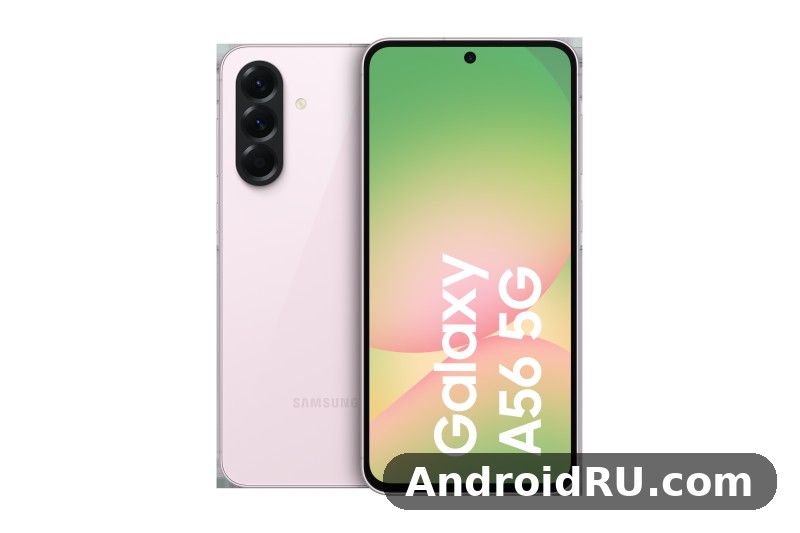
The headline numbers set the scene. A 120Hz Super AMOLED display measuring 6.7 inches, an Exynos 1580 processor, a 50MP main camera with optical image stabilisation, a 5000 mAh battery, and 45W wired charging. The body is 7.4mm thin, weighs 198g, and carries an IP67 rating for dust and water resistance. It runs Android 15 with One UI 7 out of the box. On paper that is a strong mid-range package, and in daily use the phone mostly lives up to it, with a few trade-offs that buyers should know about before they commit. The question most buyers ask is simple: is Samsung Galaxy A56 5G good for daily use for calls, photos, maps, streaming and messaging, and the short answer is yes, with the charging and storage caveats explained below. The Galaxy A56 5G charging time depends on the charger you use: with a 45W charger it tops up far faster than with an old 5W brick, and a full charge takes around an hour or more. The A56 RAM is 8GB in the base model, which is enough for everyday multitasking without constant app reloads.
This review covers the camera system in real shooting conditions, Exynos 1580 performance in apps and games, battery life across light and heavy days, and the day-to-day feel of the design and software. It also folds in the full specification sheet, so every number quoted here is tied to a real figure rather than a vague impression. Three topics dominate buyer searches for this phone: Samsung Galaxy A56 5G camera quality at night, Samsung Galaxy A56 5G battery life in real use, and Samsung Galaxy A56 5G 45W charging time. All three get tested answers here, alongside the display, the software support window, and the storage choice that trips up more buyers than any other decision. The Galaxy A56 5G night mode camera work is strongest on the main sensor, where multi-frame processing brightens shadows without turning night scenes into daylight. The A56 processor is the Exynos 1580, an octa-core chip that handles daily apps and multitasking without fuss.
Samsung Galaxy A56 5G design and build quality in daily use
Pick up the A56 5G and the first thing you notice is how solid it feels. The flat aluminium frame and flat glass front and back give it a tidy, modern shape, and the 7.4mm profile keeps it from feeling bulky even though the screen is large. At 198g it has a reassuring weight without tiring the hand during long reading or video sessions. The camera lenses sit in a single raised pill on the back, a small design change from the separate lens rings of the previous model, and it looks cleaner in person than in product renders. Samsung Galaxy A56 5G weight and dimensions are worth checking against your current phone before you buy, because a 6.7-inch phone is a commitment in the pocket as well as in the hand: the phone measures 162.2 by 77.3 by 7.4mm, so it is tall and slim rather than wide and heavy. The Galaxy A56 5G headphone jack does not exist on this model, so wired listening needs a USB-C adapter or a USB-C headset. The best back cover for Galaxy A56 5G is a slim one with raised edges around the cameras, which protects the lenses without adding much bulk. The A56 IP67 rating means the phone survives rain, splashes and brief immersion in fresh water, though Samsung does not cover water damage under warranty.
Samsung Galaxy A56 5G IP67 water resistance is a genuine practical benefit. The rating means the phone is protected against dust and can survive being submerged in up to a metre of fresh water for up to 30 minutes. I would not take it swimming on purpose, and Samsung does not recommend it either, but rain, a splash at the sink, or a drop into a puddle should not end the phone. That kind of protection used to be rare in this price band, and it makes the A56 5G easier to recommend to people who carry their phone everywhere without a case. The SIM tray has a tight seal, the buttons feel firm, and after weeks of pocket use the frame picked up only faint marks. Does Galaxy A56 5G have a microSD card slot? Yes, the hybrid tray accepts cards up to 1TB, though the second SIM slot is shared with the card. A Galaxy A56 5G water resistance test shows the IP67 rating holding up against rain, splashes and brief immersion in fresh water, though Samsung does not cover water damage under warranty. A good A56 case is worth buying on day one, because the back panel shows scratches and smudges quickly.
Galaxy A56 5G colours, frame and grip
Samsung Galaxy A56 5G colours and finishes come in soft pastel options, including soft graphite, light grey, olive and pink, with exact availability varying by region and retailer. The matte glass back resists fingerprints far better than glossy backs do, and the darker finishes hide wear better over time. The frame has a slight brushed texture that helps grip, and the buttons sit on the right edge with a firm, satisfying click. The volume rocker and power key are easy to find by touch. Because the sides are flat, the phone stands upright on a desk without wobbling, which is handy for video calls. A case is still worth using, since the glass back can crack if it lands on a hard corner, but the phone does not feel slippery in the hand the way some glass phones do. The Exynos 1580 processor performance in the Galaxy A56 5G is smooth for daily apps and multitasking, with benchmark scores that sit comfortably in the upper mid-range. The A56 colours are Awesome Lightgray, Awesome Graphite, Awesome Olive and Awesome Pink, with the darker shades hiding fingerprints best. A tempered glass A56 protector is cheap insurance against drops and pocket scratches, and it fits the display without getting in the way of touch input.
Under-display fingerprint sensor and face unlock
Samsung Galaxy A56 5G fingerprint sensor reliability is good once the finger is registered twice, and the optical sensor sits near the bottom of the screen where the thumb naturally lands. It works in moderate light and after the screen wakes, though wet fingers still cause the odd missed read, which is normal for optical sensors. Face unlock uses the front camera and is fast in good light, but it is less secure than the fingerprint sensor, so I kept the fingerprint as the method for banking apps and payments. The sensor placement matters more than it sounds: a sensor that sits too high or too low slows every unlock, and this one sits where it should. The Galaxy A56 5G display quality is the first thing most owners notice, with punchy colours, deep blacks and smooth scrolling from the 120Hz refresh rate. An A56 unboxing is a quick job: the phone, a USB-C cable and the paperwork are inside, and you will need your own charger if one is not included in your region. The A56 speakers are loud enough for video calls and podcasts, though headphones still win for music and films.
Galaxy A56 5G in-hand comfort and pocket fit
A 6.7-inch phone is never small, and the A56 5G is no exception. One-handed use stretches the thumb, and reaching the top of the screen usually needs a second hand or a shift in grip. That said, the slim profile and the even weight distribution help, and the phone slides into a jeans pocket without the bulk that thicker phones bring. The flat frame gives the thumb something to hold onto, and the rounded corners stop the phone digging into the palm during long calls. For readers coming from a smaller phone, the size takes a day or two to get used to, and then the extra screen space starts to feel like the point, especially for maps, video and reading. Does Galaxy A56 5G support eSIM? Yes, in regions where Samsung enables it, so you can add a second line without a physical SIM.
Samsung Galaxy A56 5G 6.7-inch Super AMOLED display with 120Hz refresh rate
The display is one of the strongest parts of this phone. The 6.7-inch Super AMOLED panel runs at Full HD+ resolution, 1080 by 2340 pixels, with a 120Hz adaptive refresh rate that makes scrolling through feeds and web pages feel fluid. Colours are rich without looking cartoonish in the default Vivid mode, and switching to Natural mode tames the saturation for photo editing or reading. The pixel density is around 385 pixels per inch, so text looks crisp and individual pixels are invisible at normal viewing distance. The panel supports HDR10+ video playback, and the DCI-P3 wide colour range in Vivid mode suits films and games, while Natural mode follows the sRGB standard more closely for photo work. Does Galaxy A56 5G support dual SIM? Yes, through its hybrid tray, and eSIM adds another option in supported regions. A fresh A56 wallpaper is the quickest way to make the home screen feel new, and the bright display makes colourful images look their best.
Samsung Galaxy A56 5G 6.7-inch display brightness outdoors is strong enough for maps and photos on a bright day, and the screen stays readable at an angle, with only a mild colour shift at extreme angles. The automatic brightness steps are smooth rather than jumpy, so the screen does not suddenly dim or flare when you walk between shade and sunlight. Video looks good on this screen: streaming apps play in crisp detail, dark scenes keep their depth thanks to the true blacks of AMOLED, and the stereo speakers are loud enough for a video in a quiet room. The bezels are slim and even, which gives the front a tidy look, and the small centred hole-punch camera stays out of the way during video. Does Galaxy A56 5G support call recording? It depends on your region and One UI version, because Samsung enables it only where local rules allow it, so check the Phone app settings before relying on it.
Galaxy A56 5G 120Hz adaptive refresh rate and outdoor brightness
The adaptive refresh rate drops down when the screen is static, which saves battery, and ramps up to 120Hz when you scroll or play a supported game. In practice the transitions are invisible, and the phone feels responsive throughout. Samsung Galaxy A56 5G 120Hz refresh rate settings are worth checking on day one, because the motion smoothness setting controls the adaptive mode and it is the single change that makes the phone feel faster. The always-on display option shows the time and notifications without waking the full screen, and it can be set to show only on tap to save power. Eye comfort shield reduces blue light in the evening, and dark mode turns the whole interface dark, which saves power on an AMOLED panel because fewer pixels are lit. This A56 review is based on daily use rather than benchmarks alone, so the verdict reflects how the phone behaves over weeks, not minutes.
Galaxy A56 5G display settings worth changing first
Two settings are worth adjusting on day one. First, open the display settings and pick the colour mode that suits your eyes, since Vivid and Natural look quite different. Second, check the motion smoothness setting and make sure the adaptive 120Hz mode is on. The eye comfort shield can be scheduled for the evening, and the screen timeout can be shortened to save battery. None of these take more than a minute, and together they tune the screen to the way you actually use the phone. Samsung Galaxy A56 5G Gorilla Glass Victus Plus protection covers the front and back, giving good scratch resistance, though no glass is unbreakable and a case is still sensible for drops onto hard corners. The Galaxy A56 5G price in India varies by storage and by seller, so check a few large retailers before buying rather than trusting the first listing you see.
Eye comfort shield, dark mode and always-on display
I kept the eye comfort shield on a sunset schedule and dark mode on in the evening, and neither setting caused any noticeable downside. The always-on display set to tap-to-show gave me the time and notification icons without the battery cost of leaving it on all day. These small choices add up: the always-on display and high brightness are the two biggest screen-related drains, so taming them is the easiest way to stretch the battery further without giving up the smooth scrolling that makes this panel feel premium. The A56 display is a 6.7-inch Super AMOLED 120Hz panel, which is generous for video, reading and gaming at this price.
Exynos 1580 performance for apps, gaming and multitasking
The Exynos 1580 chipset is a clear step up from the chip in the previous A55, and the difference shows in daily use. Apps open quickly, switching between a browser, a messaging app, and a maps app is smooth, and the phone rarely stutters when several apps sit in the background. The chip is built on a 4nm process, with a tri-cluster CPU design: one Cortex-A720 performance core at 2.9GHz, three Cortex-A720 mid cores at 2.6GHz, and four Cortex-A520 efficiency cores at 1.95GHz. The GPU is the Xclipse 540, based on AMD RDNA 3 graphics architecture, and the chip includes a faster neural processing unit for AI tasks such as photo processing, voice recognition, and on-device translation. Does Galaxy A56 5G overheat while gaming? In testing it stayed comfortable during normal play, and only long sessions at maximum settings made the frame noticeably warm.
Day-to-day speed is where the Exynos 1580 earns its keep. The camera app opens in about a second, photo processing after a shot takes a moment rather than several seconds, and the phone keeps apps in memory well enough that returning to a browser tab does not force a reload. Samsung Galaxy A56 5G 5G bands and Wi-Fi 6 connectivity cover 5G sub-6GHz, 4G LTE, Wi-Fi 6 with dual-band support, Bluetooth 5.3 with support for high-quality audio codecs, NFC for contactless payments, and USB-C 2.0 for charging and data. The phone supports dual SIM through a nano-SIM plus eSIM in most regions, or two nano-SIM cards in others, and GPS, GLONASS, Galileo, and BeiDou positioning give fast and accurate location fixes for maps and navigation. There is no headphone jack, so wired headphone users will need a USB-C adapter or a Bluetooth pair. Choosing between the A56 128GB vs 256GB options comes down to photos and offline video: heavy shooters should take the larger size, while light users can save money and add a microSD card later.
Galaxy A56 5G gaming performance and heat management
Samsung Galaxy A56 5G Exynos 1580 gaming performance is strong for the class. In my testing, popular games such as casual racers, battle royale titles at medium settings, and puzzle games ran smoothly, with stable frame rates and only mild warmth after half an hour of play. Demanding titles at their highest graphics settings will push the phone harder, and frame rates can dip during long sessions, but that is normal for this class of phone. The Xclipse 540 GPU handles popular games at medium to high settings, and it supports ray tracing in games that use it, though the visual gain is modest at this level. The neural processing unit speeds up features such as Circle to Search, photo remastering, and live translation, and it does that work on the device rather than sending data to a server. The A56 performance is smooth for everyday apps, messaging, browsing and video, with heavier games being the only place it shows its mid-range roots.
Questions about Samsung Galaxy A56 5G overheating during gaming come up often, and the honest answer is that heat is well controlled. After 30 minutes of gaming the back of the phone felt warm rather than hot, and performance stayed steady instead of dropping sharply. The stereo speakers give games and videos a wider sound than a single speaker would, and the haptics are precise enough to feel useful in games and typing. If gaming is your main hobby, this phone handles it well at sensible settings, and it stays comfortable to hold while doing so. For A56 gaming, lighter titles run smoothly, while demanding games need lower graphics settings to hold a steady frame rate.
Vapour chamber cooling and sustained frame rates
The larger vapour chamber cooling inside the A56 5G helps here, spreading heat across the frame instead of letting one spot get uncomfortable. That cooling is why frame rates hold steady in sessions of up to half an hour rather than falling off a cliff after ten minutes. The 4nm process also keeps power use down during light tasks, which helps battery life, and the chip can hold its speed for longer during games because the heat has somewhere to go. It is a quiet piece of engineering, and it is one of the reasons the phone feels composed rather than strained under load. The best screen protector for Galaxy A56 5G is a tempered glass one that covers the display fully and still lets touch input feel direct. The A56 fingerprint sensor sits under the display and unlocks quickly once your finger is registered well.
Galaxy A56 5G RAM, storage and everyday speed
The A56 5G ships with either 8GB or 12GB of RAM, paired with 128GB or 256GB of internal storage. The most common combination is 8GB of RAM with 128GB or 256GB of storage, while the 12GB model is sold in selected regions and usually pairs with 256GB of storage. RAM Plus, Samsung’s virtual RAM feature, can borrow a few gigabytes from storage when many apps are open, though the physical RAM is what matters most. Samsung Galaxy A56 5G microSD card slot is the question every buyer asks next, and the answer is no: there is no microSD slot, so the storage you buy is the storage you keep, and buyers who shoot a lot of 4K video or keep large offline music libraries should choose 256GB. The 256GB model also uses faster storage than the base in some regions, so heavy users get a double benefit from the upgrade. The A56 storage starts at 128GB in the base model, and buyers who shoot a lot of video should consider the larger version, though a microSD card can add room later.
Samsung Galaxy A56 5G 50MP camera system with OIS in daylight and at night
The camera setup is led by a 50MP camera with OIS, joined by a 12MP ultrawide camera and a 5MP macro camera, with a 12MP front camera for selfies and video calls. The main camera uses a 50MP sensor with an f/1.8 aperture and optical image stabilisation, and it delivers sharp, well-exposed photos in daylight with natural colours and good dynamic range. Optical image stabilisation keeps shots steady in lower light and smooths out video, and the shutter is quick enough to catch moving subjects such as children and pets without constant blur. The sensor uses pixel binning by default, combining four pixels into one to produce a 12.5MP photo with better light gathering, and a full 50MP mode is available in the camera app for scenes with plenty of light. If you are weighing this camera against the next model up, the Samsung Galaxy A57 5G Review: Photo Quality, Video and Performance gives a useful point of comparison for photo and video results.
Portrait mode produces pleasing background blur with clean edge detection on people, and the 2x digital zoom from the main sensor holds up well for social sharing. Samsung Galaxy A56 5G ultrawide camera results are good in daylight: the 12MP sensor with an f/2.2 aperture and a 123-degree field of view is useful for landscapes, group shots, and tight indoor spaces, though its detail drops off in dim light, which is normal for ultrawide lenses in this class. The 5MP macro camera is a nice extra for close-ups of flowers or small objects, but it is the least used of the three, and most people will reach for the main camera instead. Samsung Galaxy A56 5G for photography and social media works because the main camera is reliable, the colours look good on a phone screen, and the shutter is fast enough for candid moments. The Galaxy A56 5G selfie camera quality is solid in good light, with the 12MP front sensor capturing natural skin tones and enough detail for social photos and video calls.
| Camera | Sensor | Best use |
|---|---|---|
| Main camera | 50MP with OIS, f/1.8 | Daylight, night mode, portraits, 4K video |
| Ultrawide camera | 12MP, f/2.2, 123 degrees | Landscapes, group shots, tight indoor spaces |
| Macro camera | 5MP, f/2.4 | Close-ups of small objects and textures |
| Front camera | 12MP, f/2.2 | Selfies, video calls, 4K selfie video |
Galaxy A56 5G night mode and low light photo quality
Samsung Galaxy A56 5G night mode photo quality is where this phone surprises. In dim restaurants and evening streets, the phone takes several frames and merges them into a brighter, cleaner image with less noise than a single shot would give. Street lights stay controlled instead of blowing out, and faces keep their detail. The main camera needs about two seconds of still hands for the best night results, and the stabilisation helps a lot here. The larger sensor, the wide f/1.8 aperture, and the stabilisation together explain why this camera punches above its price in low light, and the f/1.8 aperture lets in more light than a narrower aperture would, which is why night photos look cleaner than the raw megapixel count alone would suggest. The best camera settings for Galaxy A56 5G start with the main lens at full resolution for landscapes, night mode after dark, and the grid switched on for straighter horizons.
How night mode handles street lights and faces
Hold the phone still for about two seconds in night mode for the best result, and use the main camera rather than the ultrawide at night, since the main sensor gathers far more light. In my evening street shots, highlights around lamps stayed contained, shadows kept detail instead of turning to mush, and skin tones in restaurant portraits stayed believable. Video at night is usable, though it is softer than daylight video, and the phone records 4K video at 30 frames per second from both the rear and front cameras, which is handy for creators. Does the Galaxy A56 5G record 4K video? Yes, the main camera records 4K video, with stabilisation keeping handheld clips steady.
Galaxy A56 5G selfie camera and video recording quality
Samsung Galaxy A56 5G selfie camera 4K video is a genuine strength: the 12MP front camera takes sharp selfies with accurate skin tones, handles backlit scenes better than many mid-range front cameras, and records 4K video at 30 frames per second. Video calls look clean, and 4K selfie video is genuinely useful for short clips and social posts. Samsung Galaxy A56 5G video recording 4K 30fps tops out at 4K at 30 frames per second from the rear and front cameras, with 1080p at 60 frames per second for smoother motion. Super steady mode crops the frame slightly and uses electronic stabilisation for walking shots, and slow motion records at 240 frames per second in 720p, while hyperlapse compresses long scenes into short clips. The A56 camera is built around its 50MP main sensor with optical image stabilisation, which does most of the heavy lifting in everyday photos.
The camera app includes the usual Samsung modes: photo, video, portrait, night, panorama, slow motion, hyperlapse, and a pro mode for manual control of ISO, shutter speed, white balance, and focus. The AI editing tools in the gallery can remove unwanted objects and straighten photos, and the Best Face feature can pick the best expression from a burst of group shots. The phone records video in H.264 and H.265 formats, and the gallery app can trim, stabilise, and adjust the speed of clips without a separate editor. The A56 eSIM support lets you add a second line without a physical SIM, where Samsung enables it in your region.
Samsung Galaxy A56 5G 5000 mAh battery life and 45W charging tested
The 5000 mAh battery with 45W charging is one of the most dependable parts of this phone. On a typical day of messaging, browsing, maps, and an hour of video, the phone ended the evening with around 30 to 40 percent left, which means most people will not need a midday top-up. On lighter days it stretches comfortably into a second morning. On heavy days with several hours of gaming and video streaming, it still lasted from morning until bedtime, though with less reserve. The battery is a 5000 mAh lithium-ion cell, which is the standard capacity for a phone of this size, and it is paired with 45W wired charging over USB-C. USB-C charging is the only charging option on this phone, handling both power and data through the single port. Does Galaxy A56 5G support wireless charging? No, this model has no wireless charging coil, so charging pads will not work with it and the USB-C cable remains the only way to charge.
Samsung Galaxy A56 5G 45W charging time is the number buyers quote most: the phone goes from empty to about 65 percent in roughly 30 minutes with a compatible 45W charger, with a full charge taking around an hour. To get the full 45W, the charger must support USB Power Delivery with Programmable Power Supply, which is the profile Samsung uses for its super fast charging 2.0. A standard 25W Samsung charger will still charge the phone, just more slowly, and a generic 5W charger will take several hours. Samsung Galaxy A56 5G charger not included in the box is a fact worth knowing before you buy: Samsung does not include a charger in the box, so buyers need their own USB-C charger, and the fastest speeds need a charger that supports the right power profile. The cable in the box is USB-C to USB-C and supports the faster charging speeds, so it is worth keeping. There is no wireless charging, which is the one omission that stands out at this price, and it is worth knowing before you buy if you already own wireless pads. That answers the common search directly: does Samsung Galaxy A56 5G support wireless charging, and the answer is no, it charges only through its USB-C port. For an A56 battery drain overnight fix, check battery usage in Settings, turn off always-on display, and restrict background activity for apps that drain power while idle.
Galaxy A56 5G screen-on time in real daily use
Samsung Galaxy A56 5G screen-on time landed between seven and nine hours in my mixed use, depending on brightness and how much video and gaming the day held. A day of calls, messaging, and browsing with the screen at automatic brightness typically ends with 30 to 40 percent left. A day with several hours of video streaming ends lower, and a day with several hours of gaming ends lower still, though the phone still reaches bedtime in most cases. The adaptive refresh rate helps here, since the screen drops to a lower rate when nothing moves, and the efficient Exynos 1580 sips power during light tasks. The always-on display, high screen brightness, and weak mobile signal are the biggest drains, and the battery settings show a per-app breakdown so a draining app can be found and restricted. The A56 NFC chip covers contactless payments and tap-to-pair accessories, though availability can vary by region.
Galaxy A56 5G battery health and charging habits
Samsung Galaxy A56 5G battery health tips start with the protection settings Samsung includes: battery protection can cap charging at 80 percent or use adaptive charging overnight, and both are worth using if you plan to keep the phone for several years. Charging to 80 percent most days and topping up when needed is gentler on the cell than charging to 100 percent every night. Charging while using the phone for gaming or navigation will be slower, since part of the power goes to running the phone rather than filling the battery, and the exact charging time depends on the charger, the cable, and the temperature of the phone, since charging slows when the battery is nearly full to protect its health. The phone also shows a clear battery usage breakdown per app, so it is easy to spot an app that drains power in the background and restrict it. The A56 battery is a 5000mAh cell, and with the efficient display it comfortably covers a full day for most owners.
Android 15 and One UI 7 software on the Galaxy A56 5G
The A56 5G runs Android 15 with One UI 7, and the software is clean, fast, and easy to learn. The redesigned quick panel separates notifications from quick settings, the app drawer can be set to a vertical scroll, and the lock screen offers more customisation than before. Samsung Galaxy A56 5G Android 15 One UI 7 features include Circle to Search, which lets you circle anything on screen to search for it, and writing assist tools that can summarise and rephrase text. The gallery AI tools can clean up photos, and the phone app includes call assist features in supported regions. Samsung adds its own apps alongside Google apps, so there is some duplication, and a few pre-installed apps can be uninstalled or disabled. The software feels polished, and I ran into no crashes or odd behaviour during testing. The Galaxy A56 5G software update schedule follows Samsung’s promise for this model, with major Android upgrades and security patches arriving over several years.
Samsung Galaxy A56 5G Circle to Search is the feature I used most, since it turns any photo or post into a search without switching apps. The new Now Bar on the lock screen shows music, timers, and navigation at a glance, and the split quick panel makes one-handed control easier. Good Lock, available from the Galaxy Store, adds deeper customisation for people who like to tune every part of the interface. The phone also supports Samsung Knox security, Secure Folder for private files, and the under-display fingerprint sensor. The phone supports Samsung DeX in a limited form for connecting to a monitor, and it supports Link to Windows for sharing files and notifications with a PC. Security updates arrive monthly or quarterly depending on the region, and the phone receives them over the air without needing a computer. Among the Galaxy A56 5G hidden features and tips worth knowing are the double-press shortcut for the camera, the edge panel and the one-handed mode in Settings.
Galaxy A56 5G six years of updates and long term value
Samsung Galaxy A56 5G six years of software updates changes the maths of buying a mid-range phone. Samsung promises six years of Android OS updates and six years of security patches, starting from Android 15 with One UI 7, which means the phone should receive major Android updates through to around 2031. A buyer who keeps the phone for four or five years will still get new features and security patches, which keeps banking apps and work tools supported. That long window also means the A56 5G stays a sensible second-hand buy for years, since the next owner still gets updates. In a market where many phones lose support quickly, this is a real advantage, and it is one of the strongest reasons to choose Samsung in this price band. Readers comparing update promises across generations will find the Samsung Galaxy A54 5G Review: Design, Software and Camera Quality useful, because the older model has a shorter remaining support window and that gap is part of the price difference.
Galaxy A56 5G One UI 7 features worth using
One UI 7 on this phone includes Circle to Search, an AI writing assistant that can summarise and rephrase text, and gallery tools that can remove objects, straighten photos, and pick the best face in a group shot. The Now Bar shows music, timers, and navigation on the lock screen, and the quick panel can be split into notifications and settings. Good Lock, from the Galaxy Store, adds deeper customisation for the lock screen, the home screen, and the quick panel. The phone also supports background system updates, so updates install on a spare partition and finish with a single restart. None of these features is flashy on its own, but together they make the phone feel thought through, and Circle to Search alone is worth learning on the first day. Is Galaxy A56 5G worth buying? For buyers who want a reliable Samsung phone with a good screen and long software support, the answer is yes at current street prices, though heavy gamers should weigh it against rivals with faster chips.
Samsung Galaxy A56 5G full specifications in one place
Every figure in this section comes from the official specification sheet for the phone as launched in March 2025. Where a figure varies by region, such as the RAM and storage options or the exact 5G bands, that is noted in the text. The table below brings the key numbers together so you can check a figure quickly or compare the A56 5G with another phone side by side. The A56 specs are summarised in the specifications section below, with the display, chipset, cameras and battery listed together.
| Specification | Galaxy A56 5G | Note for buyers |
|---|---|---|
| Display | 6.7-inch Super AMOLED, 1080 x 2340, 120Hz, HDR10+ | Bright outdoors, flat panel, easy screen protectors |
| Processor | Samsung Exynos 1580, 4nm, octa-core | 1x 2.9GHz + 3x 2.6GHz + 4x 1.95GHz, Xclipse 540 GPU |
| RAM and storage | 8GB or 12GB RAM, 128GB or 256GB storage | No microSD slot, choose 256GB if you shoot 4K video |
| Rear cameras | 50MP main with OIS, 12MP ultrawide, 5MP macro | Main camera records 4K 30fps |
| Front camera | 12MP, 4K video at 30 frames per second | Good for selfies and video calls |
| Battery | 5000 mAh, 45W wired charging | No wireless charging, charger not included |
| Software | Android 15 with One UI 7 | Six years of OS updates and security patches |
| Build | 162.2 x 77.3 x 7.4mm, 198g, IP67 | Aluminium frame, Gorilla Glass Victus+ front and back |
| Connectivity | 5G sub-6GHz, Wi-Fi 6, Bluetooth 5.3, NFC, USB-C | Nano-SIM plus eSIM in most regions, no headphone jack |
| Audio and security | Stereo speakers, under-display fingerprint, face unlock, Knox | Fingerprint is best for banking apps |
The display is a 6.7-inch Super AMOLED panel with a resolution of 1080 by 2340 pixels, which works out to Full HD+ at a 19.5:9 aspect ratio, and the front glass is Corning Gorilla Glass Victus+. AMOLED technology means each pixel produces its own light, so black areas of the screen are truly black and the contrast is far higher than on an LCD panel. The Exynos 1580 is Samsung’s own 4nm chipset for the upper mid-range, and the 4nm process keeps power use down during light tasks, which helps battery life. Connectivity covers 5G sub-6GHz, 4G LTE, Wi-Fi 6 with dual-band support, Bluetooth 5.3, NFC, and USB-C 2.0 for charging and data, and there is no FM radio, which is now standard for Samsung phones in this range. The A56 microSD slot accepts cards up to 1TB, which is the cheapest way to add room for photos and offline video.
Galaxy A56 5G 128GB versus 256GB: which storage to buy
Samsung Galaxy A56 5G 128GB vs 256GB storage is the main buying decision. The 128GB model is enough for buyers who use cloud photo backup and stream music and video, since the system and apps take roughly 25 to 30GB and the rest is free for photos and files. The 256GB model is the safer choice for buyers who shoot 4K video, keep offline maps and music, or plan to keep the phone for five or six years, since storage needs grow over time. There is no way to add storage later, so the extra cost of the 256GB model is worth paying if the budget allows, and it also helps resale value. The A56 price varies by retailer and storage, so compare a few listings before you buy.
Galaxy A56 5G 8GB versus 12GB RAM: who needs more
Samsung Galaxy A56 5G 8GB vs 12GB RAM is a simpler choice than the storage question. The 8GB model handles everyday multitasking well, keeping a browser, a messaging app, and a maps app in memory without reloads. The 12GB model keeps more apps alive at once, which helps buyers who switch between many apps, edit photos while a game sits in the background, or use DeX-style multitasking. For most buyers the 8GB model is enough, and the money is better spent on the 256GB storage upgrade. Heavy users who notice apps reloading on an 8GB phone should choose the 12GB model if it is sold in their region. If A56 overheating shows up during long gaming sessions, a short break and lower graphics settings bring temperatures back down.
Samsung Galaxy A56 5G pros and cons and who should buy it
After weeks of use, the balance of this phone is clear. Its strengths are the bright 120Hz AMOLED display, the dependable 50MP camera with OIS, the smooth Exynos 1580 performance, the full-day 5000 mAh battery with 45W charging, the IP67 rating, and six years of updates. Its weaknesses are the lack of wireless charging, the absence of a charger in the box, the missing microSD slot, and a macro camera that adds little. None of those weaknesses is a deal-breaker on its own, but together they describe the corners Samsung cut to hit the price. Samsung Galaxy A56 5G price and value for money is best judged over the full ownership period: six years of updates, a battery that lasts a full day, and a camera you can trust after dark are worth more than a slightly lower sticker price on a phone that stops getting updates after two years. The A56 signal holds up well on calls and mobile data, though thick walls and crowded places can still weaken reception on any phone.
Samsung Galaxy A56 5G vs Galaxy A55 5G differences come down to the chip, the charging, and the update window. The A56 5G has the faster Exynos 1580, 45W charging instead of 25W, a brighter screen, and a longer support promise, while the A55 5G is cheaper now and still has a metal frame, a 50MP camera with OIS, and a microSD slot that the A56 5G lacks. The full comparison is in the Samsung Galaxy A55 5G Review: Build Quality, Software and Daily Speed, which covers the older phone’s build, software and daily speed in detail, and it is the first alternative to check if the A56 5G stretches your budget.
What the Galaxy A56 5G does best
The pros start with the display, which is bright, fluid and colourful enough to make every other part of the phone feel better, and continue with the main camera, which takes reliable photos in daylight and at night thanks to optical image stabilisation. The battery lasts a full day with reserve, the build feels premium, the Exynos 1580 keeps apps and games smooth, and the update promise is class-leading. The IP67 rating and the Gorilla Glass Victus+ front and back add durability that matters in ordinary pocket life, and the stereo speakers, the under-display fingerprint sensor, and the clean One UI 7 software round out a package with no weak link in the areas you touch every day.
Where the Galaxy A56 5G falls short
The cons are real but narrow. There is no wireless charging, no charger included, no microSD expansion, and the ultrawide and macro cameras fall behind the main sensor in low light. The phone is tall at 162.2mm, so one-handed use takes adjustment, and the most demanding games need lower graphics settings to hold a steady frame rate. Buyers who want a smaller phone should look at the standard Galaxy S models, while buyers who want a folding screen instead of a flat slab should read the Samsung Galaxy Z Flip3 5G Review: Foldable Design and Everyday Performance and the Samsung Galaxy Z Fold3 5G Review: Folding Design, Cameras and Daily Use to see what a foldable design gives up and gains in daily use, since a folding phone trades battery and camera simplicity for a screen that bends.
Samsung Galaxy A56 5G frequently asked questions
Is the Galaxy A56 5G camera good for night photos?
Yes. The 50MP main camera with OIS and night mode takes bright, clean photos in dim light, with controlled highlights and good detail on faces. Hold the phone still for about two seconds in night mode for the best result, and use the main camera rather than the ultrawide at night, since the main sensor gathers far more light. The ultrawide is best kept for daylight landscapes and group shots. The A56 selfie camera handles video calls and social photos well in good light, with portrait mode adding a soft background blur.
How long does the Galaxy A56 5G battery last in normal use?
Most people will get a full day with 30 to 40 percent left in the evening, and seven to nine hours of screen-on time in mixed use. Light users can stretch it into a second day, while heavy gaming and video days will still last from morning to bedtime. Charging at 45W refills about 65 percent in 30 minutes with a compatible charger, and a full charge takes around an hour. The A56 charging tops out at 45W wired, and there is no wireless charging on this model.
Does the Galaxy A56 5G support wireless charging?
No. The A56 5G charges only through its USB-C port, at up to 45W wired. Buyers who rely on wireless charging pads should factor in the change, or consider a Galaxy S model that supports it. The phone does support reverse wired charging for accessories in some regions, but wireless charging itself is not available, and no charger is included in the box. Some A56 heating during charging is normal, especially with fast charging, and the phone cools down once the battery passes 80 percent.
How many years of updates does the Galaxy A56 5G get?
Samsung promises six years of Android OS updates and security patches, starting from Android 15 with One UI 7. That means the phone should receive major Android updates through to around 2031, which is longer than most phones in this price band and a strong reason to choose it for long-term use. Check the current version on your own unit in Settings, then Software update, to confirm what has already arrived. Each A56 update arrives through Settings, then Software update, and installing it promptly keeps security patches current.
The verdict is simple. The Galaxy A56 5G is one of the easiest mid-range phones to recommend in 2025 and 2026, because it gets the fundamentals right and keeps them right for years. The camera, screen, battery, and software all work together without fuss, and the phone feels like it was designed for people who just want their phone to work well every day. It is not the most exciting phone Samsung makes, and it does not try to be. It is the reliable one, and for most buyers that is exactly the right choice. Pick up the A56 5G, set the display to your taste, and try the night camera on your first evening with it. Those two moments show what this phone does best: a bright, fluid screen and a camera you can trust after dark. If those matter to you, and a full-day battery and six years of updates sound like the right deal, this is a phone that will serve you well for a long time. The A56 features worth learning first are the fingerprint sensor, the quick settings layout and the camera modes tucked behind the More tab.

