

VVili McTaggart
2026-10-21★★★★★
5/5
2026-10-21★★★★★
5/5
A Thousand Thumbs Up One Hundred Percent & Plus+ #LikeTacoPlus #YokohamaAsianExpress & #ZingZing Restaurant in Tucson Arizona
Swipe to see all screenshots



Download Calibrate Accelerometer & Fix APK Free to restore your phone’s accelerometer sensor and fix delays and errors that spoil motion-based games and screen orientation. Calibrate Accelerometer & Fix is a sensor repair and touch calibration tool for Android, built for phones whose accelerometer gives inaccurate results, whose screen orientation stops responding during video playback, or whose touch screen has dead pixels and slow response. The app puts accelerometer calibration, pixel repair, touch calibration, and sensor testing in one place, so you can check what is wrong and fix it without switching between tools.
In some devices the accelerometer sensor gets stuck, and the problem shows up as a screen that will not rotate or a game that reacts late to every tilt. Calibrating the sensor from time to time resets it in a few easy steps, and the same app also repairs dead pixels and improves touch response, which matters most when you play motion-based games on your phone. The Calibrate Accelerometer & Fix APK latest version keeps all of these repair tools in one small application that works without an internet connection.
The app is organized around eight tools, each aimed at one part of the sensor or the screen. Open the tool you need, follow the steps on the screen, and check the result right away.
– Calibrate Accelerometer: this tool calibrates the accelerometer sensor and resets it. Bring the navigation image to the center of the square image, tap calibrate, and the app carries out the accelerometer calibration for you.
– Check Pixel: check the pixels on your display by selecting colors, with manual and random check options. In the manual option you select a color and it is applied to the whole screen, while the random option displays random colors on the display.
– Draw Pixel: draw on the touch screen with your finger to repair its dead pixels manually. This gives you direct control over exactly which part of the screen you work on.
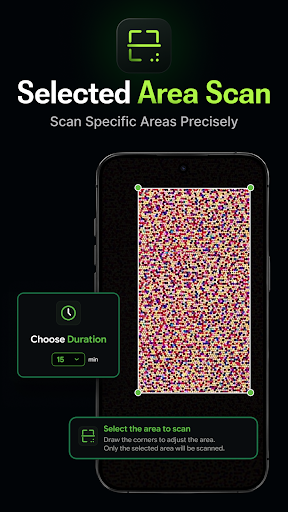
– Fix Pixel: fix dead pixels with a pixel scan or a full-screen scan. The pixel scan finds dead pixels automatically and fixes them, while the full-screen scan lets you select the time duration and area and then generates random colorful pixels on the screen to fix dead pixels.
– Calibrate Touch: perform touchscreen calibration by carrying out the actions shown on the screen. After you complete all the actions, your touchscreen is calibrated.
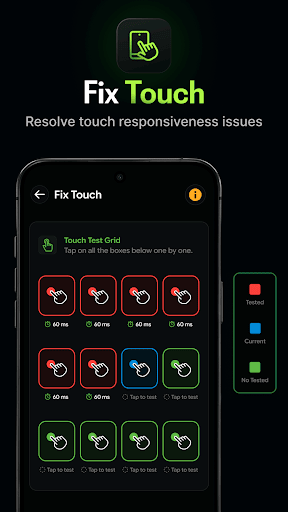
– Fix Touch: improve the responsiveness of your touchscreen by tapping Start and following the instructions to tap on the boxes. The app analyzes your touch values and reduces the screen response time.
– Test Sensor: check the accelerometer calibration and read information about the X, Y, and Z-axis. You also get angle information with the compass, so you can confirm the sensor is reading correctly.
– Device Information: view system and sensor information for your device. System information covers the device name, model, display, version, RAM and storage, while sensor information lists the available sensors on the device with their details.
Together these tools cover the full repair cycle, from testing the sensor to fixing the screen, and a fix for dead pixels on an Android phone is only a few taps away once you know which tool to use.
The app is simple and easy to use, small in size, and free to use without the internet, which makes it a practical touch screen calibration app to keep on your phone. Get smoother motion controls and a cleaner screen by installing the app and running a calibration today. Androidru.com Android App Store is the best and safest APK downloader in 2027. Get the Calibrate Accelerometer & Fix APK for Android there and start with a sensor check.
a96587159d6184d5...1effcfSafety starts with understanding how developers collect and share your data. Data privacy and security practices may vary based on your use, region, and age. The developer provided this information and may update it over time.
The developer reports data sharing with third parties.
Data collected: None reported
✓ No virus✓ No spyware✓ No malware✓ No trojan
9e09d67d1b3771f127bc69bec3686be8a42e3798bcc73428e70c8770035d998d
a96587159d6184d5a59f2e5a37656587fc9f3de337af454b228bff144c1effcf
Version 13.0 · 9.6 MB · APK
SHA-256 9e09d67d1b3771f127bc69bec3686be8a42e3798bcc73428e70c8770035d998d
Signer a96587159d6184d5a59f2e5a37656587fc9f3de337af454b228bff144c1effcf
Architecture arm64-v8a
2,798 ratings
2,798 ratings on AndroidRU. 11 written reviews on AndroidRU, 53 shown below. Their honest reviews of this app.
A Thousand Thumbs Up One Hundred Percent & Plus+ #LikeTacoPlus #YokohamaAsianExpress & #ZingZing Restaurant in Tucson Arizona
thoda sa Khali gaming performance badha do bus
👍 nice
to the people that rated this app low tripping after applying everything my aim feel better on my phone in blood strike all this time my calibration was a little off and I'm not over aiming on low or high sens anymore
good
good
Not actually accurate for some things. A foot counter doesn't need to be used. A lot of things are private.
I HAVE BEEN USED THIS APP MULTIPLE TIMES BUT NOT RECOMMENDED FOR BGMI OR PUBG
best thing that ever happened to me🥹🥹
did nothing or improve my phone just another scam prank app .
please working pubg mubile gyroscope
it work perfectly ,thank you🌠
good
THANK YOU FOR MAKING THIS APP MY SCREEN HAS LINES ON IT AFTER WATER GOT IN ,,,AND AFTER APPLYING THIS ALL THE LINES DISAPPEARED,,,,THANKS ,,,THIS APP REALLY WORKS ,,
not good
doesnt work at all. cool concept tho
Time waste
Good
Legit down load monu
Not working for my samsung note 9
Calibrating the accelerometer doesn't actually do anything
good
Good
Good app
✔️
This app is legit 100%
ADVERTS!!!
Didnt work, i probably have hardware issue. But man, 3 ads on a row gives you 1 star. Uninstalling.
Wonderful
Finish the add please
Peefect
I tried to calibrating my phone in a wrong way (intentionally) and nothing happen after restarting my phone and i played PUBG using gyroscope without a prob :)
It's working..cool but soo many ads
not working on vivo z1x trash app
It made my gyro very smooth and Quick
I messed up my accelerometers after dropping my phone and this recalibrated them first try. I'm sure not everyone will get this lucky and it's not like this app can fix a broken accelerometer. But it does a good job at recalibrating them after they get knocked out of wack.
It didn't work to me my phone is infinix note 12 g96
Great
It did work but not for the reason I wanted it
Whne
💯 percent not working
Doesn't work and ads are obnoxious. Don't bother with this app.
One of the real app that actually fix gyroscopedelay
It's not working on my divice
Bro next level fix
not sure
Very goodaap
Ok
Dear my ♥️ love 🇮🇳
This app is working
It worked the first time.
It's still not working for my phone and has never detected the sensor yet.Sorry!
Good Working App💖
No reviews match this filter.
Download the file with the button above.
On your Android device, open the file.
If asked, allow "Install unknown apps" for your browser or file manager.
An APK installs directly; no extra installer app is needed.
Merged APK · re-signed. Discover and download millions of the latest Android apps and games for free at AndroidRU.com. Fast, secure, and always updated with top-rated APKs. Download Calibrate Accelerometer & Fix APK Free, fast, safe, reliable, and daily updated, this application supports ABI: arm64-v8a. AndroidRU.com is the number one Best Google Play Store Alternative in 2027 for Safe APK Downloads. Get the best Premium Android apps & games APKs for free now. All apps and games are unlocked & ad-free. Best download apk latest version from Androidru.com APK downloader
Converter signature verified. Discover and download millions of the latest Android apps and games for free at AndroidRU.com. Fast, secure, and always updated with top-rated APKs. Download Calibrate Accelerometer & Fix APK Free, fast, safe, reliable, and daily updated, this application supports ABI: arm64-v8a. AndroidRU.com is the number one Best Google Play Store Alternative in 2027 for Safe APK Downloads. Get the best Premium Android apps & games APKs for free now. All apps and games are unlocked & ad-free. Best download apk latest version from Androidru.com APK downloader Sourced directly from Google Play — automatically clean.
The download is 9.6 MB. Keep at least that much free space, plus room for the installed app.
Download the file, then open it on your Android device. If asked, allow "Install unknown apps" for your browser or file manager. An APK installs directly; no extra installer app is needed.
toolsvideocompassnavigationstoragejoblevelrestaurant
Camponse Corporation
20.0 · APK · Updated Nov 13, 20263.7 ★ · 1,978 ratings · 500,000 downloads · 14.9 MB
Camponse Corporation
6.0 · APK · Updated Nov 13, 20263.6 ★ · 205 ratings · 50,000 downloads · 24.0 MB
AlphaBat
1.0.103 · APK · Updated Nov 13, 20264.8 ★ · 1,904 ratings · 50,000 downloads · 37.7 MB
Applus Studio
1.84 · APK · Updated Nov 13, 20263.9 ★ · 24,927 ratings · 5,000,000 downloads · 15.3 MB
Trusted Music Tools Mp3 Studio
player1.3.1-android35 · APK · Updated Nov 13, 20264.7 ★ · 167,630 ratings · 5,000,000 downloads · 25.0 MB
Applus Studio
2.261112 · APK · Updated Nov 13, 20264.4 ★ · 213,490 ratings · 50,000,000 downloads · 12.4 MB
Appalex Ltd.
1.4.11 · APK · Updated Nov 13, 20264.6 ★ · 6,981 ratings · 100,000 downloads · 16.9 MB
Bíblia Offline
1.1.1 · APK · Updated Nov 13, 20264.8 ★ · 34,076 ratings · 100,000 downloads · 61.8 MB
Cubii by Fitness Cubed
5.21.3 · APK · Updated Nov 13, 20264.1 ★ · 692 ratings · 50,000 downloads · 41.3 MB
New Tools Works
3.11.2 · APK · Updated Nov 13, 20264.4 ★ · 1,730 ratings · 500,000 downloads · 46.3 MB
Myoland, Inc.
1.15.2 · APK · Updated Nov 13, 20264.8 ★ · 14,797 ratings · 500,000 downloads · 76.9 MB
UC Vaulty
1.8.6 · APK · Updated Nov 13, 20263.8 ★ · 8,658 ratings · 1,000,000 downloads · 52.7 MB
MoxyzStudio
1.12.2 · APK · Updated Nov 13, 20264.5 ★ · 5,856 ratings · 50,000 downloads · 15.7 MB
Mukesh Kaushik
0.3 · APK · Updated Nov 12, 20264.2 ★ · 1,962 ratings · 50,000 downloads · 19.2 MB