

PPaul Drozd
2026-11-05★★★★★
5/5
2026-11-05★★★★★
5/5
Great secondary client for Termux mobile or PC terminal
VIBE TECHNOLOGIES, LLC
0.4.17 APK Old versions Merged APK · re-signed
Merged APK · re-signed. Discover and download millions of the latest Android apps and games for free at AndroidRU.com. Fast, secure, and always updated with top-rated APKs. Download OpenCode: AI Coding Agent APK Free, fast, safe, reliable, and daily updated, this application supports ABI: arm64-v8a. AndroidRU.com is the number one Best Google Play Store Alternative in 2027 for Safe APK Downloads. Get the best Premium Android apps & games APKs for free now. All apps and games are unlocked & ad-free. Best download apk latest version from Androidru.com APK downloader
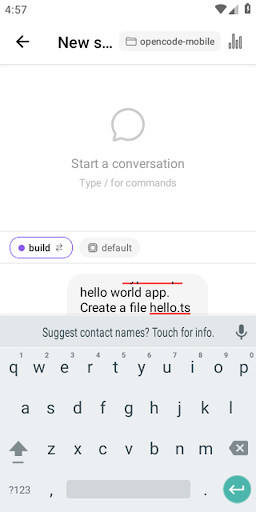
OpenCode Mobile is the AI coding agent companion built for developers who self-host opencode. Connect your Android phone to your opencode server and run AI-powered coding sessions from anywhere — watch diffs land, approve tool calls, and guide Claude, GPT-4, or Gemini in real time.
WHAT IT DOES
OpenCode Mobile is a thin client for the opencode CLI (github.com/sst/opencode). It speaks the opencode HTTP + SSE API, so every AI coding session on your workstation or server is instantly reachable from your phone. All AI model calls go through your own server — your API keys, your code, your infrastructure. Nothing passes through our servers.
CORE FEATURES
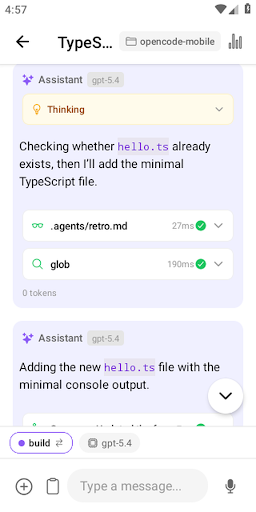
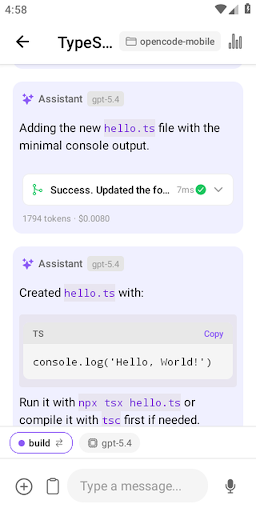
• Real-time streaming chat — watch your AI coding assistant think and respond token by token, just like a desktop terminal
• File diff viewer — see every code change the agent proposes before you approve it; no surprise rewrites
• Tool-call approval — review and approve or reject file writes, shell commands, and other agent actions from your phone
• Multi-session management — start, resume, and switch between AI coding sessions without losing context
• Biometric unlock — fingerprint or face unlock keeps your sessions private on shared or lost devices
CONNECTION OPTIONS
• Local Wi-Fi — zero config when phone and dev machine are on the same network
• Tailscale — connect securely across networks without opening ports
• Cloudflare Tunnel — public HTTPS endpoint for your opencode server in minutes
• ngrok — quick ad-hoc tunnels for demos or one-off remote sessions
WHO IT IS FOR
• Developers running opencode on their workstation who want to check in from their phone
• Engineers away from their desk who want to review or steer long-running AI coding jobs
• Teams self-hosting AI developer tools who want a polished mobile interface
• Open-source contributors who want an MIT-licensed alternative to proprietary AI coding apps
GETTING STARTED
Install opencode on any machine: npm install -g opencode-ai, then run opencode serve. Open the app, tap Connect, paste your server URL. Your AI coding agent is now on your phone.
OPEN SOURCE
MIT licensed. Source code at github.com/dzianisv/opencode-mobile. Contributions welcome.
PRIVACY
OpenCode Mobile does not collect your code, prompts, or AI responses. All traffic goes from the app directly to YOUR opencode server. Optional Sentry crash reporting collects only device model, OS version, and stack traces.
Download the file with the button above.
On your Android device, open the file.
If asked, allow "Install unknown apps" for your browser or file manager.
An APK installs directly; no extra installer app is needed.
Converter signature verified. Discover and download millions of the latest Android apps and games for free at AndroidRU.com. Fast, secure, and always updated with top-rated APKs. Download OpenCode: AI Coding Agent APK Free, fast, safe, reliable, and daily updated, this application supports ABI: arm64-v8a. AndroidRU.com is the number one Best Google Play Store Alternative in 2027 for Safe APK Downloads. Get the best Premium Android apps & games APKs for free now. All apps and games are unlocked & ad-free. Best download apk latest version from Androidru.com APK downloader
The download is 35.5 MB. Keep at least that much free space, plus room for the installed app.
Download the file, then open it on your Android device. If asked, allow "Install unknown apps" for your browser or file manager. An APK installs directly; no extra installer app is needed.
a96587159d6184d5...1effcfai codingaicodingtoolskeyboardchatcoding assistantrunning aistreaming chatassistant
Categories: Tools · Tags: Android, APK, Free Download, Tools
Version 0.4.17 · 35.5 MB · APK
SHA-256 5beaf5795f5afb7d965fe5a21e0eb6818e64a6627d79661c28d66a7933036b44
Signer a96587159d6184d5a59f2e5a37656587fc9f3de337af454b228bff144c1effcf
Architecture arm64-v8a
Antivirus scan: not run for this file. No scan result is claimed here.
5beaf5795f5afb7d965fe5a21e0eb6818e64a6627d79661c28d66a7933036b44
a96587159d6184d5a59f2e5a37656587fc9f3de337af454b228bff144c1effcf
Swipe to see all screenshots
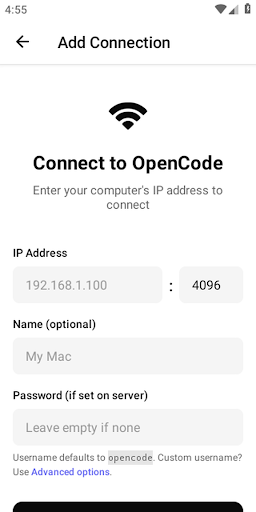
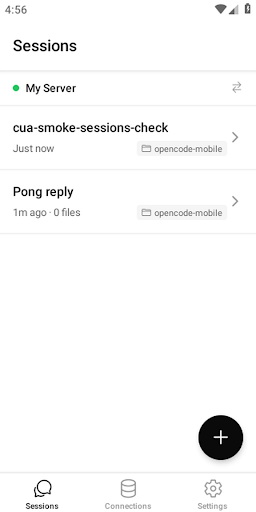
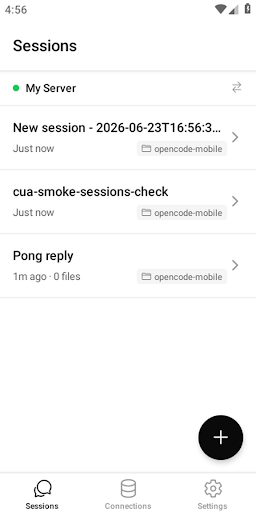
Safety starts with understanding how developers collect and share your data. Data privacy and security practices may vary based on your use, region, and age. The developer provided this information and may update it over time.
136 ratings
136 ratings on AndroidRU. 10 written reviews on AndroidRU, 17 shown below. Their honest reviews of this app.
Great secondary client for Termux mobile or PC terminal
mic not working
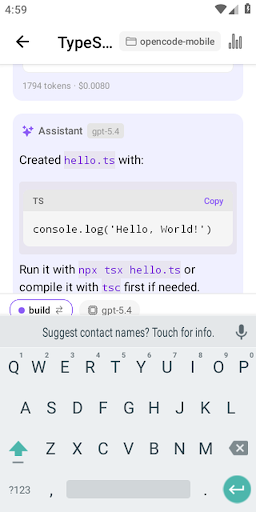
has a weird bug where the phone keyboard overlaps the entire input field thats a very basic mistake to make so i assume its completely vibe coded
There's one bug that's currently making this quite hard to use, the keyboard covers the text input, making it impossible to proofread your prompt unless you close the keyboard. It looks like there's a fix available on their GitHub (Which should be linked in the settings instead of opencode's), but it hasn't been released yet.
Works perfect!
keyboard swallows the chat box. Needs option to expand thinking. Good work though Claude!
finały first tool that works had t use tailscale in advanced settings cuz it could not login nor Aly but works like charm everything else is trash
Would be perfect if I could copy and paste an entire message
the keyboard overlap the messagebox. i can not see what i am typing.
So I'm very thankful for the app but on my s24 ultra when I click in the input field in a session at the bottom of the page it stays behind my keyboard instead of popping up to just above my keyboard so I can't see what's being typed in which I would love if that could get fixed.
connection is solid and the app layout is decent. on my Pixel Fold though the input box does not slide up above the keyboard. So as soon as I tap in the field my keyboard covers it and I can't see what I'm typing. this makes it unusable for me sadly.
Great for using opencode in mobile. The input box can be improved.
good but there is only one thing that annoy me i cant see the thoughts process for the agent live when he is working only after he finish i don't think its an issue but ok 🤙
when opening the keyboard to type, what i type stays behind the keyboard. i hope this gets fixed soon.
Why I can't copy any of the responses! And I can't see the prompt text box, it gets covered by the keyboard! If u can fix those 2 things, then it's 5 stars!
Amazing
this so good! clean, polished, there's no need to pay for anything. Seriously, this is the first FOSS i see with such a clean design! 10/10, it's SUPERB
No reviews match this filter.

HK TECHNOSOFT
2.0.3 · APK · Updated Nov 08, 20264.5 ★ · 6,502 ratings · 100,000 downloads · 55.3 MB
ZANKHANA PTE LTD
1.1.5.0 · APK · Updated Nov 08, 20264.6 ★ · 112,439 ratings · 10,000,000 downloads · 44.1 MB
GreenFields1
1.0.23 · APK · Updated Nov 08, 20264.2 ★ · 164 ratings · 5,000 downloads · 98.2 MB
Learn More - Dev
1.0.0 · APK · Updated Nov 08, 20261,000 downloads · 27.0 MB
Converter App
2.1.3 · APK · Updated Nov 08, 20265,000 downloads · 10.7 MB
minsuki
3.13.2 · APK · Updated Nov 08, 20265.0 ★ · 7 ratings · 10 downloads · 13.8 MBminsuki
3.13.2 · APK · Updated Nov 08, 20265.0 ★ · 7 ratings · 10 downloads · 13.8 MB
AI CLOUD SOLUTIONS
1.8.0 · APK · Updated Nov 08, 20264.2 ★ · 4,561 ratings · 100,000 downloads · 43.4 MB
ATOMICMAIL SYSTEMS
1.9 · APK · Updated Nov 08, 20263.5 ★ · 101 ratings · 10,000 downloads · 115.7 MB
RoyalCode
2.2.6 · APK · Updated Nov 08, 20263.9 ★ · 1,222 ratings · 1,000,000 downloads · 11.6 MB
REACTIVE APPS CORP.
1.4.2 · APK · Updated Nov 08, 20262.8 ★ · 37 ratings · 10,000 downloads · 64.1 MB
AI.NATION
49.2.19 · APK · Updated Nov 08, 20264.6 ★ · 900 ratings · 50,000 downloads · 35.4 MB