--
2026-10-23★★★☆☆
3/5
2026-10-23★★★☆☆
3/5
Failed to do anything citing storage permission issues while being granted access to a folder
 Download Comic Converter: CBZ to PDF V1.0.0 APK From Android App Store Full Free Premium1.0.0Download
Learn More - Dev
1.0.0 APK Old versions Merged APK · re-signed
Merged APK · re-signed. Discover and download millions of the latest Android apps and games for free at AndroidRU.com. Fast, secure, and always updated with top-rated APKs. Download Comic Converter: CBZ to PDF APK Free, fast, safe, reliable, and daily updated, this application supports ABI: arm64-v8a. AndroidRU.com is the number one Best Google Play Store Alternative in 2027 for Safe APK Downloads. Get the best Premium Android apps & games APKs for free now. All apps and games are unlocked & ad-free. Best download apk latest version from Androidru.com APK downloader
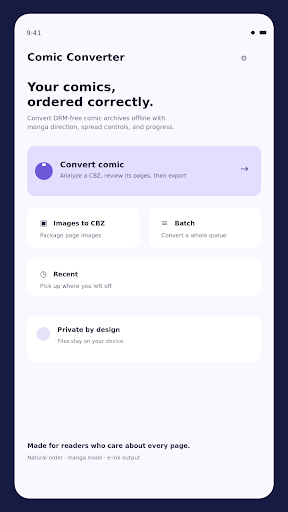
Turn your DRM-free comic archives and image collections into clean, reader-friendly files — privately and offline.
Comic Converter helps you move comics between devices without wrong page order, confusing spreads, or silent failures. Analyze a CBZ/ZIP archive safely, review its pages, choose the reading direction, then export a validated PDF, CBZ, or image folder.
Built for manga readers, comic collectors, and e-ink users:
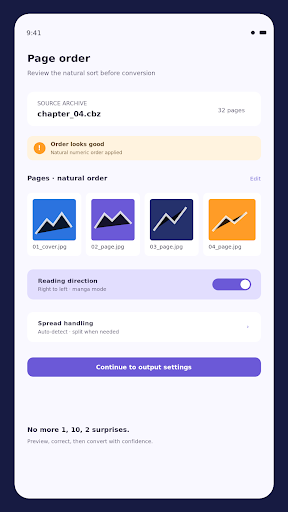
• Natural page ordering catches mistakes like 1, 10, 2 before you convert.
• Review thumbnails, reorder pages, exclude extras, and move the cover to the front.
• Choose left-to-right or right-to-left reading direction.
• Keep spreads intact or split them in the correct order for manga.
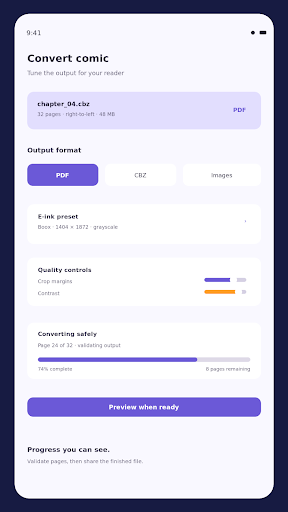
• Crop margins, resize to Kobo, Boox, or PocketBook presets, and tune grayscale, contrast, gamma, and dithering.
• Convert batches of archives with per-file and per-page progress.
• Preserve ComicInfo metadata, edit title and creator details, and export a separate cover.
• Preview first, middle, and final pages to verify the result before sharing.
• Process files on your device. Your comics are not uploaded.
Supported inputs include CBZ/ZIP archives, folders of images, JPG/JPEG, PNG, WebP, GIF first frames, BMP, and ComicInfo.xml metadata. Export to PDF, CBZ, or an image folder.
No ads. No watermark. No account required.
Comic Converter is made for DRM-free files you already own. CBR/RAR support is not advertised until compatibility and licensing validation are complete.
Download the file with the button above.
On your Android device, open the file.
If asked, allow "Install unknown apps" for your browser or file manager.
An APK installs directly; no extra installer app is needed.
Converter signature verified. Discover and download millions of the latest Android apps and games for free at AndroidRU.com. Fast, secure, and always updated with top-rated APKs. Download Comic Converter: CBZ to PDF APK Free, fast, safe, reliable, and daily updated, this application supports ABI: arm64-v8a. AndroidRU.com is the number one Best Google Play Store Alternative in 2027 for Safe APK Downloads. Get the best Premium Android apps & games APKs for free now. All apps and games are unlocked & ad-free. Best download apk latest version from Androidru.com APK downloader
The download is 27.0 MB. Keep at least that much free space, plus room for the installed app.
Download the file, then open it on your Android device. If asked, allow "Install unknown apps" for your browser or file manager. An APK installs directly; no extra installer app is needed.
a96587159d6184d5...1effcfCategories: Tools · Tags: Android, APK, Free Download, Tools
Version 1.0.0 · 27.0 MB · APK
SHA-256 14b77f4a2e41b9fc6eac6d765e915e8abbad06a7552a9e3a6d61024e55e90c4e
Signer a96587159d6184d5a59f2e5a37656587fc9f3de337af454b228bff144c1effcf
Architecture arm64-v8a
Antivirus scan: not run for this file. No scan result is claimed here.
14b77f4a2e41b9fc6eac6d765e915e8abbad06a7552a9e3a6d61024e55e90c4e
a96587159d6184d5a59f2e5a37656587fc9f3de337af454b228bff144c1effcf
Swipe to see all screenshots
Safety starts with understanding how developers collect and share your data. Data privacy and security practices may vary based on your use, region, and age. The developer provided this information and may update it over time.
2 written reviews imported. Star distribution is from the imported reviews shown here.
Failed to do anything citing storage permission issues while being granted access to a folder
There is no other app like this. I was looking for an app which would convert multiple .cbz files into PDFs. But could not find any. Those that I found only converted one file at a time. And would ask for money for batch feature. But this app supports batch conversion for free. Its a god sent for me. Thank you so much. I highly recommend it.
No reviews match this filter.

HK TECHNOSOFT
2.0.3 · APK · Updated Nov 08, 20264.5 ★ · 6,502 ratings · 100,000 downloads · 55.3 MB
ZANKHANA PTE LTD
1.1.5.0 · APK · Updated Nov 08, 20264.6 ★ · 112,439 ratings · 10,000,000 downloads · 44.1 MB
GreenFields1
1.0.23 · APK · Updated Nov 08, 20264.2 ★ · 164 ratings · 5,000 downloads · 98.2 MB
Converter App
2.1.3 · APK · Updated Nov 08, 20265,000 downloads · 10.7 MB
minsuki
3.13.2 · APK · Updated Nov 08, 20265.0 ★ · 7 ratings · 10 downloads · 13.8 MB
VIBE TECHNOLOGIES, LLC
0.4.17 · APK · Updated Nov 08, 20264.7 ★ · 136 ratings · 10,000 downloads · 35.5 MB