

Google Pixel 4a 5G Review: Gaming, Multitasking and Battery Life
The Google Pixel 4a 5G arrived in November 2020 as a larger, faster and more capable companion to the regular Pixel 4a. It kept the clean Android experience and the strong camera reputation that made the Pixel line popular, while adding a bigger 6.2-inch OLED display, 5G support, a second rear camera and a much larger battery. For buyers who wanted a Pixel without the high price of a flagship, it filled a useful middle ground between a compact budget phone and a premium handset.
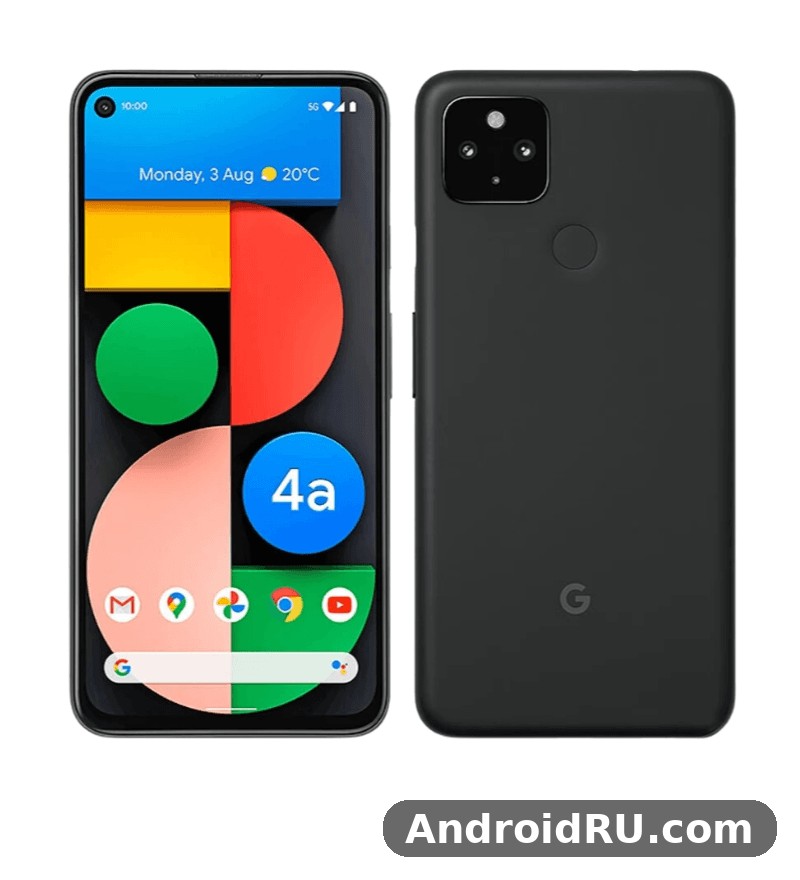
This review looks at the three areas in the title first — gaming, multitasking and battery life — and then covers the camera, display, design, software and full specifications in detail. The goal is practical: what the phone does well in ordinary use, where it shows its limits, how it compares with the Pixel 5a 5G and the Pixel 6a, and who should still consider it today. Every figure below comes from the published specification of the phone, so readers can check the numbers against the official product page before making a decision.
Readers searching for a Pixel 4a 5G review in 2026 usually have one of three questions. Can it still play popular games without constant stutter? Can it keep several apps open without reloading them? And does the battery last a full day away from a charger? The short answer is that it handles everyday games and normal multitasking with ease, and its 3,885 mAh battery is a clear step up from the smaller Pixel 4a, even though heavy gaming and long video sessions still drain it faster than a modern large-battery phone would.
Google Pixel 4a 5G Gaming Performance and Snapdragon 765G Speed
Gaming on the Pixel 4a 5G starts with the Qualcomm Snapdragon 765G, an octa-core chip built for upper mid-range phones in 2020. It pairs Kryo 475 cores with an Adreno 620 graphics processor, and it was designed to run popular titles at sensible settings rather than to chase the highest frame rates in demanding games. In practice, that means casual and mid-weight games run smoothly, while the most graphically intense titles need lower settings to stay comfortable.
Pixel 4a 5G gaming performance is best understood as steady rather than spectacular. Games such as PUBG Mobile, Call of Duty: Mobile, Asphalt 9, Genshin Impact at reduced settings, Mobile Legends, Free Fire, Clash Royale, Subway Surfers and Candy Crush Saga all run on the phone, but they do not all run at the same level of detail. Lighter titles hold a stable frame rate with the display set to its normal 60Hz refresh rate. Heavier titles benefit from medium graphics, shadows turned down and motion blur switched off, which keeps the frame rate steadier and the phone cooler during a longer session.
The 6.2-inch OLED display helps games look richer than the specification sheet might suggest. Colours are vivid without looking oversaturated, dark scenes in games keep detail in the shadows, and the punch-hole front camera sits in the top-left corner where it rarely blocks important controls. The 60Hz refresh rate is the main limit for competitive play. A 90Hz or 120Hz screen feels more fluid when scrolling through a game lobby or tracking fast movement, and the Pixel 4a 5G cannot match that feeling. For most players, though, the difference matters less than stable performance, and the phone delivers that in the games most people actually play every day.
Heat is another part of the gaming story. The Snapdragon 765G runs efficiently at moderate load, so a 20 to 30 minute session of a mid-weight game leaves the phone warm rather than hot. Longer sessions of a demanding game, especially while charging at the same time, produce more heat around the upper half of the body. The phone may reduce brightness or ease back performance slightly to protect itself, which is normal behaviour for a slim plastic-bodied phone. Taking the case off, lowering graphics one step and avoiding charging during play all help keep temperatures down.
Audio matters for gaming too. The Pixel 4a 5G has stereo speakers, so sound in games has a sense of direction, and dialogue stays clear at moderate volume. The 3.5mm headphone jack is a real advantage for players who prefer wired earphones, because it removes the delay that can appear with wireless audio and it lets the player charge the phone while listening through a wired headset with a splitter. That combination — wired audio, a clean display and a chip that stays steady at medium settings — makes the phone a sensible choice for casual gaming, even if it was never meant to be a dedicated gaming phone.
How the Snapdragon 765G Handles Popular Games
The Snapdragon 765G in the Pixel 4a 5G handles popular games by balancing power and efficiency. Its eight cores split work between performance cores for active gameplay and efficiency cores for background tasks, so a game can keep running while messages, music and system services continue in the background. The Adreno 620 graphics unit supports the visual effects used by most mobile games from 2020 and 2021, including detailed textures, dynamic lighting and particle effects, though the highest quality presets in the most demanding games will push it hard.
For a clear picture, think in three groups. First, casual games and 2D titles run without any trouble at all and barely warm the phone. Second, popular online multiplayer games such as PUBG Mobile and Call of Duty: Mobile run well at balanced or medium graphics with a stable frame rate, which is the setting most players choose for a competitive match. Third, open-world games with large maps and heavy effects, such as Genshin Impact, run best at low to medium settings, with the frame rate capped to keep play smooth. Players who insist on maximum graphics in that third group will notice dropped frames and faster battery drain, and that is a limit of the hardware rather than a fault in the phone.
Storage speed also affects gaming. The Pixel 4a 5G uses 128GB of UFS 2.1 storage, which loads games and levels noticeably faster than the slower storage in cheaper phones of the same period. Game updates, large downloads and switching between two large games feel quicker as a result. There is no microSD card slot, so the 128GB is the full capacity, and players who install many large games need to manage space by removing titles they no longer play.
Pixel 4a 5G Gaming Settings That Work Best
The best Pixel 4a 5G gaming settings depend on the game, but a few choices work across almost every title. Start with medium graphics and a high frame rate where the game offers that option, then raise the graphics only if the frame rate stays stable after ten minutes of play. Turn off extra effects such as motion blur, depth of field and high-quality shadows first, because those effects cost performance without changing how the game plays. Keep the screen brightness at a comfortable level rather than maximum, since a very bright OLED panel draws more power and adds heat during a long session.
Closing background apps before a long gaming session helps too, although the phone manages memory well on its own. Turning on Battery Saver is not a good idea during gaming, because it can limit performance and make frame rates less stable. A better approach is to charge the phone to a comfortable level before playing, use Wi-Fi rather than mobile data where possible for a steadier connection, and keep the phone updated, because system updates can include graphics driver improvements and security fixes that affect how games behave.
Frame Rate and Heat During Longer Gaming Sessions
Frame rate during a longer gaming session on the Pixel 4a 5G usually starts strong and then settles into a steady level. The first few minutes of a game often feel the smoothest, because the chip is cool and can run at full speed. After 20 to 30 minutes of demanding play, the phone warms up and the system may ease performance back a little to keep temperatures safe. This is not a sudden drop, and in most games it shows up as a slightly lower but still playable frame rate rather than a freeze or a crash.
Players who want the most stable experience should play in a cool room, remove a thick case, and avoid direct sunlight on the phone. A short break between matches also helps, because it lets the phone cool down before the next round. These are small habits, but they make a real difference on a phone with a slim body and no active cooling fan.
Does the Pixel 4a 5G Support 5G Gaming and Cloud Gaming
Yes, the Pixel 4a 5G supports 5G, and that matters for online gaming and cloud gaming where a fast, low-latency connection helps. Sub-6GHz 5G is the version most owners will use, and it gives faster downloads and lower delay than 4G in areas with good coverage. Cloud gaming services that stream a game from a server depend far more on connection quality than on the phone chip, so a stable 5G or Wi-Fi connection matters more than raw graphics power for that kind of play. On a good connection, the 6.2-inch OLED display makes streamed games look sharp, and the headphone jack keeps audio in sync with the picture.
Multitasking on the Pixel 4a 5G With 6GB RAM
Multitasking is one of the strongest everyday features of the Pixel 4a 5G. The phone ships with 6GB of RAM, which is enough to keep several common apps in memory at once: a browser with a few tabs, a messaging app, email, maps, music and a social media app can sit side by side without the phone constantly reloading them. Switching between those apps feels quick, and returning to a game or a video after answering a message usually brings the user back to the same place rather than restarting the app from the beginning.
Pixel 4a 5G multitasking benefits from clean Android and the Snapdragon 765G working together. Stock Android has fewer background services than a heavily customised interface, so more of the 6GB of RAM stays available for the apps the owner actually uses. The result is a phone that feels responsive in normal use, even when several apps are open. Heavy users who keep a dozen apps open, edit photos while a large game sits in the background, or run a video call alongside navigation may still see an app reload from time to time, because 6GB is a practical limit rather than an endless supply.
Split-screen mode works well on the 6.2-inch display. Watching a video in the top half while replying to messages in the bottom half is comfortable, and the OLED panel keeps both halves clear and bright. Copying text from a web page into a note, checking a map while a ride-hailing app stays open, or comparing prices in two browser tabs are all tasks that feel natural on this screen size. The larger display compared with the regular Pixel 4a makes split-screen noticeably more useful, because each half still has enough height to read and tap without constant scrolling.
App switching gestures are smooth and easy to learn. Swiping up from the bottom opens the recent apps view, swiping left or right moves between recent apps, and a long press on an app icon in that view opens split-screen options. Picture-in-picture mode lets a video call or a video keep playing in a small floating window while the owner opens another app, which is useful for following a tutorial, a live stream or a navigation prompt without losing the video.
Pixel 4a 5G RAM Management and App Reloading
Pixel 4a 5G RAM management is handled by Android, which keeps recently used apps in memory and closes the least recently used ones when space is needed. With 6GB of RAM, the phone can hold a typical mix of apps without trouble, but a very large game can push other apps out of memory. That means returning to a browser after an hour of gaming may reload the page, and returning to a camera app after editing a long video may restart the camera. These reloads are normal on a 6GB phone and do not mean the phone is faulty.
Owners can reduce reloading by closing apps they no longer need, avoiding live wallpapers and heavy widgets that use memory in the background, and keeping the phone updated. Restarting the phone once a week also clears temporary memory use and can make multitasking feel fresher. The phone does not offer a RAM expansion feature that borrows storage as extra memory, so the 6GB figure is the real limit to plan around.
Split Screen, Picture in Picture and Daily Productivity
Split screen and picture-in-picture turn the Pixel 4a 5G into a useful productivity tool for everyday tasks. A student can watch a lecture video while taking notes, a traveller can follow maps while checking a booking, and a worker can join a video call while reading a document. The 6.2-inch display is large enough for these tasks without feeling cramped, and the lightweight body at 168 grams means the phone stays comfortable to hold during a long call or a long reading session.
Productivity also benefits from Google apps that work well together on a Pixel. Gmail, Calendar, Docs, Drive and Photos sync quickly, voice typing is accurate, and the Recorder app can transcribe speech on the device. The fingerprint sensor on the back opens the phone quickly and works well for signing into apps and confirming payments. These small details add up across a day of multitasking, because they remove friction from the tasks people repeat most often.
How Many Apps Can the Pixel 4a 5G Keep Open at Once
There is no fixed number, because it depends on the size of each app. In normal use, the Pixel 4a 5G can keep roughly six to ten light and medium apps in memory at once, such as messaging, email, browser, music, maps, calendar and social media. Large games and camera apps use far more memory, so keeping two or three of those open alongside other apps is a more realistic expectation. The exact count varies with updates and with how each app manages its own memory, but the pattern stays the same: light apps stay ready, heavy apps may reload after a long gap.
Pixel 4a 5G Battery Life and 18W Charging in Daily Use
Battery life is where the Pixel 4a 5G improves most clearly over the regular Pixel 4a. The battery is 3,885 mAh, which is a large increase over the 3,140 mAh cell in the smaller model, and the extra capacity shows up in daily use. Most owners can expect a full day of normal use — messaging, browsing, social media, maps, music and some photos — with charge left in the evening. Heavy days with long gaming sessions, extended video streaming or constant 5G use will drain the battery faster, and a top-up during the day may be needed on those days.
Pixel 4a 5G battery life depends on how the phone is used, and the differences are large. A day of light use with Wi-Fi, moderate brightness and mostly messaging can stretch well beyond a day. A day of mixed use with 5G, navigation and video calls lands around a full working day. A day dominated by gaming or by recording long videos will end earlier. Screen-on time is the best guide: many owners report around five to seven hours of screen-on time on a mixed day, with lighter days reaching higher and heavier days falling lower. Those figures vary with signal strength, brightness and app behaviour, so they should be read as a range rather than a promise.
Charging uses an 18W wired charger over USB-C with USB Power Delivery. A full charge from empty takes roughly an hour and a half, with the first half of the charge arriving much faster than the second half. There is no wireless charging on this phone, which is one of the clear trade-offs compared with flagship Pixel models. Owners who already use a wireless charging pad will need to switch back to a cable, while owners who charge overnight will not notice the difference at all.
Battery care is straightforward. Adaptive Battery in Android learns which apps are used often and limits power for apps that are rarely opened, which helps the battery last longer over time. Keeping the screen brightness at a comfortable level, using Wi-Fi where possible, and turning off location for apps that do not need it all reduce drain. Extreme Battery Saver is available for days when the phone must last as long as possible, though it limits some features and notifications, so it is best saved for travel days or emergencies.
How Long Does the Pixel 4a 5G Battery Last on 5G
How long the Pixel 4a 5G battery lasts on 5G depends on signal strength and on what the phone is doing. 5G can use more power than 4G or Wi-Fi, especially in an area where the signal is weak and the phone works hard to stay connected. In an area with strong 5G coverage, streaming video and browsing feel fast and the extra drain is modest. In an area with weak coverage, switching to 4G or Wi-Fi for a long download or a long video call can save a useful amount of battery.
For owners who want the longest battery life, the practical choice is to use 5G when its speed is needed and Wi-Fi when it is available. Downloading large files, updating apps and streaming long videos over Wi-Fi rather than 5G reduces both battery use and mobile data use. The phone makes this easy, because it connects to saved Wi-Fi networks automatically and the owner can check which apps use the most battery in Settings under Battery.
Pixel 4a 5G Charging Speed, Battery Health and Tips
Pixel 4a 5G charging speed is 18W wired, which was standard for mid-range Pixel phones in 2020 and is slower than the faster charging in many newer phones. A 30-minute charge from a low battery adds a useful amount of power, enough for several hours of light use, but it will not fill the battery. Owners who charge overnight will find 18W perfectly adequate, while owners who often need a quick top-up before leaving the house should plan for a longer charging window or keep a charger at work as well as at home.
Battery health after several years depends on charging habits and on how many charge cycles the battery has been through. Avoiding very high temperatures, not leaving the phone in a hot car, and avoiding constant charging to 100 percent followed by heavy gaming while plugged in can all help the battery age more slowly. Android shows battery health information in Settings, and a battery that drains much faster than it used to, or a phone that shuts down early, may need a battery replacement from a qualified repair service rather than a software fix.
Pixel 4a 5G Camera Review: 12.2MP Main and 16MP Ultrawide
The camera is the strongest reason many people chose the Pixel 4a 5G, and it remains the strongest reason to consider one today. The rear camera system has two lenses: a 12.2MP main camera with optical image stabilisation and a 16MP ultrawide camera. The main camera uses a large pixel size and Google computational photography to produce sharp, well-exposed photos in daylight and in low light, while the ultrawide camera captures a much wider scene for landscapes, buildings and group photos.
Pixel 4a 5G Night Sight camera performance is a highlight. Night Sight takes several short exposures and combines them into one brighter, cleaner photo, so evening street scenes, indoor rooms and portraits in dim light come out with more detail and less noise than a single exposure would give. The main camera also supports Portrait Mode with a natural background blur, and the ultrawide camera helps when the subject does not fit in a normal frame. Colours stay true to life rather than oversaturated, which makes photos look natural when viewed on a computer or printed.
Daylight photos from the main camera are detailed and balanced, with good dynamic range that keeps both bright skies and dark shadows visible in the same shot. HDR+ processing works automatically, so the owner does not need to adjust settings for most scenes. The ultrawide camera is useful, but its photos are slightly softer at the edges and show a little more distortion than the main camera, which is normal for an ultrawide lens. For the sharpest photos, the main camera is the better choice; for the widest view, the ultrawide camera is the right tool.
Video recording reaches 4K at 30 frames per second from the rear cameras, with stabilisation that keeps handheld video smooth while walking. The front camera records at 1080p and is good for video calls and selfies. Slow motion, time lapse and a range of video stabilisation modes are available in the camera app. The 8MP front camera takes clear selfies in good light, with Portrait Mode available for a blurred background, though it has a narrower field of view than the front cameras on some newer phones.
Compared with the regular Pixel 4a, the addition of the ultrawide camera is the main camera upgrade, and it changes how the phone is used. A traveller can capture a whole building, a parent can fit a whole group into one photo, and a landscape photographer can include more sky and foreground in the same frame. Readers who want to see how the next Pixel in the line built on this camera setup can look at the Google Pixel 5a 5G Review: Camera Quality, Battery and Value, which covers a similar dual-camera approach with a larger battery.
Pixel 4a 5G Photo Quality in Daylight and Low Light
Pixel 4a 5G photo quality in daylight is consistent and reliable. Landscapes keep detail in grass, leaves and stone, portraits keep skin tones natural, and food photos keep colours warm without looking artificial. The camera focuses quickly, and the shutter responds without a long delay, so candid moments are easier to capture. The main camera handles backlit scenes well, keeping the subject visible even when the sun is behind it.
In low light, the phone relies on Night Sight and on the optical stabilisation of the main camera. Night Sight works best when the phone is held steady for a few seconds, and a tripod or a stable surface improves the result further. Astrophotography mode, which appears when the phone is kept very still in a dark sky, can capture stars and the night sky in a way that few phones at this price could match in 2020. Indoor photos in warm lighting keep a natural tone, though very dark rooms will still show some noise, as they do on almost any phone camera.
Ultrawide Camera, Portrait Mode and Video Features
The ultrawide camera on the Pixel 4a 5G captures a 107-degree field of view, which is wide enough for interiors, architecture and large groups. It works well in daylight and in bright indoor light, and it keeps straight lines reasonably straight for an ultrawide lens. In low light, the ultrawide camera is less capable than the main camera, because it has a smaller aperture and no optical stabilisation, so Night Sight on the main camera is the better choice for a dark scene.
Portrait Mode uses the main camera and software depth mapping to blur the background while keeping the subject sharp. It works for people and for pets, and the blur looks natural at normal viewing sizes. Video features include stabilised 4K recording, slow-motion video for action, and time-lapse video for clouds, traffic and sunsets. The camera app stays simple, with the main modes visible at the bottom of the screen and extra modes a swipe away, so owners can switch between photo, portrait, night and video without digging through menus.
Best Pixel 4a 5G Camera Settings for Everyday Photos
The best Pixel 4a 5G camera settings for everyday photos are usually the defaults, with a few small adjustments. Keep HDR+ on, keep Night Sight set to automatic so it appears when the light is low, and use the main camera for most shots. Tap the screen to focus on the subject and slide the brightness control up or down if the scene looks too dark or too bright. For group photos or landscapes, switch to the ultrawide camera before stepping back, because stepping back is not always possible indoors. Cleaning the camera lens with a soft cloth before an important photo also makes a visible difference, because a smudged lens softens every photo.
Display, Design and Everyday Comfort of the Pixel 4a 5G
The Pixel 4a 5G has a 6.2-inch OLED display with a resolution of 1080 by 2340 pixels and a 60Hz refresh rate. Text looks sharp, photos look vivid, and videos look clear, with deep blacks that only an OLED panel can produce. The display is protected by Corning Gorilla Glass 3, and the punch-hole camera in the top-left corner keeps the screen area large without a notch cutting into the middle of the display.
Pixel 4a 5G display quality is good for reading, browsing and watching video, though it is not the brightest display in its class. In direct sunlight, the screen remains readable, but owners may need to raise brightness to maximum to see fine detail outdoors. Indoors, the display is comfortable at moderate brightness, and the Always-on Display shows the time, date and notifications without waking the full screen. Dark mode works well on OLED, because black pixels use very little power, and it can help the battery last a little longer.
Design is simple and practical. The body is made from polycarbonate, which keeps the weight down to 168 grams and makes the phone less likely to crack than a glass-bodied phone if it is dropped. Dimensions are 153.9 by 74 by 8.2 millimetres, so the phone fits comfortably in one hand for most owners, even with the larger screen. The fingerprint sensor sits on the back, where the index finger naturally rests, and it opens the phone quickly. The power button has a contrasting colour, which makes it easy to find by touch.
There is no official IP water resistance rating on the Pixel 4a 5G, so owners should keep it away from water and dust where possible. That is a real difference from the Pixel 5a 5G, which added water resistance, and from flagship phones with a formal rating. A case and a screen protector are sensible accessories, because the polycarbonate body can pick up scratches over time and the display, while protected, is not unbreakable. The 3.5mm headphone jack on the top edge is a feature many owners still value, and it sets the phone apart from most phones released after 2020.
Pixel 4a 5G Software, Android Updates and Clean Android Experience
The Pixel 4a 5G launched with Android 11 and received updates through Android 14, with security updates continuing for a period after that. Clean Android is one of the main attractions: there are no duplicate apps, no heavy custom interface and no advertising built into the system. The home screen, settings and notifications follow Google design, and features such as Call Screen, Live Caption, Now Playing and the Recorder app with on-device transcription are included.
Software support is also a point to weigh in 2026. The phone has received its major Android version updates, so owners should not expect new Android versions beyond what Google has already delivered. Security updates also have an end date, and after that point the phone becomes less suitable as a primary device for banking and sensitive work, even though it continues to work for calls, messages, browsing and media. Buyers considering a used Pixel 4a 5G should check the installed Android version and the latest security patch date in Settings before paying, and should factor in that the phone is now a budget or secondary device rather than a current flagship.
Google apps work smoothly on the phone, and the Play Store, Gmail, Maps, Photos and YouTube all run without trouble. Google Photos offers backup and editing tools, including Magic Eraser on supported versions, though some newer AI editing features need a newer Pixel or a subscription. The phone supports Google Pay with NFC, so contactless payments work where they are accepted, and the rear fingerprint sensor makes confirming payments quick.
Pixel 4a 5G Daily Use, Calls, Audio and Connectivity
Daily use on the Pixel 4a 5G is comfortable. Calls are clear, the earpiece is loud enough for a noisy street, and the stereo speakers are clear for videos and podcasts. The vibration motor is firm enough to notice in a pocket, and the fingerprint sensor works reliably even after the phone has been used for a long time. The phone supports Wi-Fi, Bluetooth 5.0, NFC, GPS and USB-C, and it connects quickly to headphones, cars and wireless accessories.
Connectivity includes sub-6GHz 5G and 4G LTE, so the phone works on most carriers that support those bands, though owners should check band support with their carrier before buying a used model from another region. Dual SIM is available through a physical nano-SIM and an eSIM, which is useful for travellers and for people who keep a work number and a personal number on one phone. Call quality on 5G and 4G is good, and the phone handles video calls well on both Wi-Fi and mobile data.
Pixel 4a 5G Size, Weight and One Handed Use
At 153.9 by 74 by 8.2 millimetres and 168 grams, the Pixel 4a 5G is larger than the regular Pixel 4a but still lighter than many modern phones with a similar screen size. Most owners can reach the top of the screen with a thumb stretch, and the narrow width helps one-handed use. The polycarbonate back has a soft matte finish that resists fingerprints and gives a secure grip, which matters for a phone that is used without a case. A slim case adds protection without making the phone feel bulky, and it helps protect the camera area, which sits in a square module on the top-left of the back.
Full Specifications of the Google Pixel 4a 5G
The full specifications below give the complete picture of the Pixel 4a 5G in one place. They cover the display, chip, memory, cameras, battery, design and connectivity, so readers can compare the phone with other models without searching through several pages. All figures are the published specifications for the phone as released in November 2020.
Pixel 4a 5G 128GB storage is the only storage option, and there is no microSD card slot, so buyers should treat 128GB as the full capacity. The phone has 6GB of RAM, a Snapdragon 765G chip, and a 3,885 mAh battery with 18W wired charging. Those three numbers — 128GB, 6GB and 3,885 mAh — define the practical limits of the phone: enough storage for most owners, enough memory for normal multitasking, and enough battery for a full day of ordinary use.
| Feature | Google Pixel 4a 5G Specification |
|---|---|
| Release date | November 2020 |
| Display | 6.2-inch OLED, 1080 x 2340 pixels, 60Hz, HDR support, Gorilla Glass 3 |
| Chipset | Qualcomm Snapdragon 765G, octa-core, Adreno 620 graphics |
| RAM | 6GB |
| Storage | 128GB UFS 2.1, no microSD card slot |
| Rear camera | 12.2MP main, f/1.7, optical image stabilisation, dual pixel autofocus; 16MP ultrawide, f/2.2, 107-degree field of view |
| Front camera | 8MP, f/2.0, 1080p video |
| Video recording | 4K at 30 frames per second rear, 1080p front, stabilised video |
| Battery | 3,885 mAh, non-removable |
| Charging | 18W wired USB-C, USB Power Delivery, no wireless charging |
| Operating system at launch | Android 11, updated through Android 14 |
| Dimensions | 153.9 x 74 x 8.2 mm |
| Weight | 168 grams |
| Build | Polycarbonate body, Gorilla Glass 3 front, rear fingerprint sensor |
| Water resistance | No official IP rating |
| Headphone jack | Yes, 3.5mm |
| Connectivity | 5G sub-6GHz, 4G LTE, Wi-Fi, Bluetooth 5.0, NFC, GPS, USB-C |
| SIM | Nano-SIM and eSIM |
| Speakers | Stereo speakers |
| Colours | Just Black, Sorta Sage |
Pixel 4a 5G Display, Chipset and Memory Explained
The display, chipset and memory together explain how the Pixel 4a 5G feels in use. The 6.2-inch OLED panel gives sharp text and vivid colour, the Snapdragon 765G gives enough power for everyday apps and mid-weight games, and 6GB of RAM keeps several apps ready at once. None of those parts is the fastest available today, but together they give a balanced phone that rarely feels slow in normal tasks such as browsing, messaging, email, maps and social media.
Storage is 128GB of UFS 2.1, which is fast enough for quick app loading and for 4K video recording, though it is slower than the UFS 3.1 storage in newer phones. Owners who record a lot of 4K video or install many large games should back up photos and videos to the cloud regularly and remove apps they no longer use, because 128GB fills up faster than it seems when a few large games and a long video library are combined.
Pixel 4a 5G Camera, Battery and Charging Specifications
The camera, battery and charging specifications show the trade-offs Google made to keep the price down. The dual rear camera gives a versatile setup with a strong main camera and a useful ultrawide camera, but there is no telephoto lens, so zoom beyond digital crop loses detail. The 3,885 mAh battery is large for a Pixel of this period and gives a full day of normal use, but 18W charging is slow by current standards and there is no wireless charging. Those are the two areas where a buyer should be most aware of what the phone does and does not offer.
For readers comparing the Pixel 4a 5G with the earlier, smaller Pixel in the same family, the Google Pixel 3a XL Review: Strengths, Trade-Offs and Everyday Use shows how Google built larger Pixel phones before the 4a 5G, with a similar focus on camera quality and clean software at a lower price. The 4a 5G improves on that approach with 5G, a faster chip, more RAM and a second rear camera.
Google Pixel 4a 5G vs Pixel 5a 5G vs Pixel 6a Comparison
Comparing the Pixel 4a 5G with the Pixel 5a 5G and the Pixel 6a helps buyers decide whether to buy the 4a 5G, pay a little more for the 5a 5G, or look for the newer 6a. All three phones share the Pixel camera philosophy and clean Android, but they differ in chip, battery, water resistance and design, and those differences matter more than the similar names suggest.
Pixel 4a 5G vs Pixel 6a comparison is the most useful pairing, because the 6a is the newer phone with the Google Tensor chip, a faster processor for AI features and a more modern design, while the 4a 5G keeps the headphone jack and a lower used price. The 5a 5G sits between them: it keeps the Snapdragon 765G, adds a larger 4,680 mAh battery and an IP67 water resistance rating, and keeps the headphone jack, making it a practical upgrade for owners who like the 4a 5G but want longer battery life and water protection.
| Feature | Pixel 4a 5G | Pixel 5a 5G | Pixel 6a |
|---|---|---|---|
| Display | 6.2-inch OLED, 60Hz | 6.34-inch OLED, 60Hz | 6.1-inch OLED, 60Hz |
| Chipset | Snapdragon 765G | Snapdragon 765G | Google Tensor |
| RAM and storage | 6GB, 128GB | 6GB, 128GB | 6GB, 128GB |
| Rear camera | 12.2MP main plus 16MP ultrawide | 12.2MP main plus 16MP ultrawide | 12.2MP main plus 12MP ultrawide |
| Battery | 3,885 mAh | 4,680 mAh | 4,410 mAh |
| Charging | 18W wired, no wireless | 18W wired, no wireless | 18W wired, no wireless |
| Water resistance | No official rating | IP67 | IP67 |
| Headphone jack | Yes | Yes | No |
| Weight | 168 grams | 183 grams | 178 grams |
| Launch Android | Android 11 | Android 11 | Android 12 |
The table shows that the Pixel 5a 5G is the closest relative to the 4a 5G, with the same chip and camera setup but a bigger battery and water resistance. Readers who want the full detail on that model should read the Google Pixel 6a Review: Display Quality, Speed and Daily Use alongside the 5a 5G review, because the 6a changes the chip and the design while keeping the same battery and charging approach. In practice, the 4a 5G is the lightest of the three and the only one with the smallest screen, the 5a 5G is the best for battery life, and the 6a is the best for newer software features and longer update support.
Camera quality across the three phones is close in daylight, because they share a similar 12.2MP main camera approach, but the 6a benefits from Tensor processing for some photo features, and the 5a 5G benefits from the same dual-camera setup as the 4a 5G with a larger battery for a long day of photography. Gaming performance is similar between the 4a 5G and the 5a 5G, because they share the Snapdragon 765G, while the 6a can run some games faster but can also warm up more under sustained load. For everyday use, the differences are smaller than the specification table suggests, and price and condition matter more than the chip name for a used purchase.
Pixel 4a 5G vs Pixel 5a 5G: Battery and Water Resistance
The Pixel 5a 5G improves on the Pixel 4a 5G in two practical ways: a 4,680 mAh battery that lasts longer on a heavy day, and an IP67 rating that protects against dust and brief immersion in water. Those two changes make the 5a 5G a better choice for travellers, for outdoor use and for anyone who worries about rain or splashes. The 4a 5G is lighter and a little smaller, which some owners prefer, and it is usually cheaper on the used market, so the choice depends on whether battery life and water protection are worth the extra cost and weight.
Pixel 4a 5G vs Pixel 6a: Tensor Speed and Software Support
The Pixel 6a replaces the Snapdragon 765G with Google Tensor, which brings faster AI features, better voice recognition and longer software support. It also removes the headphone jack, which is a loss for owners who use wired earphones, and it uses a different design with a camera bar across the back. The Google Pixel 7a Review: Screen Quality, Cameras and Charging shows the next step after the 6a, with a higher-resolution main camera and wireless charging, for readers who want to see how the A-series continued to develop after the 6a. For a buyer in 2026, the 6a usually makes more sense as a primary phone because of its newer software support, while the 4a 5G makes more sense as a cheaper secondary phone or as a first Pixel for someone on a tight budget.
Pros and Cons of the Google Pixel 4a 5G
Every phone has strengths and trade-offs, and the Pixel 4a 5G is no exception. Its strengths are the camera, the clean software, the OLED display, the headphone jack and the light weight. Its trade-offs are the 60Hz display, the lack of water resistance, the lack of wireless charging, the 18W charging speed and the limited software support in 2026. Weighing those points against price and against how the phone will be used is the best way to decide.
Pros of the Pixel 4a 5G
- Strong dual rear camera with a 12.2MP main camera and a 16MP ultrawide camera, with Night Sight for low-light photos.
- Clean Android with useful Google features such as Call Screen, Live Caption and on-device transcription, without a heavy custom interface.
- Bright 6.2-inch OLED display with deep blacks and sharp text, in a light 168-gram body that is comfortable to hold.
- 3.5mm headphone jack for wired earphones, plus stereo speakers and a fast rear fingerprint sensor.
- 5G support, 128GB of storage and 6GB of RAM, which are enough for everyday apps, multitasking and casual gaming.
- Larger 3,885 mAh battery than the regular Pixel 4a, giving a full day of normal use for most owners.
Cons of the Pixel 4a 5G
- 60Hz display only, so scrolling and gaming feel less fluid than on a 90Hz or 120Hz phone.
- No official IP water resistance rating, so the phone needs more care around water and dust than the Pixel 5a 5G or Pixel 6a.
- No wireless charging and only 18W wired charging, which is slow compared with newer phones.
- Software support has ended for major Android versions, so the phone is now a budget or secondary device rather than a current primary phone for sensitive use.
- No telephoto camera and no microSD card slot, so zoom is limited to digital crop and storage is fixed at 128GB.
- Snapdragon 765G can warm up and ease back performance during long sessions of the most demanding games at high settings.
Frequently Asked Questions About the Google Pixel 4a 5G
Is the Pixel 4a 5G still worth buying in 2026?
The Pixel 4a 5G is still worth buying in 2026 as a cheap secondary phone, a first Pixel, or a backup device, provided the price is low and the battery is in good condition. It is less suitable as a primary phone for banking and sensitive work after its security updates end, and buyers who need long software support should look at a newer Pixel instead. Check the battery health, the Android version, the security patch date and the physical condition before paying, and buy from a seller who allows a return if the phone has a fault.
How long does the Pixel 4a 5G battery last?
The Pixel 4a 5G battery lasts a full day of normal use for most owners, with around five to seven hours of screen-on time on a mixed day. Light days with Wi-Fi and moderate brightness last longer, while heavy days with gaming, video streaming and weak 5G signal drain the battery faster. The 3,885 mAh battery charges at 18W wired over USB-C, with a full charge taking roughly an hour and a half, and there is no wireless charging.
Does the Pixel 4a 5G have wireless charging?
No, the Pixel 4a 5G does not have wireless charging. Charging is wired only, at 18W over USB-C with USB Power Delivery. Owners need a USB-C cable and charger, and a wireless charging pad will not work with this phone. That is one of the main differences from flagship Pixel phones, which do support wireless charging.
Does the Pixel 4a 5G support 5G?
Yes, the Pixel 4a 5G supports 5G, including sub-6GHz 5G, as well as 4G LTE, Wi-Fi, Bluetooth 5.0 and NFC. Actual 5G speed depends on the carrier, the plan and the coverage in the area. In areas with strong 5G coverage, downloads are faster and online gaming feels more responsive, while in areas with weak coverage, 4G or Wi-Fi may give a steadier connection and use less battery.
What is the difference between the Pixel 4a and the Pixel 4a 5G?
The Pixel 4a 5G is larger and more capable than the regular Pixel 4a. It has a 6.2-inch display instead of 5.81 inches, a Snapdragon 765G chip instead of a Snapdragon 730G, 5G support, a second 16MP ultrawide rear camera, and a 3,885 mAh battery instead of 3,140 mAh. Both phones have 6GB of RAM, 128GB of storage, a 12.2MP main camera, a headphone jack and clean Android, but the 4a 5G is the better choice for gaming, multitasking, photography and battery life.
More About the Pixel 4a 5G: Price, Specs and Everyday Questions
These extra answers cover the questions readers ask most about the Pixel 4a 5G, from price and specifications to the camera, battery life and everyday use.
Pixel 4a 5G Price, Release Date and Specifications
The Pixel 4a 5G price at launch was $499 for the base model, and it has since fallen at many retailers during sale events. The Pixel 4a 5G specs cover a Snapdragon 765G chipset, 6GB of RAM and a 3,885 mAh battery, which we cover in detail in the specifications section above. Questions about the Pixel 4a 5G release date come up often, because this model launched alongside the rest of its Pixel generation. The Pixel 4a 5G storage is 128GB, with no larger option offered, so cloud backup matters more on this model. The Pixel 4a 5G processor is the Snapdragon 765G chipset, which handles everyday apps and photography well. The Pixel 4a 5G storage options are limited to 128GB, with no larger tier offered.
A Pixel 4a 5G trade in can cut the cost of your next phone, and the value depends on the phone’s condition and storage size. The Pixel 4a 5G full specifications are listed in the specifications section above, from the display and chipset to the cameras and battery. The Pixel 4a 5G price and specifications together explain the value case: you pay for the camera and the clean software, so buy at a low used price. The Pixel 4a 5G specifications and price are both covered above, so compare them with the previous Pixel before deciding. The Pixel 4a 5G price in India varies by retailer and storage option, so check local listings for the current street price.
Pixel 4a 5G Camera, Display and Performance
The Pixel 4a 5G night mode, known as Night Sight, brightens low-light photos without a flash and keeps detail in the shadows. The Pixel 4a 5G video recording reaches 4K, with stabilization that keeps handheld clips smooth. The Pixel 4a 5G portrait mode blurs the background behind your subject and works well for people and pets. The Pixel 4a 5G zoom is digital only, using the main sensor and software to crop in, so quality drops at high magnification. The Pixel 4a 5G speakers are stereo, with clear sound for video and calls at normal volumes. A Pixel 4a 5G camera test in low light shows the Night Sight processing keeping detail without harsh noise.
This Pixel 4a 5G performance review finds everyday speed smooth, with the chipset only showing its limits in long gaming sessions. The Pixel 4a 5G camera quality stands out in low light, where Night Sight keeps photos bright without a flash. The Pixel 4a 5G astrophotography mode works best on a tripod, capturing stars and the night sky over several minutes. The Pixel 4a 5G night sight photos keep detail in dark scenes without a flash, which is where this phone beats many rivals. The Pixel 4a 5G call screen feature screens unknown callers for you and shows a live transcript before you answer. Is Pixel 4a 5G good for gaming? It handles popular titles at medium settings, though serious gamers will want a phone with stronger cooling.
Pixel 4a 5G Battery Life and Charging
The Pixel 4a 5G overheating reports mostly involve long gaming sessions or hot weather, and the phone slows down to protect itself. In a Pixel 4a 5G battery life test with mixed use, browsing, video and messaging, the phone gets through a full day with charge to spare. This Pixel 4a 5G battery review finds a full day of use realistic, with heavier days needing an evening top-up. A Pixel 4a 5G battery drain overnight fix starts with checking battery use in Settings, then turning off background data for the worst apps. A Pixel 4a 5G overheating problem fix starts with closing heavy apps and moving out of direct sun, then checking for a software update. A Pixel 4a 5G battery health check starts in Settings, under Battery, where usage by app shows what is draining the phone. How long does Pixel 4a 5G battery last? Most owners get a full day from the 3,885 mAh cell, with lighter use stretching into a second day.
Pixel 4a 5G SIM, Security and Everyday Use
The Pixel 4a 5G eSIM support lets you add a second line without a physical SIM card, which is handy for travel. The Pixel 4a 5G software update support runs for 3 years from launch, covering security patches and feature drops. The Pixel 4a 5G fingerprint sensor sits on the back of the phone and unlocks the phone quickly once your finger is registered. The Pixel 4a 5G dual SIM setup pairs a physical nano-SIM with an eSIM, so you can keep two numbers on one phone. To learn how to take a screenshot on Pixel 4a 5G, press the power and volume-down buttons together, then find the image in Photos.
The Pixel 4a 5G fingerprint sensor not working usually means a dirty sensor or a poorly registered finger, so clean the area and re-register your finger. The Pixel 4a 5G eSIM setup runs through Settings, then Network and internet, then SIMs, where you can add a plan by scanning a QR code. The Pixel 4a 5G dual SIM support combines a nano-SIM with an eSIM, so two numbers can share one phone. Does Pixel 4a 5G support 5G? Yes, on most carriers, using sub-6GHz and mmWave bands where they are available. Is Pixel 4a 5G waterproof? No, and it has no official water-resistance rating, so keep it dry.
Pixel 4a 5G Accessories, Repairs and Buying Advice
A Pixel 4a 5G screen protector is worth fitting, because it guards the display against scratches and small drops. A Pixel 4a 5G case adds grip and drop protection, and clear cases show off the phone’s colour. The Pixel 4a 5G accessories worth considering are a case, a screen protector and a USB-C charger, since the box has no charger. Is Pixel 4a 5G worth buying? For most buyers the answer is yes only as a cheap used phone, because the camera still holds up even though software support has ended or is nearly over. The Pixel 4a 5G pros and cons are simple: the camera and software are strong, while charging speed and gaming power lag behind rivals. This Pixel 4a 5G full review covers the camera, display, performance, battery and software, so you can judge the whole phone. The Pixel 4a 5G screen replacement cost varies by repair shop and region, so get a quote before booking a repair.
Who Should Buy the Google Pixel 4a 5G and What to Do Next
The Pixel 4a 5G suits several kinds of buyer. It suits a photography fan on a budget who wants Night Sight and a clean camera app without paying flagship prices. It suits a casual gamer who plays popular titles at medium settings and values a headphone jack and stereo speakers. It suits a multitasker who wants clean Android, split-screen and reliable app switching on a light phone. And it suits anyone who wants a secondary phone for travel, for work, or as a backup, where the camera and the clean software matter more than the newest chip.
It suits fewer people as a primary phone in 2026. Buyers who need the latest Android version, long security updates, wireless charging, water resistance, a high refresh rate display or fast charging should look at a newer Pixel instead. Readers curious about how far Pixel design has moved since the 4a 5G can read the Google Pixel 11 Pro Fold Review: Folding Design, Cameras and Daily Use, which covers a folding Pixel with a very different design and a much larger display, to see how the line has changed. The contrast makes the strengths of the 4a 5G clearer: it is simple, light and focused on the basics, rather than trying to do everything.
For a concrete next step, check three things before buying a used Pixel 4a 5G today. First, check the battery health and ask the seller how long the battery lasts on a normal day. Second, check the Android version and the latest security patch in Settings, and confirm that the phone is not locked to a carrier or an account. Third, test the cameras, the fingerprint sensor, the headphone jack, the speakers and the charging port in person where possible, and take a photo in low light to check Night Sight. If those checks pass and the price is low, the Pixel 4a 5G remains a capable, honest phone with a camera that still holds up, a display that still looks good, and software that stays out of the way.

