

Samsung Galaxy M53 5G Review: Daily Use, Software and Battery Life
The Samsung Galaxy M53 5G arrived in April 2022 as a mid-range phone with one clear job: give people a big screen, a big battery and a camera with a headline number, without asking flagship money. It launched with the MediaTek Dimensity 900 chipset, a 6.7-inch Super AMOLED+ display running at 120Hz, a 108MP main camera, and a 5000 mAh battery. On paper that is a strong hand for the price, and the M series has always been Samsung’s way of putting battery life and screen size first. The real question, a few years after launch, is how the phone holds up when it is used the way most people actually use a phone: messaging all day, maps on the road, video in the evening, photos of family and friends, and a game or two when there is time to kill. Many buyers ask, is Galaxy M53 5G worth buying? For buyers who want a 108MP camera, a 120Hz AMOLED display and 5G, the answer is yes. The Galaxy M53 5G fingerprint sensor sits under the display and unlocks the phone quickly once you register the same finger twice.
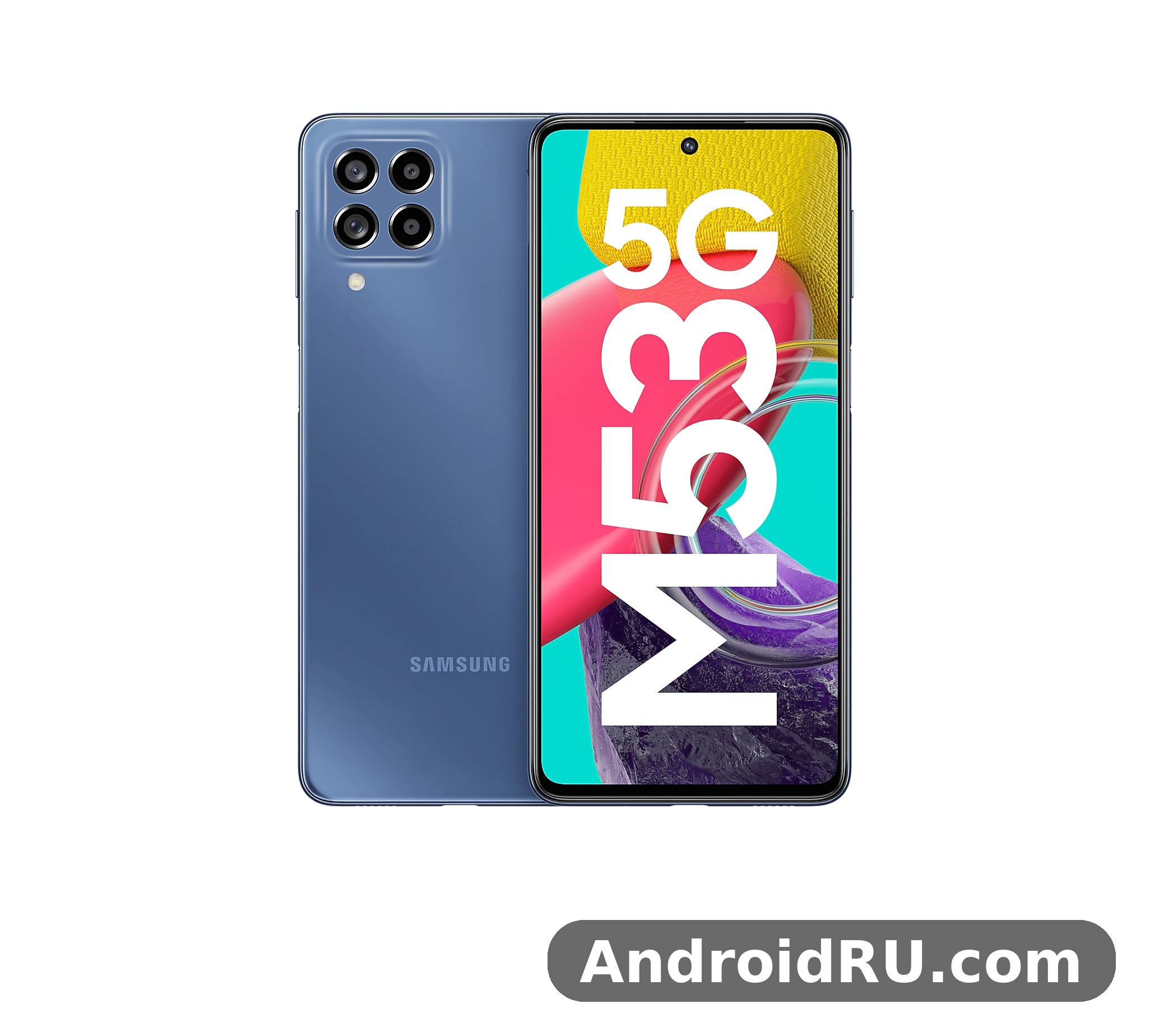
I judged this phone against that everyday routine rather than against benchmark charts. A mid-range phone earns its keep in small moments: the app that opens before you lose patience, the photo that stays sharp when your hand shakes a little, the battery that still has charge left at 11 at night. This merged review works through each of those moments in turn, then lays out the complete hardware sheet, so the hands-on verdict and the numbers sit in one place. If you want the raw figures first, skip ahead to the Full Specifications section, where every display, chipset, camera and battery figure is listed in tables. In a Galaxy M53 5G camera test, daylight shots come out sharp and well exposed, while low light is where the limits show. The Galaxy M53 5G microSD slot takes cards up to 1TB, which is the easy way to add room for photos and offline video.
Who should read this? Anyone comparing Samsung’s M series phones, anyone coming from an older Galaxy A or M series phone, and anyone wondering whether the M53 5G is still worth buying in 2026 or better left on the shelf. Short version: it is a pleasant everyday phone with a very good screen, a reliable battery and a camera that rewards good light, held back by a few familiar mid-range compromises that are easy to live with once you know about them. A Galaxy M53 5G battery life test with mixed use shows it reaches the end of the day, and lighter users often get into a second day. The Galaxy M53 5G headphone jack is absent, so wired headphones need a USB-C adapter or Bluetooth.
Samsung Galaxy M53 5G Design and In-Hand Feel
The first thing you notice about the Galaxy M53 5G is how thin and light it feels for a phone with a 6.7-inch screen and a 5000 mAh battery inside. At 7.4 mm thick and 176 grams, it slips into a jeans pocket without the bulk you might expect from a phone with this much battery. The back panel is plastic with a matte finish that resists fingerprints far better than glossy glass, and the camera lenses sit in four separate rings rather than inside a raised island, which keeps the phone stable when it lies flat on a desk. The Galaxy M53 5G full specifications run from the Dimensity 900 chip and 5,000 mAh battery to the 108MP camera and 6.7-inch Super AMOLED display. The Galaxy M53 5G overheating reports are rare in normal use, and the phone stays comfortable during long video sessions.
Build quality is solid rather than luxurious. The frame is plastic, the back is plastic, and the front is protected by Corning Gorilla Glass 5, which handles everyday scratches from keys and coins reasonably well. There is no official water resistance rating on this model, so it is best kept away from rain and sinks, and a case is worth buying on day one. The buttons sit on the right edge, with the volume rocker above the power key, and the fingerprint sensor is built into that power key, which is fast and reliable once you train the same finger twice. Face unlock is also available, and it works well in good light. The Galaxy M53 5G price and specifications together make it a strong budget option, with the screen and battery leading the list. A Galaxy M53 5G screen protector is a cheap add-on that keeps the display free of scratches.
Is the Galaxy M53 5G Slim and Light for a Big Phone?
Yes, and that is one of its best design traits. Many phones with a 5000 mAh battery feel like a brick, but the M53 5G stays under 180 grams and under 7.5 mm thick, so one-handed use is possible for short tasks and long reading sessions do not tire your wrist. The flat sides and the rounded corners help too: the phone does not dig into your palm the way some sharper-edged rivals do. Put it in a slim case and it still feels like a normal phone rather than an armoured one. For buyers who carry their phone all day, the Galaxy M53 5G slim body and light weight matter more than any single benchmark score, because comfort is the feature you feel on every pickup. In a Galaxy M53 5G vs Galaxy M54 5G comparison, the deciding factors are chipset, battery and camera resolution. The Galaxy M53 5G 128GB price is the one most buyers compare, since that is the standard storage option.
Build Materials, Colours and Fingerprint Sensor
Colour choice is a matter of taste, but the darker finishes hide wear better over a year of use, while the lighter finishes show the matte texture more clearly. Colours offered at launch were blue, green and brown, varying by region. The phone supports two nano-SIM cards, and storage can be expanded with a microSD card up to 1TB in the shared slot, which matters if you pick the 128GB version and shoot a lot of video. At this price, a headphone jack is absent, so wireless earbuds or a USB-C adapter are part of the package if you still listen wired. The side-mounted fingerprint sensor in the power key is the sensible security choice here: it is fast, it works with wet hands better than an in-display sensor, and it doubles as the button you press anyway. How long does Galaxy M53 5G battery last? With mixed use it reaches the end of the day, and lighter users often get into a second day. The Galaxy M53 5G used price depends on condition and battery health, so check the screen and charging port before paying.
6.7-Inch Super AMOLED+ Display With 120Hz Refresh Rate
The display is the single best reason to pick this phone. The 120Hz Super AMOLED+ display produces deep blacks, strong contrast and colours that stay vivid without looking artificial in the Natural screen mode. Text is crisp thanks to the Full HD+ resolution of 1080 by 2408 pixels, and the 120Hz refresh rate makes scrolling through news feeds, photo galleries and long web pages feel smooth in a way that a 60Hz panel simply cannot match. Once you live with 120Hz for a week, going back feels sluggish.
That screen quality is the M53 5G’s main defence against newer rivals. Even in 2026, a 6.7-inch Super AMOLED+ panel with a 120Hz refresh rate, about 394 pixels per inch and Gorilla Glass 5 protection is a genuinely pleasant panel for reading, video and browsing. If you are weighing a newer mid-range phone instead, the Samsung Galaxy M55 5G Review: Display, Cameras and Budget Trade-Offs shows how Samsung’s later M series models trade screen brightness and build against price, and the comparison makes the M53 5G’s value clearer.
How Bright Is the Galaxy M53 5G Screen Outdoors?
Outdoor visibility is good for this class. The panel reaches brightness levels that keep maps and messages readable in direct sunlight, though it is not as searingly bright as a flagship panel on a beach at noon. The automatic brightness sensor reacts quickly when you step from indoors to outdoors, and the high brightness mode kicks in without any menu digging. If you read a lot outside, the Vivid mode adds punch, while the Natural mode is kinder for long reading sessions and keeps skin tones honest in photos. Galaxy M53 5G outdoor screen visibility is good enough for navigation on a sunny day, which is the test that actually matters. A Galaxy M53 5G performance test shows the Dimensity 900 handling everyday apps smoothly, with only heavy games asking for lower settings. A Galaxy M53 5G battery replacement is a repair-shop job, and it is worth pricing before you decide to keep an old phone.
120Hz Scrolling, Video Playback and Everyday Smoothness
The 120Hz refresh rate adapts to what is on screen, dropping lower for still images and video to save battery, then ramping up the moment you start scrolling. Video apps play at their native frame rates, so films and shows look exactly as their makers intended, and the single bottom-firing speaker is loud enough for a video call or a clip in a quiet room, even if it lacks the bass and stereo width of a flagship. The always-on display shows the time and notifications without waking the full screen, and it is easy to schedule it to switch off overnight so it never disturbs your sleep. The Galaxy M53 5G display quality stands out for the price, with strong colours and good outdoor visibility. The Galaxy M53 5G screen replacement cost varies by repair shop, so get two quotes before booking a repair.
Display Settings Worth Changing on Day One
Open Settings, then Display, and set the screen mode to Natural if you edit photos, turn on Eye Comfort Shield for evening reading, and check that Motion Smoothness is set to High so you actually get the 120Hz benefit. Dark mode is worth enabling too: on an AMOLED panel it saves a little battery and makes the phone easier on the eyes at night. These four small changes take two minutes and make the screen feel like it was tuned for you rather than for a shop display. The M53 5G display settings for eye comfort and motion smoothness are the first things I change on any Galaxy phone, and they make the biggest difference for the least effort. The Galaxy M53 5G camera quality at night is decent for the price, with night mode lifting shadows at the cost of some detail. The Galaxy M53 5G best price usually shows up during sales events, so wait for a promotion if you are not in a hurry.
MediaTek Dimensity 900 Performance for Daily Use
Day-to-day speed is where the M53 5G quietly earns its keep. The Dimensity 900 chipset is a 6nm chipset with an octa-core CPU, two fast Cortex-A78 cores at up to 2.4GHz and six efficient Cortex-A55 cores, paired with a Mali-G68 MC4 GPU. In normal use that combination means apps open promptly, switching between a browser, a chat app and the camera does not force reloads, and the interface rarely stutters. It is not a flagship chip, and it does not pretend to be, but for the tasks this phone is designed for, it is fast where it counts.
The 6nm process is the detail behind that everyday smoothness. A smaller process generally means better efficiency, so the chip does the same work with less heat and less battery drain than older 7nm and 8nm designs. Its integrated 5G modem handles sub-6GHz 5G without a separate modem chip, which helps battery life as well. Samsung Galaxy M53 5G performance for daily use is therefore best judged by responsiveness rather than by raw benchmark numbers: the phone feels quick in the hand, and that feeling lasts through a normal day. Should I buy Galaxy M53 5G or wait for a sale? If you want a 108MP camera, a 120Hz AMOLED display and 5G, it is an easy recommendation. The Galaxy M53 5G weight feels balanced in the hand for a phone with a large screen, and a case adds only a little.
App Launching, Multitasking and 6GB or 8GB RAM in Daily Use
With 6GB or 8GB of RAM depending on the version you buy, the phone keeps a good number of apps in memory without aggressively closing them, so returning to a half-written message or a paused video does not mean starting over. The 8GB version is the safer pick if you keep many apps open, while the 6GB version is fine for lighter users. Split-screen multitasking works well on the large display: a video call on top and notes below is genuinely usable, and pop-up view lets a chat window float over a map while you navigate. Samsung’s RAM Plus feature can extend memory virtually using storage, but the physical RAM is enough for most people, and the default setting is the sensible one. This Galaxy M53 5G honest review keeps the trade-offs in view: the screen and battery impress, while 25W charging is slow and there is no official IP rating.
Is the Galaxy M53 5G Good for Gaming?
For casual and mid-weight games, yes. Titles like puzzle games, racing games at balanced settings and popular battle royale games at medium graphics run smoothly, and the large screen makes on-screen controls comfortable. Demanding games at their highest graphics settings will push the Dimensity 900 harder: frame rates dip, and the phone warms up after twenty minutes of sustained play. Dropping one graphics preset restores smooth play, and the 120Hz display keeps the experience feeling responsive even at medium settings. Galaxy M53 5G gaming performance is confident rather than extreme, and that is the right expectation for this price. The Galaxy M53 5G charging time from empty is an hour and a half with a 25W charger, so overnight charging is the easy routine.
Heat, Throttling and Sustained Performance After Long Sessions
After a long gaming session or a 4K video export, the upper back of the phone gets warm but never uncomfortably hot, and performance settles to a steady level rather than collapsing. That is the behaviour you want: a phone that slows a little to stay cool is far better than one that races, overheats and stutters. For everyday use, heat is a non-issue; the chip only works hard when you ask it to, and it recovers quickly once the load is gone. If you record long 4K videos or play for an hour, expect the phone to feel warm and to manage its speed to stay cool. A Galaxy M53 5G gaming test shows casual games running smoothly, while demanding titles need medium settings to stay stable.
108MP Main Camera: Photo Quality in Real Life
The camera system is built around a 108MP main camera, joined by an 8MP ultrawide camera, a 2MP depth camera and a 2MP macro camera, with a 32MP front camera for selfies and video calls. The big megapixel number is not the whole story: the phone combines pixels by default to produce brighter 12MP photos, and the full 108MP mode is there when you want maximum detail for cropping. Samsung’s image processing leans toward vivid colours and bright exposures, which most people like straight out of the camera, even if purists sometimes find the greens a touch strong.
The main camera uses a 108MP sensor with an f/1.8 aperture and autofocus, and there is no optical image stabilisation, so Night mode and a steady hand matter in low light. That missing stabilisation is the camera’s honest weakness, and it shapes how you should use the phone: brace it against a surface for night shots, and use the default pixel-binned output for everyday photos rather than the full 108MP mode, which is slower and noisier in dim light. The Galaxy M53 5G unboxing covers the phone, a USB-C cable and the paperwork, so check what your retailer includes before you buy.
Daylight Photos, Detail and Colour From the 108MP Camera
In good light the main camera produces detailed, punchy photos with reliable autofocus and sensible HDR that holds both sky and shadow. The full 108MP mode captures extra detail for cropping, but the default pixel-binned output is the better everyday choice: smaller files, faster processing and cleaner results in most conditions. Portrait mode uses the depth camera to separate subject from background convincingly for people and pets, and the 2x digital zoom from the main sensor is usable for social posts, though it cannot match a dedicated telephoto lens. Galaxy M53 5G daylight photo quality is the camera’s strongest suit, and it is where the 108MP sensor earns its headline. A Galaxy M53 5G battery drain overnight fix usually starts with battery saver and a check for apps running in the background.
Low Light, Night Mode and Indoor Photography
Low light is where the large sensor and pixel binning earn their keep. Night mode takes a few seconds and merges several frames, and the results are bright, usable photos of streets, cafes and living rooms that a phone with a smaller sensor would smear. Noise is visible if you zoom right in, and moving subjects still blur, which is true of every phone in this class. Indoors, the camera handles warm artificial light well, keeping skin tones natural rather than orange, and food photos come out appetising without heavy editing. Galaxy M53 5G low light and night mode photos are good for the price, provided you hold the phone steady, since there is no optical stabilisation to save a shaky shot. For a Galaxy M53 5G fingerprint sensor not working problem, re-register the same finger twice and clean the sensor area first.
Ultrawide, Macro and the 32MP Selfie Camera
The 8MP ultrawide is handy for landscapes, group shots and tight interiors, with a noticeable but acceptable drop in detail compared with the main camera. Edge distortion is controlled, and colours stay close to the main sensor, so switching lenses does not change the look of a photo set. The 2MP macro camera is the weakest part of the system: it needs bright light and a steady hand, and most people will get better close-ups by cropping a main-camera shot. The depth camera helps portrait mode rather than taking photos itself. The 32MP front camera takes sharp selfies with natural skin tones, and video calls look clear even in mediocre indoor light. Galaxy M53 5G selfie camera quality is one of the stronger parts of the phone, and it is a genuine reason to pick this model if you spend a lot of time on calls. A Galaxy M53 5G screen flickering issue is rare, and a restart or a software update usually clears it.
Video Recording, Stabilisation and 4K Capture
Video recording reaches 4K at 30 frames per second from the main camera and the front camera, with electronic stabilisation for smooth walking footage. The results are steady and detailed, and the phone switches between lenses during recording without jarring jumps in exposure. For a family video or a short clip for social media, this is more than enough. Serious video makers will miss 4K at 60 frames per second and optical stabilisation on the main camera, but at this price that omission is expected rather than surprising. Slow motion and hyperlapse modes are available for creative clips, and 1080p recording is available at 30 or 60 frames per second. Wondering how to take a screenshot on Galaxy M53 5G? Press power and volume down together, or use a palm swipe.
5000 mAh Battery Life and 25W Fast Charging
Battery life is the second-best reason to buy this phone. The 5000 mAh battery with 25W wired charging is a combination that covers long days and steady top-ups. The efficient 6nm chipset, the adaptive 120Hz display and the large cell work together, and in my use the phone regularly ended the day with a third of its charge left after heavy messaging, navigation, streaming and photography. Lighter users will comfortably reach a second day, and the battery care settings can cap charging at 85 percent to slow long-term wear if you plan to keep the phone for years.
That endurance is the M series promise, and the M53 5G keeps it. If you are comparing battery-first phones across generations, the Samsung Galaxy M51 Review: Everyday Speed, Cameras and Value is worth a look, since the older M51 set the template for big-battery Galaxy phones and shows how the M53 5G’s balance of slimness and endurance compares with the model that came before it.
Real Battery Life: Screen Time, Streaming and Standby Drain
Expect around seven hours of screen-on time with mixed use, including an hour or two of video streaming, which is strong for a phone of this size. Standby drain overnight is minimal, usually one or two percent, thanks to Samsung’s power management putting unused apps to sleep. The heaviest drains are 5G in weak signal areas, long navigation sessions with the screen at full brightness, and extended gaming, so a day of travel with maps running will still need a top-up by evening. Samsung Galaxy M53 5G battery life in real use is therefore about seven hours of screen-on time on a heavy day, and a second day is realistic for light users. This is how to factory reset Galaxy M53 5G safely: back up first, then use Settings, General management, Reset.
How Fast Is 25W Charging on the Galaxy M53 5G?
With a compatible 25W USB-C charger, the phone charges from empty to about half in roughly half an hour, and a full charge takes around an hour and a half, though exact times vary with temperature and charger. Note that Samsung does not include a charger in the box, so you need your own USB-C Power Delivery charger to get the full 25W speed; a basic 15W charger will work but takes far longer. There is no wireless charging, which is normal for this price, and the USB-C port also handles data transfer and audio output. Galaxy M53 5G 25W charging time is moderate by current standards, so overnight charging or a long desk session is the most practical routine. Does Galaxy M53 5G have a headphone jack? No, audio goes through USB-C or Bluetooth.
Battery Care Settings and Long-Term Battery Health
Open Settings, then Battery and device care, and turn on battery protection so charging stops at 85 percent. That single setting slows long-term wear if you plan to keep the phone for years, and the phone still lasts a full day at 85 percent for most users. Avoid leaving the phone charging overnight in a hot room, and do not use a damaged cable, since both shorten battery life. Checking the battery usage breakdown in settings also shows exactly which app is draining power, so you can restrict it before it becomes a daily problem. Does Galaxy M53 5G support microSD card expansion? Yes, the slot takes cards up to 1TB.
One UI Software, Updates and Everyday Features
The Galaxy M53 5G launched with Android 12 and One UI 4.1, and software is one of Samsung’s strongest cards in this price range. One UI 4.1 brings a calm quick panel, smooth animations, better lock screen customisation and a polished notification shade. The interface is consistent, the settings menus are sensibly organised, and Samsung’s own apps for gallery, notes and health are genuinely useful rather than filler. Later software updates brought newer One UI versions to the phone, so the experience today is newer than the version it shipped with, and you should install all available updates after setting the phone up. The Galaxy M53 5G best settings for battery life are adaptive brightness, a 60Hz cap when you need it, and battery saver overnight.
Galaxy M53 5G software experience in daily use is calm and predictable. Notifications are grouped sensibly, the quick settings panel is customisable, and the keyboard and system animations stay consistent. Samsung’s update record for the M series was generous for its generation, and that support window changes the value calculation for a used or discounted phone: a phone that keeps receiving security patches stays safe to use for longer. The Galaxy M53 5G hidden features include one-handed mode, edge panels and routines that automate daily tasks.
Samsung Software Updates and Long-Term Support
Samsung gave the M series a generous update policy for its generation, and the M53 5G received major Android version upgrades after launch, moving beyond the Android 12 it shipped with. Before buying a used M53 5G, check the software update screen to confirm it is on the latest available version, and check the current status in your region, since update timing can vary by market. Buyers in 2026 should check the security patch date in settings, confirm the phone is not tied to a previous owner’s account, and treat the remaining update window as part of the price: a cheaper phone with no updates left is not the same bargain as a cheaper phone with patches still arriving. A Galaxy M53 5G overheating while gaming fix is to lower the graphics settings and take the case off during long sessions.
Useful One UI Features: Modes, Routines and Security
Modes and Routines deserve a mention because they quietly improve daily life: a sleep routine that silences notifications and dims the screen, a driving routine that reads messages aloud, a work routine that limits distractions during office hours. Samsung Knox security runs underneath, with Secure Folder for private files and apps, and the phone supports Samsung Wallet for payments and passes where available. Bloat is present but manageable: a handful of preinstalled apps can be uninstalled or disabled in a few minutes. Galaxy M53 5G One UI features like Modes and Routines, Secure Folder and Edge panels are the kind of additions that matter more over months of use than any single headline feature. A Galaxy M53 5G camera blurry photos fix is to clean the lens, tap to focus, and hold the phone steady for a second longer.
Full Specifications of the Samsung Galaxy M53 5G
This section is the complete hardware reference for the Galaxy M53 5G, with every figure taken from the full specification sheet. Where the hands-on review above and the specification sheet disagreed, the specification sheet wins here: these are the numbers to use when you compare versions, check compatibility before you buy, or choose accessories like a charger or a case. Use this guide before buying a new or used M53 5G, before choosing between the 6GB and 8GB versions, and before deciding whether the 128GB or 256GB storage version fits your photo and video habits. The Galaxy M53 5G software update problems are uncommon, and a restart after installing usually clears a stuck update.
Display Specifications
The display is the strongest part of the hardware. The 6.7-inch Super AMOLED+ display with 120Hz refresh rate is the same class of panel Samsung puts in far more expensive phones, and it defines how the phone feels every time you pick it up. Super AMOLED+ means the pixels produce their own light, so blacks are truly black, contrast is high, and colours are vivid. The 120Hz refresh rate means the screen redraws twice as often as a standard 60Hz panel, so scrolling and animations look smooth. To learn how to turn off 5G on Galaxy M53 5G, open Settings, Connections, Mobile networks, and pick 4G.
| Display feature | Specification |
|---|---|
| Size | 6.7 inches |
| Panel type | Super AMOLED+ |
| Resolution | 1080 by 2408 pixels, Full HD+ |
| Refresh rate | 120Hz |
| Aspect ratio | 20:9 |
| Pixel density | About 394 pixels per inch |
| Protection | Corning Gorilla Glass 5 |
| Always-on display | Yes |
Screen Size, Resolution and Pixel Density Explained
The screen measures 6.7 inches diagonally, with a resolution of 1080 by 2408 pixels and an aspect ratio of 20:9. At about 394 pixels per inch, text looks crisp and individual pixels are invisible at normal viewing distance. The tall 20:9 shape suits video, reading and split-screen multitasking, and the thin bezels keep the body manageable despite the large panel. Brightness is strong enough for outdoor use in sunlight, with an automatic brightness sensor that reacts quickly when you step outside, and the always-on display shows the time, date and notification icons without waking the full screen. A Galaxy M53 5G slow charging fix is to use a 25W USB-C PD charger and a good cable, since old low-wattage chargers charge slowly.
Chipset, RAM and Storage Specifications
The Galaxy M53 5G runs on the MediaTek Dimensity 900, a 6nm chipset built for upper mid-range phones. It pairs two fast performance cores with six efficient cores, and its integrated 5G modem handles sub-6GHz 5G without a separate modem chip, which helps battery life. Is Galaxy M53 5G good for students? With a 108MP camera and a 120Hz display and a price that fits a student budget, it is a sensible pick.
| Chipset feature | Specification |
|---|---|
| Chipset | MediaTek Dimensity 900 (MT6877) |
| Process | 6nm |
| CPU | Octa-core: 2x Cortex-A78 at 2.4GHz + 6x Cortex-A55 at 2.0GHz |
| GPU | Arm Mali-G68 MC4 |
| 5G modem | Integrated sub-6GHz 5G |
| RAM options | 6GB or 8GB |
| Internal storage | 128GB or 256GB |
| Expandable storage | microSD up to 1TB (shared SIM slot) |
| RAM Plus | Virtual RAM using storage |
The two Cortex-A78 cores run at up to 2.4GHz and handle demanding tasks like app launches, photo processing and games, while the six Cortex-A55 cores run at up to 2.0GHz and handle background work efficiently. The Mali-G68 MC4 GPU is a mid-range graphics unit that handles casual and mid-weight games well at medium settings, and it drives the 120Hz display smoothly in everyday apps. Galaxy M53 5G RAM 6GB vs 8GB is a simple choice: the 8GB version is the safer pick if you keep many apps open, use split-screen multitasking often, or plan to keep the phone for three years or more, while the 6GB version is fine for lighter users and costs less. Galaxy M53 5G storage 128GB vs 256GB follows the same logic: the 256GB version is the better pick if you shoot a lot of 4K video, download films for offline viewing, or keep large games installed. Use a fast microSD card, rated UHS-I U3 or better, and put photos, video and music on it while keeping apps on the internal storage, since internal storage is faster for apps. The Galaxy M53 5G specs cover the essentials: Dimensity 900, 5,000 mAh battery, 108MP main camera and a 6.7-inch Super AMOLED display.
Camera Specifications in Full
The camera system is built around a 108MP main sensor, and the full specification sheet shows four rear cameras plus a high-resolution front camera. The 108MP main camera with pixel binning combines nine pixels into one by default, producing brighter 12MP photos, while the full 108MP mode is available when you want maximum detail for cropping. There is no optical image stabilisation on the main camera, so Night mode and a steady hand matter in low light. The Samsung Galaxy M53 5G price varies by region and storage option, so compare a few sellers before you buy.
| Camera | Specification |
|---|---|
| Main camera | 108MP, f/1.8, wide, autofocus, no OIS |
| Ultrawide camera | 8MP, f/2.2, 123-degree field of view |
| Depth camera | 2MP, f/2.4 |
| Macro camera | 2MP, f/2.4 |
| Front camera | 32MP, f/2.2, wide |
| Rear video | 4K at 30 frames per second, 1080p at 30 or 60 frames per second |
| Front video | 4K at 30 frames per second, 1080p at 30 frames per second |
| Features | Night mode, portrait mode, panorama, slow motion, hyperlapse |
What the 108MP Camera Numbers Mean in Practice
The 8MP ultrawide camera covers a 123-degree field of view, which is handy for landscapes, group shots and tight interiors, with a noticeable but acceptable drop in detail compared with the main camera. The 2MP macro camera is for close-ups in bright light, though most people will get better close-ups by cropping a main-camera shot. The 2MP depth camera does not take photos itself; it measures distance so portrait mode can separate the subject from the background. The 32MP front camera takes sharp selfies with natural skin tones and handles video calls cleanly even in mediocre indoor light, and it records video at up to 4K at 30 frames per second. The Galaxy M53 5G camera setup is built around a 108MP main sensor and an 8MP ultrawide beside it.
Battery, Design, Connectivity and Software Specifications
The battery is a 5000 mAh lithium-ion cell, which is large for a phone this slim, and charging runs at up to 25W over USB-C with Power Delivery. There is no wireless charging and no reverse charging, and no charger is included in the box, so the charger is a separate purchase if you do not already own a compatible one. The Galaxy M53 5G is one of the slimmest phones in its class, and the dimensions below explain why it feels light in the hand despite the large screen and battery. The Galaxy M53 5G display is a 6.7-inch Super AMOLED panel with a 120Hz refresh rate, which keeps scrolling smooth.
| Feature | Specification |
|---|---|
| Battery capacity | 5000 mAh, lithium-ion, non-removable |
| Wired charging | 25W fast charging, USB-C Power Delivery |
| Wireless charging | No |
| Charger in the box | No |
| Dimensions | 164.7 by 77.0 by 7.4 mm |
| Weight | 176 grams |
| Build | Plastic frame and back, glass front |
| Front protection | Corning Gorilla Glass 5 |
| Water resistance | No official IP rating |
| Colours | Blue, Green, Brown (varies by region) |
| Fingerprint sensor | Side-mounted, in the power key |
| SIM | Dual nano-SIM, hybrid slot with microSD |
| Operating system at launch | Android 12 with One UI 4.1 |
| 5G | Sub-6GHz 5G, dual SIM 5G |
| Wi-Fi | Wi-Fi 6 (802.11ax), dual band, Wi-Fi Direct, hotspot |
| Bluetooth | 5.2, A2DP, LE |
| NFC | Yes |
| USB | USB-C 2.0, OTG |
| Positioning | GPS, GLONASS, BDS, GALILEO |
| Sensors | Fingerprint, accelerometer, gyroscope, proximity, compass |
| Headphone jack | No |
| Security | Samsung Knox, Secure Folder |
Connectivity covers sub-6GHz 5G, Wi-Fi 6, Bluetooth 5.2 and NFC, and the sensor set covers the essentials for navigation, fitness and security. Band support varies by region, so check the configuration for your market before buying an imported unit, since a phone from another region may miss a band your carrier uses. The hybrid slot takes two nano-SIM cards, or one nano-SIM plus a microSD card. To set it up, open Settings, then Connections, then SIM manager, and choose which SIM handles mobile data and calls. A Galaxy M53 5G vs Galaxy M54 5G comparison comes down to chipset, battery and camera resolution.
Samsung Galaxy M53 5G Compared With the M54 5G and M52 5G: Pros and Cons
The closest rivals to this phone wear the same badge. The Samsung Galaxy M53 5G vs Galaxy M52 5G question comes down to camera resolution and price: the M53 5G has the 108MP camera and the slimmer launch price, while the M52 5G is cheaper now but runs the Snapdragon 778G and a 64MP main camera. The Galaxy M54 5G is the newer model, with a larger 6000 mAh battery and a newer chipset. The M53 5G sits between them: a higher-resolution 108MP camera than the M52, a slimmer body than the M54, and a price that has fallen since launch. If you value the biggest battery, the M54 wins. If you value the slimmest body and the lowest price, the M53 5G is the smarter buy. The Galaxy M53 5G charging setup tops out at 25W, so a full charge takes a while but overnight charging covers it.
Read the two closest comparisons in full before you decide. The Samsung Galaxy M54 5G Review: App Performance and Camera Quality covers the newer successor with its bigger battery, while the Samsung Galaxy M52 5G Review: Build Quality, Battery and Daily Use covers the older model that the M53 5G replaced, and together they show exactly what changed between generations.
| Feature | Galaxy M53 5G | Galaxy M54 5G | Galaxy M52 5G |
|---|---|---|---|
| Display | 6.7-inch Super AMOLED+, 120Hz | 6.7-inch Super AMOLED+, 120Hz | 6.7-inch Super AMOLED+, 120Hz |
| Chipset | Dimensity 900 | Exynos 1380 | Snapdragon 778G |
| RAM | 6GB or 8GB | 8GB | 6GB or 8GB |
| Main camera | 108MP | 108MP with OIS | 64MP with OIS |
| Battery and charging | 5000 mAh, 25W | 6000 mAh, 25W | 5000 mAh, 25W |
| Thickness and weight | 7.4 mm, 176 g | 8.4 mm, 199 g | 7.4 mm, 173 g |
| Positioning | Slim value with 108MP camera | Big battery successor | Older value option |
The table makes the trade-off plain: the M53 5G matches its siblings on screen and charging, and its main weakness is the missing optical stabilisation on the main camera and the smaller battery than the M54. For most buyers those are acceptable compromises at the price, and the slim body is the feature that will still matter every time you pick the phone up. The Galaxy M53 5G release date was April 2022, and the phone has been on sale since then.
Pros of the Galaxy M53 5G for Everyday Buyers
Excellent 120Hz AMOLED display: bright, smooth and vivid, the best screen in its price band. Long battery life: the 5000 mAh cell comfortably lasts a full heavy day and often a second morning. High-resolution 108MP camera: detailed daylight photos and a sharp 32MP selfie camera. Slim and light body: 7.4 mm and 176 grams make a big phone easy to carry all day. Expandable storage: a microSD slot up to 1TB keeps the 128GB version useful for years. Fast and efficient chipset: the Dimensity 900 keeps apps moving without the stutters that cheaper mid-range chips show after a year of use. The Galaxy M53 5G price in India varies by seller and variant, so check a few listings before ordering.
Cons of the Galaxy M53 5G You Should Know Before Buying
No optical stabilisation: the 108MP camera lacks OIS, so low-light shots need a steady hand. Plastic frame and back: solid but less premium to hold than metal-framed rivals. Weak macro camera: the 2MP macro lens is rarely worth using over a cropped main-camera shot. No charger in the box: the full 25W speed needs a separate USB-C Power Delivery charger. No wireless charging and no water resistance rating: expected at this price, but still a convenience some buyers will miss. No headphone jack: wired listening needs an adapter or USB-C earphones. The Galaxy M53 5G benchmark score reflects a mid-range chip: quick in everyday apps, modest in heavy games.
Samsung Galaxy M53 5G Review FAQ
Is the Galaxy M53 5G worth buying in 2026?
For buyers who want a large smooth display, long battery life and a slim body at a low price, yes, especially at a discount or as a used phone in good condition. It is not the best choice for heavy gamers chasing maximum frame rates, for anyone who needs an official water resistance rating, or for anyone who wants the longest remaining update window, but as an everyday phone it delivers where it matters. Galaxy M53 5G price in 2026 varies by seller and condition, so check the current price for a new or used unit in your country rather than trusting an old listing. The Galaxy M53 5G colours range from understated dark shades to lighter finishes, so pick the one that hides smudges best for you.
Does the Galaxy M53 5G support 5G, Wi-Fi 6 and NFC?
Yes. The phone supports sub-6GHz 5G, Wi-Fi 6, Bluetooth 5.2 and NFC for contactless payments where Samsung Wallet or Google Wallet is available. It also supports dual nano-SIM, GPS with multiple satellite systems, and a USB-C port for charging, audio and data. Band support can vary by market, so check the configuration for your region before buying an imported unit. A Galaxy M53 5G case is worth buying from day one, since it protects the camera lenses and the corners from drops.
How long does the Galaxy M53 5G battery last?
With mixed use, expect around seven hours of screen-on time from the 5000 mAh battery, including an hour or two of video streaming. Lighter users will comfortably reach a second day, and standby drain overnight is usually only one or two percent. Heavy 5G use in weak signal areas, long navigation sessions and extended gaming drain the battery fastest, so a day of travel with maps running will still need a top-up by evening. The Galaxy M53 5G NFC supports contactless payments in markets where the feature is included.
Is the Galaxy M53 5G good for photography and video calls?
For photography in good light, yes: the 108MP main camera takes detailed daylight photos, and the 32MP front camera handles selfies and video calls cleanly. Video reaches 4K at 30 frames per second with electronic stabilisation. The ultrawide is useful for landscapes and groups, while the macro camera is the one part of the system most people can ignore, and low-light shots benefit from Night mode and a steady hand. The Galaxy M53 5G dual SIM support covers two nano-SIM cards in most regions.
Final Verdict: Who Should Buy the Samsung Galaxy M53 5G?
The Galaxy M53 5G is a phone that understands its job. It gives you a superb screen, a battery that outlasts your day, a camera you can trust in good light, and a slim body that is easy to carry. It asks you to accept a plastic body, no water resistance rating, no charger in the box and no optical stabilisation, and for most buyers that is a fair exchange at a discounted price. Students, commuters, parents and anyone upgrading from a three-year-old Galaxy will feel the difference from the first day. The Galaxy M53 5G water resistant claims are limited: there is no official IP rating, so keep it away from water.
If you are still comparing options, the Samsung Galaxy M56 5G Review: Everyday Speed, Cameras and Value shows what a newer M series phone offers for everyday speed and cameras, and it is worth reading before you decide. Then, if the M53 5G is your pick, buy the 8GB and 256GB version if you shoot a lot of video, pick up a 25W charger and a case on the same order, and set the display to High motion smoothness on day one. That is the whole setup, and the phone takes care of the rest.

