

Samsung Galaxy M55 5G Review: Display, Cameras and Budget Trade-Offs
The Samsung Galaxy M55 5G arrived in March 2024 as a mid-range phone that tries to give buyers the parts of a flagship they notice every day, without charging a flagship price. I spent time with the phone as a daily driver, carrying it through workdays, commutes, photo walks and long evenings of video, and the first thing that stood out was how much of the experience is shaped by its screen. A big 6.7-inch Super AMOLED+ panel with a 120Hz refresh rate sets the tone for everything else, from scrolling through feeds to watching films in bed. That said, this phone is not trying to be perfect at everything, and the honest story of the M55 5G is about where Samsung spent the money and where it held back. Many buyers ask, is Galaxy M55 5G worth buying? For buyers who want a 120Hz AMOLED display, 45W charging and a 50MP front camera, the answer is yes. The Galaxy M55 5G release date was March 2024, and the phone has been on sale since then.
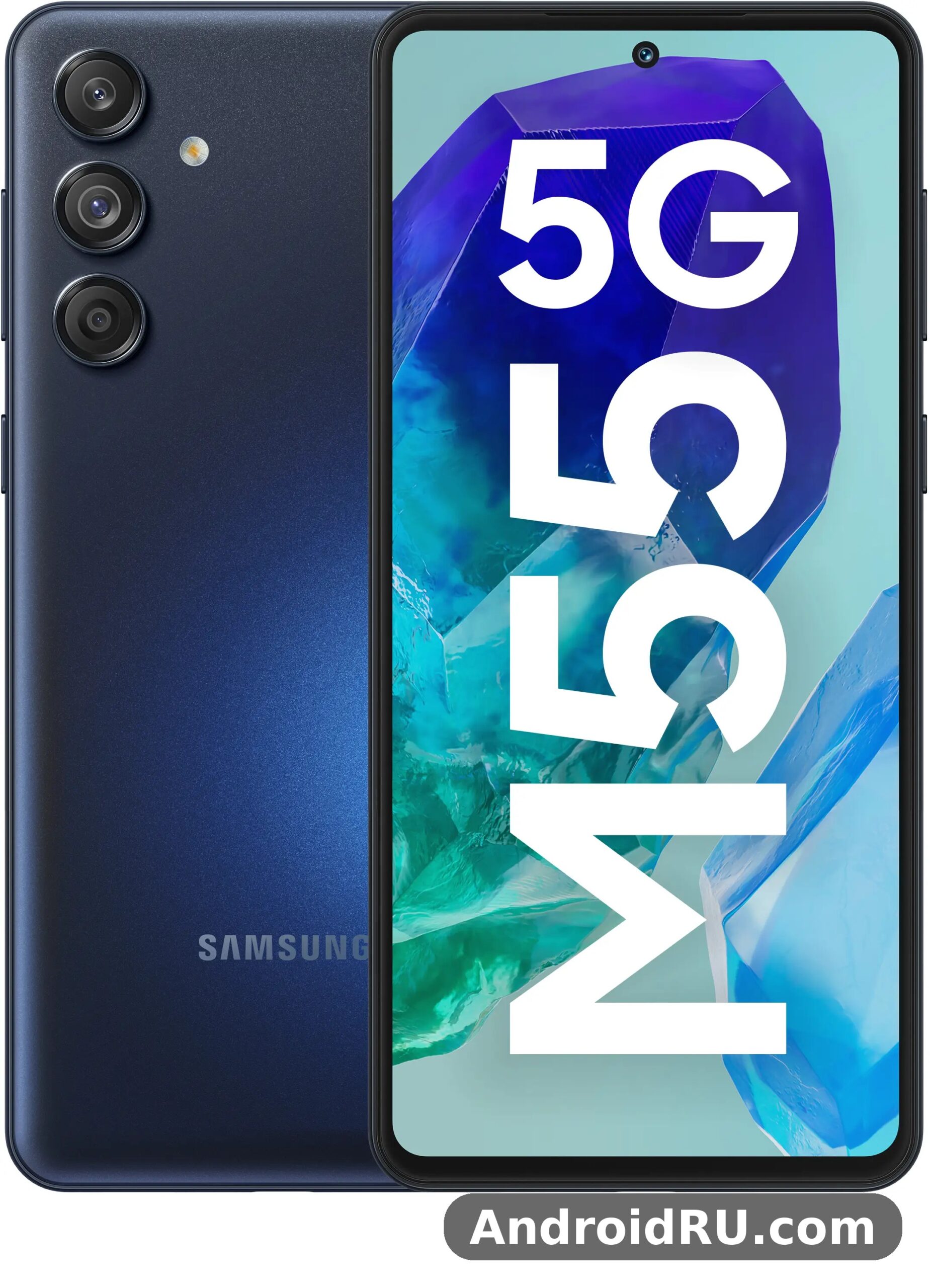
For readers who want the numbers first, the headline facts are easy to list: a Snapdragon 7 Gen 1 chipset, 8GB of RAM, 128GB or 256GB of storage, a 50MP main camera with optical image stabilisation, a 50MP front camera, a 5000mAh battery and 45W wired charging, all running One UI 6.1 on Android 14. This merged review and specification guide looks at how those facts feel in real use, how the cameras behave in daylight and at night, how long the battery really lasts, and which trade-offs matter most if you plan to keep the phone for two or three years. The full specification tables further down the page list every detail, from the display resolution to the network bands, so you can check a number and then read what it means in practice. In a Galaxy M55 5G camera test, daylight shots come out sharp and well exposed, while low light is where the limits show. The Galaxy M55 5G price in India varies by seller and variant, so check a few listings before ordering.
Is the Samsung Galaxy M55 5G good for everyday use in 2026, and is it still worth buying now that newer mid-range phones have arrived? Those are the questions this review answers. The short version is that the M55 5G suits people who watch a lot of video, take a lot of selfies, want a large bright screen and a battery that survives a full day, and who do not need the fastest gaming chip or a premium metal frame. If you are a heavy gamer who plays demanding titles for hours, or a photographer who needs a telephoto lens, the trade-offs below will matter more to you. For everyone else, the balance is easier to live with than the spec sheet alone suggests. A Galaxy M55 5G battery life test with mixed use shows it reaches the end of the day, and lighter users often get into a second day. The Galaxy M55 5G benchmark score reflects a mid-range chip: quick in everyday apps, modest in heavy games.
Samsung Galaxy M55 5G display quality in daily use
The display is the best reason to buy this phone. The 6.7-inch Super AMOLED+ panel is bright, colourful and smooth, and it makes the phone feel more expensive than it is. Colours look rich without turning cartoonish in the default Vivid mode, and switching to Natural mode calms them down for photo editing and reading. Text stays sharp, icons look clean, and the 120Hz Super AMOLED+ display makes scrolling through social feeds, web pages and the app drawer feel fluid. After a few days, going back to a 60Hz phone feels sluggish by comparison, which is the clearest sign that the high refresh rate is doing real work here.
Outdoors, the screen holds up well in bright sunlight. I could read messages, check maps and frame photos on sunny afternoons without cupping a hand over the display, and the automatic brightness steps up quickly when you walk out of a shaded room. At night, the panel goes dim enough for comfortable reading in a dark room, and the always-on display shows the time and notifications without waking the whole screen. Video looks strong too: streaming apps play in crisp detail, dark scenes keep their depth, and the large size makes the M55 5G a natural choice as a portable video player on trains and flights. The Galaxy M55 5G full specifications run from the Snapdragon 7 Gen 1 chip and 5,000 mAh battery to the 50MP camera and 6.7-inch Super AMOLED display. The Galaxy M55 5G colours range from understated dark shades to lighter finishes, so pick the one that hides smudges best for you.
Is the Samsung Galaxy M55 5G screen good for watching videos and reading? Yes, and this is where the phone earns its keep. The combination of a large panel, deep blacks and smooth motion suits long video sessions, and the stereo speakers are loud enough for a quiet room, though they lack the bass of a flagship. Samsung Galaxy M55 5G stereo speakers quality is good for dialogue and casual video, and headphones or a small speaker will sound better for music, as they do on almost every phone in this class. For reading, the large screen fits more text per page, and the eye comfort shield in One UI warms the colour temperature in the evening so long reading sessions strain your eyes less. If you read a lot of ebooks or news on your phone, the M55 5G is a comfortable pick, and the newer Samsung Galaxy M56 5G Review: Everyday Speed, Cameras and Value shows how Samsung kept the same big-screen idea going in the next model up the range.
How the 120Hz refresh rate feels when scrolling and gaming
Samsung Galaxy M55 5G 120Hz refresh rate battery impact is modest in everyday use, because the Adaptive setting drops the rate when the screen is still and raises it only when you scroll or play. Open Settings, then Display, and you will find Motion smoothness with Standard and Adaptive choices, plus brightness controls and the eye comfort shield. Adaptive keeps the 120Hz refresh rate for scrolling and drops it when the screen is still, which helps battery life. I left it on Adaptive for the whole test period and never felt the need to change it. If battery life matters more than smoothness on a long day, Standard locks the screen to 60Hz and stretches the charge a little further, though the difference is modest in practice. In games, the smooth panel makes casual titles feel responsive, and the large screen gives you more room for on-screen controls without covering the action. The Galaxy M55 5G price and specifications together make it a strong budget option, with the screen and battery leading the list. A Galaxy M55 5G case is worth buying from day one, since it protects the camera lenses and the corners from drops.
Samsung Galaxy M55 5G screen modes and eye comfort settings
Samsung Galaxy M55 5G screen modes and eye comfort settings are worth setting up on the first day, since a small change here shapes how the screen looks every time you pick the phone up. Vivid mode suits video and games, Natural mode suits photos and reading, and the eye comfort shield warms the colours after sunset. The always-on display can show the clock, the date, battery level and notification icons, and you can pick a simple clock style that sips power rather than a busy animated one. The punch-hole cutout for the front camera sits in the centre of the top edge and is easy to ignore after a day, and the thin bezels keep the phone from feeling oversized for its screen. Brightness steps are smooth rather than jumpy, so the screen rarely surprises you when you move between rooms. In a Galaxy M55 5G vs Galaxy M56 5G comparison, the deciding factors are chipset, charging speed and front camera. The Galaxy M55 5G NFC supports contactless payments in markets where the feature is included.
Samsung Galaxy M55 5G cameras: 50MP OIS main camera and selfie results
The camera system is the second big selling point, and it is built around a 50MP main camera with optical image stabilisation, an 8MP ultrawide camera and a 2MP macro camera, plus a 50MP front camera that is unusually strong for this price band. In daylight, the main camera takes sharp, well-exposed photos with natural colours and plenty of detail for cropping and sharing. Optical image stabilisation helps in two places: it steadies handheld shots in dim light, and it smooths video when you walk while recording. I took photos on streets, in markets and in parks, and the keeper rate in good light was high, with only a few shots needing a second try because of a moving subject. The 50MP main camera with optical image stabilisation is the hardware that carries the whole camera story, and it is the reason the M55 5G punches above its price in daylight photography.
Samsung Galaxy M55 5G ultrawide camera quality is useful rather than outstanding. The 8MP ultrawide is handy for landscapes, large buildings and group photos, though it is softer at the edges than the main camera and it loses detail faster as light fades. That is normal for an 8MP ultrawide in this class, and the sensible habit is to use the main camera whenever the scene fits in its frame, and to reach for the ultrawide only when the wider view is worth the trade. Samsung Galaxy M55 5G macro camera 2MP shots need bright light and a steady hand, and the results are fine for a quick close-up of a flower or a texture, but the low resolution and fussy focus distance mean most people will use it rarely. There is no telephoto lens, so zoom relies on digital cropping from the main sensor, which loses detail at longer distances. How long does Galaxy M55 5G battery last? With mixed use it reaches the end of the day, and lighter users often get into a second day. The Galaxy M55 5G dual SIM support covers two nano-SIM cards in most regions.
Is the Samsung Galaxy M55 5G selfie camera good for video calls and portraits? The 50MP front camera is a genuine highlight, and Samsung Galaxy M55 5G selfie camera for video calls is one of the strongest reasons to pick this phone over rivals with a basic front sensor. Selfies are detailed, skin tones look natural in good light, and portrait mode separates the subject from the background cleanly in most cases. Video calls look sharp, and the front camera records video that is good enough for vlogging and short clips. If you take a lot of selfies or you are on video calls all day for work or study, this front camera is a real advantage over rivals that still ship a basic front sensor. The older Samsung Galaxy M54 5G Review: App Performance and Camera Quality shows the trade Samsung made one generation earlier, with a higher-resolution rear camera and a more modest 32MP front camera, while the M55 5G flips that balance towards the selfie shooter.
Samsung Galaxy M55 5G camera quality in low light and at night
Samsung Galaxy M55 5G camera quality in low light is better than the price suggests, thanks to the stabilised main sensor and multi-frame night mode. At night, the main camera holds up well for a mid-range phone. Night mode brightens shadows, keeps street lights from blowing out completely, and preserves enough detail for social sharing. Photos are not as clean as a flagship night shot, and fine textures can look smoothed, but the results are usable and often pleasing. The ultrawide struggles more after dark, so I switched back to the main camera for night scenes and cropped in when I needed a wider feel. Samsung Galaxy M55 5G night mode photos reward patience: hold the phone still for a second longer in night mode and let the capture finish before you move, because the multi-frame processing needs that time. A Galaxy M55 5G performance test shows the Snapdragon 7 Gen 1 handling everyday apps smoothly, with only heavy games asking for lower settings. The Galaxy M55 5G water resistant claims are limited: there is no official IP rating, so keep it away from water.
Video recording, stabilisation and portrait mode tips
For video, the main camera records smooth footage in daylight and acceptable footage at dusk, with stabilisation doing visible work when I walked and filmed at the same time. Samsung Galaxy M55 5G video recording 4K is available from the main camera at 30 frames per second, with 1080p at 30 or 60 frames per second for smoother action, and the front camera covers selfies and video calls in sharp detail. Samsung Galaxy M55 5G portrait mode tips are simple: step back a little, let the phone find the edges of hair and glasses before you tap the shutter, and shoot in good light for the cleanest separation. Clean the camera lenses with a soft cloth before an important shot, since a fingerprint on the lens softens every photo and is the most common reason for a blurry result on any phone. Night video is usable but noisier than daylight video, as it is on every phone in this class. The Galaxy M55 5G camera quality at night is decent for the price, with night mode lifting shadows at the cost of some detail. The Galaxy M55 5G headphone jack is absent, so wired headphones need a USB-C adapter or Bluetooth.
Snapdragon 7 Gen 1 performance for gaming and everyday apps
The Snapdragon 7 Gen 1 chipset, paired with 8GB of RAM, handles daily life without drama. Apps open quickly, switching between a browser, a messaging app, a map and a music player feels smooth, and the phone rarely stutters in normal use. I ran the usual mix of social apps, email, banking, streaming and navigation across a week, and the M55 5G kept up with all of it. The chip is built on a 4nm process, which helps it stay efficient, and the Adreno graphics handle the 120Hz display and most games at balanced settings. For most people, who game in shorter bursts and use the phone mainly for apps, video and photos, the Snapdragon 7 Gen 1 is a sensible balance of speed and efficiency. Should I buy Galaxy M55 5G or wait for a sale? If you want a 120Hz AMOLED display, 45W charging and a 50MP front camera, it is an easy recommendation. The Galaxy M55 5G gaming performance is fine for casual titles, though heavy games run best at medium settings.
Is Samsung Galaxy M55 5G good for gaming and multitasking? For casual and mid-level gaming, yes. Popular casual games and mid-weight titles run well at smooth frame rates, and the large screen makes games look good. Demanding 3D games run, but you will need to lower the graphics settings for the smoothest experience, and long sessions warm the phone up. The phone does not get uncomfortably hot in my testing, yet sustained heavy gaming is not its strongest suit, and buyers who play demanding games for hours each day should weigh that carefully. Snapdragon 7 Gen 1 performance for gaming is good rather than great, and that is an honest description of a mid-range chip that puts stamina and everyday smoothness ahead of peak frame rates. This Galaxy M55 5G honest review keeps the trade-offs in view: the screen and battery impress, while there is no charger in the box and no wireless charging. The Galaxy M55 5G overheating reports are rare in normal use, and the phone stays comfortable during long video sessions.
Samsung Galaxy M55 5G multitasking with 8GB RAM and split-screen use
Samsung Galaxy M55 5G multitasking with 8GB RAM is a stronger point than its gaming ceiling. The 8GB of RAM, the large screen and One UI window tools make split-screen multitasking easy: run two apps side by side, copy text between them, and keep a video playing in a floating window while you reply to messages. Split screen works well on the large display, and 8GB of RAM is enough to keep several apps in memory so they do not reload every time you switch back to them. Storage matters here too, since games and video take space fast, and the choice between 128GB and 256GB is worth thinking about before you buy, with the larger size suiting heavy downloaders. Samsung Galaxy M55 5G heating during gaming stays moderate at medium settings, with the back warming up near the top after a long session rather than getting hot in the first ten minutes. Taking a short break, lowering the graphics preset by one step, or removing a thick case all help the phone shed heat, and medium settings give you the best mix of smooth play and cool running. A Galaxy M55 5G gaming test shows casual games running smoothly, while demanding titles need medium settings to stay stable. A Galaxy M55 5G screen protector is a cheap add-on that keeps the display free of scratches.
Samsung Galaxy M55 5G battery life and 45W charging speed
The 5000mAh battery is one of the most practical features on this phone. On a typical day of messaging, browsing, maps, streaming and photos, I finished the evening with charge to spare, and on lighter days the phone comfortably reached a second morning before it needed a charger. Heavy days with lots of video, navigation and camera use still got through to bedtime. That kind of stamina matters more than any single benchmark, because it removes the low-battery worry that shapes how people use their phones. The 5000mAh battery with 45W charging is the combination that defines the daily experience, and it is the feature I missed most when I switched back to a phone with a smaller battery.
Samsung Galaxy M55 5G battery life on a full charge depends on how you use the screen, and the numbers are generous either way. For a mixed day of apps, video and calls, expect a full day with room to spare, and for lighter use, expect to stretch into a second day. Screen-on time varies with brightness, refresh rate and signal strength, so your own result will differ a little, yet the 5000mAh capacity gives you a generous margin. Samsung Galaxy M55 5G 45W charging speed is fast enough to be genuinely useful. A short top-up while you get ready in the morning adds a meaningful amount of charge, and a full charge from empty takes well under an hour and a half in practice, though the exact time depends on the charger, the cable and the temperature. You will need a compatible 45W charger to get the fastest speeds, since the fastest charging depends on the adapter you use, so check what is in the box and what charger you already own. There is no wireless charging here, which is a trade-off to accept at this price, and the phone charges over USB-C as expected. The Samsung Galaxy M53 5G Review: Daily Use, Software and Battery Life covers an older M-series phone that made the same battery-first promise with slower charging, which makes the M55 5G step up in top-up speed easy to appreciate.
How long does the Samsung Galaxy M55 5G battery last and how fast does it charge?
Samsung Galaxy M55 5G charging time from empty is well under ninety minutes with a compatible 45W adapter, and a fifteen-minute top-up adds enough charge for several hours of ordinary use. Turning the refresh rate to Standard, lowering brightness outdoors only when needed, and keeping 5G on only where it helps all stretch the battery further, though most owners will not need to change anything to get through a day. The efficient Snapdragon 7 Gen 1 chip helps too, sipping power during light tasks and only drawing hard when a game or a camera session asks for it. If you charge overnight, the phone will sit at full charge for hours, so a slower overnight charge with a lower-wattage adapter is gentler on the cell over the years, while the 45W top-up is there for the mornings when you are in a hurry. The Galaxy M55 5G unboxing covers the phone, a USB-C cable and the paperwork, so check what your retailer includes before you buy. The Galaxy M55 5G 128GB price is the one most buyers compare, since that is the standard storage option.
One UI 6.1 on Android 14: software features and update promise
One UI 6.1 on Android 14 is clean, familiar and easy to live with. The interface is well organised, the quick panel puts the controls you use most within reach, and Samsung apps such as Gallery, Notes and the camera sit alongside Google apps without getting in the way. Customisation is a strength: you can change the lock screen, the always-on display, themes, icon shapes and the edge panel, and Good Lock adds deeper tweaks for owners who enjoy personalising their phone. The software feels polished in daily use, with smooth animations and sensible defaults that most people will not need to change. Security features include an in-display fingerprint sensor that unlocks quickly, face recognition for convenience, and Samsung Knox protection in the background. A Galaxy M55 5G battery drain overnight fix usually starts with battery saver and a check for apps running in the background. The Galaxy M55 5G used price depends on condition and battery health, so check the screen and charging port before paying.
One UI 6.1 features on the Samsung Galaxy M55 5G that stand out most are the camera app, the Gallery editing tools, the multitasking window controls and the modes and routines feature. Modes and routines can silence notifications at night, turn on battery saving when you leave home, or open your music app when you connect headphones, and these small automations add up over a week. The phone also handles Samsung and Google account backup, so moving from an older Samsung phone keeps your apps, photos and settings largely intact. Samsung Galaxy M55 5G software update promise covers several years of support for this line, which matters if you plan to keep the phone for a long time, though you should check the official page for the exact update schedule for your region before you buy. The One UI 6.1 on Android 14 experience shares much of its character with newer Samsung phones, so owners who later move up the range will find everything familiar from the first hour.
Samsung Galaxy M55 5G design, build quality and in-hand feel
Samsung Galaxy M55 5G design and build quality are honest about the price. The design is slim and light for a phone with a 6.7-inch screen and a 5000mAh battery, and the flat frame and clean camera layout give it a tidy, modern look. Samsung Galaxy M55 5G weight and dimensions are about 180 grams and about 163.9 x 76.5 x 7.8 mm, which makes it tall and slim rather than bulky, and it slips into a pocket more easily than its screen size suggests. The back is plastic, which keeps the weight down and resists shattering better than glass, though it does not feel as premium as a metal and glass flagship and it picks up fingerprints more easily. The phone feels balanced in the hand, the buttons are easy to reach, and the in-display fingerprint sensor sits in a natural spot. For a Galaxy M55 5G fingerprint sensor not working problem, re-register the same finger twice and clean the sensor area first. A Galaxy M55 5G battery replacement is a repair-shop job, and it is worth pricing before you decide to keep an old phone.
A case is still worth using, since the large screen and slim body are easier to grip with a little extra texture, and a case also protects the camera lenses. There is no official high-level water resistance rating to rely on here, so treat the phone with the same care you would give any mid-range handset around water. The USB-C port, speaker grille and SIM tray are neatly finished, and the overall build feels solid, with no creaks or flex in daily handling. The phone is available in colours that suit different tastes, and the slim profile slips into a pocket more easily than its screen size suggests. For buyers who care most about build materials, the step up to a flagship frame is visible, yet the M55 5G design is honest about its price and does not pretend to be something it is not. If you want a cheaper entry point into the same Samsung design language, the Samsung Galaxy A13 5G Review: Screen Quality, Cameras and Charging shows what the budget end of the range looks like, and the M55 5G justifies its higher price with a much better screen, faster charging and a far stronger selfie camera.
Full Specifications of the Samsung Galaxy M55 5G
The tables below list the full specifications of the Galaxy M55 5G in one place, section by section, so you can check the display, the processor, the memory, the cameras, the battery, the design, the sensors and the network support before you buy. Every figure below follows the specification article for this model, and where a detail varies by region or by storage version, that variation is flagged so you can check the exact configuration sold where you live. Use the tables to compare at a glance, then read the notes under each table for the details that a bare spec list usually leaves out. A Galaxy M55 5G screen flickering issue is rare, and a restart or a software update usually clears it. The Galaxy M55 5G screen replacement cost varies by repair shop, so get two quotes before booking a repair.
| Specification | Samsung Galaxy M55 5G |
|---|---|
| Launch | March 2024 |
| Display | 6.7-inch Super AMOLED+, 120Hz, 1080 x 2400 pixels |
| Processor | Qualcomm Snapdragon 7 Gen 1 |
| RAM | 8GB |
| Storage | 128GB or 256GB |
| Rear cameras | 50MP main with OIS, 8MP ultrawide, 2MP macro |
| Front camera | 50MP |
| Battery | 5000mAh |
| Charging | 45W wired charging over USB-C |
| Software | One UI 6.1 based on Android 14 |
| Security | In-display fingerprint sensor, face recognition |
Display specifications: size, resolution and refresh rate
The display is a 6.7-inch Super AMOLED+ panel with a resolution of 1080 x 2400 pixels, which works out to a Full HD+ picture with sharp text and clean icons. The 120Hz refresh rate makes scrolling smooth, and the panel supports an always-on display for the time and notifications. The screen uses a punch-hole cutout for the front camera, thin bezels around the edges, and an in-display fingerprint sensor for unlocking. Brightness and colour are strong for the price band. The AMOLED panel produces deep blacks, rich colours and good contrast, and the Vivid and Natural screen modes let you choose between punchy colour and a calmer, more accurate look. Outdoor visibility is good in bright light, and the screen dims low enough for comfortable reading at night. Wondering how to take a screenshot on Galaxy M55 5G? Press power and volume down together, or use a palm swipe. The Galaxy M55 5G best price usually shows up during sales events, so wait for a promotion if you are not in a hurry.
| Display feature | Detail |
|---|---|
| Size | 6.7 inches |
| Panel type | Super AMOLED+ |
| Resolution | 1080 x 2400 pixels, Full HD+ |
| Refresh rate | 120Hz, Adaptive motion smoothness |
| Front camera cutout | Punch hole, centred |
| Always-on display | Yes |
| Fingerprint sensor | Optical, under the display |
Samsung Galaxy M55 5G screen modes and eye comfort settings in the spec sheet
In Settings, then Display, you can switch between Vivid and Natural screen modes, turn on the eye comfort shield to warm the colours in the evening, and choose Adaptive or Standard motion smoothness. Adaptive keeps 120Hz for scrolling and lowers the rate when the screen is still, which helps battery life. These settings are worth checking on the first day, since a small change here shapes how the screen looks every time you pick the phone up. This is how to factory reset Galaxy M55 5G safely: back up first, then use Settings, General management, Reset.
Chipset, RAM and storage specifications
The processor is the Qualcomm Snapdragon 7 Gen 1, an octa-core chipset built on a 4nm process, paired with 8GB of RAM in the Galaxy M55 5G. That combination handles everyday apps, multitasking, streaming and casual gaming smoothly, and the 8GB of RAM keeps several apps in memory so switching between them stays quick. The chip is not the fastest in its class for demanding 3D games at the highest settings, yet for daily use it is a sensible balance of speed, efficiency and price. Storage comes in two sizes: 128GB and 256GB. Samsung Galaxy M55 5G 128GB vs 256GB storage is a choice worth making carefully: the 256GB version suits buyers who store a lot of photos, videos, music and games on the phone, while the 128GB version suits lighter users who back up photos to the cloud and stream most of their media. Samsung Galaxy M55 5G microSD card support depends on the model and region, so check the exact version you are buying, since some configurations support a microSD card and others do not. If you keep a large offline library, choose the larger storage size at purchase, because you cannot add internal storage later. Does Galaxy M55 5G have a headphone jack? No, audio goes through USB-C or Bluetooth.
| Performance feature | Detail |
|---|---|
| Chipset | Qualcomm Snapdragon 7 Gen 1, octa-core, 4nm |
| RAM | 8GB |
| Internal storage | 128GB or 256GB |
| Expandable storage | microSD support varies by model and region |
| Graphics | Adreno graphics, part of the Snapdragon 7 Gen 1 platform |
Camera specifications in detail
The rear camera system has three lenses: a 50MP main camera with optical image stabilisation and an f/1.8 aperture, an 8MP ultrawide camera with an f/2.2 aperture, and a 2MP macro camera with an f/2.4 aperture. The main camera is the workhorse, taking sharp daylight photos, usable night shots with night mode, and smooth video with stabilisation. The ultrawide covers landscapes, buildings and group photos, though it is softer at the edges than the main camera. The macro camera takes close-ups in bright light, but its 2MP resolution makes it the weakest part of the set, and most owners will use it only occasionally. The front camera is a 50MP sensor with an f/2.4 aperture, which is unusually strong for a mid-range phone and makes the M55 5G a good pick for selfies and video calls. Both the rear and front cameras support video recording, with the main camera recording 4K video at 30 frames per second and 1080p video at 30 or 60 frames per second in typical use. Does Galaxy M55 5G support microSD card expansion? Yes, the slot takes cards up to 1TB.
| Camera | Detail |
|---|---|
| Rear main | 50MP, f/1.8, optical image stabilisation, autofocus |
| Rear ultrawide | 8MP, f/2.2 |
| Rear macro | 2MP, f/2.4 |
| Front camera | 50MP, f/2.4 |
| Rear video | 4K at 30 frames per second, 1080p at 30 or 60 frames per second |
| Camera features | Night mode, portrait mode, panorama, slow motion, HDR |
| Flash | LED flash on the rear |
Video recording and stabilisation notes
Video from the main camera benefits from optical image stabilisation, which smooths handheld footage when you walk and record. For the steadiest results, hold the phone with both hands, walk slowly, and use 1080p at 60 frames per second for action or 4K at 30 frames per second for the most detail. Night video is usable but noisier than daylight video, as it is on every phone in this class. The Galaxy M55 5G best settings for battery life are adaptive brightness, a 60Hz cap when you need it, and battery saver overnight.
Battery, charging and connectivity specifications
The battery is a 5000mAh lithium-ion cell, which gives the M55 5G full-day stamina for mixed use and often stretches into a second day on lighter use. Charging is wired over USB-C at up to 45W, which makes short top-ups genuinely useful, though the fastest speeds need a compatible 45W charger. There is no wireless charging, so every charge uses a cable. Connectivity covers 5G, Wi-Fi, Bluetooth, NFC and GPS. The phone supports dual SIM use in most regions, with the exact SIM and microSD arrangement varying by model, so check the configuration for your region. Wi-Fi supports modern standards for fast home and office networks, Bluetooth handles wireless earbuds and speakers, and NFC supports contactless payments where the service is available. Samsung Galaxy M55 5G 5G network bands vary by region, so check that the model sold in your region supports the bands your carrier uses, especially for 5G. The USB-C port handles charging and data, and the phone has stereo speakers for video and calls. Samsung Galaxy M55 5G fingerprint sensor under display is an optical sensor that unlocks quickly, with face recognition as a convenient backup. The Galaxy M55 5G hidden features include one-handed mode, edge panels and routines that automate daily tasks.
| Power and connectivity | Detail |
|---|---|
| Battery capacity | 5000mAh, lithium-ion, non-removable |
| Wired charging | 45W over USB-C |
| Wireless charging | Not supported |
| Port | USB-C |
| Mobile networks | 5G, 4G LTE, 3G, 2G, bands vary by region |
| Wi-Fi | Wi-Fi 6, dual band 2.4GHz and 5GHz |
| Bluetooth | Bluetooth 5.2 or later, check the exact version for your model |
| NFC | Yes, varies by region |
| Location | GPS, GLONASS, Galileo, BeiDou |
| Audio | Stereo speakers, no 3.5mm headphone jack, USB-C audio and Bluetooth audio |
Design, dimensions, sensors and network specifications
The Galaxy M55 5G has a slim, light build for a phone with a 6.7-inch screen and a 5000mAh battery, with a flat frame, a plastic back and a clean camera layout on the rear. The sensor set covers the daily essentials: an accelerometer, a gyroscope, a proximity sensor, a compass and an ambient light sensor, plus the in-display fingerprint sensor for unlocking and face recognition for convenience. Samsung Knox security runs in the background, and the phone supports Samsung and Google account backup for moving from an older phone. The design trade-off is clear: plastic keeps the weight down and resists shattering better than glass, yet it feels less premium than a metal and glass flagship. Does the Samsung Galaxy M55 5G have a headphone jack? No, the phone does not include a traditional headphone jack, so you will use USB-C audio or wireless earbuds for listening. A Galaxy M55 5G overheating while gaming fix is to lower the graphics settings and take the case off during long sessions.
| Design feature | Detail |
|---|---|
| Dimensions | About 163.9 x 76.5 x 7.8 mm |
| Weight | About 180 grams |
| Build | Plastic back and frame, glass front |
| Colours | Colours vary by region |
| Sensors | Fingerprint under display, accelerometer, gyroscope, proximity, compass, light sensor |
| SIM | Dual SIM, arrangement varies by region |
| Water resistance | No high-level official rating |
Pros and cons: who should buy the Samsung Galaxy M55 5G
Samsung Galaxy M55 5G price and value in 2026 is where this phone makes its strongest case. You get a large 120Hz AMOLED screen, a 50MP stabilised main camera, a 50MP selfie camera, a 5000mAh battery with 45W charging, 8GB of RAM and Samsung software support, in one package that costs far less than a flagship. Prices vary by region, retailer and storage size, and they fall over time, so check the current price before you buy rather than relying on the launch figure. The 256GB version is the better pick if you store a lot of photos, videos and games, while the 128GB version suits lighter users who back up to the cloud. A Galaxy M55 5G camera blurry photos fix is to clean the lens, tap to focus, and hold the phone steady for a second longer.
| Feature | Samsung Galaxy M55 5G | Why it matters |
|---|---|---|
| Display | 6.7-inch Super AMOLED+, 120Hz | Smooth scrolling and bright video |
| Main camera | 50MP with OIS | Steadier photos and video |
| Selfie camera | 50MP | Sharp selfies and video calls |
| Battery | 5000mAh, 45W charging | Full-day stamina, fast top-ups |
| Chipset and RAM | Snapdragon 7 Gen 1, 8GB | Smooth daily apps and multitasking |
| Software | One UI 6.1, Android 14 | Clean interface and long support |
Who is the Samsung Galaxy M55 5G best for?
Samsung Galaxy M55 5G for students and commuters is an easy recommendation: a big screen for reading and video on the move, a battery that survives a full day of classes or travel, and a selfie camera that handles video calls without fuss. This phone is best for video watchers, social media users, selfie lovers, students and commuters who want a large screen and a long-lasting battery without paying flagship money. It also suits buyers upgrading from an older mid-range phone who want a clear jump in screen quality, camera detail and charging speed. It is less suited to competitive mobile gamers who need the fastest chip, to photographers who need a telephoto zoom, and to buyers who want wireless charging or a premium metal frame. If you fall in the first group, the M55 5G is an easy recommendation, and the Samsung Galaxy M52 5G Review: Build Quality, Battery and Daily Use is worth a look if you want to see how an older M-series phone handled the same battery-first brief with a different balance of strengths. Pros: bright 6.7-inch 120Hz Super AMOLED+ display that makes video and scrolling a pleasure every day; sharp 50MP main camera with optical image stabilisation and a standout 50MP selfie camera; long-lasting 5000mAh battery with useful 45W wired charging for fast top-ups; clean One UI 6.1 software on Android 14 with 8GB of RAM for smooth multitasking. Cons: plastic build that feels less premium than a metal and glass flagship; ultrawide and macro cameras are weaker than the main camera, especially in low light; no wireless charging, and demanding games need lower graphics settings for the smoothest play.
Samsung Galaxy M55 5G frequently asked questions
Is the Samsung Galaxy M55 5G worth buying in 2026?
Yes, for buyers who want a large AMOLED screen, a strong selfie camera and a long-lasting battery at a mid-range price. The Snapdragon 7 Gen 1 still handles daily apps well, the 5000mAh battery remains a practical advantage, and One UI 6.1 keeps the software experience current. Check the current price and the update schedule for your region, since a newer mid-range rival may offer a faster chip at a similar price, yet the M55 5G remains a solid value pick. The Galaxy M55 5G software update problems are uncommon, and a restart after installing usually clears a stuck update.
Does the Samsung Galaxy M55 5G support 5G and fast charging?
Yes, the phone supports 5G networks where coverage is available, and it supports 45W wired charging over USB-C for fast top-ups. You need a compatible 45W charger to reach the fastest speeds, and charging times vary with the adapter, the cable and the temperature. There is no wireless charging, so plan on using a cable for every charge. To learn how to turn off 5G on Galaxy M55 5G, open Settings, Connections, Mobile networks, and pick 4G.
How good is the Samsung Galaxy M55 5G camera for photos and video?
The 50MP main camera with optical image stabilisation takes sharp daylight photos and usable night shots, and the 50MP front camera takes detailed selfies and clear video-call footage. The 8MP ultrawide is handy for wide scenes in good light but softer at the edges, and the 2MP macro is best treated as a fun extra rather than a daily tool. For most buyers, the main and selfie cameras cover the photos they actually take. A Galaxy M55 5G slow charging fix is to use a 45W USB-C PD charger and a good cable, since old low-wattage chargers charge slowly.
Does the Samsung Galaxy M55 5G have a microSD card slot and a headphone jack?
Storage expansion depends on the model and region, so check the exact configuration you are buying, since some versions support a microSD card and others rely on the built-in 128GB or 256GB storage alone. The phone does not include a traditional headphone jack, so you will use USB-C audio or wireless earbuds for listening. If you keep a large offline media library, the 256GB version is the safer choice. Is Galaxy M55 5G good for students? With a 120Hz display and 45W charging and a price that fits a student budget, it is a sensible pick.
After a week of daily use, the verdict is clear: the M55 5G is a strong mid-range phone with a great screen, a capable main camera, an excellent selfie camera and a battery that rarely lets you down, held back by a plastic build, a modest ultrawide and macro set, no wireless charging and gaming performance that is good rather than great. That balance is honest, and it is why the phone works so well for its target buyer. The trade-offs are visible, they are easy to understand, and none of them breaks daily use for the people this phone is made for. The Galaxy M55 5G specs cover the essentials: Snapdragon 7 Gen 1, 5,000 mAh battery, 50MP main camera and a 6.7-inch Super AMOLED display.
My advice is simple: if the screen, the cameras and the battery are your priorities, buy the M55 5G with confidence and pick the 256GB version if you keep a lot of media on the phone. If gaming speed, zoom photography or premium materials top your list, compare a step-up model first. Either way, test the phone in a shop if you can, hold it, try the camera, and check the current price, because those three steps tell you more in five minutes than any spec sheet can. The M55 5G is not a phone that tries to win every category. It wins the categories most people notice every day: the screen you look at, the camera you use for people you love, and the battery that gets you home with charge left. A Galaxy M55 5G vs Galaxy M56 5G comparison comes down to chipset, charging speed and front camera.

