

Samsung Galaxy Z Flip5 Review: Portability, Performance and Battery
The Flip5 arrived in August 2023 as the fifth generation of Samsung’s flip foldable, and it was the first Flip that felt finished rather than experimental. Earlier Flip phones asked buyers to accept a tiny cover screen and a visible gap when folded. This phone fixed both complaints at once: a much larger 3.4-inch cover display called the Flex Window, and a new Flex Hinge that lets the phone close flat with no gap. What remains is a pocket-sized foldable with a genuinely useful cover screen, a flagship chip, and a camera system that turns the folded phone into its own tripod. This review looks at how the phone holds up in daily use, from the hinge and the two screens to the chip speed, the cameras, and the 3700mAh battery that sits at the centre of every buying question about this phone. How long does Galaxy Z Flip5 battery last? On a normal day it gets through to bedtime for most people, while heavy gaming or long video sessions will drain it faster. The Galaxy Z Flip5 common problems and fixes are listed in the tips section, with the quick checks first and the deeper resets last.
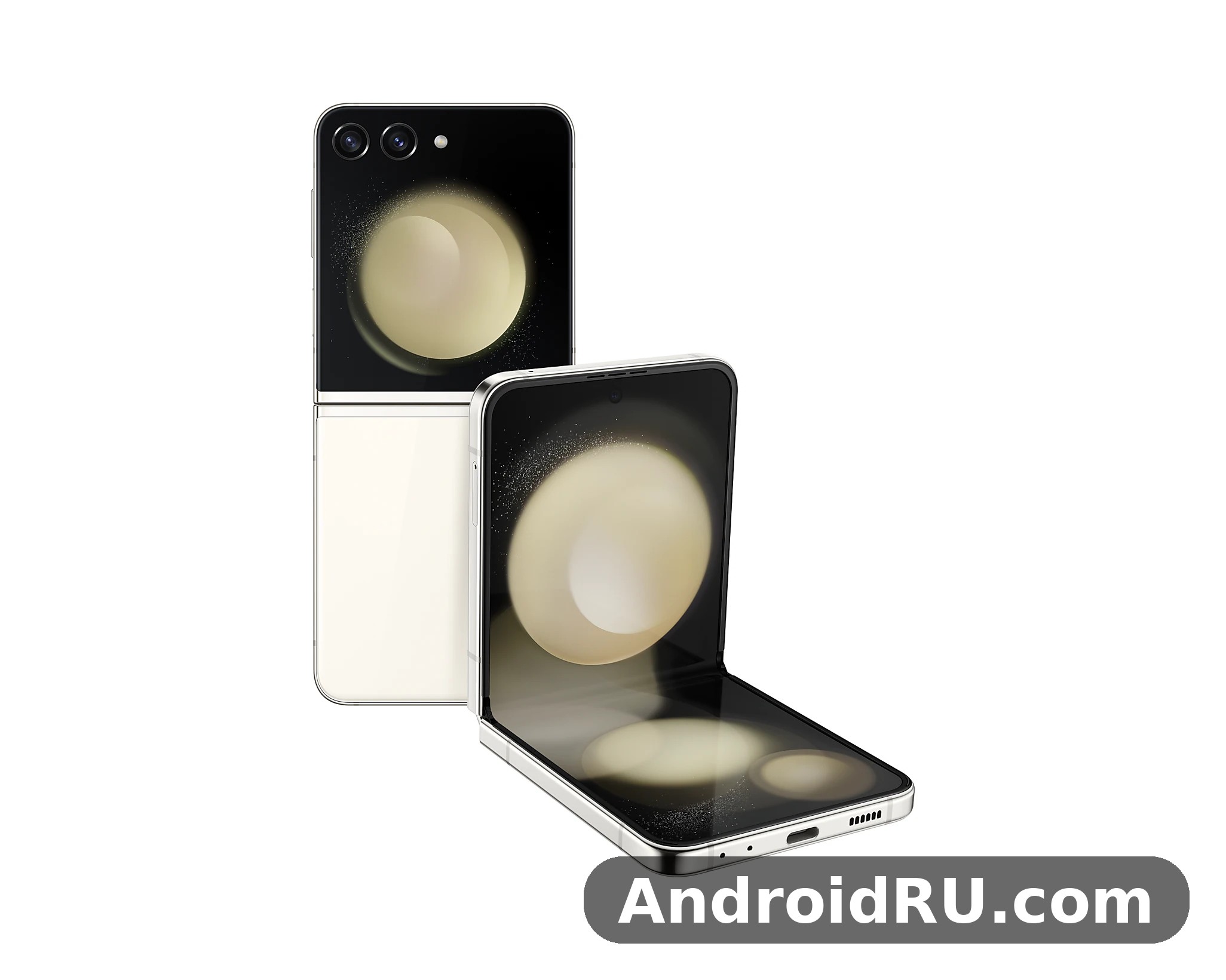
At launch the phone cost $999.99, which put it in the same price band as a conventional flagship slab phone rather than in the ultra-premium territory of the larger Fold. That pricing matters, because this is not a phone for everyone. It is a phone for people who want something small in a pocket or a small bag, who like the idea of flipping a phone shut to end a call, and who are willing to trade some battery capacity and camera reach for portability. Over a full week of daily use, the pattern became clear: the Flip5 is at its best when it stays folded, handling quick tasks on the cover screen, and it is at its weakest when it is asked to behave like a big-screen phone for hours at a time. The sections below work through each part of the phone in turn, with the real figures behind every claim, and the specification table near the end gathers every number in one place. The Galaxy Z Flip5 battery saving tips that matter most are adaptive battery, a lower refresh rate and taming background apps. The Galaxy Z Flip5 battery drain fix is simple in most cases: check background apps and adaptive battery settings before blaming the cell itself.
Before going further, it helps to place this phone in its family. The larger book-style foldable from the same era is covered in Samsung Galaxy Z Fold5 Review: Foldable Design and Everyday Performance, and the comparison shows how different the two shapes are in the hand, even though they share much of the same software and the same design language. The Flip is the compact choice, the Fold is the tablet choice, and buyers who are unsure which shape fits their life should weigh pocket size against screen size first, because that single choice shapes everything else about the experience.
Flip5 Design and the Flex Hinge That Closes Flat
Folded, the phone measures 85.1 x 71.9 x 15.1 mm, and open it measures 165.1 x 71.9 x 6.9 mm. It weighs 187 grams, which is light for a foldable and only a little heavier than many conventional phones. The frame is Armor Aluminum, the outer panels are Gorilla Glass Victus 2, and the phone comes in colours such as Graphite, Cream, Lavender and Mint, with extra online-only finishes from Samsung. The design change that matters most is the Flex Hinge. Earlier Flip phones closed with a wedge-shaped gap near the hinge. This one closes flat, so dust and grit have a harder time working their way between the two halves of the screen, and the folded phone looks and feels like a single solid object rather than two halves held apart. A Galaxy Z Flip5 water resistance test confirms the rating covers splashes and brief submersion, not every kind of water damage. The Galaxy Z Flip5 slow charging fix is usually a cable or adapter problem, so try a certified 25W charger before anything else.
The zero-gap hinge and how the phone closes
The zero-gap hinge uses a teardrop-shaped fold for the display panel, which lets the two halves meet without pressing the screen against itself. In practice the phone snaps shut with a satisfying click and opens smoothly to a flat 180 degrees, with stable stops at several angles in between. Those intermediate angles are what make Flex Mode work: prop the phone half open on a table and the top half becomes a viewfinder while the bottom half holds the controls. Samsung rates the hinge for 200,000 folds, which works out to roughly 100 folds a day for more than five years. Long-term owners have reported broadly positive hinge durability, though any folding phone deserves a case and a little care around sand and grit, which are the enemies of every hinge. A Galaxy Z Flip5 battery test puts the phone through a normal mix of browsing, video and calls, and it holds up for a full day for most people. This Galaxy Z Flip5 full review covers cameras, performance, battery and software as one daily device, not as separate launch figures.
What the 200,000-fold rating really means
A fold rating is a laboratory figure, not a promise that nothing will ever wear out, but it is still useful. At 100 folds a day, 200,000 folds covers more than five years, and most owners fold their phone far less often than that once the novelty wears off, because the cover screen handles many quick checks. The rating also tells you that Samsung tested the mechanism hard before launch, and that the hinge is built to be used, not babied. Keep the phone away from sand, wipe the hinge area if it picks up grit, and the mechanism should stay smooth for the life of the phone. For a Galaxy Z Flip5 gaming test, the phone stays smooth in popular titles at sensible settings, though long sessions will warm it up. A Galaxy Z Flip5 drop test is best left to reviewers, but the glass and frame are built to survive everyday knocks.
Colours, materials and the 187-gram pocket feel
At 187 grams the Flip5 disappears into a jeans pocket, a jacket pocket or a small bag in a way that a 6.7-inch slab phone never does. That is the whole point of the flip form factor, and it is the reason most owners choose it. The matte glass back resists fingerprints better than glossy finishes, the side-mounted fingerprint sensor doubles as the power button, and the phone is easy to hold one-handed when open because it is narrow at 71.9 mm wide. The squared-off folded shape is distinctive, and the large cover screen gives the closed phone a character of its own. If you carry a small bag or wear clothes with shallow pockets, the pocket fit may matter more than any specification on the sheet.
What the IPX8 rating does and does not cover
The phone carries an IPX8 water resistance rating, which means it can survive immersion in fresh water beyond one metre under test conditions. That is genuine protection against rain, spills and an accidental drop in a sink. What IPX8 does not cover is dust: there is no dust-resistance digit in the rating, because a folding hinge cannot be sealed the way a slab phone can be. Treat the rating as splash and dunk protection, not as permission to take the phone to the beach. Sand can damage the hinge and the soft inner display, so the sensible rule is simple: water is fine, dust and sand are not.
The 3.4-Inch Flex Window and What the Cover Screen Can Do
The Flex Window is a 3.4-inch Super AMOLED panel with a 720 x 748 resolution and a 60Hz refresh rate, and it is the single biggest upgrade over the Flip4, whose cover screen measured only 1.9 inches. The new screen is big enough for real tasks: checking the time and weather, reading notifications, controlling music, answering calls, using Samsung Wallet, and replying to messages with a full on-screen keyboard. Widgets can be arranged in a swipeable stack, and the clock faces are customisable with photos, fonts and colours, so the closed phone can look the way its owner wants it to look. The jump from 1.9 inches to 3.4 inches sounds small on paper, yet in the hand it changes the cover screen from a notification strip into a working display. A Galaxy Z Flip5 screen brightness test shows the display staying readable outdoors, even in bright sunlight. The Galaxy Z Flip5 outdoor visibility holds up well, with the display staying readable even in bright sunlight.
Widgets, notifications and quick replies on the cover screen
Cover screen widgets cover the everyday essentials: calendar, weather, alarms, timers, voice recorder, Samsung Health step counts and music controls. Notifications arrive with enough text to read at a glance, and quick replies let you send a short answer without opening the phone. Samsung also allows a small set of apps to run on the cover screen through Labs settings, including Maps and Messages, though the list is limited and the experience is better for glancing than for long sessions. For most owners the cover screen becomes the default way to triage the phone: check, dismiss, reply briefly, and only unfold when a task genuinely needs the big screen. That habit also saves battery, because the small panel draws far less power than the 6.7-inch main display. For the Galaxy Z Flip5 how to screenshot shortcut, press the power and volume-down buttons together, and the captured image lands straight in your gallery.
FlexCam selfies with the rear cameras
FlexCam is the best camera trick on this phone. Because the cover screen sits next to the rear cameras, you can frame a selfie or a group photo with the 12MP main camera while looking at the Flex Window as the viewfinder. The result is a selfie with the quality of the main camera rather than the quality of the 10MP front camera, and it works for video calls and vlogging too. Fold the phone halfway and it stands on its own as a tripod for hands-free photos, timed shots and video. A FlexCam selfie is sharper, with better dynamic range and better low-light performance than a standard front-camera selfie, and it is one of the clearest reasons to choose a Flip over a slab phone. The previous generation kept the same idea on a smaller screen, as described in Samsung Galaxy Z Flip4 Review: Cover Screen, Software and Cameras, but the larger window on this model makes framing far easier.
Cover screen limits worth knowing before you buy
The Flex Window is useful, but it has limits. The 60Hz refresh rate is less smooth than the 120Hz main display, the screen is too small for comfortable web browsing or long typing sessions, and only a small number of apps are officially supported on it. Third-party workarounds exist, but they are fiddly and can behave oddly after updates. Go in with the right expectation: the cover screen is a triage tool and a camera viewfinder, not a second phone. Used that way, it saves time and battery all day, and owners who expect it to replace the main display will be disappointed. The Galaxy Z Flip5 best camera settings for everyday shooting are simple: keep the main lens clean, let the phone pick the mode, and save the manual controls for tricky light. In a Galaxy Z Flip5 camera test, daylight shots look clean and detailed, while low light is where the processing has to work hardest.
The 6.7-Inch Main Display With 120Hz Dynamic AMOLED 2X
Open the phone and the main display is a 6.7-inch Dynamic AMOLED 2X panel with a 2640 x 1080 (FHD+) resolution, a 120Hz adaptive refresh rate that drops to as low as 1Hz for static content, and peak brightness around 1750 nits. It is bright enough for outdoor use in sunlight, colours are rich without looking artificial in Natural mode, and HDR video looks strong on apps that support it. The tall 22:9 aspect ratio suits scrolling through feeds and reading long articles, though video with standard aspect ratios shows black bars at the top and bottom. For a phone that folds in half, the display is impressively close to what a flagship slab offers, and at about 425 pixels per inch it is sharp for text, photos and video at normal viewing distances.
Brightness, colour and the crease in daily use
The crease is still there. Run a finger across the centre of the screen and you can feel a shallow dip where the panel folds, and in certain light at an angle it is visible. After a day or two most owners stop noticing it, and it rarely interferes with reading or watching video. The panel is Ultra Thin Glass with a protective plastic layer on top, and Samsung warns against removing that layer or pressing hard with a fingernail. Display quality in normal use is excellent: deep blacks, accurate colours, and brightness that holds up outdoors. The crease is a trade-off of the form factor, not a defect, and anyone considering a flip phone should expect it. The adaptive refresh rate also helps the battery, because the panel drops to low rates on static content such as a reading page or an always-on clock.
Natural mode versus Vivid mode
Samsung offers two colour modes, and the choice is worth making in the first week. Natural mode aims for sRGB accuracy, so photos look close to how they will look on other screens, while Vivid mode pushes saturation for a punchier picture. Neither mode is wrong; Natural suits photo editing and anyone who dislikes oversaturated colours, while Vivid suits video and casual browsing. Try both for a day each and keep the one that feels right, because the setting changes the whole look of the phone.
Multitasking and Flex Mode on the tall screen
One UI on this phone supports split-screen multitasking, pop-up windows and Flex Mode, where the bottom half of the screen becomes a control panel when the phone is half open. Flex Mode is most useful for video calls, watching videos hands-free, and taking photos from low angles. The tall screen fits two apps stacked vertically, though each app gets a narrow slice, so multitasking feels more like a convenience than a workspace. Compared with the wider Fold, the Flip is a phone first and a multitasking device second, and that is the right way to think about it.
Snapdragon 8 Gen 2 Performance and 8GB of RAM
The phone runs on the Snapdragon 8 Gen 2 for Galaxy, a 4nm chip with a prime core clocked up to 3.36GHz, paired with 8GB of LPDDR5X RAM and either 256GB or 512GB of UFS 4.0 storage. In daily use the phone is fast: apps open instantly, the interface stays smooth at 120Hz, and switching between a dozen apps rarely forces a reload. Gaming performance is strong too, with demanding games running at high settings, though the slim folded body has less room to shed heat than a larger phone, so long gaming sessions can warm the upper half of the phone and trigger modest throttling. For everyone except heavy gamers playing for hours at a stretch, the performance is flagship-grade and will stay that way for years.
CPU, GPU and 4nm efficiency
The chip is built by TSMC on a 4nm process, with an octa-core CPU: one Cortex-X3 prime core at up to 3.36GHz, two Cortex-A715 performance cores at 2.8GHz, two Cortex-A710 cores at 2.8GHz, and three Cortex-A510 efficiency cores at 2.0GHz. The Adreno 740 GPU handles graphics and includes hardware ray tracing support. The “for Galaxy” variant runs its prime core faster than the standard Snapdragon 8 Gen 2, and it was exclusive to Samsung flagships in this generation. The mix of prime, performance and efficiency cores gives strong peak speed with good power efficiency for everyday tasks, and the chip includes an AI engine for camera processing, voice features and on-device tasks.
Gaming, heat and sustained speed
In short bursts this phone is as fast as any Android phone of its generation. Sustained loads tell a slightly different story: after 20 to 30 minutes of a demanding game, frame rates can dip as the phone manages heat in a thin chassis. This is normal for a compact foldable and it rarely affects casual games, video streaming or everyday apps. If mobile gaming is your main hobby, a larger phone with more thermal headroom will hold peak speed longer. If you play in shorter sessions, the phone keeps up without complaint, and the 120Hz display makes games look fluid. The newer Flip generation refines the same idea, as covered in Samsung Galaxy Z Flip6 Review: Folding Design, Cameras and Daily Use, but the speed gap in everyday use is small.
Storage choices: 256GB or 512GB, no microSD slot
There is no microSD card slot, so the storage choice at purchase is permanent: buyers who shoot a lot of 4K video or keep large offline media libraries should choose 512GB. The 8GB of RAM is enough for smooth multitasking with a dozen apps held in memory, and the UFS 4.0 storage keeps loading times short. The 256GB model suits most people, while the 512GB model suits heavy media users. Check the price gap before deciding, because the extra storage is often cheaper at purchase than the hassle of running out of space later.
Cameras: 12MP Main, 12MP Ultrawide and a 10MP Selfie Camera
The camera hardware is a 12MP main camera with an f/1.8 aperture, optical image stabilisation and Dual Pixel autofocus, a 12MP ultrawide camera with a 123-degree field of view, and a 10MP front camera in a hole-punch cutout on the main display. There is no telephoto lens, so zoom beyond 2x is digital and loses detail. That is the camera story in one line: two good cameras, no zoom lens. For most owners that is enough, because the main camera is the star, and the ultrawide is a capable second lens for landscapes, interiors and group shots.
Daylight photos and low-light results
In daylight the main camera produces sharp, well-exposed photos with lively colours and reliable autofocus, and camera quality holds up well against other phones at its launch price. Night mode brightens dark scenes effectively, though fine detail softens and highlights can blow out around street lights. The ultrawide is good in daylight but noticeably noisier after dark, which is typical for a small-sensor ultrawide. Portrait mode gives pleasing background blur for people and pets, and the ability to shoot portraits with the rear cameras via the Flex Window is a genuine advantage over slab phones. The main sensor uses 1.8-micron pixels after binning, which helps low-light performance, and its optical stabilisation keeps photos sharp in dim conditions.
Video recording and FlexCam angles
Video recording reaches 4K at 60 frames per second on both the main camera and the front camera, with good stabilisation and clean audio from the stereo microphones. Flex Mode turns the phone into its own tripod for stable video, time-lapse and hands-free recording, which is handy for creators who film themselves. The lack of a telephoto lens matters less for video than for stills, since most casual video is shot at 1x. Vloggers who want a compact camera that films itself will find this phone unusually capable for its size. Video modes also include 1080p slow motion up to 240 frames per second and 720p super slow motion up to 960 frames per second, plus HDR10+ recording and Director’s View, which records from the front and rear cameras at the same time.
Battery Life: the 3700mAh Cell and 25W Charging
The battery is the weakest part of the phone on paper: a 3700mAh battery, which is far smaller than the 5000mAh cells in slab flagships. In practice battery life is adequate for a moderate day, typically ending with 15 to 25 percent left after around 5 to 6 hours of screen-on time, helped by the fact that the cover screen handles many quick checks without waking the big display. Heavy users who stream video, navigate with GPS and play games will need a top-up before bedtime. The 3700mAh cell is the price of the pocketable design, and buyers should be honest with themselves about how heavy their usage really is. Charging is 25W wired, which takes the phone from empty to full in roughly an hour and a half, plus 15W wireless charging and 4.5W reverse wireless charging for earbuds or a watch.
How long the battery lasts in a normal day
A normal day of messaging, browsing, music, some photos and an hour or two of video leaves most owners with charge to spare. A heavy day of travel, with navigation, hotspot use and a bright screen outdoors, will drain the cell by the early evening. Power-saving mode and the habit of using the Flex Window for quick checks both stretch the battery noticeably. Anyone coming from a phone with a 5000mAh battery will feel the difference in the first week, and anyone coming from an older Flip will find this model a small step forward rather than a transformation. A compact power bank or a charger at the desk removes the worry for most people.
15W wireless charging and 4.5W reverse wireless charging
Wireless charging runs at up to 15W with a compatible Samsung charger, and slower with generic Qi pads. Reverse wireless charging at 4.5W can top up Galaxy Buds or a Galaxy Watch in a pinch, though it is slow and best used for emergencies rather than as a routine. The 25W wired charging speed is unremarkable next to rivals that offer 45W or more, but it is consistent and the phone stays cool while charging. A full charge overnight or a 30-minute top-up during the day covers most routines, and wired charging over USB-C runs at up to 25W with USB Power Delivery PPS, reaching about 50 percent in roughly 30 minutes. No charger is included in the box, so buyers need a 25W USB-C charger to reach the rated speed.
Software: One UI 5.1.1 on Android 13 and the Update Promise
The phone launched with One UI 5.1.1 on Android 13, and Samsung promised four generations of Android OS updates and five years of security updates, which takes the phone to Android 17 in principle. One UI adds useful foldable features such as Flex Mode panels, cover screen customisation and Good Lock tweaks, plus Samsung’s own apps and services. Software update support is one of the strongest in the Android world, and it matters for resale value as well as for security. The software is polished and feature-rich, though it does include duplicate Samsung apps alongside Google apps, which some owners tidy up in the first week. Samsung Knox security, Secure Folder and hardware-backed encryption are included, and owners can check for updates in Settings under Software update. The Galaxy Z Flip5 tips and tricks in this review are the ones worth turning on first, because they change daily use the most. The Galaxy Z Flip5 hidden features worth finding first live in the settings menus most owners never open.
Connectivity, sensors and audio
Connectivity covers 5G (sub-6GHz and mmWave, depending on region and model), LTE, Wi-Fi 6E, Bluetooth 5.3, NFC, GPS, GLONASS, Galileo, BeiDou and QZSS positioning, and USB-C 3.2 for wired data and charging. The phone supports one nano-SIM and one eSIM in most regions, with dual-SIM behaviour varying by market. Samsung DeX is not supported, and there is no 3.5mm headphone jack. The fingerprint sensor is capacitive and mounted on the side, doubling as the power button, and face unlock is available as a secondary option using the front camera. Stereo speakers tuned by AKG support Dolby Atmos, and the sensor set includes an accelerometer, gyroscope, proximity sensor, ambient light sensor, compass and barometer. USB-C 3.2 provides wired data transfer at up to 10Gbps and video output over DisplayPort Alt Mode. The Galaxy Z Flip5 best settings for daily use are the ones that save taps: edge panels, quick settings and a sensible refresh rate. A Galaxy Z Flip5 factory reset is the last resort for stubborn software trouble, so back up first and try a restart before it.
Full Specifications for the Galaxy Z Flip5
The table below gathers every specification in one place. Figures are for the standard international model; regional variants may differ in 5G bands and SIM configuration. Check the official page for the exact model sold in your region before buying. The numbers confirm the story told in the review sections above: flagship chip and displays, a compact battery, and a camera system built around two lenses rather than three. The Galaxy Z Flip5 full specifications are listed in full in the specifications section below, from display and chipset to cameras and battery. The Galaxy Z Flip5 user manual is available from Samsung’s support pages if you want the official steps for any feature.
| Specification | Galaxy Z Flip5 |
|---|---|
| Launch | August 2023 |
| Dimensions (open) | 165.1 x 71.9 x 6.9 mm |
| Dimensions (folded) | 85.1 x 71.9 x 15.1 mm |
| Weight | 187 g |
| Build | Armor Aluminum frame, Gorilla Glass Victus 2, Flex Hinge |
| Water resistance | IPX8 |
| Main display | 6.7-inch Dynamic AMOLED 2X, 2640 x 1080, 120Hz adaptive, HDR10+ |
| Cover display | 3.4-inch Super AMOLED Flex Window, 720 x 748, 60Hz |
| Chipset | Snapdragon 8 Gen 2 for Galaxy, 4nm |
| CPU | Octa-core, prime core up to 3.36GHz |
| GPU | Adreno 740 |
| RAM | 8GB LPDDR5X |
| Storage | 256GB or 512GB UFS 4.0, no microSD slot |
| Rear cameras | 12MP main f/1.8 OIS + 12MP ultrawide f/2.2, 123-degree field of view |
| Front camera | 10MP f/2.2 |
| Video | 4K at 60fps, 1080p slow motion up to 240fps |
| Battery | 3700mAh, dual-cell |
| Wired charging | 25W USB-C, USB Power Delivery PPS |
| Wireless charging | 15W wireless, 4.5W reverse wireless |
| Connectivity | 5G, LTE, Wi-Fi 6E, Bluetooth 5.3, NFC, USB-C 3.2 |
| Positioning | GPS, GLONASS, Galileo, BeiDou, QZSS |
| SIM | Nano-SIM + eSIM (varies by region) |
| Security | Side-mounted fingerprint sensor, face unlock |
| Audio | Stereo speakers, Dolby Atmos, no 3.5mm jack |
| Software | One UI 5.1.1, Android 13, 4 OS updates + 5 years security updates |
| Colours | Graphite, Cream, Lavender, Mint, plus online-only finishes |
| Launch price | $999.99 |
How to read the specification table
Read the table as a set of trade-offs, not as a score. The chip, the main display and the cover display are flagship-grade, the battery and the charging speed are mid-range, and the camera list is short but strong where it counts. Buyers who compare this table with the larger foldable in Samsung Galaxy Z Fold4 Review: Screens, Hinge and Battery Life will see the same pattern in a different shape: a bigger battery and a triple camera on the Fold, a smaller pocket footprint on the Flip. Neither table tells you which phone to buy on its own; the right choice depends on whether you value a big screen or a small pocket more.
Dimensions and weight in context
The open measurements of 165.1 mm tall, 71.9 mm wide and 6.9 mm thin make the phone easy to hold one-handed despite the large screen, because width matters most for grip. The folded measurements describe a device closer to a powder compact than to a phone, and the folded thickness of 15.1 mm is the price of the hinge mechanism. Compared with the Flip4, the differences are small on paper: a fraction of a millimetre thinner when folded and a few grams lighter, but the zero-gap hinge makes the folded phone feel noticeably more solid.
Pros and Cons of the Galaxy Z Flip5 and Who It Suits Best
After weighing every part of the phone, the balance is clear. This is a distinctive, well-made foldable whose strengths are about form rather than raw specification, and whose weaknesses are the familiar costs of that form. At launch it was a fair description to call it the best flip phone for most buyers in 2023, and at used or discounted prices it remains a tempting way into foldables. The lists below summarise the case for and against it. Is Galaxy Z Flip5 still worth buying in 2026? It comes down to the price you can find and whether its cameras, battery and software still cover your daily use. The Galaxy Z Flip5 release date and price question is covered in the verdict section, but the short version is that it launched in August 2023 and its price has fallen since.
Pros of the Galaxy Z Flip5
- Portability: the phone folds to half its height and fits pockets that reject slab phones.
- The Flex Window is genuinely useful for notifications, widgets and FlexCam selfies.
- The Snapdragon 8 Gen 2 delivers flagship speed, and the main camera is strong in daylight and at night.
- The IPX8 rating adds real water protection, and the build quality feels premium with the zero-gap hinge.
- Samsung’s long update promise and the wide availability of cases and accessories round out a strong package.
Cons of the Galaxy Z Flip5
- Battery life is modest for heavy users, and wired charging stops at 25W.
- There is no telephoto camera, so zoom beyond 2x is digital and loses detail.
- The cover screen supports only a limited set of apps, and the inner display crease is visible and needs care.
- The phone is more fragile than a slab phone by nature: a folding screen and a hinge will always be more vulnerable to drops and grit.
Who the phone suits best
This phone suits people who want a phone that disappears into a pocket, who take a lot of selfies and group photos, who like the practicality of flipping a phone shut, and who use their phone in moderate bursts rather than in eight-hour screen marathons. It suits commuters, social photographers and anyone who finds modern phones too big. Is Galaxy Z Flip5 worth buying? It comes down to the price you can find and whether its cameras, battery and software still cover your daily use. The Galaxy Z Flip5 price in India varies by storage, condition and seller, so compare a few listings in that market before you decide.
Who should pick a different phone instead
Heavy gamers, long-distance travellers who live on their phone, mobile photographers who need a zoom lens, and anyone who wants the longest possible battery life should pick a slab flagship instead. Buyers who want the folding idea with a much larger screen should read Samsung Galaxy Z Fold6 Review: Cover Screen, Software and Cameras before deciding, because the Fold6 shows what the book-style shape offers when size and weight are not the priority. This phone is a lifestyle choice as much as a specification choice, and it rewards buyers who choose it for the form factor rather than for the spec sheet alone.
Frequently Asked Questions About the Galaxy Z Flip5
These are the questions buyers ask most often about this phone, answered with the real figures from the specification sheet and from daily use. The Galaxy Z Flip5 pros and cons are summed up near the end of this review, with the strongest points first and the trade-offs stated plainly. The Galaxy Z Flip5 where to buy question comes down to trusted sellers and warranty, not just the lowest number on a listing.
Is the Galaxy Z Flip5 waterproof?
The phone is water resistant with an IPX8 rating, which means it can survive immersion in fresh water under test conditions. It is not dust resistant, and it should be kept away from sand and grit, which can damage the hinge and the folding display. Treat it as protected against rain, splashes and accidental dunks, not as a phone for the beach or the pool. The Galaxy Z Flip5 price in US varies by storage, condition and seller, so compare a few listings in that market before you decide. The Galaxy Z Flip5 best price question comes down to trusted sellers and warranty, not just the lowest number on a listing.
Does the Galaxy Z Flip5 support wireless charging?
Yes, the phone supports 15W wireless charging with a compatible charger, and it also supports 4.5W reverse wireless charging, which can charge earbuds or a smartwatch placed on the back of the phone. Wired charging is 25W over USB-C.
How long will the Galaxy Z Flip5 receive software updates?
Samsung promised four generations of Android OS updates and five years of security updates for this phone, which launched on Android 13 with One UI 5.1.1. That is one of the longest support windows available on an Android phone from its generation.
Is 3700mAh enough for a full day?
For moderate use, yes: most owners end a normal day with charge to spare, helped by the cover screen handling quick checks. For heavy use with lots of video, navigation and gaming, the battery can run out before bedtime, so a top-up or a power bank is worth planning for. The 3700mAh cell and 25W charging combination is the clearest compromise in the phone, and it is the first thing a buyer should weigh against the pocketable design.
Does the Galaxy Z Flip5 have a microSD card slot?
No, the phone has no microSD card slot, so storage cannot be expanded after purchase. It is sold with either 256GB or 512GB of internal UFS 4.0 storage, and buyers who record a lot of 4K video or keep large offline libraries should choose the 512GB model.
Does the Galaxy Z Flip5 support eSIM?
Yes, the phone supports eSIM alongside a physical nano-SIM in most regions, allowing dual-SIM use with one physical SIM and one eSIM. Exact dual-SIM behaviour and supported combinations vary by region and carrier, so check with the seller or carrier for the model sold in your country.
The verdict is straightforward. Buy this phone if you want the smallest flagship-shaped Samsung you can carry, if you will use the cover screen every day, and if you accept a modest battery in exchange for that pocket fit. Skip it if battery life, zoom photography or a large screen for work sits at the top of your list. Check the hinge action, the inner display protector and the battery health on any used unit, charge it with a proper 25W charger, and set up the Flex Window widgets in the first hour, because that single setup step is what turns the folded phone from a novelty into a daily tool.

