

Partitions in plain language
A phone storage is divided into partitions. Each partition holds a distinct part of the system. One partition holds the boot image. One partition holds the system image. One partition holds vendor code for hardware. One partition holds user data. One partition holds recovery tools. That division lets the phone update one part without rewriting everything. It also lets the phone verify each part separately during boot. A fault in one partition does not always destroy the whole system.
Partition layout shapes every flashing and recovery task. A flash tool writes images to named partitions. A wrong partition name can overwrite the wrong part of the phone. A missing partition can leave the phone unable to start an app or a sensor. A recovery tool restores partitions one at a time. Understanding the map prevents a blind flash. It also helps a reader interpret error messages that name a partition. A partition name in an error is a clue rather than noise.
Read this warning even though this guide is mostly theory. Partition knowledge tempts readers to edit partitions directly. Editing a partition can void the device warranty. Editing a partition can cause a bootloop. Editing a partition can brick a phone when a critical image is damaged. Back up all data before any partition work. Do not edit partitions on your only phone without a spare device ready. Keep stock firmware for the exact model nearby before any experiment. Theory should guide safe flashing rather than encourage risky edits.
Only-A systems and how they update
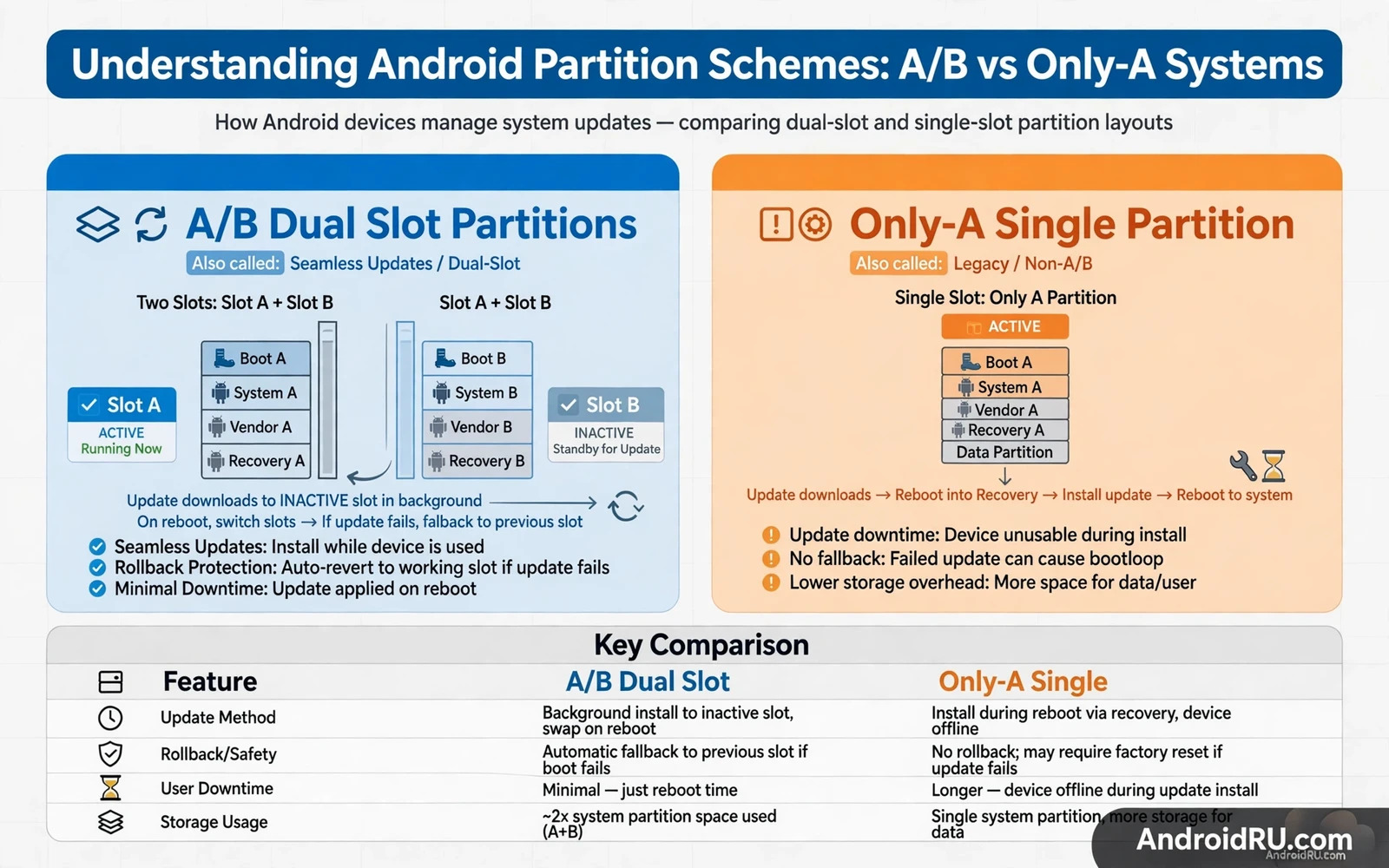
An only-A system has one set of boot and system partitions. An update overwrites that single set in place. The phone must reboot into recovery to apply the update. The user waits while recovery writes the new images. A failed update can leave the single set in a broken state. Recovery from that state needs a full flash or a backup image. That fragility is the main weakness of only-A design. It is also simpler to understand and simpler to flash by hand.
Only-A flashing follows a direct map. A fastboot command writes a boot image to the boot partition. Another command writes a system image to the system partition. Another command writes a recovery image to the recovery partition. Each command names its target clearly. A mistake in a target name is visible in the command itself. That visibility helps careful readers. It also punishes haste because one wrong name overwrites a different part. Double check every target name before pressing enter.
Only-A devices often keep a separate recovery partition. That recovery can flash updates and wipe data and restore backups. A custom recovery replaces the stock recovery on such devices. That replacement gives powerful backup tools. It also changes the boot chain trust state. A custom recovery on an only-A device is easy to spot and easy to remove by flashing stock recovery back. That simplicity made only-A devices popular with early custom system fans.
A/B systems and seamless updates
An A/B system has two slots named slot A and slot B. Each slot holds its own boot and system and vendor images. One slot is active and runs the phone. The other slot is inactive and waits for the next update. An update writes to the inactive slot while the phone keeps running normally. The phone then reboots into the newly updated slot. That design is called a seamless update. The user waits far less during an update. A failed update can fall back to the previous slot in many cases.
Slot fallback is powerful yet it is not magic. The bootloader marks a slot as good or bad based on boot attempts. A slot that fails to boot several times can be marked bad. The bootloader then tries the other slot. That fallback saves many failed updates. It does not save a phone when both slots are damaged. It does not save a phone when a shared partition is damaged. Shared partitions hold data that both slots use. A fault in a shared partition affects both slots equally. Slot design protects against a bad update rather than against all faults.
A/B devices usually lack a separate recovery partition. Recovery lives inside the boot image instead. That change confuses readers who expect a recovery partition to flash. Flashing a recovery image to a nonexistent partition fails or writes to the wrong place. Custom recovery installation on A/B devices therefore uses a boot image patch method. That method differs by model and by slot state. Always follow the recovery method for the exact slot layout. A method copied from an only-A device can fail on an A/B device.
Dynamic partitions and the super partition
Modern Android adds dynamic partitions inside a large super partition. The super partition holds system and vendor and product images as resizable logical partitions. That design lets makers adjust partition sizes through updates. It removes the rigid size limits of fixed partitions. A system image can grow in one update without a full repartition. That flexibility helps long term support. It also makes manual flashing more complex because logical partitions are not simple fastboot targets.
Flashing a dynamic partition device often uses a special fastboot mode for dynamic images. That mode can write logical partitions inside the super partition. A normal fastboot command may not accept a logical partition name. A reader who meets that refusal should stop and read the maker flash method. Forcing a logical image into a fixed partition name can corrupt the super layout. A corrupted super layout can brick the phone. Patience and model specific guidance matter more than speed here.
Partition map notes
- Only-A has one boot and system set
- A/B has slot A and slot B sets
- A/B recovery lives inside the boot image
- Dynamic partitions live inside super
- Shared partitions affect both slots
User data sits outside the system slot design on most devices. A slot switch does not move user data. An update that switches slots keeps apps and files in place. A factory reset wipes user data regardless of slot. A stock flash may wipe user data depending on the tool option. Keep those distinctions clear when planning a backup. A slot backup is not a data backup. A system image backup is not a user data backup. Each backup type protects a different layer.
How layout affects root and custom systems
Root methods differ by layout because the boot image location differs by layout. An only-A root patch targets a single boot partition. An A/B root patch must target the active slot boot image. A patch applied to the inactive slot will not affect the running system. That silent miss confuses many first time root users. Always confirm the active slot before patching a boot image. Confirm it again after an update switches slots. An update can move the active slot without a clear notice.
Custom system installation also differs by layout. An only-A installer writes system images directly to fixed partitions. An A/B installer writes to the inactive slot and then switches to it. A dynamic partition installer must respect the super layout. An installer made for one layout can fail or damage another layout. Check the installer notes for layout support before flashing. A universal installer claim deserves scepticism when layout details are missing. Layout is a first class compatibility check.
A stock restore must match the layout of the device. The unroot and stock restore walkthrough explains the restore sequence for a modified phone. That sequence works only when the firmware package matches the layout. A package for an only-A variant will not restore an A/B variant correctly. A package for the wrong slot state can leave a phone looping. Read the partition map before the restore package. The map turns a restore from guesswork into a planned write sequence.
Relocking also depends on slot state because the boot chain verifies the active slot images. The safe bootloader relocking walkthrough warns against relocking a modified system. On an A/B device that warning includes the inactive slot state. A modified inactive slot can still affect verification after a switch. Verify both slots when a tool allows it. Relock only when the whole verified set is stock. A single stock slot is not enough when the other slot can become active later.
Unlocking behaviour also changes with layout because the gate protects different partition sets. The bootloader unlocking tutorial explains the gate in general terms. Apply that general lesson to the specific layout of your model. An only-A unlock opens a single system set. An A/B unlock opens a dual slot system with fallback behaviour. That fallback can save a bad flash yet it can also hide a bad slot until later. Know your layout before you open the gate.
Choosing a device with layout in mind
A buyer who plans custom work should research layout before purchase. An A/B device offers safer updates and easier fallback. An only-A device offers simpler manual flashing and a separate recovery. A dynamic partition device offers flexible updates yet complex manual work. None of those designs is best for every reader. The best design depends on whether the reader values update safety or manual simplicity. A buyer who never flashes needs only seamless updates. A buyer who flashes often needs clear manual tool support.
Layout knowledge pays off even for readers who never flash. It explains why an update takes minutes on one phone and seconds on another. It explains why a failed update recovers cleanly on one phone and loops on another. It explains why a storage full warning appears even when user files look small. System partitions reserve space that user files cannot use. That reserved space is not wasted. It holds the safety net for updates and recovery. A phone is more than its free storage number.
Partition knowledge for everyday users
Everyday users benefit from partition knowledge even without flashing anything. An update that seems stuck may simply be writing the inactive slot. A phone that reboots during an update may be switching slots rather than failing. Knowing that process reduces panic during updates. It also explains why a phone should stay charged during an update. A slot switch during low battery can still cause trouble. Calm update habits come from understanding the mechanism.
Storage warnings also make more sense with partition knowledge. A phone can report low storage while user files look modest because system partitions reserve space. That reserved space protects updates and recovery. Deleting personal files cannot free reserved system space. A user who understands that limit stops deleting precious photos in vain. Instead that user clears app caches and removes unused apps. Correct diagnosis leads to correct action.

