

Google Pixel 4 Review: Display Quality, Speed and Daily Use
The Google Pixel 4 arrived on 22 October 2019 as a compact flagship with a clear personality: a small phone, a fast screen, a camera that punched above its size, and a new radar chip in the forehead that promised a different way to interact with a phone. It was never the biggest phone in the room, and it was never the longest-lasting one either. What it offered instead was a tight, polished package where the display, the software and the camera worked together without fuss.
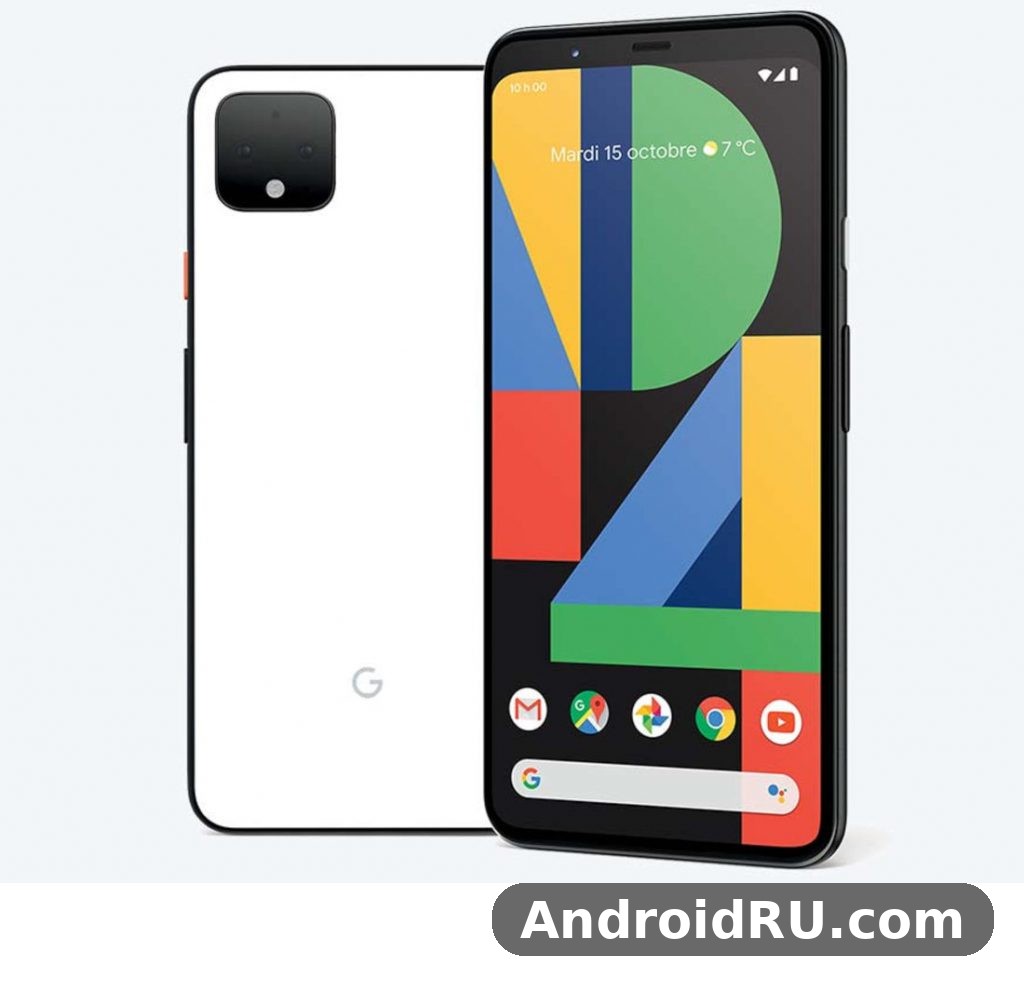
Years later, the Pixel 4 still makes sense as a second phone, a compact daily driver for light use, or a cheap way into Google’s camera software. Its 5.7-inch OLED screen runs at 90Hz, its Snapdragon 855 chipset still handles everyday apps without drama, and its Night Sight camera still takes pleasing photos after dark. The trade-offs are just as clear now as they were at launch: a 2,800 mAh battery that needs a top-up on busy days, no fingerprint reader, and storage that tops out at 128GB with no microSD slot.
This review covers the three things that matter most about this phone in daily use — display quality, speed and everyday handling — and then goes further, with the camera system, battery life, design, face unlock, the full specifications table, a comparison with the Pixel 4 XL and the Pixel 3, and a straight answer on who should still consider one. If you are weighing a used or refurbished Pixel 4 against a newer budget phone, the detail below should help you decide.
Display Quality: A Compact 90Hz OLED That Still Holds Up
The Pixel 4 display quality is the first thing you notice, and it is the feature that ages best. The 5.7-inch OLED panel measures 1080 by 2280 pixels, which works out to around 444 pixels per inch, so text looks crisp and fine detail in photos stays sharp at normal viewing distance. Colours are rich without looking cartoonish, and the deep blacks of the OLED panel give photos and videos a sense of depth that cheaper LCD screens cannot match. For a phone of this size, the screen feels generous without making the handset hard to hold.
Google tuned the panel with two colour profiles, Natural and Boosted, and the default Natural mode keeps skin tones and everyday photos looking honest rather than oversaturated. The Boosted mode adds a little extra punch if you prefer a more vivid look, and switching between the two takes seconds in the display settings. Ambient EQ, borrowed from the Nest Hub idea of matching the light around you, adjusts the white balance of the screen to the room, so whites look less blue under warm indoor lighting and less yellow outdoors. It is a subtle touch, and it makes long reading sessions easier on the eyes.
How the 90Hz Refresh Rate Changes Everyday Scrolling
The headline display feature is the 90Hz OLED display, and it changes the feel of the phone more than any single specification on the sheet. Scrolling through a news feed, swiping between home screens and pulling down notifications all look smoother than on a standard 60Hz panel, because the screen redraws more often and motion blur is reduced. The difference is easy to spot side by side with a 60Hz phone, and once you get used to it, going back feels slightly sluggish. That Pixel 4 90Hz smoothness is one of the main reasons people who try the phone end up liking it.
Google’s Smooth Display system does not lock the panel at 90Hz all the time. It drops back to 60Hz when the screen is static or when the battery is low, and it ramps up again when you start scrolling. That behaviour protects battery life, though in practice the Pixel 4 battery life is still the weak point of the phone, and the high refresh rate is one of the reasons. If you want the longest possible time between charges, turning Smooth Display off is one of the first settings worth trying, and the phone still feels quick at 60Hz.
Brightness, Viewing Angles and Outdoor Use
Outdoor visibility is good rather than outstanding. The OLED panel gets bright enough to read messages and check maps in sunlight, though it does not reach the peak brightness of later Pixel models, so direct summer sun can wash the image out a little. Viewing angles are wide, with only a slight colour shift when the phone is tilted a long way, which is normal for OLED panels of this generation. The screen is protected by Gorilla Glass 5, and the forehead above the display is noticeably taller than on most rivals, because it houses the front camera, the infrared face unlock sensors and the Soli radar chip.
Screen Size and One-Handed Comfort
At 5.7 inches, the Pixel 4 compact size is one of the smaller flagship footprints of its era, and that is a genuine selling point for anyone who dislikes large handsets. The phone measures around 147 mm tall and 68.8 mm wide, so most people can reach the top of the screen with a thumb without shuffling the phone in their hand. The 19:9 aspect ratio keeps the body narrow, and the matte glass back gives a secure grip. If you have been looking for a compact Android phone with a high refresh rate display, the Pixel 4 screen size and shape are still hard to beat at this price.
Video, Reading and Everyday Viewing
Watching video on the Pixel 4 is a pleasure for a phone this size. The OLED panel supports HDR playback, so supported clips on video apps show brighter highlights and deeper shadows, and the stereo front-facing speakers are loud and clear enough for a short clip without headphones. Reading is comfortable too: the crisp text, the warm white balance from Ambient EQ and the smooth scrolling all help during long articles. The only real limit is size — a 5.7-inch screen will never replace a tablet for a long film — but for clips, social feeds and reading on the move, the Pixel 4 display quality is still a strong point.
Speed and Performance: Snapdragon 855 in Daily Use
The Pixel 4 speed comes from the Qualcomm Snapdragon 855 chipset, paired with 6GB of RAM and either 64GB or 128GB of internal storage. The Snapdragon 855 was the flagship Android chip of 2019, built on a 7nm process with a prime Kryo 485 core, and it still handles the everyday workload of a phone in 2026 without complaint: messaging, email, browsing with several tabs open, maps, music and social apps all open quickly and switch without long pauses. The Pixel 4 performance in daily use feels closer to a modern mid-range phone than to an old flagship, because the clean version of Android 10 it launched with — later updated to Android 13 — carries very little extra software weight.
App launch times are quick, and the 6GB of RAM is enough to keep a handful of apps in memory, so returning to a browser or a chat app usually picks up where you left off. Heavy multitasking with a dozen apps, a camera session and a navigation app running at once can push the phone to reload an app, but that is normal for 6GB of RAM and it rarely gets in the way. The UFS 2.1 storage is not as fast as the storage in the newest phones, yet installing apps and opening the gallery still feels snappy.
Pixel 4 Gaming Performance and Heat
For gaming, the Pixel 4 gaming performance is respectable for a phone of its age. The Adreno 640 graphics processor runs popular titles such as PUBG Mobile, Call of Duty: Mobile and Asphalt at smooth frame rates on medium to high settings, and the 90Hz display makes fast-paced games feel more responsive. Longer sessions do warm the back of the phone, and the small body has less room to spread heat than a larger handset, so sustained performance can dip a little after twenty or thirty minutes of demanding play. Short bursts of gaming are fine, and casual games run without any trouble at all. If gaming is your main hobby, a newer phone with a bigger battery and a larger screen would serve you better, and the Google Pixel 9a Review: Gaming, Multitasking and Battery Life shows what a more recent mid-range Pixel offers for players who want longer sessions.
Software, Updates and the Pixel Experience
The software is one of the best reasons to pick any Pixel, and the Pixel 4 is no exception. It launched with Android 10 and received updates through Android 13, which was its last major version, along with security patches that ran beyond that. Any Pixel 4 Android 13 handset you buy today is therefore running the final major version the phone will ever receive. The interface is clean, with no duplicate apps and no heavy skin over Android, and Pixel-only touches such as the Recorder app with live transcription, Call Screen, and the astrophotography mode in the camera all add real value. Google Assistant is tightly woven into the system, and the new Assistant of that generation answered faster because more of its processing happened on the device.
Because the Pixel 4 no longer receives new Android versions, buyers should weigh that against the price. The phone still runs the apps most people need, and the Play Protect security system still works, but a phone that stopped at Android 13 will miss newer features and, over time, newer app requirements. For a second phone, a media device or a camera-first handset, that trade-off is often acceptable. For a primary phone you plan to keep for three more years, a newer Pixel with a longer support window is the safer choice.
Storage Choices: 64GB or 128GB, No microSD
Storage deserves a careful look before you buy. The Pixel 4 comes in 64GB and 128GB versions, and there is no microSD card slot, so the capacity you choose is the capacity you keep. The 64GB model fills up quickly once you add a few large games, offline maps and a library of photos, so the 128GB version is the one to look for if the price gap is small. Google Photos backup can ease the pressure, and the phone’s USB-C port supports fast file transfers to a computer, but neither replaces local room. Pixel 4 storage is fixed at purchase, so check the size on any used listing before you pay, because a 64GB model at a tempting price can turn into a daily exercise in deleting apps.
Cameras: Night Sight, Telephoto Zoom and Portrait Mode
The Pixel 4 camera system is the reason many people still talk about this phone. On the back there are two lenses: a 12.2-megapixel main camera with an f/1.7 aperture and optical image stabilisation, and a 16-megapixel telephoto camera with an f/2.4 aperture that gives roughly 2x optical zoom. Google’s computational photography does the heavy lifting, combining several frames into one image, and the result is a set of photos that look natural, well exposed and full of detail in most lighting. The Pixel 4 camera quality in low light is still impressive, and in good light it can trade blows with much newer mid-range phones.
Daylight photos show accurate colours, good dynamic range and sharp detail across the frame. The HDR+ processing keeps bright skies from blowing out while lifting shadow detail, so a photo taken against the light still looks usable. The Pixel 4 telephoto lens is genuinely useful, not a token extra: at 2x zoom, text on a sign stays readable and distant subjects keep their detail, and the Super Res Zoom software extends the reach further with acceptable results. Pixel 4 portrait mode also benefits from that second lens, because the extra depth information keeps edges clean. Video recording goes up to 4K at 30 frames per second, with stabilisation that smooths out walking footage, though there is no 4K at 60 frames per second, which later Pixels added.
Night Sight and Astrophotography After Dark
Night Sight is the Pixel 4’s party trick, and it still works well. Hold the phone steady in a dark street or a dim restaurant and the camera gathers light over a few seconds, producing a photo that looks far brighter and cleaner than what your eyes see. Noise is kept under control, colours stay believable, and the result is the kind of shot that makes people ask which phone took it. Pixel 4 astrophotography mode, which appears when the phone is held still on a tripod or a flat surface in very dark conditions, can capture stars and the night sky with surprising clarity for a phone camera.
Portrait Mode and the Front Camera
Portrait mode on the Pixel 4 benefits from the second rear lens, because the telephoto camera helps the phone judge depth more accurately than a single-lens system. Edge detection around hair and glasses is generally clean, and the background blur looks natural rather than painted on. You can adjust the blur strength and the background lighting after the shot, which is handy when a portrait comes out slightly too strong. The front camera is an 8-megapixel unit with an f/2.0 aperture, joined by a time-of-flight sensor that helps with depth and with the face unlock system, and selfies are sharp, well exposed and flattering without heavy smoothing.
Pixel 4 Photo Quality Compared With Newer Pixels
Newer Pixels have larger sensors, higher megapixel counts and more advanced processing, so a Pixel 6 or later will beat the Pixel 4 in raw detail and in very dark scenes. The Google Pixel 6 Review: Photo Quality, Video and Performance gives a good sense of how far the camera hardware moved on in two generations. Even so, the Pixel 4 photo quality holds up for social sharing, prints at normal sizes and everyday memories, and the consistency of its results — few missed exposures, few blurry shots — is something many newer budget phones still struggle to match. If photography is your priority and your budget is tight, a used Pixel 4 is a smarter camera buy than most new phones at the same price.
Battery Life and Charging: The 2,800 mAh Compromise
Battery life is the Pixel 4’s weakest area, and any honest Pixel 4 battery life review has to say so plainly. The Pixel 4 uses a 2,800 mAh battery, which was small even in 2019, and the 90Hz display, the Soli radar and the always-on features all draw power through the day. With light use — messaging, some browsing, a few photos and an hour of music — most people will reach the evening with a little charge left. With heavy use, including navigation, video streaming and gaming, the phone often needs a charge by late afternoon. Screen-on time is typically around four to five hours, and on a busy day it can be less, which is the direct result of the Pixel 4 battery 2800mAh capacity paired with a 90Hz screen.
That does not make the phone unusable, but it does change how you use it. Carrying a small power bank, topping up during a lunch break, or charging in the car turns the small battery from a daily worry into a minor habit. Turning off Smooth Display, lowering the screen brightness and limiting background activity for hungry apps all stretch the battery further. Buyers of a used Pixel 4 should also remember that batteries age: a phone from 2019 may hold noticeably less than its original capacity, so ask the seller about battery health, or budget for a replacement battery if you plan to keep the phone for a long time.
18W Wired Charging and 11W Wireless Charging
Charging is quick for the size of the battery. The Pixel 4 supports 18W wired charging over USB-C with Power Delivery, and a compatible 18W charger takes the phone from empty to around half full in about half an hour. Pixel 4 wireless charging runs at up to 11W with a supported Pixel Stand or a Qi charger, which is convenient for overnight charging or for a desk stand during the working day. Pixel 4 18W charging over USB-C is the faster option when you need a quick top-up before heading out. There is no charger in the box with a used phone, so check what is included and buy a proper USB-C Power Delivery charger if you need one — a slow old charger will make the small battery feel even smaller.
Battery Saving Tips That Actually Help
A few settings make a real difference to how long the Pixel 4 lasts. Adaptive Battery learns which apps you use and limits the rest, and it works quietly in the background without you having to manage it. Battery Saver, which you can switch on manually or set to start automatically at a chosen percentage, dims the screen and limits background activity. Turning off the always-on display, shortening the screen timeout and keeping the 90Hz mode off on days when you are away from a charger are the three quickest wins. None of these turns a 2,800 mAh battery into a two-day battery, but together they can add an hour or more of useful time.
How the Pixel 4 Battery Compares With Its Bigger Brother
The size gap between the Pixel 4 and its larger sibling shows up most clearly in battery life. The Google Pixel 4 XL Review: Screen Quality, Cameras and Charging covers a phone with a 3,700 mAh battery and a bigger screen, and in practice the XL lasts noticeably longer — often an extra hour or two of screen time. If battery life matters more to you than pocketability, the XL is the better pick of the pair, and it shares the same camera, chipset and software. The standard Pixel 4 is the choice for people who value a small phone and are willing to charge more often.
Design, Face Unlock and Motion Sense in Daily Use
The Pixel 4 design is simple, clean and easy to live with. The back is matte glass with a soft-touch finish that resists fingerprints and feels secure in the hand, and the square camera module in the top corner gives the phone a look that later Pixels kept in spirit. The frame is aluminium, the buttons are clicky, and the phone carries an IP68 rating, so it survives rain and an accidental splash. There is no headphone jack, so music goes through USB-C or Bluetooth, and the stereo speakers on the front are a welcome touch for calls and video.
Daily use is where the Pixel 4’s small size pays off. It slips into a jacket pocket without a bulge, it is easy to use one-handed on a crowded train, and it is light enough to hold for a long call without tiring your hand. The haptic feedback is precise, the fingerprint-free design means there is no sensor to find by touch, and the clean software keeps the home screen uncluttered. For anyone who has grown tired of large, heavy phones, the Pixel 4 daily use experience is a reminder that a compact phone can still feel like a flagship.
Face Unlock With Infrared Sensors
Because there is no fingerprint reader, the Pixel 4 relies on face unlock, and it is one of the fastest face unlock systems on any Android phone of its generation. Two infrared cameras, a dot projector and a flood illuminator map your face in three dimensions, so it works in the dark, with glasses, and at odd angles, and it is secure enough for payments and banking apps. The phone starts unlocking as you pick it up, so by the time you look at the screen it is often already open. Pixel 4 face unlock speed is a genuine highlight, and it works in low light thanks to the infrared hardware. The trade-off is that it can unlock when you only meant to check the time, and it does not work well when the phone is lying flat on a desk — you have to lift it or lean over it.
Motion Sense and the Soli Radar Chip
The Soli radar chip in the forehead is the Pixel 4’s most unusual feature. It senses motion above the phone, and Motion Sense uses it for a handful of tricks: waving a hand to skip a track, silencing an alarm or a call with a gesture, and waking the face unlock sensors as your hand approaches the phone. The media gestures work, though most people use them for a week and then forget about them, and the radar was never rolled out in every country, so availability depends on where the phone was sold. The more useful effect is invisible: the phone knows you are reaching for it, so face unlock is ready before you look at the screen, and that is why unlocking feels so instant.
Build Quality, Water Resistance and Colours
Build quality is solid, with Gorilla Glass 5 on the front and back, and Pixel 4 IP68 water resistance means the phone can survive being submerged in shallow water for a short time. It was sold in Just Black, Clearly White and Oh So Orange, and the orange version, with its bright back and contrasting power button, is the one collectors still look for. A case is still worth using: the matte glass back is grippy but not immune to a hard drop, and a screen protector will keep the OLED panel free of scratches.
Full Specifications
The table below gathers the complete Pixel 4 specifications in one place, from the display and chipset to the cameras, battery and connectivity. Use it to check a used listing, to compare the phone with another model, or to confirm a detail before you buy. Where a specification varied by region or by storage version, the table notes the difference, and where an exact figure is not printed on the official specification sheet, the entry says so rather than guessing.
| Feature | Google Pixel 4 |
|---|---|
| Release date | 22 October 2019 |
| Display | 5.7-inch OLED, 1080 x 2280, 90Hz, HDR, Gorilla Glass 5 |
| Chipset | Qualcomm Snapdragon 855 |
| RAM | 6GB |
| Storage | 64GB or 128GB, no microSD card slot |
| Rear camera | 12.2MP main (f/1.7, OIS) + 16MP telephoto (f/2.4, 2x optical zoom) |
| Front camera | 8MP (f/2.0) + time-of-flight sensor |
| Video | 4K at 30fps, 1080p at up to 120fps |
| Battery | 2,800 mAh, 18W wired charging, 11W wireless charging |
| Biometrics | Face unlock (infrared), no fingerprint reader |
| Sensors | Soli radar (Motion Sense), accelerometer, gyroscope, proximity, ambient light, barometer, magnetometer |
| Water resistance | IP68 |
| Connectivity | USB-C, Wi-Fi, Bluetooth 5.0, NFC, GPS, eSIM + nano-SIM |
| Operating system | Android 10 at launch, last major update Android 13 |
| Dimensions and weight | About 147.1 x 68.8 x 8.2 mm, about 162 g |
| Colours | Just Black, Clearly White, Oh So Orange |
Pixel 4 Display and Performance Specifications in Detail
The display specification deserves a second look, because it explains both the strengths and the limits of the phone. A 5.7-inch OLED panel at 1080 by 2280 pixels gives a sharp image, the 90Hz refresh rate makes motion smooth, and HDR support improves video. The Snapdragon 855, built on a 7nm process, pairs a high-performance prime core with three performance cores and four efficiency cores, and the Adreno 640 graphics handle games and video editing without fuss. With 6GB of RAM, the Pixel 4 specifications sit a step above the Pixel 3, which had 4GB, and that extra memory is one of the reasons the Pixel 4 still feels responsive.
Camera, Battery and Connectivity Specifications
On the camera side, the full Pixel 4 specifications show a dual rear system rather than the single lens of the Pixel 3, and the addition of the 16MP telephoto lens is the biggest hardware change. The battery specification is the one number that needs no dressing up: 2,800 mAh is small, and the 18W wired and 11W wireless charging figures are modest next to newer phones that charge at 30W or more. Connectivity is complete for a 2019 flagship, with Wi-Fi, Bluetooth 5.0, NFC for payments, GPS, and support for both a physical nano-SIM and an eSIM, which is handy for travel or for keeping a work number and a personal number on one handset.
Google Pixel 4 vs Pixel 4 XL vs Pixel 3
Choosing between the Pixel 4, the Pixel 4 XL and the older Pixel 3 comes down to three questions: how big a phone do you want, how much battery life do you need, and how much do you want to spend. The Pixel 4 and the Pixel 4 XL share the same chipset, the same cameras, the same software and the same Soli radar, so the choice between them is mostly about size and battery. The Pixel 3 is a generation older, with a slower chip, less RAM and a single rear camera, but it is also cheaper, and for light use it still works.
| Feature | Pixel 4 | Pixel 4 XL | Pixel 3 |
|---|---|---|---|
| Display | 5.7-inch OLED, 1080 x 2280, 90Hz | 6.3-inch OLED, 1440 x 3040, 90Hz | 5.5-inch OLED, 1080 x 2160, 60Hz |
| Chipset | Snapdragon 855 | Snapdragon 855 | Snapdragon 845 |
| RAM | 6GB | 6GB | 4GB |
| Rear camera | 12.2MP + 16MP telephoto | 12.2MP + 16MP telephoto | 12.2MP single lens |
| Battery | 2,800 mAh | 3,700 mAh | 2,915 mAh |
| Biometrics | Face unlock only | Face unlock only | Rear fingerprint reader |
| Launch Android | Android 10 | Android 10 | Android 9 |
| Last major update | Android 13 | Android 13 | Android 12 |
Pixel 4 vs Pixel 4 XL: Same Phone, Different Size
The Pixel 4 vs Pixel 4 XL comparison is straightforward: the XL has a larger, sharper 6.3-inch display, a much bigger 3,700 mAh battery, and a slightly larger body, while everything else — the Snapdragon 855, the 6GB of RAM, the dual camera, the face unlock and the software — is the same. In daily use the XL lasts longer and its screen is better for video, but it is harder to use one-handed and it costs more on the used market. If you want the best Pixel 4 experience and you do not mind a bigger phone, the XL is the one to buy. If you want a compact phone that disappears into a pocket, the standard Pixel 4 is the better fit, and the screen, camera and speed are identical.
Pixel 4 vs Pixel 3: Is the Upgrade Worth It?
Against the Pixel 3, the Pixel 4 is a clear step forward in the areas that matter most. The 90Hz display is smoother, the extra 2GB of RAM keeps more apps in memory, the telephoto camera adds real zoom, and Night Sight and astrophotography are better. The Pixel 3 keeps one advantage: a fingerprint reader on the back, which some people prefer to face unlock, especially when the phone is on a desk. Battery life is similar on both, which is to say modest. If you already own a Pixel 3 and it still works, the Pixel 4 is a pleasant upgrade but not an essential one; if you are choosing between the two on the used market, the Pixel 4 is worth the small extra cost for the screen and the camera alone.
Pixel 4 vs Pixel 5: What Changed a Year Later
A year after the Pixel 4, Google took a different path with the Pixel 5: a larger 4,080 mAh battery, a fingerprint reader on the back, a wider ultrawide camera instead of the telephoto lens, and a mid-range Snapdragon 765G chip instead of a flagship one. The Pixel 5 lasts much longer between charges and it has 5G, which the Pixel 4 lacks, but the Pixel 4 feels faster in raw speed and its telephoto zoom is more useful for distant subjects. The Google Pixel 5 Review: Design, Battery Life and Usability explains that trade-off in full, and it is worth reading if battery life is your top priority. For camera zoom and outright speed, the Pixel 4 still holds its own; for endurance and 5G, the Pixel 5 wins.
Pros and Cons: Who Should Still Buy a Pixel 4?
After weighing the display, the speed, the cameras and the battery together, the Pixel 4 comes out as a phone with a clear character: excellent in the hand, excellent behind the lens, and limited by its battery. The list below sums up the balance, and the section after it looks at who will be happy with this phone and who should look elsewhere.
Pixel 4 Pros
- Compact 5.7-inch 90Hz OLED display with crisp text, rich colours and smooth scrolling.
- Strong dual camera with Night Sight, astrophotography and a useful 2x telephoto zoom.
- Fast Snapdragon 855 performance with 6GB of RAM for everyday apps and games.
- Clean Android software with Pixel-only features, fast face unlock and IP68 water resistance.
- Good value on the used market for a camera-first compact phone.
Pixel 4 Cons
- Small 2,800 mAh battery that often needs a top-up on busy days.
- No fingerprint reader, no microSD slot and no 5G support.
- Storage tops out at 128GB, and the 64GB model fills up quickly.
- Last major update was Android 13, so newer Android features will not arrive.
- No 4K video at 60 frames per second and no charger in the box with a used phone.
Who the Pixel 4 Is Best For
The Pixel 4 is best for someone who wants a small, light phone with a great camera and a clean version of Android, and who does not mind charging during the day. It suits a second phone, a travel camera that also makes calls, a first smartphone for a teenager who mainly messages and takes photos, or a backup handset for someone whose main phone is large and heavy. It also suits anyone who values the Pixel camera look — natural colours, good low-light shots and reliable portraits — over the newest specifications. If you charge overnight, keep a power bank in your bag and mostly use your phone for messaging, photos and browsing, the Pixel 4 will serve you well.
Who Should Choose a Newer Pixel Instead
Some buyers should skip the Pixel 4 and look at a newer model. If you need a phone that lasts a full day of heavy use without a charger, if you need 5G, if you want several more years of Android updates, or if you play demanding games for hours at a time, a newer Pixel is the better investment. The Google Pixel 10a Review: Camera Quality, Battery and Value shows what a recent budget Pixel offers, with a much bigger battery and a longer support window, and it is a sensible alternative if your budget stretches that far. Heavy users, travellers who spend long days away from power, and anyone buying a primary phone to keep for years should spend the extra money.
Buying a Used Pixel 4: What to Check
If you do buy a used Pixel 4, check five things before you pay. First, confirm the storage size — 128GB is the safer choice. Second, ask about battery health, and expect a 2019 battery to hold less than its original capacity. Third, test face unlock in normal light and in a dim room, and check that the front camera and the Soli features respond. Fourth, inspect the screen for burn-in or dead pixels, and check the USB-C port for wear. Fifth, confirm the phone is not locked to a carrier or an account, and that it factory resets cleanly. A careful check takes ten minutes and saves a lot of regret, and a phone that passes all five is a good buy at the right price.
More About the Pixel 4: Price, Specs and Everyday Questions
These extra answers cover the questions readers ask most about the Pixel 4, from price and specifications to the camera, battery life and everyday use.
Pixel 4 Price, Release Date and Specifications
The Pixel 4 specs cover a Snapdragon 855 chipset, 6GB of RAM and a 2,800 mAh battery, which we cover in detail in the specifications section above. The Pixel 4 storage options are 64GB and 128GB. A Pixel 4 trade in can cut the cost of your next phone, and the value depends on the phone’s condition and storage size. The Pixel 4 price in USA started at $799 for the base model at launch. The Pixel 4 full specifications are listed in the specifications section above, from the display and chipset to the cameras and battery. The Pixel 4 price and specifications together explain the value case: you pay for the camera and the clean software, so buy at a low used price. The Pixel 4 specifications and price are both covered above, so compare them with the previous Pixel before deciding. The Pixel 4 price in India varies by retailer and storage option, so check local listings for the current street price.
Pixel 4 Camera, Display and Performance
The Pixel 4 night mode, known as Night Sight, brightens low-light photos without a flash and keeps detail in the shadows. The Pixel 4 video recording reaches 4K, with stabilization that keeps handheld clips smooth. A Pixel 4 camera test in low light shows the Night Sight processing keeping detail without harsh noise. This Pixel 4 performance review finds everyday speed smooth, with the chipset only showing its limits in long gaming sessions. This Pixel 4 camera review finds the main sensor reliable in most light, with the supporting lenses adding real flexibility. The Pixel 4 night sight photos keep detail in dark scenes without a flash, which is where this phone beats many rivals. The Pixel 4 call screen feature screens unknown callers for you and shows a live transcript before you answer.
Pixel 4 Battery Life and Charging
The Pixel 4 overheating reports mostly involve long gaming sessions or hot weather, and the phone slows down to protect itself. In a Pixel 4 battery life test with mixed use, browsing, video and messaging, the phone gets through a full day with charge to spare. This Pixel 4 battery review finds a full day of use realistic, with heavier days needing an evening top-up. The Pixel 4 wireless charging speed is slower than wired charging, so use a pad overnight and a cable when you are in a hurry. A Pixel 4 battery drain overnight fix starts with checking battery use in Settings, then turning off background data for the worst apps.
A Pixel 4 overheating problem fix starts with closing heavy apps and moving out of direct sun, then checking for a software update. Does Pixel 4 have wireless charging? Yes, it works with standard Qi chargers and pads. A Pixel 4 battery health check starts in Settings, under Battery, where usage by app shows what is draining the phone. How long does Pixel 4 battery last? Most owners get a full day from the 2,800 mAh cell, with lighter use stretching into a second day.
Pixel 4 SIM, Security and Everyday Use
The Pixel 4 eSIM support lets you add a second line without a physical SIM card, which is handy for travel. The Pixel 4 software update support runs for 3 years from launch, covering security patches and feature drops. The Pixel 4 dual SIM setup pairs a physical nano-SIM with an eSIM, so you can keep two numbers on one phone. To learn how to take a screenshot on Pixel 4, press the power and volume-down buttons together, then find the image in Photos. The Pixel 4 eSIM setup runs through Settings, then Network and internet, then SIMs, where you can add a plan by scanning a QR code. The Pixel 4 dual SIM support combines a nano-SIM with an eSIM, so two numbers can share one phone. Does Pixel 4 support 5G? No, this model is 4G LTE only, since it launched before Google added 5G to the Pixel line. Is Pixel 4 waterproof? Not fully, no phone is truly waterproof, but the IP68 rating covers rain, splashes and brief immersion.
Pixel 4 Accessories, Repairs and Buying Advice
A Pixel 4 screen protector is worth fitting, because it guards the display against scratches and small drops. A Pixel 4 case adds grip and drop protection, and clear cases show off the phone’s colour. Is Pixel 4 worth buying? For most buyers the answer is yes only as a cheap used phone, because the camera still holds up even though software support has ended or is nearly over. This Pixel 4 full review covers the camera, display, performance, battery and software, so you can judge the whole phone. The Pixel 4 screen replacement cost varies by repair shop and region, so get a quote before booking a repair.
Frequently Asked Questions About the Google Pixel 4
Is the Google Pixel 4 still worth buying in 2026?
It can be worth buying at the right price, as a compact second phone or a camera-first handset, because the 90Hz OLED display, the Snapdragon 855 speed and the Night Sight camera still work well for everyday use. It is not the best choice as a primary phone to keep for several more years, because the 2,800 mAh battery is small, the last major update was Android 13, and there is no 5G. Pixel 4 price in 2026 varies a lot by condition and storage, so compare a few listings before you decide. If the price is low, the storage is 128GB and the battery is healthy, it is good value; if the price is close to a newer budget Pixel, buy the newer phone instead. Weighing the Pixel 4 pros and cons above is the quickest way to judge whether the Pixel 4 worth buying question has a yes answer for you.
How long does the Pixel 4 battery last in daily use?
With light use, the Pixel 4 battery lasts a full day, reaching the evening with a little charge left. With heavy use — navigation, video streaming and gaming — it often needs a charge by late afternoon, and screen-on time is typically around four to five hours. Turning off the 90Hz Smooth Display mode, lowering brightness and using Adaptive Battery can add useful time, and a power bank or a midday top-up makes the small battery much easier to live with.
Does the Pixel 4 have a fingerprint reader?
No, the Pixel 4 has no fingerprint reader. It uses face unlock instead, with infrared cameras, a dot projector and a flood illuminator that map your face in three dimensions. Face unlock is fast, works in the dark, and is secure enough for payments, but it does not work well when the phone is lying flat on a desk, and some people miss the convenience of a fingerprint sensor. If a fingerprint reader matters to you, the Pixel 5 or the Pixel 3 is a better fit.
What Android version does the Pixel 4 run, and will it get more updates?
The Pixel 4 launched with Android 10 and its last major update was Android 13. It no longer receives new Android versions, though security patches continued for a time after that. The phone still runs the apps most people need, but buyers should expect no new Android features and, over time, some newer apps may require a newer version. Check the exact Android version on any used phone before you buy, and weigh the shorter support window against the price.
Is the Pixel 4 camera still good compared with newer phones?
Yes, for everyday photos the Pixel 4 camera is still good. The 12.2MP main camera and 16MP telephoto lens, combined with Google’s HDR+ processing and Night Sight, produce natural, well-exposed photos in good light and in the dark, and portrait mode is reliable. Newer phones have larger sensors and more detail, but the Pixel 4 still beats most new budget phones for consistency and low-light quality, which is why it remains a popular choice for photography on a tight budget.
Should I buy the Pixel 4 or the Pixel 4 XL?
Buy the Pixel 4 XL if battery life and screen size matter most to you: its 3,700 mAh battery lasts noticeably longer and its 6.3-inch display is better for video, while the camera, chipset and software are the same. Buy the standard Pixel 4 if you want a compact phone that is easy to use one-handed and easy to carry, and you are willing to charge more often. Both are good phones, and the right choice depends on whether you value pocketability or endurance more.

