


Download Flashlight Pro – SOS & Strobe V1.0.1 APK From Android App Store Trusted
CloudEx Inc.
1.0.1 APK Old versions Merged APK · re-signed
Merged APK · re-signed. Discover and download millions of the latest Android apps and games for free at AndroidRU.com. Fast, secure, and always updated with top-rated APKs. Download Flashlight Pro - SOS & Strobe APK Free, fast, safe, reliable, and daily updated, this application supports ABI: arm64-v8a. AndroidRU.com is the number one Best Google Play Store Alternative in 2027 for Safe APK Downloads. Get the best Premium Android apps & games APKs for free now. All apps and games are unlocked & ad-free. Best download apk latest version from Androidru.com APK downloader
About Download Flashlight Pro – SOS & Strobe V1.0.1 APK From Android App Store Trusted
Flashlight Pro turns your phone’s camera LED into a bright flashlight with one tap. It lights up the moment you open the app, ready for a power outage, a dark street or digging through your bag. Strobe, SOS, a color screen light and Morse code signaling are all built in.
It never asks for camera, location, phone or storage permission. A flashlight shouldn’t need them.
★ KEY FEATURES
■ One-tap flashlight
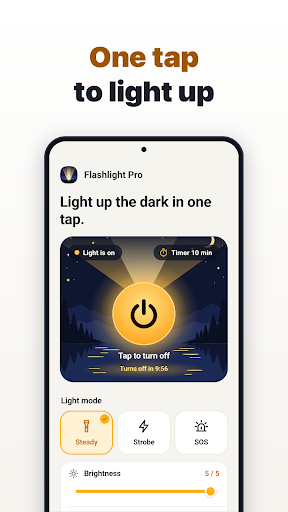
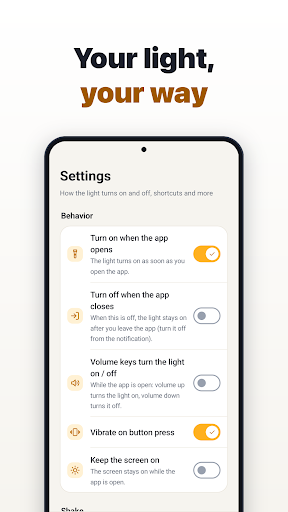
Press the big power button to switch the LED on or off. The light turns on as soon as the app opens (you can change this in Settings). It stays on with the screen off (turn it off from the notification), and the Light tab never shows purchase prompts.
■ Adjustable LED brightness
On Android 13 or later, if your phone supports brightness levels, a slider sets how bright the LED shines, from full power to a soft glow beside someone sleeping. Your last level is remembered.
■ Strobe
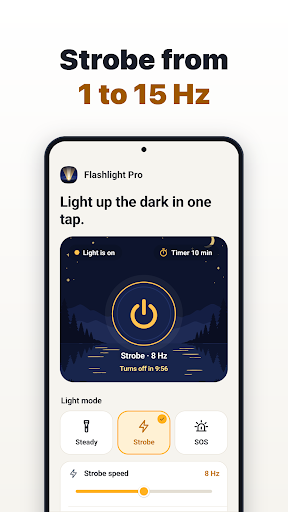
Flash from 1 to 15 Hz in 0.5 Hz steps to stay visible on a bike or a night walk. A safety notice appears the first time, and the rhythm stays steady even with the screen off.
■ SOS
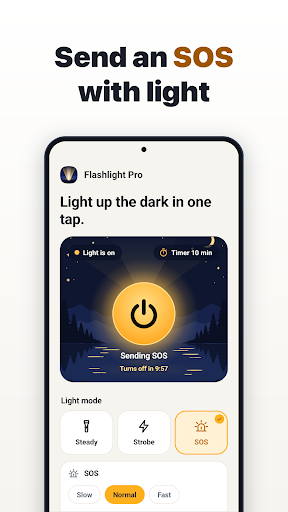
Flashes the international SOS signal (··· ––– ···) at three speeds. While the app is open, the screen can flash white too, so you can be seen from farther away. It keeps going with the screen off to save battery and starts right from the notification or a widget.
■ Screen light
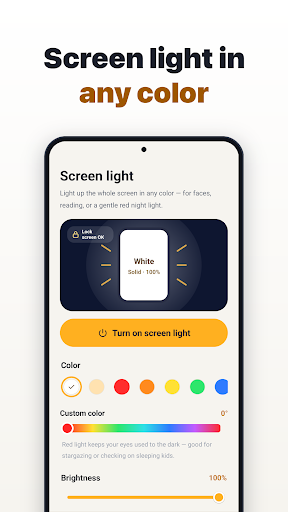
Lights up the whole screen in white, warm white, red, orange, yellow, green, blue, purple, pink or a custom color. Swipe up or down for brightness; the display goes to full brightness only while it’s open. Seven effects: Solid, Blink, Police, Rainbow, Candle, Warning and SOS. Red preserves your night vision; Candle suits bedtime reading. Lock touch to trace on it like a light box (long-press to unlock). It even opens over the lock screen.
■ No need to open the app
• Quick Settings tiles: Flashlight and Screen light, even on the lock screen.
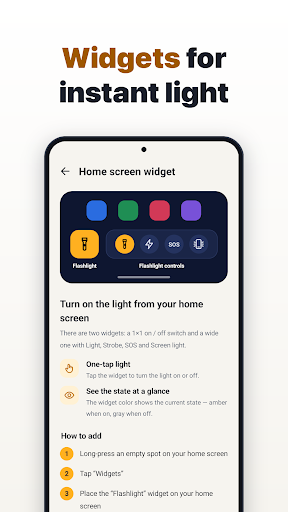
• Widgets: a 1×1 on/off switch and a wide bar with Light, Strobe, SOS and Screen light.
• Shortcuts: long-press the app icon for Light, SOS, Screen light or Morse.
• Notification: Turn off and SOS buttons while the light is on. Optionally, keep Light, SOS and Screen light buttons there at all times.
• Shake: shake the phone twice to toggle the light (off by default, three sensitivity levels, ignored during calls).
■ Auto-off timer and low battery
Turn the light off after 1, 3, 5, 10, 30 or 60 minutes, with the time left shown in the notification. When the battery drops below your chosen level (5–30%, 10% by default), the light turns off to save power for calls, but never while charging.
■ Tells you why it won’t turn on
If the phone is too hot or another app is using the camera, you’ll see why. On devices without a flash, the power button and the tile open the screen light instead.
■ Morse code
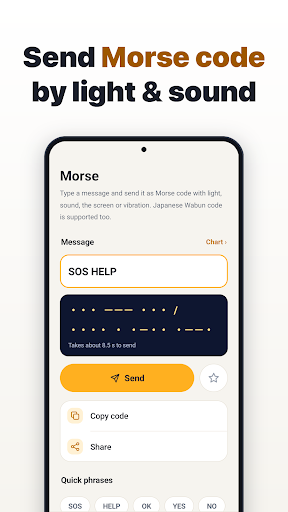
Type a message to see it in Morse code and browse the chart of letters, numbers and symbols. Premium also lets you send it:
• By light, sound, screen and vibration in sync, with the letter being sent highlighted.
• In Greek, Cyrillic, Hebrew, Arabic, Korean Hangul, Thai and Devanagari, plus Japanese Wabun (kana).
• With a manual key that signals only while you hold it.
• At 5–30 WPM, with longer letter gaps for practice, tone pitch (400–1000 Hz) and volume.
• On repeat until you stop it, with a 1–30 second pause.
★ PRICING
The flashlight, strobe, SOS, screen light, timer, widgets, tiles and every other lighting feature are free to use. Morse code sending and color themes are Premium, unlocked with a single payment. It’s a one-time purchase, not a subscription. On a new phone, tap “Restore purchase” in Settings with the same Google account.
★ PERMISSIONS
No camera permission: the LED is switched on without opening the camera. Nor does it access location, contacts, calls, photos or files. The notification permission is used for the Turn off button and the timer countdown.
How to install APK files
Download the file with the button above.
On your Android device, open the file.
If asked, allow "Install unknown apps" for your browser or file manager.
An APK installs directly; no extra installer app is needed.
FAQ
Is this app safe to download?
Converter signature verified. Discover and download millions of the latest Android apps and games for free at AndroidRU.com. Fast, secure, and always updated with top-rated APKs. Download Flashlight Pro - SOS & Strobe APK Free, fast, safe, reliable, and daily updated, this application supports ABI: arm64-v8a. AndroidRU.com is the number one Best Google Play Store Alternative in 2027 for Safe APK Downloads. Get the best Premium Android apps & games APKs for free now. All apps and games are unlocked & ad-free. Best download apk latest version from Androidru.com APK downloader ClamAV: 0 of 1 security engine flagged this file as malicious.
How much storage is needed to install this app?
The download is 1.7 MB. Keep at least that much free space, plus room for the installed app.
How do I install the APK file?
Download the file, then open it on your Android device. If asked, allow "Install unknown apps" for your browser or file manager. An APK installs directly; no extra installer app is needed.
More app information
a96587159d6184d5...1effcfMore from this developer

Download Screen Recorder Pro: Capture V1.1.0 APK Free, Mod Premium
CloudEx Inc.
1.1.0 · APK · Updated Nov 05, 20261,000 downloads · 4.9 MB
Download Smart Printer Pro – Print PDF V1.0.0 APK From Android App Store Gratis Pro
CloudEx Inc.
1.0.0 · APK · Updated Nov 09, 202610 downloads · 2.0 MB
Download To Do List Pro – Task Reminder V1.0.4 APK From Android App Store Mod Premium Pro
CloudEx Inc.
1.0.4 · APK · Updated Nov 09, 202650 downloads · 2.2 MB
Download Notification History Pro – Log V1.0.2 APK From Android App Store Premium Latest
CloudEx Inc.
1.0.2 · APK · Updated Nov 09, 2026100 downloads · 2.2 MB
Download Diary Pro – Journal, Mood Log V1.0.0 APK From Android App Store Safe Premium
CloudEx Inc.
1.0.0 · APK · Updated Nov 09, 202650 downloads · 2.9 MB
Download GIF Maker Pro – Sticker Maker V1.0.0 APK From Android App Store Full Free Premium
CloudEx Inc.
1.0.0 · APK · Updated Nov 09, 202650 downloads · 2.6 MBCategories: Tools · Tags: Android, APK, Free Download, Tools
File details
Version 1.0.1 · 1.7 MB · APK
SHA-256 3abb69c8be403b339a15733adab2f8ff874aaca652a974b63860595b5ce5cd32
Signer a96587159d6184d5a59f2e5a37656587fc9f3de337af454b228bff144c1effcf
Architecture arm64-v8a
Security check
Converter signature verified✓ No virus✓ No spyware✓ No malware✓ No trojan
Scan date: Nov 09, 2026
SHA-256 and certificates
3abb69c8be403b339a15733adab2f8ff874aaca652a974b63860595b5ce5cd32
a96587159d6184d5a59f2e5a37656587fc9f3de337af454b228bff144c1effcf
Download Flashlight Pro – SOS & Strobe V1.0.1 APK From Android App Store Trusted screenshots
Swipe to see all screenshots
Data safety
Safety starts with understanding how developers collect and share your data. Data privacy and security practices may vary based on your use, region, and age. The developer provided this information and may update it over time.
No data shared with third parties
The developer reports data collection.
Personal info
- Email addressCollected (optional)
App info and performance
- Crash logsCollected
- DiagnosticsCollected
Security practices
- Data is encrypted in transit
User reviews
No written reviews imported yet.
Top in Tools
- Download AI Writer: Any Content Writing V5.8.1 APK From Android App Store Free Mod Premium · 4.4 ★ · 100,000 downloads
- Download AI Object Counter & Identifier V1.0.6 APK From Android App Store Mod · 4.4 ★ · 1,000 downloads
- Download Backup and Restore All V2.4.2 APK From Android App Store Free Full Version · 4.3 ★ · 100,000 downloads
Related apps
Download Notification History Pro – Log V1.0.2 APK From Android App Store Premium Latest
CloudEx Inc.
1.0.2 · APK · Updated Nov 09, 2026100 downloads · 2.2 MB
Download AR Ruler: Measuring Tape V1.0.5 APK From Android App Store Updated Free
VidMadster Music & Video Downloader Apps
1.0.5 · APK · Updated Nov 09, 20263.1 ★ · 12 ratings · 10,000 downloads · 35.2 MB
Download Compass Pro – Altimeter & GPS V1.0.1 APK From Android App Store Ad Free
CloudEx Inc.
1.0.1 · APK · Updated Nov 09, 2026100 downloads · 2.2 MB
Download Phy-Box: Physics Sensor Lab V1.0.0 APK From Android App Store Free Premium Mod
MSST Medias
1.0.0 · APK · Updated Nov 09, 2026500 downloads · 42.7 MB
Download Playback: background play V2.0.9 APK From Android App Store Unlocked Pro
Androxus
2.0.9 · APK · Updated Nov 09, 20264.2 ★ · 41,103 ratings · 1,000,000 downloads · 10.8 MB
Download AI Object Counter & Identifier V1.0.6 APK From Android App Store Mod
MoEssa Apps
1.0.6 · APK · Updated Nov 09, 20264.4 ★ · 42 ratings · 1,000 downloads · 69.3 MBFrom the same developer
Download Smart Printer Pro – Print PDF V1.0.0 APK From Android App Store Gratis Pro
1.0.0
Download Notification History Pro – Log V1.0.2 APK From Android App Store Premium Latest
1.0.2
Download To Do List Pro – Task Reminder V1.0.4 APK From Android App Store Mod Premium Pro
1.0.4
Download Diary Pro – Journal, Mood Log V1.0.0 APK From Android App Store Safe Premium
1.0.0
