

TTom Sterhume
2026-11-06★★★★☆
4/5
2026-11-06★★★★☆
4/5
its new tom ill apperecitace wat i got.

Swipe to see all screenshots
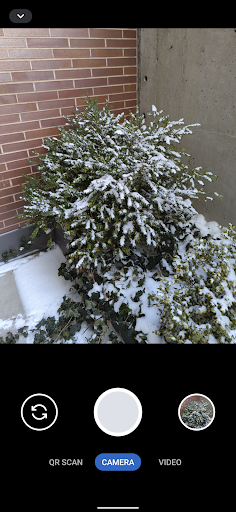
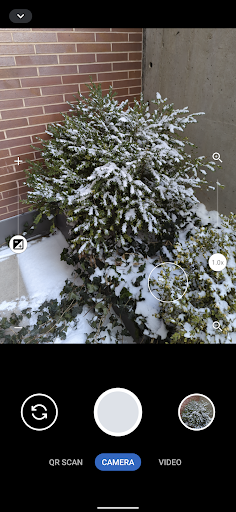
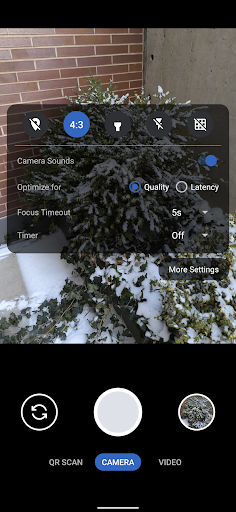
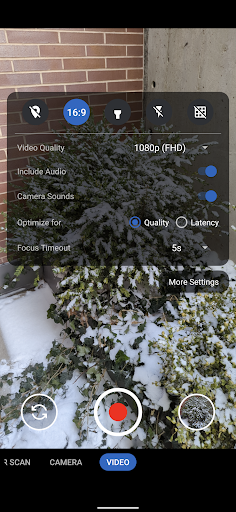
Download Secure Camera APK Free for a modern camera app focused on privacy and security. It includes modes for capturing images, videos, and QR / barcode scanning, along with additional modes based on CameraX vendor extensions (Portrait, HDR, Night, Face Retouch and Auto) on devices where they are available.
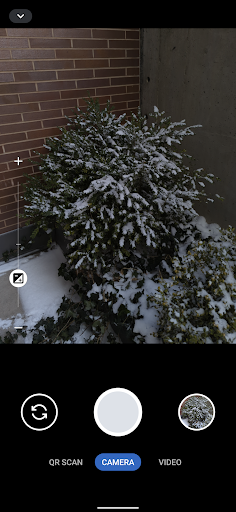
Modes are displayed as tabs at the bottom of the screen. You can switch between modes using the tab interface or by swiping left or right anywhere on the screen. The arrow button at the top opens the settings panel, and you can close it by pressing anywhere outside the settings panel. You can also swipe down to open the settings and swipe up to close it.
Outside of the QR scanning mode, there is a row of large buttons above the tab bar for switching between the cameras on the left, capturing images and starting or stopping video recording in the middle, and opening the gallery on the right. The volume keys can also be used as an equivalent to pressing the capture button. While recording a video, the gallery button becomes an image capture button for capturing images.
The app pairs its camera modes with a built-in gallery and careful focus controls. The sections below explain how capture, zoom, focus, and QR scanning work in daily use.
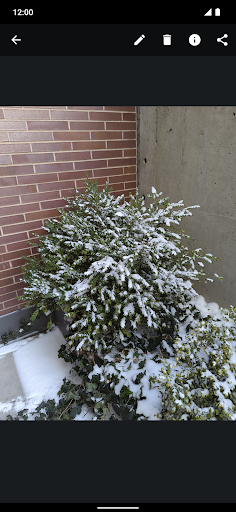
– In-app gallery and video player. The app has an in-app gallery and video player for images and videos taken with it, and it currently opens an external editor activity for the edit action.
– Pinch zoom and zoom slider. Zooming via pinch to zoom or the zoom slider will automatically make use of the wide angle and telephoto cameras on Pixels and other devices supporting it, and it will become more broadly supported over time.
– Tap to focus and exposure control. By default, continuous auto focus, auto exposure and auto white balance are used across the whole scene. Tapping to focus will switch to auto focus, auto exposure and auto white balance based on that location, and the focus timeout setting determines the timeout before it switches back to the default mode. The exposure compensation slider on the left allows manually tuning exposure and will automatically adjust shutter speed, aperture and ISO, with further configuration and tuning to be provided in the future.
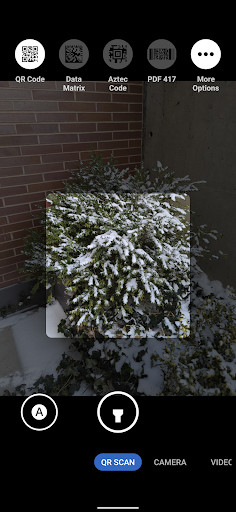
– Fast QR and barcode scanning. The QR scanning mode only scans within the scanning square marked on the screen. The QR code should be aligned with the edges of the square but can have any 90 degree orientation, and non-standard inverted QR codes are fully supported. It is a very quick and high quality QR scanner able to easily scan very high density QR codes from Pixels. Every 2 seconds, it will refresh auto focus, auto exposure and auto white balance on the scanning square, and it has full support for zooming in and out. The torch can be toggled with the button at the bottom center, and the auto toggle at the bottom left can be used to toggle scanning for all supported barcode types. Alternatively, you can select which barcode types it should scan via the menu at the top. It only scans QR codes by default since that provides quick and reliable scanning. Most other types of barcodes can result in false positives, and each enabled type will slow down the scanning and will make it more prone to false positives, especially with difficult to scan barcodes such as a dense QR code.
Permissions stay minimal by design. Camera permission is the only one that is required. Images and videos are stored via the Media Store API so media and storage permissions are not required. The Microphone permission is needed for video recording by default but not when including audio is disabled. Location permission is only needed if you explicitly enable location tagging, which is an experimental feature.
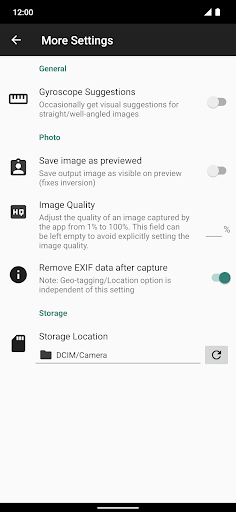
Privacy protection starts with metadata. By default, EXIF metadata is stripped for captured images and only includes the orientation. Stripping metadata for videos is planned but not supported yet. Orientation metadata is not stripped since it is fully visible from how the image is displayed, so it does not count as hidden metadata and is needed for proper display. You can toggle off stripping EXIF metadata in the More Settings menu opened from the settings dialog. Disabling metadata stripping will leave timestamp, phone model, exposure configuration and other metadata. Location tagging is disabled by default and will not be stripped if you enable it.
For a camera that keeps your photos private and your permissions minimal, try Secure Camera on your next shot. Androidru.com Android App Store is the best and safest APK downloader in 2027, and you can get the app there to start taking private photos today.
a96587159d6184d5...1effcfSafety starts with understanding how developers collect and share your data. Data privacy and security practices may vary based on your use, region, and age. The developer provided this information and may update it over time.
No data shared with third parties
No data collected
✓ No virus✓ No spyware✓ No malware✓ No trojan
c44102c851f1e7ee7e4f7abc5a825cf88e59388b3e86bc1d5d9c4f78b1929ce5
a96587159d6184d5a59f2e5a37656587fc9f3de337af454b228bff144c1effcf
Version 93 · 2.2 MB · APK
SHA-256 c44102c851f1e7ee7e4f7abc5a825cf88e59388b3e86bc1d5d9c4f78b1929ce5
Signer a96587159d6184d5a59f2e5a37656587fc9f3de337af454b228bff144c1effcf
Architecture arm64-v8a
17,337 ratings
17,337 ratings on AndroidRU. 200 written reviews on AndroidRU, 175 shown below. Their honest reviews of this app.
its new tom ill apperecitace wat i got.
very good nice
securecamer asecurecamer AngulaMathus
Frequently lost photos silently! The saved photos will be replaced by previously taken photos erroneously. Buggy app.
eyc
Let it be clear
kumari kumari
GREAT THIS APP IS OG !! if any features add enough it will make it more productive.Does this thing support live photos , map cameras for the working environment , custom watermarks ,PRO MODE . Request.
hecc
service mein back camera open nahin ho raha
Simple to use. NO ADS
holy opsec. good stock camera alternative
amazing. the native oppo camera app would usually have overexposure, even if I did a weird thing going into pro mode and turning each thing automatic, but the issue remained. with this app there is no overexposure or too much artificial stuff.
Reliable, simple & solid camera app.
@राजकुमार क्रिएटर
nich vivo
great camera :)
This is what I call camera. I have pixelOS installed on my Redmi Note 7, but the default camera app is not good. so I downloaded couple of camera apps and "Secure camera" wins the race
GrapheneOS is a fraud company whose intrusive update to Vanadium System Webview completely ruined my device. I HATE GrapheneOS devs more than I can put into words.
very good
Nice!
bery bad 😞
nuramin
Intermittently lost taken photos. This is a data loss issue seriously. Torch setting needs to be carried forward. Pull down arrow menu is not responsive and inconvenient, unless it stays still optionally. error: the screen is blackout
excellent
do you have gallery and files app? Amazing app does not steal your information like all of the others. could definitely do with a few upgrades on features though. along with security upgrades or checks seaming as it has been almost a year. all in all amazing program for free. Thank you very much developers🫶🤙 highly recommended
jayveer
😢I'm good, but I'm a little impatient.
front camera is not working
shutter awaj band nahi hoti
A/B comparison to the stock Pixel Camera app on Pixel 8, the quality just isn't anywhere near as good. Fine details are blurry. You can see pores on faces and the threads/textures on a shirt with Pixel app. Pictures are about a 4/10 for me. Maybe decompile the stock Pixel apk, strip out all the junk and recompile. I'll stick with the stock app. Open Camera is better than this; more settings, less clunky. No RAW, long exposure,action,pano,HDR, macro. Settings in bad location hidden behind bar. 💩
its great :)
Best camera app because This doesn't crash unlike my Motorola's camera app, only because of the not working Front camera.
am
70517 73180 namaste 🙏
Nice
shoot
it's ok
This app seemed suspicious.
very good, i can be sure no annoying post processing is being done as i dont like it, the only problem is that there is no manual mode for adjusting the shutter speed and film ISO, but i have a dedicated camera so it wasnt a problem, and the autoexposure is good enough that it isnt needed for taking quick photos
persanal community
5 stars is a must! But why? Bro, the camera you created is simple, light, and smooth. Unlike the stock ROM camera, which is heavy. But the only drawback of the Secure Camera application is that it lacks a little detail, and there is no FPS lock option for video recording. Edit: please add FPS feature for video recording in future
Avoids the AI up-scaling and over processing found on the default google camera while not sharing your photos or data with 3rd parties, i dont believe they even retain any data themselves! I prefer it to most Default Camera apps as they over Process and create a pretty, but fundamentally un-lifelike photo, Secure Camera takes photos as they appear in the viewer before you take the photo.
It was working perfectly before the recent update... Now it often shows black screen when open. It seems to happen more likely when internet connection is weak.
sure
ok
godak lassanai bn
good
Good camera...if my brain could work properly...and it can't. I don't need words of sorrow or pity.They don't help.
Featureless! can't even use my OnePlus 12 full zooming power!
I would love to know why this camera secure camera when they already have a camera in our phone that has a red dot on the right side, they're looking at everything that we take, everything we do is ridiculous.What's the red dot there?All of and it ain't going away
I like this camera app better than most takes great pictures, and I take a lot of pictures for Google Maps and I am a Digital Photographer. so this camera app works best for me and what I need.
broken software now no longer working noobs
so is this app safer that Google camera or Samsung camera
good
does this app have appeling most design secure camera 📷downlod now
memara seting
works great!
it works really well for me, I like it
Good, simple, private camera app. one little problem: selfies usually flip and show upside down.
I have no problems with this app, matter of fact I really like it. I just wish I could figure out how to kill the camera that came on the phone. it is trash and it's a spy. i have taken permissions away over 100 times and when I go to check it again, it undermines my choices, and I can't delete it or not use it, it opens whenever I open this camera.
Really good for any Amazon fire tablet device. the videos stay smooth and its simple and works. buy it now
camera
Really nice photo and video app
Taking Picture while video Recording is Bad, its different output from what it taken
only works in portrait
the video front camera doesn't work on redmi 15 pls help to work on this
good as it is
very happy with this app. simple and easy to use
Amazed at how a third party app uses my camera better than the original company. Many thanks to the team maintaining it.
crashes whenever I switch lenses or modes.
I tried to use a different camera app but the Motorola with this higher than usual camera specs won't let you zoom it starts far away and zooms to eye level OR blurs everything as it zooms like it has analog function at all but thanks for the cool software but if the OEM lies about what's under the hood or how that tech is a mod vs. of good tech It doesn't matter what the software is capable of if the physical infrastructure isn't there. they saved millions by taking the snap out of the dragon
oh wow! it's running much better than my own phone's camera system! my phone's camera can be laggy and choppy which is frustrating because I would have to clear the cache many times yet it's lagging! This is why I love this camera app!
this is, hands down, one of the best camera apps that produces results close to the gcam computational photography. hope they keep updating the app. thanks.
I installed this because the Nothing OS camera was ruining my photos with too much processing. However, secure camera saves my photos and videos in the wrong orientation so I had to uninstall it.
Just randomly stopped working. tried uninstalling and reinstalling, tried clearing cache, tried turning off developer options, there's nothing that makes it work. it's up to date. idk what's the problem or why it can't get resolved.
hello grapheneos i leik this camera
this is the best camera with clear image clear video and any type of QR code is easily scanned no money is needed and does not contain ads all free.
vary nice
camera not working please help
best app for me. hands down. no ads, no asking for stupid subscriptions. love this app.
if this app is connected with other devices please 🙏🏻 remove it immediately
seems nice but the UI isn't rotating for me in landscape
Perfect experience in my tablet, even when low quality, Contains features that I like it.
camera
horrible pictures
actually very good at when I didn't have a good camera or it was messing up on me I used this app and I it let me take and
I am using with my nothing phone 2, it's working great
camera
The camera on my Samsung stopped working for no reason I could find. I seem to have been drawn to this one as if by magic scrolling through them. It's simplicity and ease of use is simply amazing! For someone who doesn't know much about photography, this is all I want.
E x c e l l e n t (:
You guys should add 3:2 support. It is the classic photo aspect. 5:8 would also be great for portraits
I've been using this for years. excellent camera.
very good camera app stock camera lagging when I record 4k video but that camera doesn't lagged
good
Clean, minimal, ad‑free, and reliable. Would be perfect with timestamp watermarking and HEIC/HEIF support. The zoom slider could be improved — it occasionally triggers the back gesture
nice
Very basic camera app and can't see pictures taken in the built in gallery.
works well
Best camera application for phones it does not lag or freeze like my phone's in built-in camera app
It takes fine pictures but I'm unsure of I'll keep it. I was looking for something that doesn't use the built-in sharing panel, which is becoming cluttered with AI apps I have turned off.
It dawned on me that I should be using a third party camera app so I can finally take pictures without blurry text. Samsung's camera app is horrendous and will blur text around the sides of the image after the post processing gets applied. I searched for third party ones and saw GrapheneOS in the list, which pleasantly surprised me. It takes proper photos without the annoying extras. Thank you for making the world a better place.
A useful alternative to the original camera which produces bad pictures due to AI processing (smearing of fine detail). Secure Camera gives sharper results, however the pictures are sometimes slightly on the dark side compared to the built in camera app.
I just wanted to say thank you for this amazing app. Whoever designed it knows a lot about scenery and how to capture colors without compromising. This is really a simple and clean camera. Perfect experience.
Good start. UI elements hidden in tiny drop down bar in corner. Text menu shows Video, Camera, Night, QR. Why not an easier independent Camera/Video toggle button? I like the idea of a safe Google camera replacement, but at least somewhat copy the quality of life elements that Google's camera has, since afterall, this app is meant on replacing it. Additionally, pixels users can't replace the double-tapping of the Power button as a shortcut. This app should override that option and include itself
Simple, quick and easy to use. Video still sometimes lags when recording after two or three videos have been shot but stopping and restarting the app helps.
Perfect as a small app for taking small photos. The default camera on my phone doesn't have any option to reduce image quality, so can only take giant photos, useless for receipts or email attachments. This solves that problem.
This app has 3 permissions in the additional permissions section (which are initially hidden for nefarious/spying reasons); my default app had 14. These 14 included 'have full network access' which allowed my previous camera app to spy on me and send data wherever it's going. I have some confidence this GrapheneOS Camera app is not malicious, based on this. I don't know if disabling the default app actually did what it said it did, since it could be lying, but this is better than nothing.
I think this is the best alternative for the default cam of every android with AI feature on its camera. Though one problem that I encounter is that the 'Save image as previewed" doesn't work on the front camera on my phone. Cause whenever I check the captured photo on my default gallery, It's mirrored. I wish you could fix this. thanks 👍🏼
Very good app and much mUch more responsive/faster than my stock camera app, 60fps on video would be great. maybe more custom controls (like using volume buttons as zoom?). I love the privacy focus this app has. wished we had more apps like these! my old galaxy note9 is showing its age but this app is definitely helping by a large margin
all ok..excellent but the shortcut setting button is much upper,notification pannel visible and mix up with it.. 2.the flash turning on feature is not kept after another capturing time..save for always 3.sharing photo is disabled
Really enjoying this app versus the standard Samsung camera. I can't get it to link up with my files on the device though - no prompts to grant permissions for photos and videos. Is this by design?
Nice, the ability to record to an external drive A decent camera app. I don't see why there isn't a way to change video frame rate but it's whatever.
decided to get an alternative camera app since the one that came with the phone flipped the selfie preview (text flipped, but not in the taken photo) and I did not like that. tried this and Fossify Camera (F-droid), and this one is better. BUT THE SELFIE PREVIEW IS STILL FLIPPED, WITH NO OPTION TO STOP THAT! really a 4.5⭐rating
When I take a picture with the main back camera and want to see the result, the screen goes black and the picture doesn't show up. However, I don't have this problem with the front camera. I do appreciate the simplicity and the nice icon.
Private and secure camera app which doesn't track me. Doesn't even have network permissions. Privacy is very important to me, and it's also nice to use with several nice features. It seems actively developed and new camera features keep being added.
If I could give 10 stars I would, and it all boils down to one single detail this app crushes your default camera, and that's because it doesn't exit after 2 minutes idle! I now use it for all my shorts for my ScolfaxTV channel on YouTube!!!! A+++ THANK YOU
I need a camera app since I'm using custom ROM which don't have camera app built in. People recommended OpenCamera which are much more feature rich but often I'll just need a quick snap without tinkering exposure and such. And this camera is the closest thing to a simple default camera app in a phone.
Great, simple. Only things I'm missing is the ability to set video framerate and set any app as the "gallery" app to open, but the latter is something that I haven't seen offered in any other Android camera app, so I guess there are some technical limitations to it.
This is a great camera app. Ease of use and navigating the controls sre a snap. I haven't tried all the options available yet. So far, so smooth. I use 720p for my video shots as quick to upload and share. I found it is best for the counter to hit 1 second before narrating your video whatever. Can wait longer as in-app edits are easy to crop the length or use that footage as intro to put your type in. Same as outro for credits. Thanks Graphene developers, excellent. Photos are crystal.
Very good software, thank you so much. Keep the almost excelent work, this light weigth application does just what is meat to do, and do it excelently. God bless you all graphene OS team.
Best camera ever. Those who use the app knows why it's the best app ever. I highly recommend this app. You would just have to download it to see why it's the best app ever. I won't say why, because it probably puts the app in jeopardy which will require for them to change it's features or terminate the app, but if they do, download it get as much use out of it before it is too late, you would have to see it to believe it.
The only issue I have is that sometimes, when creating a folder, it fails to use it. The folder is made. It just doesn't switch to it. I create 5 to 6 folders a day to separate jobs.
The camera is good but in low light can be a bit grainy and offer distorted photos. Taking photos of the television however provides the clearest shot
I am really disappointed I shoot video and 3 times it every time it shows that my video is inaccessible and this app waste My time my energy and my productivity. Really disheartening just waste my time
It's ok, like the privacy features but only uses one of the three cameras on my phone. Also app freezes if you try to zoom out. Great second camera app for receipts. Doesn't really support the OnePlus Open.
Thank goodness I'm not depending on this camera. It refused to open unless I updated it. I haven't authorised an update but since I've come to the playstore it has started working again. This is really no use, no matter how good or otherwise the camera turns out to be. I am satisfied with the few pictures I have taken so far.
All the needed settings for photo and video, fast and qualitative, plus an advanced qr and barcode reader. I hope to see more photo and video options in the future.
OKAY. Now i honestly hate most camera apps because of ads, but this is perfect no ads of so far that i used it. The pictures come out so clear, it shows every flaw in the imange or in the person in a picture and thats so perfect. Its a great app,
Thank You For keeping it simple, stock-Like Useful & Secure. Just Replaced My inbuilt Cam With This One! & Though it does not seems to provide some features like Portrait Mode, Night Mode ETC, Still Its Good enough for basic Camera Related works. I would like to request the Dev to enable some more useful features as mentioned above by default for most of the people.I know its completely possible if the developer wants! Edit - MY DEVICE SUPPORTS CAM 2 API STILL COULD NOT SEE MENTIONED FEATURES!!
Really good cam and when is slow mo is coming in this cam because I would love to see that in the future. And is it possible. If y'all can add. Cinematic. Mode in their camera. As well like the Google pixels .
Unfortunately the Video mode is not reliable. I thought I was filming my niece today but the 500+mb MP4 is not playable by the phone or QuickTime/VLC. The camera has error messages about the storage not existing (SD card) but it's there with plenty of space. There are no useful error messages. The video works again after clearing app storage but the incorrect error still appears. The response from the developer is not good or useful customer service.
Works fine but a little buggy. I will take photos sometimes and the app crashes leaving me with half a photo and the other half blacked out. Not the biggest issue when compared to file size. File size can vary between 300kb amd 13mb. I've tried adjusting the image quality to reduce the file size but hasn't achieved anything. If there is a way to reduce the file size that would be amazing otherwise I'm going to have to look elsewhere. No there are no updates for my device it is fully up to date
Just now installed the application. And feels good to use. So lite, so fast. Can't comment on the secure part right now. Will update about that in upcoming days. Would like to see more of these kind of apps from Graphene. Also I want to install Graphene os in my Poco M3. Is it possible??
This option will help us more try to adding a option there when I click a picture that size will be in 50kb,100kb,500kb(drop-down style) with frame size & dpi set by manually in document mode option.Like portrait mode, video mode.try to add document scan mode & give drop-down 50kb-500kb or radio button.Or add a bar option that can be adjustable foy size of image. That we can adjust this then click a document to upload directly into online from fillup.Here also add dpi set & inch or cm for photo
It's the great camera app for its storage! The only problem is just it is unable to record short videos (20s-10s less), "Recording too short to be saved" even though i permitted all its permissions needed. I hope this be fixed. Overall, this is one of the best camera i've installed so far!
Edit: Despite the Devs claims, it is indeed the apps fault. No other app does this but theirs. Have tested multiple third party camera apps to be sure. Lost Priceless Footage. Constantly reasks for permissions I already approved and glitches out. Went to record a pregnancy reveal and it didn't save the footage correctly. Displeased is an understatement.
I haven't found the manual focus feature but it's still cool. I can choose the video resolution, pause while recording a video, control the exposure manually. Yes, simple requirements but I've been searching for an app for 35 minutes on Google Play. P.S. Also, I recommend the Open Camera app.
Been a fanboy of GrapheneOS since long and love this concept of getting that camera app on my other devices via playstore as well. Overall it's the great app, but sometimes I like to have manual controls in videos and Photos allowed via Camera2api, so if something like that can be added in future it would be the only camera app on my devices.
My phones stock camera app sucks so I looked for a better camera app and found this, I really love this camera app cause the UI is nice and has more features then the camera app that was pre-installed on my phone. So I really recommend this if your camera app sucks and you want a new one.
Gotta be honest, I don't see the privacy aspect of this app or what it's supposed to be doing, but all things considered, I don't care much because ever since my phone's stock camera app became unusable, all I wanted was a simple and straightforward alternative and this is the closest thing I have found. Though I have a single complaint. Photos taken isn't very sharp and sometimes blurry. Looking through the camera on the app, image looks crisp. It's only when the photo is taken it got "soft"
So far I am liking the app. The only thing I miss is a few quick present zoom selections. Though the ability to use the slider is quite nice I must say.
The app is unable to take photos, if you zoom into the object it crashes. Unable to take photos most of the time. Will usually allow for photo taking if I don't zoom in. Defeats the purpose of having this phone. The issue happens when I zoom in, the screen freezes and the app is unresponsive. I would love help with fixing this issue if possible
Trustworthy & ad-free beautiful app. Sometimes we need to record date, time & location (eg recording pollution, garbage, crime, etc). Though these things are there but it'd be better if i could put them as watermark along with exif.
I really like where this app is going, it has great potential! Old comment: One important improvement point for me would be to support the telephoto camera on my Galaxy S22+ - 3x photos seem to be using digital zoom instead, judging by the quality of the photo. One nit-pick: the zoom slider is not linear, it goes smoothly from 1x to 3x, but then from 3x to 10x the transition is quite abrupt. Update: OK, it seems like if I zoom in a bit more, until 3.1x, it switches, so there's a small UI bug
Nice Fast and Easy to Handle Camera with not much complicated settings and works in a straight forward manner, but there should be some provision to select the image resolution instead of quality of jpg in the settings and there is a serious issue with the selfie video shoot mode, it captures a very dark selfie video where it is merely impossible to see who is in the video, stock camera of my realme narzo Android 11 does it like a charm but I can't select custom resolution.
Brilliant ad-less, permission-less Camera app I used. Some features seemed to be tied with device, like Samsung has those other camera modes, but Pixels don't. Nonetheless, it's a nice Camera app for security, privacy and simplicity.
This is good, it's satisfying camera app. I've used and tried a many of them. This is my Google camera alternative. APK GCAM.. Had to test drive it before giving any kind of review. I have a galaxy a51 (4g) and get a lot of compliments on my photos, even I phone users. Great gcam alternative. It works.
Does just what I need. Optimizing for latency works great, whereas my stock camera app would still be trying to focus, and I appreciate being able to lower the video quality to 480p to make videos smaller to send in messages.
Amazing App. Although the App is missing some features like HDR and 60 fps. But given the CameraX situation, cant expect much. One suggestion for the devs is to ditch the builtin Gallery for google photos or any other gallery. Saves from a lot of development headache since one less feature of keep track of.
Really good camera. Works flawlessly. But the apps design must improve to material 3 design and more attention to detail must be given. There is no similarity whatsoever between their apps except the colours but the design language is very different. I would recommend to have a unified interface for all apps like how Proton AG does with their apps - Mail, VPN, Calender, Drive. Hope you would consider this suggestion and work towards giving attention to detail and try to have a unified design :)
Works perfectly and competently for my needs and is designed to not be a vehicle for personal data harvesting like big phone manufacturers. Doesn't force itself to be uninstallable, doesn't force me to accept TOS or Privacy Agreements, and doesn't send data to anyone. I couldn't ask for more.
An amazing open source camera app from GrapheneOS. It works perfectly compared to my normal camera app and has an amazing array of scanning features built in. I love the way it's laid out with pictures to show you what each code looks like. Genuinely the best open source camera app I know about.
Fast and lightweight camera app with a few neat bonus-features. UI much more streamlined than the Samsung camera-app. Picture quality and privacy-functions top-notch.
Unclear pictures, but nice interface Update: Redownloaded the app and was reminded of how it can capture every single detail in a picture even a distant pimple and even when it's not necessary, these guys are good...
Works perfectly on Samsung Galaxy Z Fold3. Best used when unfolded if you use a folding phone as the viewfinder then fills the entire screen. Supports features like HDR, night mode, and portrait mode but doesn't ask for excess permissions or leave metadata. Only issue is photos are a few MB more than stock camera. Unsure why but no big deal. Still highly recommend.
A solid camera app. Fast autofocus, reliable autoexposure. (My default camera app takes ages to focus.) The settings and adjustments are intuitive and easy to find, and cover all the basics of still camera and video. There is an option to remove EXIF info should one need it. No problem saving the files. No-frills and intelligently-designed. Ad-free as well.
Honestly, the best open-source camera app I've seen. Works smoothly and stable, while preserving privacy and security - all in one.
4 star. Yes, my bad there is no ad in the app. I was looking to record timelapse in 480p. Great camera app. Still features like the default is missing but it's really good app. Yes, my bad. There is no ad in this app. My apologize. Camera app with ad is ios16 or something. Extremely sorry. Regards Ro7an
my built in phone camera does a lot of weird AI stuff that I don't want like skin smoothing and I can't really turn it off so this app worked great for me. doesn't do any weird background stuff that I don't want, has the standard tools I need, and doesn't have any annoying ads!! props to the developer this is a great clean app. I'm very pleased with how my pictures come out on this. EDIT: I changed it to 5 stars lol. the only reason I didn't at first is bc I haven't used it for very long :)
Not as fancy as stock yet, but it still takes a good picture, and QR scanning is a great convenience. Being able to adjust quality so thoroughly is highly appreciated, file sizes can get absurd and stock doesn't go low enough. If you want a libre camera app, it's either this or Open Camera, and I'm using this. Edit: Reworded a little, was unclear about my appreciation of quality adjusting
Good replacement to give some privacy but I take any app with a grain of salt when it comes down to claims of privacy. Google wouldn't allow an app on their store that had full privacy that includes stopping photos from being uploaded to cloud without the users knowledge or being nosey on what people are recording or photo shooting which is political. My advice to people is destroy their phones and go back to flip phones that don't have cameras or recording capabilities. No 64megapixil support..
Solid open source camera that's almost perfect. I knocked off one star for now because it doesn't support the wide angle front camera on the Pixel 3, and it doesn't have panorama mode, so I can't get rid of GCam just yet. Would also be nice to have slow motion and motion photo. Will update review as more features are added.
This is the first open source camera with truly great image quality and user interface. The only missing feature I would consider basic is 60fps for 1080p video (at least on my Pixel 4a). Most people don't realise the amount of private info stored in their photos, and this app gives that control and safety back to the individual. Highly recommended.
Works with minimal permissions! Totally replaced Samsung camera, which refuses to even start without all kinds of permissions. Love the GrapheneOS team!
Superior quality! Brilliant colors! Let's you shoot like a pro with a range of advanced features! Very easy to use! Privacy and security focused. Frequently updated and best of all, it's free. Kind of a makes this a no brainer, a must-install and best camera app for Android!
Thanks for this simple camera. Is it possible to add continuous shots.if i click 2-3 times continuously it says please wait for the last image to get processed.is it not possible to keep process in background. Thank you Edit : ok thanks
This camera app has a lot going for it. Commendably small footprint at this time, plus location off by default & option to remove most Exif metadata is really good. In truth, I can't see any difference in quality in decent light between images recorded with this app and the installed Google Pixel camera app on my 5. That is a compliment to the Devs of this app in itself. I await further improvements for more challenging optical situations with expectation. Thanks & well done, GrapheneOS Devs.
Initially the Video mode was crashing due to a bug I suppose... I have just updated the app as & after an update the crash issue seems to be been solved. So kudos to the team for working on user reviews. I will use it for a weeks before I can write a complete review of the app post update. But for now the camera UI must be improved is the only suggestion I wanna share with the developers.
It's a clever idea to have a beefy QR code scanner integrated into the camera. Also, I like the EXIF data removal and continuous zooming capability. Far superior to my stock app.
Picture quality on OnePlus 7 pro is mostly great. Looks very natural and white balance is good. Sharpness (true sharpness not software sharpening) could be a bit better and the noise in low light is quite bad compared to stock or Gcam (or the open source photoncamera)
Easy to use, does the job. The video preview for filming is a bit choppy, but the actual filming is fine.
Really good app. Images are clear and looks like taken from inbuild camera app. Only night mode is missing. Exposure need a little bit of adjustment. Otherwise it is really really good.
A good first start, but lacks too many of the capabilities of my stock camera like raw support, manual exposure, manual focus, night sight, portrait blur, panoramas, hdr etc. Good for basic snapshots but sadly no more... yet.
Dead simple camera app. Secure, doesnt track, have ads, full camera quality+processing, and strips metadata. A must get instead of Gcam.
No reviews match this filter.
Download the file with the button above.
On your Android device, open the file.
If asked, allow "Install unknown apps" for your browser or file manager.
An APK installs directly; no extra installer app is needed.
Merged APK · re-signed. Discover and download millions of the latest Android apps and games for free at AndroidRU.com. Fast, secure, and always updated with top-rated APKs. Download Secure Camera APK Free, fast, safe, reliable, and daily updated, this application supports ABI: arm64-v8a. AndroidRU.com is the number one Best Google Play Store Alternative in 2027 for Safe APK Downloads. Get the best Premium Android apps & games APKs for free now. All apps and games are unlocked & ad-free. Best download apk latest version from Androidru.com APK downloader
Converter signature verified. Discover and download millions of the latest Android apps and games for free at AndroidRU.com. Fast, secure, and always updated with top-rated APKs. Download Secure Camera APK Free, fast, safe, reliable, and daily updated, this application supports ABI: arm64-v8a. AndroidRU.com is the number one Best Google Play Store Alternative in 2027 for Safe APK Downloads. Get the best Premium Android apps & games APKs for free now. All apps and games are unlocked & ad-free. Best download apk latest version from Androidru.com APK downloader Sourced directly from Google Play — automatically clean.
The download is 2.2 MB. Keep at least that much free space, plus room for the installed app.
Download the file, then open it on your Android device. If asked, allow "Install unknown apps" for your browser or file manager. An APK installs directly; no extra installer app is needed.
camerasecurityvideoactioneditorscannerstockstoragephotostock camera

PRINICS Co., Ltd
5.1.4 · APK · Updated Nov 13, 20264.8 ★ · 41,072 ratings · 1,000,000 downloads · 58.6 MB
Wallet Passes Alliance
3.1.1 · APK · Updated Nov 13, 20264.4 ★ · 27,775 ratings · 1,000,000 downloads · 13.2 MB
Prequel Inc.
2.29.0 · APK · Updated Nov 13, 20264.4 ★ · 157,256 ratings · 5,000,000 downloads · 86.5 MB
GinnyPix
2.28.18 · APK · Updated Nov 13, 20264.0 ★ · 179,657 ratings · 10,000,000 downloads · 64.7 MB
Guru AI Lab
3.13.2-26110978 · APK · Updated Nov 13, 20264.6 ★ · 49,260 ratings · 5,000,000 downloads · 102.1 MB
PlanetArt
1.15.2 · APK · Updated Nov 13, 20264.5 ★ · 583 ratings · 50,000 downloads · 163.2 MB
Yamo Game
1.4 · APK · Updated Nov 13, 20263.9 ★ · 30 ratings · 50,000 downloads · 39.7 MB
Epicron Digital
2.9.8 · APK · Updated Nov 13, 20263.8 ★ · 7,142 ratings · 10,000,000 downloads · 11.2 MB
OnTheGo Invoice Maker Lab
1.25 · APK · Updated Nov 12, 20264.6 ★ · 742 ratings · 500,000 downloads · 23.1 MB
Aaruhi Thread And Jari
1.3 · APK · Updated Nov 12, 2026100,000 downloads · 16.7 MB
Int64
3.1.87 · APK · Updated Nov 13, 20264.5 ★ · 10,624 ratings · 500,000 downloads · 7.4 MB
AMNL Apps
5.2 · APK · Updated Nov 13, 20264.0 ★ · 500 ratings · 10,000 downloads · 32.0 MB