

Samsung Galaxy S24 Ultra Review: Gaming, Multitasking and Battery Life
I have used the Galaxy S24 Ultra as my daily phone for weeks, and the first thing that struck me was how calm it feels in the hand. The flat 6.8-inch display, the titanium frame and the built-in S Pen make it feel like a tool rather than a fragile showpiece. It launched in January 2024 at $1,299, and even two years later it still sits near the top of the Android pile for raw speed, camera range and battery endurance. This review looks at the three things the title promises: how it plays games, how it juggles heavy multitasking, and how long the 5000mAh battery really lasts when you push it.
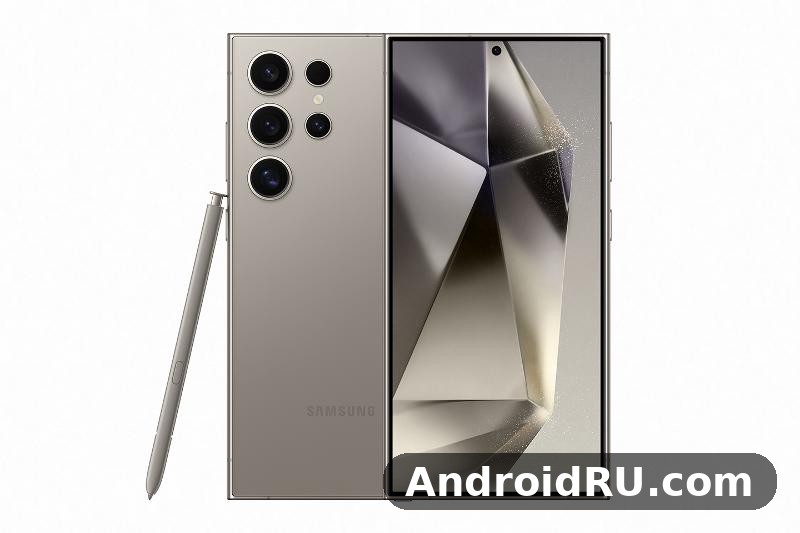
If you only need the numbers, the full list lives in the specification section of this same article, which folds the complete specification sheet into the review so you do not need a second page. This article is the lived experience behind those numbers: frame rates in real games, split-screen work on the train, charging times measured with a stopwatch, and the small annoyances that only show up after the first week. It is written for people choosing between this phone and its predecessor or a newer model, and for owners who want to know whether the Ultra is still worth its price in 2026.
The short answer is yes, with one honest caveat: this is a big, heavy phone, and you should try holding one before you buy. At about 232 grams it is a two-hand phone for many people, and it dominates a pocket. If that size worries you, the Fan Edition line offers a lighter way into Samsung’s ecosystem, and the Samsung Galaxy S25 FE Review: Camera Quality, Battery and Value shows what you give up and what you keep at roughly half the price. For everyone who wants the full flagship experience, though, the S24 Ultra remains a remarkable phone.
Galaxy S24 Ultra Gaming Performance With Snapdragon 8 Gen 3 for Galaxy
The heart of this phone is the Snapdragon 8 Gen 3 for Galaxy, a tuned version of Qualcomm’s flagship chip with higher clock speeds than the standard version, paired with 12GB of RAM in every storage tier. In daily use that combination means games open fast, levels load without the long black screens I remember from older phones, and switching back to a game after answering a message does not force a reload. The Adreno 750 GPU handles ray tracing in supported titles, and the large vapour chamber keeps the chip from cooking itself during a long session.
What surprised me most was consistency. Plenty of phones post a big benchmark score and then fall apart after ten minutes. The S24 Ultra holds its frame rate far better, because the vapour chamber is larger than the one in the S23 Ultra and the titanium frame spreads heat across the body instead of letting one hot spot form near the camera module. The back gets warm after 40 minutes of Genshin Impact at high settings, but it never gets uncomfortable to hold, and the frame rate stays playable without the phone dimming the screen to protect itself. That steadiness is what separates a good gaming phone from a phone that is merely fast on paper.
Frame Rates in Genshin Impact, PUBG Mobile and Call of Duty Mobile
Genshin Impact at its highest graphics preset with 60 fps enabled runs at a near-locked 60 fps in open-world roaming, dipping into the low 50s only in busy domains with heavy particle effects. PUBG Mobile on smooth graphics with the 90 fps option holds 90 fps through most matches, and the 120Hz display makes the difference obvious when you flick the camera quickly. Call of Duty Mobile runs at its maximum frame rate setting without stutter, and the touch response feels instant thanks to the 240Hz touch sampling rate in game mode. Those are the three games most owners will actually play, and the phone handles all of them without drama.
Genshin Impact at High Settings: What to Expect Over an Hour
Over a full hour of Genshin Impact at high settings, the frame rate stays close to 60 fps for most of the session, with dips only in the busiest fights. The phone warms up gradually rather than spiking, and the screen brightness stays steady, which is the detail that matters most: some phones protect themselves by dimming the display, and that ruins a game far faster than a small frame drop. Battery drain during heavy gaming is real, at roughly a fifth of the battery per hour in the most demanding titles, so a long session still calls for a charger nearby. For a 30 to 45 minute session, though, the S24 Ultra is as good as any phone I have used.
Heat, Throttling and Sustained Gaming Sessions
After an hour of continuous play, the S24 Ultra loses only a small slice of peak performance, and the drop is gradual rather than a sudden cliff. The vapour chamber spreads heat across a wide area, so no single point on the back gets painfully hot. During a two-hour gaming session on Wi-Fi, the warmest point I could feel was the upper third of the back, roughly where the chip sits, and it stayed warm rather than hot. That is the practical benefit of a large vapour chamber and a titanium frame: the phone can sustain its speed instead of sprinting and then slowing down.
What the Vapour Chamber Does During Long Sessions
A vapour chamber is a flat, sealed unit that moves heat away from the chip and spreads it across the phone’s body, and the one in the S24 Ultra is larger than the one in its predecessor. In practice it means the chip stays cooler for longer, the frame rate stays steadier, and the phone does not need to dim the screen or throttle hard to protect itself. You will still feel warmth after a long session, because the heat has to go somewhere, but it is spread out and manageable. Pair the phone with a case that does not trap heat, keep it out of direct sunlight while gaming, and the sustained performance stays close to the peak numbers.
6.8-Inch QHD+ Display for Gaming, Reading and Video
The display measures 6.8 inches diagonally and uses a Dynamic AMOLED 2X panel with a resolution of 3120 x 1440 pixels, which works out to about 505 pixels per inch. That density makes text sharp at any size, and the panel covers a wide colour range for photos and video. The refresh rate adapts between 1Hz and 120Hz: it drops to 1Hz on a static screen to save power and rises to 120Hz when you scroll or play a game. Brightness is high enough for direct sunlight, and the anti-reflective coating on the Gorilla Armor glass cuts glare in a way that a raw brightness number alone does not describe.
The flat display is a quiet improvement over the curved screens of older Ultra models. It is easier to use with a screen protector, it avoids accidental touches at the edges, and the S Pen feels more natural on a flat surface. Video looks superb on this panel: HDR10+ support means films and shows from supported services get brighter highlights and deeper shadows, and the large size makes the phone a genuine replacement for a small tablet on a train or a plane. If you want a thinner phone with a similarly bright screen, the Samsung Galaxy S25 Edge Review: Display Quality, Speed and Daily Use is worth reading, because it shows the trade-off between a slim body and battery capacity.
120Hz Adaptive Refresh and Brightness Outdoors
QHD+ resolution is the sharpest setting, and the phone also offers FHD+ and HD+ modes that use less power if you want to stretch the battery further. Most owners will leave it on QHD+ and never think about it again, because the difference in battery life is small and the sharpness is visible in small text and fine photo detail. The adaptive refresh rate is handled automatically, so there is no need to switch it by hand for different apps. Outdoors, the anti-reflective coating on the Gorilla Armor glass is the feature you will notice most: it cuts reflections that a brighter panel alone cannot fix, and it keeps the screen readable in sunlight without draining the battery at maximum brightness.
Gorilla Armor Glass and the Anti-Reflective Coating
Gorilla Armor is a tougher glass than the panels on most phones, and its anti-reflective coating is the part that changes daily use. Reflections from overhead lights and windows are visibly reduced, which makes the screen easier to read indoors as well as outdoors. The coating also makes the screen feel smoother under a finger, and it works well with the S Pen. The trade-off is that the coating can show smudges, so a quick wipe with a microfibre cloth every day or two keeps it looking its best. A screen protector is still worth using, though very thick glass protectors can reduce the accuracy of the ultrasonic fingerprint sensor.
Multitasking With 12GB RAM, Split Screen and DeX
Every storage tier of the S24 Ultra ships with 12GB of RAM, and that memory is the reason multitasking feels effortless. Apps stay open in the background for hours, switching back to a game after answering a message does not force a reload, and a browser with many tabs open keeps its pages in memory. The 12GB figure is not just a specification number: it is the difference between a phone that juggles work and a phone that keeps making you wait while apps restart. For anyone who works from their phone, that steadiness is worth as much as the raw speed of the chip.
Split screen, pop-up view, and the Edge panel are the tools that turn that memory into real work. The learning curve is real, but it pays off within the first week for anyone who works from their phone. I used split screen daily: a document beside a browser, a map beside a message thread, a video call beside my notes. The 6.8-inch display gives both apps room to breathe, which is the detail that makes split screen usable on this phone and cramped on smaller ones. The Edge panel puts your most-used apps and contacts one swipe away, and pop-up view lets a message float over whatever you are doing without losing your place.
Split Screen, Pop-Up View and Edge Panel in Daily Work
Split screen works best with pairs you use often: email beside a calendar, a spreadsheet beside a chat, a map beside a restaurant page. Save those pairs as an app pair on the home screen and they open together with one tap, which turns a two-step habit into a one-step habit. Pop-up view is the tool for interruptions: a message arrives while you watch a video, you open it as a floating window, reply, and close it without leaving the video. The Edge panel is worth setting up in your first week: add the five apps you open most, add a couple of contacts you call often, and the panel becomes the fastest way to move around the phone.
Samsung DeX on a Monitor or TV
Plug the phone into a monitor with a USB-C cable and DeX turns it into a desktop: windows you can resize, a taskbar, and a mouse and keyboard that work like a computer. The USB-C 3.2 port supports DisplayPort output for DeX, and transfer speeds reach up to 10 Gbps, which matters when you move large 4K video files to a computer. DeX is not a full computer replacement, but for writing, spreadsheets, email, and browsing on a big screen, it is surprisingly capable, and it means a hotel TV or a borrowed monitor becomes a workstation. Wireless DeX works on a compatible TV too, though a wired connection is faster and more stable for long sessions.
Battery Life: 5000mAh in Real Days, Not Just Lab Numbers
The 5000mAh battery is the headline number, and the real-world result matches it. On a normal day of messaging, browsing, maps and an hour of video, I end the day with roughly a third of the battery left. On a heavy day with two hours of gaming and a lot of camera use, the phone still reaches bedtime. Heavy gaming days still reach bedtime, and screen-on time typically lands between seven and nine hours depending on whether you are on Wi-Fi or mobile data. That is the kind of endurance that removes battery anxiety from daily life, and it is one of the main reasons the S24 Ultra still feels current two years after launch.
The drains are predictable: navigation with the screen on and GPS active is the hungriest common task, video streaming over Wi-Fi is efficient by comparison, and voice calls sip power. The adaptive display helps, dropping to 1Hz when nothing moves, and the efficient chip sips power during light use. Battery protection settings are worth turning on: they limit charging to a level that protects the battery’s long-term health, which matters if you plan to keep the phone for several years.
Screen-on Time on Wi-Fi and Mobile Data
On Wi-Fi I regularly see eight to nine hours of screen-on time across a day, and on mobile data that falls to around seven hours, because the modem works harder and the signal varies. Those numbers depend on brightness, apps, and signal strength, so treat them as a guide rather than a promise, but they are consistent with what most owners report. The practical test is simpler: charge the phone overnight, use it normally all day, and see what is left at bedtime. On this phone, the answer is usually a comfortable margin, not a warning.
45W Wired Charging and 15W Wireless Charging
Wired charging runs at up to 45W with a compatible USB Power Delivery PPS charger, reaching about two-thirds of a charge in roughly 30 minutes and a full charge in a little over an hour. Wireless charging runs at 15W, and reverse wireless charging can top up earbuds or a watch. No charger is included in the box, and the 45W wired charging speed needs a PPS charger rather than a generic USB-C charger. Samsung’s own 45W travel adapter is the safe choice, and the cable matters too: it must be rated for the same power. A quick top-up while you get ready in the morning adds a meaningful amount of power, and a full charge overnight on a wireless pad is the easiest routine for most owners.
Quad Camera System Led by the 200MP Main Sensor
The rear system has four cameras: a 200MP main camera, a 50MP periscope telephoto with 5x optical zoom, a 10MP telephoto with 3x optical zoom, and a 12MP ultrawide camera. The front camera is 12MP with autofocus and 4K video at 60 frames per second. That range covers every focal length from ultrawide to 5x zoom, and it is the reason the S24 Ultra is still one of the most flexible camera phones you can buy. The 200MP main camera sensor is the one that handles most everyday photos, and pixel-binning combines its pixels for cleaner 12MP shots by default, with a full 200MP mode for shots you plan to crop hard or print large.
In daylight the main camera is superb: fine detail, natural colour, and dynamic range that holds both a bright sky and a shaded foreground. The ultrawide lens is good for landscapes and tight interiors, though it is the weakest of the four in very dark scenes. Laser autofocus helps the phone lock focus quickly in dim light, and the flash is a single LED unit beside the camera module. If you want a lighter phone that still takes excellent photos, the Samsung Galaxy S24 Review: Screen Quality, Cameras and Charging covers the smaller S24, which shares much of the camera philosophy in a far more pocketable body.
5x Periscope Zoom and 3x Telephoto in Practice
The 5x periscope zoom is the lens that sets this phone apart. At 5x, distant subjects stay sharp and detailed: a building across a river, a bird in a tree, a sign you cannot walk closer to. The 3x telephoto covers the middle distance and works well for portraits, because the longer focal length flatters faces. Between them, the two zoom lenses mean you rarely need digital zoom, and when you do use it, the results start from a much better place. Beyond 10x the quality drops, and 100x zoom is a novelty rather than a tool, but 5x and 10x shots are genuinely usable, which is more than most phones can say.
Video Recording: 8K, 4K and What to Actually Use
Video goes up to 8K at 30 fps, and 4K at 60 fps is the setting I actually use, because it looks excellent and the files stay manageable. 8K recording is available, but the files are very large and the extra resolution is only visible on a very large screen, so most owners will never need it. The most useful setting is 4K at 60 fps, which looks superb on the phone’s own display and on a TV, and the stabilisation holds up well when you walk while filming. The front camera records 4K video at 60 fps too, which matters for video calls and for anyone who films themselves. Slow-motion and portrait video modes are worth trying, but the everyday win is simple: point, record, and the result looks good without extra work.
S Pen, One UI and Seven Years of Updates
The S Pen is built into the phone, pressure sensitive, with Bluetooth remote functions, and it is the feature that makes the Ultra feel different from every other large phone. Pull the pen out while the screen is off and a note opens instantly, which is the fastest way to capture an idea without unlocking the phone. Handwriting recognition turns scribbles into searchable text, and the translation feature lets me hover over foreign words to see a translation. The S Pen also works as a remote shutter for the camera, which is useful for group photos and for tripod shots.
The phone launched with Android 14 and One UI 6.1, and it is updatable to One UI 7 on Android 15, with seven years of operating system and security updates promised. That promise means the phone will stay current and secure for years, which matters for a $1,299 phone you plan to keep. Galaxy AI features arrived with this generation: live translation on calls, Circle to Search, note summarisation and photo editing tools that remove objects from pictures. Some of those features feel like novelties at first, but Circle to Search and the editing tools are the ones that stick, and the translation tools earn their place on trips abroad.
Galaxy AI Features That Matter After the Novelty Fades
Circle to Search is the AI feature I use most: circle anything on screen and search for it without switching apps. Live Translate on calls helps when you speak to someone in another language, and it works well enough for real conversations, not just demos. Note summarisation turns long meeting notes into short summaries, and the photo editing tools remove distractions from pictures with a tap. The honest assessment is that half of these tools are conveniences and half are genuine time-savers, and the time-savers are the search, translation, and editing tools. Try them in your first week, keep the ones that fit your routine, and ignore the rest.
Is the S Pen Worth It if I Never Draw?
Yes, for most owners, because the S Pen is a note-taking and navigation tool first and a drawing tool second. Quick notes with the screen off, precise selection of text, signing documents, and remote camera control are the uses that matter, and none of them needs drawing skill. The pen is also a precise pointer for small on-screen controls, which is useful on a large display. If you never take notes and never use the remote shutter, the pen adds little, but it costs nothing to carry and it is always there when you need it. For a smaller phone without a pen, the Samsung Galaxy S25 Review: Screen Quality, Cameras and Charging is the closest comparison in the current range.
Samsung Galaxy S24 Ultra Full Specifications
The table below is the complete specification summary for the Galaxy S24 Ultra, drawn from the official specification. The sections after it walk through each area in detail: display, processor, memory, cameras, battery, connectivity, design, and software. Every figure here comes from the official specification of the phone, and where a number varies by region or depends on how you use the phone, this article says so instead of pretending there is one exact answer.
| Specification | Samsung Galaxy S24 Ultra |
|---|---|
| Display | 6.8-inch Dynamic AMOLED 2X, 3120 x 1440 QHD+, 1-120Hz adaptive, HDR10+ |
| Processor | Snapdragon 8 Gen 3 for Galaxy, octa-core, Adreno 750 GPU |
| RAM | 12GB |
| Storage | 256GB, 512GB or 1TB UFS 4.0, no microSD slot |
| Rear cameras | 200MP main + 50MP periscope 5x + 10MP telephoto 3x + 12MP ultrawide |
| Front camera | 12MP, 4K video at 60 fps |
| Battery | 5000mAh, 45W wired, 15W wireless, reverse wireless charging |
| Operating system | Android 14 with One UI 6.1 at launch, updatable to One UI 7 on Android 15 |
| Updates | Seven years of operating system and security updates |
| Body | Titanium frame, Gorilla Armor glass, about 232 grams |
| Dimensions | 162.3 x 79.0 x 8.6 millimetres |
| Water resistance | IP68 dust and water resistance |
| S Pen | Built in, pressure sensitive, Bluetooth remote functions |
| Connectivity | 5G, Wi-Fi 7, Bluetooth 5.3, NFC, USB-C 3.2, UWB |
| Launch price | From $1,299 |
Galaxy S24 Ultra Display Specifications: 6.8-Inch QHD+ Dynamic AMOLED 2X
The display measures 6.8 inches diagonally and uses a Dynamic AMOLED 2X panel with a resolution of 3120 x 1440 pixels, which works out to about 505 pixels per inch. That density makes text sharp at any size, and the panel covers a wide colour range for photos and video. The refresh rate adapts between 1Hz and 120Hz: it drops to 1Hz on a static screen to save power and rises to 120Hz when you scroll or play a game. Brightness is high enough for direct sunlight, and the anti-reflective coating on the Gorilla Armor glass cuts glare in a way that a raw brightness number alone does not describe.
Processor and Graphics: Snapdragon 8 Gen 3 for Galaxy
The Snapdragon 8 Gen 3 for Galaxy is an octa-core chip with an Adreno 750 GPU, and the “for Galaxy” label means Samsung worked with Qualcomm on a tuned version of the chip, with higher clocks on the prime core and the GPU than the standard Snapdragon 8 Gen 3. That tuning is the reason games hold their frame rates and the phone feels fast in every task, from photo editing to DeX. The chip is efficient enough that the phone does not need to throttle hard during long sessions, and the large vapour chamber keeps it cool. For buyers who want the fastest Android phone of its generation, this is the chip to look for.
Memory and Storage Options: 12GB RAM and up to 1TB
Every model has 12GB of RAM, and storage comes in 256GB, 512GB or 1TB options using UFS 4.0 flash memory. There is no microSD card slot, so the storage tier you buy is permanent. The 512GB storage tier is the best balance for most buyers, giving room for 4K video, large games and years of photos without paying for the 1TB model. The 256GB model is enough for owners who stream most of their media and back up photos to the cloud, while the 1TB model suits owners who shoot a lot of 8K video or keep a large offline library.
Camera Specifications: 200MP Quad Rear System and 12MP Selfie Camera
The rear system has four cameras: a 200MP main camera, a 50MP periscope telephoto with 5x optical zoom, a 10MP telephoto with 3x optical zoom, and a 12MP ultrawide camera. The front camera is 12MP with autofocus and 4K video at 60 frames per second. Video recording reaches 8K at 30 fps on the main camera, and the 200MP main camera sensor is the one that handles most everyday photos. Laser autofocus helps the phone lock focus quickly in dim light, and the flash is a single LED unit beside the camera module.
Rear Camera Details and Video Recording Capabilities
For video, the most useful setting is 4K at 60 fps, which looks excellent and keeps file sizes manageable. 8K recording is available, but the files are very large and the extra resolution is only visible on a very large screen, so most owners will never need it. The front camera is a 12MP sensor with an f/2.2 aperture and autofocus, which keeps selfies sharp and video calls clear. The 200MP main camera is the sensor that does the heavy lifting, and the two telephoto lenses are the reason this phone covers every distance from a wide landscape to a subject hundreds of metres away.
Battery, Charging, Connectivity, Sensors and Security
The battery is a 5000mAh cell with 45W wired charging, 15W wireless charging, and reverse wireless charging for accessories. A full wired charge takes a little over an hour with a compatible 45W charger, and the phone reaches roughly two-thirds of a charge in about 30 minutes. Connectivity covers 5G on sub-6 GHz and millimetre-wave bands, Wi-Fi 7, Bluetooth 5.3, NFC for payments, ultra-wideband for precise device finding, and a USB-C 3.2 port that supports DisplayPort output for DeX. The phone has dual SIM support through one physical nano-SIM and one eSIM, and the modem supports the major 5G bands used in most regions. Wi-Fi 7 is ready for the newest routers, though the benefit only appears when the router and the network support it.
Ultrasonic Fingerprint Sensor and Face Recognition
The ultrasonic sensor sits under the lower part of the display and works by sending sound waves through the glass to read a 3D map of the fingerprint. It works even with slightly wet fingers, and it works through most screen protectors, though very thick glass protectors can reduce accuracy. Face recognition is convenient for unlocking at a glance, but Samsung is clear that it is less secure than the fingerprint sensor, so the phone uses it for convenience and the fingerprint for the things that matter. The sensor set includes an accelerometer, gyroscope, compass, and proximity sensor, and Samsung Knox provides hardware-level security for the device. The phone carries an IP68 rating for dust and water resistance, meaning it can survive immersion in fresh water up to 1.5 metres for 30 minutes.
Design, Dimensions and Software: Titanium, S Pen and One UI
The phone measures 162.3 x 79.0 x 8.6 millimetres and weighs about 232 grams, which makes it one of the larger and heavier phones on the market. The titanium frame is strong and light for its size, though the phone is still heavy because of its size, its large battery and the S Pen silo. At 232 grams it is noticeable in a pocket and it rewards a case with a good grip. The software story starts with Android 14 and One UI 6.1 at launch, updatable to One UI 7 on Android 15, with seven years of updates promised. Taken as a whole, the specification sheet describes a phone with no weak area: a large, bright and sharp display, a tuned flagship processor, 12GB of RAM in every model, a camera system that covers every focal length from ultrawide to 5x zoom, a 5000mAh battery with fast wired charging, a titanium body with an IP68 rating, and a built-in S Pen.
Galaxy S24 Ultra vs Galaxy S23 Ultra vs Galaxy S24+ Comparison
The S24 Ultra improves on the S23 Ultra in the places that matter: a larger vapour chamber for steadier gaming, a brighter and less reflective display, a 5x periscope zoom that replaces the older 10x lens with a more useful range, and a titanium frame that is lighter and stronger. The S23 Ultra is still a capable phone, and owners of that model do not need to upgrade for speed alone, but the display and the zoom are the two upgrades you would notice every day. Against the S24+, the Ultra adds the S Pen, the 200MP camera system with 5x zoom, and the titanium frame, while the Plus model is lighter, cheaper, and easier to hold one-handed. The Samsung Galaxy S24+ Review: Display, Audio and Overall Experience covers that middle option in full, and it is the right pick for buyers who want a large screen and a long battery life without the weight and the price of the Ultra.
| Feature | Galaxy S24 Ultra | Galaxy S23 Ultra | Galaxy S24+ |
|---|---|---|---|
| Chipset | Snapdragon 8 Gen 3 for Galaxy | Snapdragon 8 Gen 2 for Galaxy | Snapdragon 8 Gen 3 for Galaxy |
| Display | 6.8-inch QHD+, 1-120Hz, Gorilla Armor | 6.8-inch QHD+, curved display | 6.7-inch QHD+, 1-120Hz |
| Zoom camera | 5x periscope, 50MP | 10x telephoto | 3x telephoto |
| Battery | 5000mAh, 45W | 5000mAh, 45W | 4900mAh, 45W |
| S Pen | Built in | Built in | Not included |
| Weight | About 232 grams | About 234 grams | About 197 grams |
Pros and Cons After Weeks of Daily Use
The strengths are easy to list: the Snapdragon 8 Gen 3 for Galaxy holds its frame rates in long gaming sessions, the 12GB of RAM keeps apps open for hours, the 5000mAh battery lasts a full day with a third left at bedtime, and the camera system covers every focal length from ultrawide to 5x zoom. The display is sharp, bright, and readable outdoors thanks to the anti-reflective coating, the S Pen is genuinely useful for notes, and seven years of updates mean the phone will stay current for years. Those are the reasons the S24 Ultra still sits near the top of the Android pile two years after launch.
The weaknesses are just as real. The phone is heavy and large: at about 232 grams it is a two-hand phone for many people, and it dominates a pocket. There is no microSD slot, so the storage choice is permanent, and no charger is included in the box, which adds a small extra cost for the fastest charging. The ultrawide camera is the weakest of the four in very dark scenes, and 8K video files are very large for the benefit they give. None of those flaws ruins the phone, but they are the reasons to try holding one before you buy, and to choose the 512GB model if you shoot a lot of video.
Frequently Asked Questions About the Galaxy S24 Ultra
Is the Galaxy S24 Ultra good for gaming in 2026?
Yes. The Snapdragon 8 Gen 3 for Galaxy still holds near-locked 60 fps in Genshin Impact at high settings, 90 fps in PUBG Mobile, and the maximum frame rate in Call of Duty Mobile, and the large vapour chamber keeps those frame rates steady over long sessions. The 6.8-inch 120Hz display and the 240Hz touch sampling rate make games feel responsive, and the 5000mAh battery lasts through a long evening of play. It is still one of the best gaming phones you can buy, even two years after launch.
How long does the Galaxy S24 Ultra battery last?
On a normal day the phone lasts a full day with roughly a third left at bedtime. Screen-on time typically lands between seven and nine hours depending on whether you are on Wi-Fi or mobile data: eight to nine hours on Wi-Fi, around seven hours on mobile data. Heavy gaming days still reach bedtime, and wired charging at 45W refills about two-thirds of the battery in around 30 minutes with a compatible charger.
Does the Galaxy S24 Ultra have a microSD card slot?
No. There is no microSD slot, so you should choose your storage tier carefully at purchase: 256GB, 512GB or 1TB, all with 12GB of RAM. The 512GB tier is the best balance for most buyers, giving room for 4K video, large games and years of photos without paying for the 1TB model. Cloud backup helps, but it does not replace local storage for large video files.
Is the S Pen worth it if I never draw?
Yes, for most owners, because the S Pen is a note-taking and navigation tool first and a drawing tool second. Quick notes with the screen off, precise text selection, signing documents, and remote camera control are the uses that matter, and none of them needs drawing skill. If you never take notes and never use the remote shutter, the pen adds little, but it costs nothing to carry and it is always there when you need it.
What are the S24 Ultra specs?
The S24 Ultra specs start with the S24 Ultra display, a 6.8-inch panel with a 120Hz refresh rate, so most buyers can pick a size that fits without paying for more than they need. The S24 Ultra RAM is 12GB, and the S24 Ultra storage comes in 256GB, 512GB or 1TB. The S24 Ultra screen size is 6.8-inch, the S24 Ultra weight is 232g, and the S24 Ultra colors vary by region, with black and grey finishes in most stores and extra shades in Samsung’s online store. The S24 Ultra performance comes from the Snapdragon 8 Gen 3 for Galaxy chip, and the S24 Ultra WiFi 6E support keeps downloads fast. The S24 Ultra S Pen docks inside the body and charges while it sits there. The S24 Ultra release date was January 2024.
When was Samsung Galaxy S24 Ultra released?
The Samsung Galaxy S24 Ultra was released in January 2024. That date matters when you compare prices, because the S24 Ultra price has fallen since launch and newer models have taken the top spot in Samsung’s range.
Is Samsung Galaxy S24 Ultra worth buying, and will S24 Ultra price drop further?
Yes, if the price is right. The S24 Ultra price in USA started at $1,299 at launch, and the S24 Ultra price has fallen since then, so the value case is much stronger now than it was on day one. Look for S24 Ultra deals around sales events, and check the S24 Ultra trade in value of your current phone, because a good trade in can cut the cost further. On that basis, the S24 Ultra worth buying case is simple: it is a good buy for anyone who wants a flagship camera and a big screen without paying the newest model’s price.
How does the S24 Ultra vs S23 Ultra comparison look?
The S24 Ultra runs on Snapdragon 8 Gen 3 for Galaxy, while the S23 Ultra runs on Snapdragon 8 Gen 3 for Galaxy, so the newer phone is faster in heavy games and AI tasks, but the gap in everyday apps is small. The S24 Ultra also gets a longer remaining update window, while the S23 Ultra is now the cheaper buy and still covers the basics well. Buy the S24 Ultra if you want the newest cameras and the longest support; buy the S23 Ultra if the discount is large and you are happy with last year’s speed.
How good is the Samsung Galaxy S24 Ultra camera?
The Samsung Galaxy S24 Ultra camera is led by a 200MP main sensor, and the S24 Ultra best camera settings for most people are the default Photo mode with scene optimisation on and HDR set to auto. A Samsung Galaxy S24 Ultra camera test in everyday use shows sharp daylight shots, clean night photos and steady video, with the long zoom best kept to its optical range for the cleanest results.
Is S24 Ultra waterproof?
Yes. The S24 Ultra IP68 rating means it can handle dust and a dip in fresh water, so rain and splashes are nothing to worry about. Rinse it with clean water if it goes in the sea or a pool, and do not charge it until the port is dry.
How long does S24 Ultra battery last?
In normal use the S24 Ultra battery lasts a full day, and the S24 Ultra battery life is helped by the 5,000mAh battery and the efficient chip. The S24 Ultra screen on time usually lands between six to eight hours, and in a S24 Ultra battery life test with maps, photos, video and messaging, the phone still had charge left at bedtime.
Does S24 Ultra have wireless charging?
Yes. The S24 Ultra wireless charging watts rating is 15W, so a compatible pad or stand tops the phone up slowly overnight, while the 45W wired charging is the faster option when you are in a hurry. The S24 Ultra charging speed is 45W wired and 15W wireless, which is slower than some rivals but fast enough for an overnight charge.
Why is S24 Ultra fast charging not working?
Check the charger and cable first: the S24 Ultra needs a USB-C PD charger rated for 45W and a 5A cable to reach full speed, and a weak charger or a dirty port slows it down. Clean the port gently, try another cable, and restart the phone before you assume the battery is at fault.
Why does my S24 Ultra lose battery overnight?
The simplest S24 Ultra battery drain overnight fix is to open Settings, check Battery usage for the app draining power, and put that app to sleep. The S24 Ultra always on display settings sit under Lock screen and AOD, so turning that display off at night also helps the battery hold its charge.
How to take screenshot on S24 Ultra?
Press the Side key and Volume Down together for a quick screenshot, or swipe the edge of your palm across the screen if that gesture is turned on. After the capture, tap Scroll capture to save a long page as one image.
How to restart S24 Ultra?
Hold the Side key and Volume Down together until the power menu appears, then tap Restart. If the phone is frozen, hold both keys for about seven seconds to force a restart.
How to transfer data to S24 Ultra?
Use Smart Switch: install it on both phones, connect them by cable or Wi-Fi, and pick the photos, messages, apps and settings to move. Keep both phones charged and on the same Wi-Fi network until the transfer finishes.
How to turn off 5G on S24 Ultra?
Open Settings, go to Connections, then Mobile networks, then Network mode, and pick a mode without 5G. Turning 5G off can help the battery in weak-signal areas, and you can turn it back on the same way.
Why is 5G not working on S24 Ultra?
Turn airplane mode on and off, check that the SIM is seated properly, and confirm that your plan and area both support 5G. If it still fails, reset the network settings in Settings under General management, then restart the phone.
How to free up storage on S24 Ultra?
Open Settings, go to Battery and device care, then Storage, and delete the large videos and unused apps it lists. The S24 Ultra storage is fixed, with no microSD slot, so back photos up to the cloud and clear the Gallery recycle bin to win space back.
How to use S24 Ultra with one hand?
Turn on one-handed mode in Settings under Advanced features, then swipe down on the bottom edge to shrink the screen. It makes the top of the display easy to reach on a big phone like this one.
How to record calls on S24 Ultra?
Call recording on the S24 Ultra depends on your region: where it is allowed, open the Phone app, go to Settings, then Record calls, and turn it on. Where it is not offered, the option simply does not appear, and recording laws vary, so check the rules where you live before you record anyone.
Does S24 Ultra overheat?
In normal use the S24 Ultra stays cool, and it only gets warm during long gaming sessions, 4K recording or charging in a hot car. That warmth is normal; if the phone ever shows a heat warning, close the heavy app, move it out of the sun and let it cool before you charge it.
What S24 Ultra hidden features are worth trying?
The S24 Ultra hidden features worth trying first are Modes and Routines, which change settings automatically, and Secure Folder, which keeps private apps and files behind a lock. Good Lock in the Galaxy Store adds more tweaks, and the Edge panel puts your favourite apps and tools one swipe away.
What S24 Ultra problems do owners report most?
The most talked-about S24 Ultra problems are small ones: charging feels slow next to rivals, no charger comes in the box, and there is no microSD slot. Software quirks after big updates are usually fixed by a restart or a later patch, so keep the phone updated.
Which S24 Ultra cases and accessories are worth buying?
Good S24 Ultra cases range from slim clear shells to rugged cases with a kickstand, and a S24 Ultra screen protector is worth adding on a phone with a screen this size. The wider S24 Ultra accessories range covers chargers, car mounts and Galaxy Buds, so buy the case first and add the rest as you need them.
S24 Ultra fingerprint sensor not working: what should I do?
Clean the screen and your finger, then delete the old fingerprint and register it again, pressing firmly at different angles. The S24 Ultra fingerprint sensor is an ultrasonic reader under the display, and a thick screen protector can confuse it, so register the fingerprint after you fit the protector.
What if the S24 Ultra Bluetooth keeps disconnecting?
If your S24 Ultra Bluetooth keeps disconnecting, forget the device in Bluetooth settings and pair it again. Update the phone, restart both devices, and check that no battery optimisation is putting the Bluetooth app to sleep.
Why are notifications delayed on the S24 Ultra?
A common S24 Ultra notification delay fix is to turn off battery optimisation for the app in Settings, so the phone does not put it to sleep. Also check that notifications are allowed for the app and that Do Not Disturb or a sleeping-apps rule is not holding them back.
What should I know about S24 Ultra software updates?
Most S24 Ultra software update problems clear after a restart and a retry on Wi-Fi, with the phone charged and enough free space. The S24 Ultra software update promise is seven years of updates, so the phone keeps getting new features and security patches for years.
Does the S24 Ultra support dual SIM and eSIM?
Yes. The S24 Ultra dual SIM eSIM setup pairs one physical nano-SIM with one eSIM in most regions, so you can keep a work number and a personal number on one phone. The S24 Ultra eSIM is added in Settings under Connections, then SIM manager.
Final Verdict: Who Should Buy the Galaxy S24 Ultra
The Galaxy S24 Ultra is still the phone to buy if you want the complete Samsung flagship: the fastest chip of its generation, a camera system that covers every distance, a battery that lasts a full day, a display that stays readable in sunlight, and an S Pen that turns the phone into a notebook. The two gaps worth knowing are the lack of a microSD slot, which makes the storage choice permanent, and the lack of a charger in the box, which adds a small extra cost for the fastest charging. The seven years of updates is the specification that gives the phone its long life, and it is the reason the S24 Ultra still makes sense in 2026.
Buy the 512GB model if you shoot video or keep large games installed, buy a 45W USB Power Delivery PPS charger if you do not already own one, and set up split screen pairs and the Edge panel in your first week. Try DeX on a monitor, try Circle to Search, and try the S Pen for quick notes with the screen off. If you do those things, the S24 Ultra will feel less like a phone and more like a tool you reach for all day, and that is the best verdict a flagship can earn.

