

Samsung Galaxy S22 Ultra Review: Cameras, Performance and Battery Life
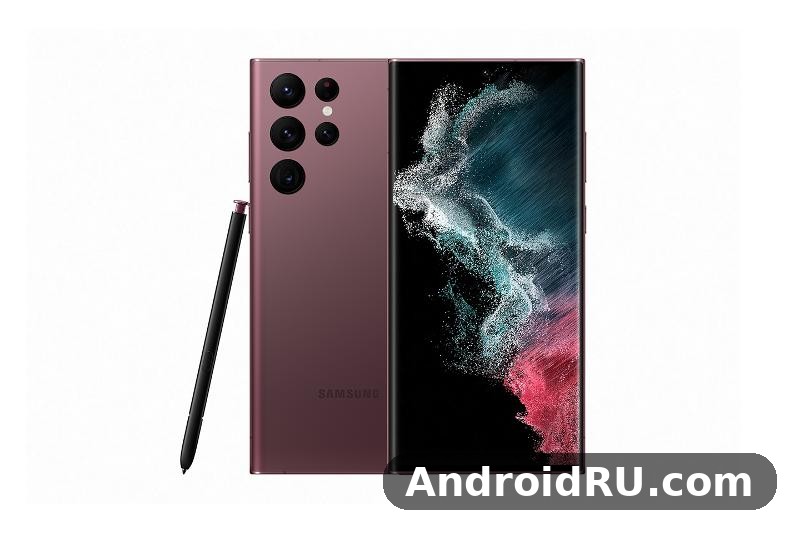
When Samsung launched the Galaxy S22 Ultra in February 2022, it did something bold: it folded the Galaxy Note into the Galaxy S line. The result was a phone with a built-in S Pen, a boxy Note-style frame, a huge 6.8-inch screen, and a camera system headlined by a 108MP main sensor and two telephoto lenses. Four years later, the question is no longer whether it was a flagship at launch. The question is whether the Galaxy S22 Ultra still holds up as a daily phone in 2026, and where its age finally shows. This review answers that question from real use: the cameras in daylight and at night, the speed of the Snapdragon 8 Gen 1 in everyday apps and games, the battery life of the 5000mAh cell, and the S Pen experience that still sets this phone apart from most rivals.
The short answer is that the S22 Ultra remains a very capable phone, with a camera system and a display that still feel premium, and a stylus that no other mainstream flagship of its generation matched. Its weaknesses are equally clear: charging is slow by modern standards, the processor can run warm under sustained load, and the software support window is now in its later years. If you buy one today, you should buy it for the cameras, the screen, and the S Pen, at a price that reflects its age. If you need the fastest charging, the coolest sustained gaming, or the longest remaining update runway, a newer model will serve you better. For readers who want the hardware numbers in one place, the full specifications table near the end of this article lists the display, chipset, memory, cameras, battery, and connectivity in full, and the sections below work through how those numbers behave in practice. Buyers comparing generations may also want the Samsung Galaxy S23 FE Review: Strengths, Trade-Offs and Everyday Use as a cheaper, smaller Samsung alternative with a longer remaining support window.
Samsung Galaxy S22 Ultra design and built-in S Pen experience
The Galaxy S22 Ultra looks different from every other S22 model, and that was deliberate. It has flat top and bottom edges, softly curved sides, and a camera array that sits directly in the back glass without a raised island. The frame is aluminium, the front and back are Gorilla Glass Victus+, and the whole phone carries an IP68 rating for dust and water resistance. At around 228 grams, it is heavy, and at 163.3 x 77.9 x 8.9 mm it is a large phone by any measure. People with smaller hands will need two hands for most tasks, and a case adds further bulk. The weight is the price of the big screen, the big battery, and the S Pen silo, and Samsung made no attempt to hide it.
What makes the design work is how the S Pen changes the phone. The stylus slides into the bottom edge, clicks into place, and is always with you. Samsung Galaxy S22 Ultra S Pen latency is rated at 2.8 ms, and in practice writing feels close to pen on paper, with little visible lag between the tip and the ink. Notes open quickly from the lock screen, you can write on screenshots, sign documents, and sketch ideas without opening a separate app. For students, field workers, and anyone who annotates documents, that convenience is hard to give up once you have used it daily. The curved display edges look premium, but they make the phone slippery and they can register accidental touches if you grip the sides tightly, so a matte skin or a thin case fixes the grip problem without hiding the design.
How the S Pen fits daily note taking and sketching
Samsung Galaxy S22 Ultra S Pen note taking is at its best when the task is quick and frequent: a phone number scribbled on a call, a shopping list, a diagram in a meeting, or a signature on a form. Samsung Notes syncs across devices, converts handwriting to text with reasonable accuracy, and lets you organise notes by subject. The pen also works as a remote shutter for the camera, which is genuinely useful for group photos and tripod shots. The stylus is thin, so long writing sessions can tire the hand, and the tip is not a replacement for a full-size pen. Still, as a tool that is always in the phone, it earns its place.
S Pen latency and handwriting accuracy in real use
The 2.8 ms latency figure sounds like marketing, yet the effect is visible: strokes appear under the tip without the floaty delay older stylus phones showed. Handwriting recognition copes with fast, untidy writing better than expected, though it struggles with very small script and with mixed languages in one line. Pressure sensitivity is good enough for shading in sketching apps, and palm rejection works well when the phone is held flat. If you buy the S22 Ultra mainly for the pen, test it with your own handwriting style before you commit, because accuracy depends on how you write.
S Pen storage, durability and replacement tips
The S Pen lives in a silo at the bottom of the phone, and it is easy to lose if you are careless. Keep a spare tip kit if you write a lot, because the rubber tip wears down over months of heavy use. The pen itself is IP68 rated with the phone, so rain is not a problem, but dropping the phone on its bottom edge can bend the silo or jam the pen. A slim case that leaves the silo accessible is a better choice than a bulky case that makes the pen hard to pull out.
Samsung Galaxy S22 Ultra build quality, IP68 rating and grip
Samsung Galaxy S22 Ultra build quality has aged well. The aluminium frame resists dents, the Victus+ glass resists scratches better than the glass on many mid-range phones, and the IP68 rating means the phone survives rain, splashes, and an accidental drop in a sink. The camera lenses sit proud of the back glass, so the phone wobbles on a flat table, and the lenses pick up dust and fingerprints that need a quick wipe before photos. The phone has stereo speakers, no 3.5 mm headphone jack, and a USB-C port for charging and data. For a smaller phone from the same generation with a different balance of size and speed, the Samsung Galaxy S22+ Review: Build Quality, Software and Daily Speed shows what you give up and what you gain when the S Pen and the periscope zoom leave the package.
Samsung Galaxy S22 Ultra display quality and 120Hz adaptive refresh
The 6.8-inch Dynamic AMOLED 2X display is one of the best parts of this phone, even in 2026. It runs at 3088 x 1440 resolution, supports an adaptive refresh rate from 1Hz to 120Hz, and reaches high peak brightness outdoors. Text is sharp, colours are vivid without looking artificial in Natural mode, and HDR video looks rich on streaming apps. Samsung Galaxy S22 Ultra display brightness in direct sunlight remains strong enough to read maps and messages outdoors, which is a test many older phones fail. The screen is also large enough for split-screen multitasking, reading long documents, and editing photos without constant zooming. The 6.8-inch Dynamic AMOLED 2X display with 1750 nits peak brightness is still one of the reasons to choose the S22 Ultra over a cheaper phone with a dimmer panel.
The adaptive refresh rate is the quiet hero here. It drops to 1Hz for static images and reading, which saves battery, and rises to 120Hz when you scroll or play games, which makes motion feel smooth. The panel uses LTPO technology, which allows the refresh rate to drop to 1Hz for static content and rise to 120Hz for scrolling and gaming, and Vision Booster software adjusts tone mapping in bright light, so contrast stays visible outdoors without washing out colours. The curved edges can cause slight colour shift at extreme angles, and the under-display fingerprint sensor is fast but less forgiving than a side-mounted sensor when your finger is wet. Neither flaw is a deal breaker, but both are worth knowing before you buy. The Samsung Galaxy S23 Review: Display, Audio and Overall Experience shows how Samsung later refined this formula on a smaller, lighter phone, yet the S22 Ultra display still competes with many newer mid-range phones.
Samsung Galaxy S22 Ultra screen brightness, colours and outdoor visibility
Samsung Galaxy S22 Ultra screen visibility outdoors is helped by a peak brightness that Samsung rated at 1750 nits. In practice, the screen stays readable in bright daylight, and auto-brightness reacts quickly when you step from shade into sun. Colour accuracy in Natural mode is good for photo editing, while Vivid mode suits video and games. The always-on display shows the time, notifications, and music controls without waking the full screen, and you can tune its brightness and schedule. The display supports the S Pen with 2.8 ms latency, and it works with an ultrasonic under-display fingerprint sensor for biometric unlocking. Colour modes include Vivid and Natural, and the screen covers a wide colour gamut for photo and video work.
Resolution settings and battery trade-offs
The QHD+ resolution of 3088 x 1440 is the sharpest setting, and the phone also offers FHD+ at 2316 x 1080 and HD+ at 1548 x 720 for users who want to save battery. Dropping to FHD+ is barely noticeable in most apps and can stretch battery life on a long day, while QHD+ is worth keeping for photo editing and reading small text. The adaptive refresh rate adjusts automatically, and you can also choose a standard 60Hz mode if you want the longest possible battery life from a single charge.
Samsung Galaxy S22 Ultra cameras, 108MP photos and 10x zoom
The camera system is the headline feature, and it still delivers. The rear setup pairs a 108MP main camera with optical image stabilisation, a 12MP ultrawide camera, a 10MP telephoto with 3x optical zoom, and a 10MP periscope telephoto with 10x optical zoom. The front camera is 40MP. That combination covers almost every shooting situation: wide landscapes, everyday photos, portraits, distant subjects, and night scenes. Samsung Galaxy S22 Ultra camera performance in daylight is excellent, with sharp detail, accurate white balance, and colours that look pleasing without heavy editing. The phone also records 8K video at 24 frames per second and 4K video at 60 frames per second, with good stabilisation for walking shots. The 108MP main camera with 10x periscope zoom remains the feature that still surprises people who pick up this phone for the first time.
Where the system shows its age is in processing speed and in very low light. The 108MP sensor captures a lot of detail, but the phone takes a moment to process a full-resolution shot, and night mode needs a steady hand for the best result. The periscope zoom is still impressive at 10x, and usable at 30x in good light, but 100x Space Zoom is a novelty rather than a tool you will use often. For most people, the practical range is 0.6x to 10x, and inside that range the S22 Ultra remains a strong camera phone. The camera app includes Pro mode, Expert RAW, Single Take, Portrait mode, Night mode, Director View, and Super Steady video stabilisation, and learning the three or four modes you actually use is more valuable than trying them all.
Samsung Galaxy S22 Ultra 108MP main camera and low light photos
Samsung Galaxy S22 Ultra 108MP main camera photos in daylight show fine detail in foliage, brickwork, and fabric, and the nona-binning mode merges nine pixels into one for cleaner 12MP shots in dimmer conditions. Samsung Galaxy S22 Ultra low light camera performance benefits from Night Mode, which brightens shadows and keeps highlights under control, though it can smooth fine texture if you look closely. The main camera focuses quickly in good light and copes well with moving subjects such as children and pets, as long as you use the standard photo mode rather than the full 108MP mode for action shots. The 108MP sensor is 1/1.33 inch, with 0.8 micrometre pixels that combine to 2.4 micrometres in binned mode, and the f/1.8 aperture lets in enough light for good daylight and indoor photos, while laser autofocus helps in low contrast scenes.
Samsung Galaxy S22 Ultra night mode tips for sharper photos
For the sharpest night photos, hold the phone with both hands, lean against a wall or rest the phone on a surface, and let Night Mode finish its full exposure. Avoid the 108MP mode at night, because the binned 12MP output is cleaner. Tap to focus on your subject and drag the exposure down slightly if street lights are blowing out. These small habits matter more than any setting, and they close much of the gap between the S22 Ultra and newer phones in night photography. The ultrawide camera, with its f/2.2 aperture and smaller sensor, shows more noise at night, and the telephoto lenses need good light for sharp results, so the main camera is the best choice after dark.
Samsung Galaxy S22 Ultra 10x periscope zoom and portrait mode
Samsung Galaxy S22 Ultra 10x periscope zoom uses a folded lens design to fit a long focal length inside a slim phone body. The 10x lens has a focal length equivalent to around 230 mm, while the 3x lens is equivalent to around 70 mm, and the ultrawide lens is equivalent to around 13 mm. At 10x, text on signs, architectural detail, and wildlife stay sharp in daylight, and the 3x telephoto covers the middle range for portraits and street photography. Portrait mode separates the subject from the background cleanly in good light, with natural skin tones and a pleasing blur. In dim light, portrait mode needs more patience, and edge detection around hair can look rough.
When to use 3x, 10x and 30x zoom on the S22 Ultra
Use the 3x lens for portraits, food, and street scenes where you want a natural perspective. Use the 10x periscope for distant architecture, concerts, and wildlife, and only in good light. Use 30x for reading a distant sign or checking a detail you cannot walk closer to, and accept that the image will be softer. Avoid 100x except as a curiosity, because the result is rarely worth keeping. This simple rule keeps your zoom photos in the range where the hardware is genuinely strong.
Samsung Galaxy S22 Ultra front camera, selfies and 4K video
The 40MP front camera produces detailed selfies with good skin tones, and it records 4K video, which is useful for video calls and vlogging. Samsung Galaxy S22 Ultra selfie camera quality holds up in daylight, though the beautification defaults can smooth skin more than some people like, so turn the effect down if you prefer a natural look. Video stabilisation is strong at 4K 30 frames per second, and the phone handles panning and walking shots without the jitter that cheaper phones show. Audio from the microphones is clear, with decent wind reduction outdoors. The front camera has an f/2.2 aperture, phase detection autofocus, and support for portrait mode with background blur.
Samsung Galaxy S22 Ultra performance, Snapdragon 8 Gen 1 and gaming
Performance depends on which chipset your unit has. Phones sold in the United States and a few other markets use the Snapdragon 8 Gen 1, while most global units use the Exynos 2200. Both are paired with 8GB or 12GB of RAM and fast UFS 3.1 storage, and both feel fast in everyday use: apps open quickly, multitasking is smooth, and the 120Hz display keeps scrolling fluid. Samsung Galaxy S22 Ultra Snapdragon 8 Gen 1 performance in daily apps remains strong in 2026, and the phone handles social media, messaging, browsing with many tabs, photo editing, and split-screen work without hesitation. The difference between the two chipsets shows up under sustained load, where the Snapdragon version generally stays cooler and holds its speed longer. Samsung Galaxy S22 Ultra Snapdragon 8 Gen 1 vs Exynos 2200 comparisons from the launch period consistently found the Snapdragon unit ahead in sustained gaming and in thermal behaviour, while the Exynos unit was close in short bursts and in everyday apps.
When you check a used phone, the model number tells you which chipset it has: the Snapdragon version is model SM-S908U, SM-S908U1, or SM-S908E in some regions, while the Exynos version is model SM-S908B in Europe and SM-S908N in Korea. Open Settings, go to About phone, and read the model name and model number, or install a hardware info app to read the chipset name directly. Knowing the chipset helps you set realistic expectations for gaming heat and battery life, and it helps when you search for repair parts or software updates, because some firmware is region-specific. The Snapdragon 8 Gen 1 is built on a 4 nm process, with one Cortex-X2 prime core at 3.0 GHz, three Cortex-A710 performance cores at 2.5 GHz, and four Cortex-A510 efficiency cores at 1.8 GHz, paired with the Adreno 730 GPU, while the Exynos 2200 pairs the same core layout with an Xclipse 920 GPU based on AMD RDNA 2 graphics.
Samsung Galaxy S22 Ultra gaming, heat and sustained speed
Gaming is where you should set expectations carefully. The S22 Ultra runs popular games at high settings, and the large screen, stereo speakers, and haptic feedback make it a pleasant gaming phone for sessions of 30 to 45 minutes. In longer sessions, the Snapdragon 8 Gen 1 can throttle, the back of the phone gets warm, and frame rates dip in demanding titles. Samsung Galaxy S22 Ultra gaming heat is the main performance caveat. The phone is thin for its power, and the vapour chamber can only do so much when the chipset is pushed hard for an hour. In practice, you will feel warmth near the camera area, and the phone may dim the screen slightly to manage temperature. This is normal thermal management, not a fault, and the phone recovers quickly once the load drops. For the best sustained gaming, close background apps, use Wi-Fi rather than mobile data, and avoid charging while you play, because charging adds heat on top of gaming heat. If you play demanding games for hours every day, a newer phone with a cooler, more efficient chipset will be a better fit, and a phone cooler or a lower graphics setting will help this phone last through a long session.
Samsung Galaxy S22 Ultra battery life, 5000mAh test and charging speed
The 5000mAh battery is large on paper, and in real use it delivers a full day for most people, with lighter users reaching into a second day. Samsung Galaxy S22 Ultra battery life test results in mixed use typically land at six to seven hours of screen-on time, depending on brightness, refresh rate, and signal strength. Heavy camera use, 5G in a weak signal area, and long gaming sessions drain the battery faster, as they do on every phone. The adaptive refresh rate helps, and the power saving modes are effective when you need to stretch the last 20 percent. Battery health after several years depends on how the previous owner charged the phone, so check battery health before buying a used unit. The 5000mAh battery with 45W wired charging is large enough that most people charge once a day, overnight, and never feel the slow speed in daily life.
Charging is the weakest part of the package. Wired charging is capped at 45W, wireless charging at 15W, and reverse wireless charging at 4.5W, and the phone ships without a charger in the box. A full wired charge from empty takes around an hour, and often a little longer if the phone is warm. A 45W charger with Programmable Power Supply support is required to reach the full 45W rate; a standard 25W Samsung charger will charge the phone more slowly. That 45W rate is slower than the 65W and 100W charging on many newer rivals, and that gap is noticeable when you need a quick top-up before leaving the house. There is no charger included, so factor the cost of a 45W USB-C charger into the total price.
Samsung Galaxy S22 Ultra battery drain, 5G and power saving tips
Samsung Galaxy S22 Ultra battery drain is worst in two situations: weak 5G signal, where the modem works hard to stay connected, and long sessions with the screen at full brightness. Switching to 4G in a weak 5G area, lowering the screen resolution to FHD+, and using the adaptive refresh rate all help. The phone also learns your usage patterns and puts unused apps to sleep, which reduces background drain over time. If your battery drops sharply overnight, check for an app that is waking the phone, because a single misbehaving app can cost more battery than the screen. Power saving modes reduce the refresh rate, limit background activity, and lower the screen resolution to extend battery life.
Full Specifications
The numbers below are the published hardware figures for the retail Galaxy S22 Ultra, with the known regional differences for the chipset clearly noted, so you can check a unit you own or plan to buy against the real specification. The 108MP quad camera, 5000mAh battery and built-in S Pen are the three specifications that define this phone, because they combine the Galaxy S camera system with the Galaxy Note stylus in a single device, while the 45W charging cap and the chipset split are the two specifications buyers should weigh carefully before they pay.
Samsung Galaxy S22 Ultra display specifications and screen features
The display is a 6.8-inch Dynamic AMOLED 2X panel with a resolution of 3088 x 1440 pixels, a 20:9 aspect ratio, and a pixel density of around 500 pixels per inch. It supports an adaptive refresh rate from 1Hz to 120Hz, HDR10+ video, and a peak brightness rated at 1750 nits. The screen is protected by Corning Gorilla Glass Victus+, and it has a centred hole-punch cutout for the front camera. Samsung Galaxy S22 Ultra display specifications place it among the brightest and sharpest phone screens of its generation, and the high resolution makes text and photos look crisp at normal viewing distance.
Screen brightness, resolution and refresh rate
Samsung Galaxy S22 Ultra screen brightness reaches 1750 nits at peak, which keeps the screen readable in direct sunlight. The QHD+ resolution of 3088 x 1440 is the sharpest setting, and the phone also offers FHD+ at 2316 x 1080 and HD+ at 1548 x 720 for users who want to save battery. The adaptive refresh rate adjusts automatically, and you can also choose a standard 60Hz mode. Vision Booster software adjusts tone mapping in bright light, so contrast stays visible outdoors without washing out colours.
Samsung Galaxy S22 Ultra chipset, RAM and storage options
Units in the United States, China, and a few other markets use the Qualcomm Snapdragon 8 Gen 1, built on a 4 nm process, with one Cortex-X2 prime core at 3.0 GHz, three Cortex-A710 performance cores at 2.5 GHz, and four Cortex-A510 efficiency cores at 1.8 GHz, paired with the Adreno 730 GPU. Most global units, including those sold in Europe, use the Samsung Exynos 2200, also built on a 4 nm process, with one Cortex-X2 prime core at 2.8 GHz, three Cortex-A710 cores at 2.52 GHz, and four Cortex-A510 cores at 1.8 GHz, paired with the Xclipse 920 GPU based on AMD RDNA 2 graphics. Both versions use fast UFS 3.1 storage and LPDDR5 RAM, and both support 5G, Wi-Fi 6E, and Bluetooth 5.2. The Snapdragon GPU is the Adreno 730, while the Exynos GPU is the Xclipse 920, the first Samsung mobile GPU with hardware ray tracing support.
The Galaxy S22 Ultra is sold with 8GB or 12GB of LPDDR5 RAM, paired with 128GB, 256GB, 512GB, or 1TB of UFS 3.1 internal storage. The 128GB version comes with 8GB of RAM, the 256GB and 512GB versions are available with 12GB of RAM in most markets, and the 1TB version comes with 12GB of RAM. There is no microSD card slot, so storage cannot be expanded after purchase. Samsung Galaxy S22 Ultra RAM and storage options mean buyers should choose the storage size carefully at purchase, because photos, 4K video, and large games fill 128GB quickly. The 256GB version with 12GB of RAM is the best balance for most buyers, and the 512GB version suits heavy photographers and video shooters. The phone ships with Android and One UI taking around 25GB to 30GB, so a 128GB unit has roughly 95GB to 100GB free when new.
Samsung Galaxy S22 Ultra camera specifications, 108MP sensor and zoom lenses
The rear camera system has four lenses. The main camera is 108MP with an f/1.8 aperture, a 1/1.33-inch sensor, phase detection autofocus, laser autofocus, and optical image stabilisation. The ultrawide camera is 12MP with an f/2.2 aperture and a 120-degree field of view. The first telephoto camera is 10MP with an f/2.4 aperture, 3x optical zoom, and optical image stabilisation. The second telephoto camera is 10MP with an f/4.9 aperture, 10x optical zoom, and optical image stabilisation. The front camera is 40MP with an f/2.2 aperture and phase detection autofocus. Camera specifications include 8K video recording at 24 frames per second, 4K video at 30 and 60 frames per second, 1080p video at up to 240 frames per second for slow motion, and 720p video at up to 960 frames per second for super slow motion. The 108MP sensor uses nona-binning to combine nine pixels into one for cleaner 12MP photos in low light, and the full 108MP mode is available for daylight shots where maximum detail matters. The periscope lens provides true 10x optical zoom, and digital zoom extends to 100x, though image quality drops sharply beyond 30x.
Samsung Galaxy S22 Ultra battery, charging, connectivity and sensors
The battery is a non-removable lithium-ion cell with a capacity of 5000mAh. Wired charging is rated at 45W via USB-C with USB Power Delivery 3.0 and Programmable Power Supply, wireless charging is rated at 15W with Qi and PMA support, and reverse wireless charging is rated at 4.5W for accessories such as Galaxy Buds and Galaxy Watch. The phone does not include a charger in the box in most markets, and it does not include a 3.5 mm headphone jack. Charging time from empty to full on a 45W charger is around 60 minutes, with the fastest charging in the first 30 minutes. The phone supports USB-C 3.2 with DisplayPort 1.2 for video output, and it supports Samsung DeX for a desktop experience on a monitor. Connectivity includes 5G in sub-6 GHz and mmWave bands depending on region, 4G LTE, Wi-Fi 6E on the 2.4 GHz, 5 GHz, and 6 GHz bands, Bluetooth 5.2 with A2DP and LE support, NFC, Ultra Wideband, GPS with GLONASS, Galileo, BeiDou, and QZSS, and USB-C 3.2 with DisplayPort 1.2. The phone supports dual SIM in most markets, with a nano-SIM plus eSIM or dual nano-SIM depending on the model, and it supports Samsung Pay with NFC and MST in supported regions. Samsung Galaxy S22 Ultra 5G bands vary by region and carrier, so check the exact model number against your carrier before you buy an imported unit, because a phone from another region may miss a band your carrier uses. Sensors include an ultrasonic under-display fingerprint sensor, an accelerometer, a gyroscope, a proximity sensor, a compass, and a barometer. Wi-Fi 6E adds the 6 GHz band for faster and less congested wireless connections, though you need a Wi-Fi 6E router to use it. Bluetooth 5.2 supports high-quality audio codecs including aptX, LDAC, and Samsung Scalable Codec, and it pairs well with Galaxy Buds and other wireless headphones. The phone has no FM radio and no infrared blaster, which are features some buyers still look for.
Samsung Galaxy S22 Ultra full specification table
The table below brings together the key specifications of the Galaxy S22 Ultra in one place. Use it to compare the phone with another model, to check a detail before a repair, or to confirm the specification of a unit you are buying. Regional differences are noted where they matter, especially for the chipset and the 5G bands, because those are the two areas where the same model name can hide different hardware.
| Feature | Specification |
|---|---|
| Display | 6.8-inch Dynamic AMOLED 2X, 3088 x 1440, 120Hz adaptive, 1750 nits peak, HDR10+ |
| Chipset | Snapdragon 8 Gen 1 (US) or Exynos 2200 (global), 4 nm process |
| RAM | 8GB or 12GB LPDDR5 |
| Storage | 128GB, 256GB, 512GB, or 1TB UFS 3.1, no microSD slot |
| Rear cameras | 108MP main f/1.8 OIS, 12MP ultrawide f/2.2, 10MP telephoto 3x f/2.4 OIS, 10MP periscope 10x f/4.9 OIS |
| Front camera | 40MP f/2.2, phase detection autofocus, 4K video |
| Video | 8K at 24fps, 4K at 30 and 60fps, 1080p up to 240fps slow motion |
| Battery | 5000mAh, non-removable lithium-ion |
| Charging | 45W wired, 15W wireless, 4.5W reverse wireless, USB-C |
| S Pen | Built-in, 2.8 ms latency, IP68 rated, remote shutter support |
| Connectivity | 5G sub-6 and mmWave, 4G LTE, Wi-Fi 6E, Bluetooth 5.2, NFC, Ultra Wideband, GPS |
| Sensors | Ultrasonic fingerprint, accelerometer, gyro, proximity, compass, barometer |
| Water resistance | IP68 dust and water resistant |
| Dimensions | 163.3 x 77.9 x 8.9 mm, weight about 228 grams |
| Operating system | Android 12 with One UI 4.1 at launch, upgradable through later Android versions |
| Colours | Phantom Black, Phantom White, Green, Burgundy, plus online exclusive colours |
Use the table as a checklist when you inspect a used phone, and test the cameras, the S Pen, the fingerprint sensor, and the charging port before you pay. A phone that matches the specification on paper can still have a worn battery, a scratched lens, or a faulty S Pen, and those faults only show up in a hands-on check.
Samsung Galaxy S22 Ultra software, One UI and long term updates
The S22 Ultra launched with Android 12 and One UI 4.1, and Samsung promised four years of major Android updates and five years of security patches. That promise has been kept, with the phone receiving Android 13, Android 14, and later versions through its support window. One UI is feature-rich: it offers deep customisation, good multitasking, Samsung DeX for a desktop-like experience on a monitor, and strong integration with Galaxy Buds and Galaxy Watch. Samsung Galaxy S22 Ultra One UI software experience is polished, with a clean settings layout, a useful Edge Panel, and a notification system that is easy to manage. The trade-off is duplication: Samsung and Google both offer a browser, a gallery, a messages app, and a cloud service, and you will spend time choosing defaults. Samsung Galaxy S22 Ultra DeX mode turns the phone into a desktop computer when connected to a monitor, with windows, a taskbar, and keyboard and mouse support. Galaxy AI tools, where available on this model, include photo object removal, live translation in calls, and note summaries, and they work well enough to be useful rather than a gimmick.
By 2026, the update runway is the main software question. The phone is in the later part of its promised support, so buyers should expect security patches to continue for a time, but not the same long future as a brand-new flagship. Check the exact Android version and security patch date on the unit you buy, because that date tells you how much official support remains. The phone still runs current apps well, and the S Pen software remains one of the best stylus systems on any phone, with Screen Off Memo, Smart Select, Screen Write, Live Messages, and AR Doodle. For a smaller and newer-feeling Samsung phone with a different software balance, the Samsung Galaxy S22 Review: Design, Software and Camera Quality shows the base model of the same generation and how its lighter body and simpler camera setup change daily use.
Samsung Galaxy S22 Ultra pros and cons after extended use
After extended use, the strengths and weaknesses of the S22 Ultra are clear, and they point to different buyers. The display, the camera zoom range, and the S Pen are the reasons to buy it. The charging speed, the heat under sustained load, and the shortening update window are the reasons to pause. The pros start with the camera system, which still covers 0.6x to 10x with real optical quality, and with the 108MP main sensor that captures detail in good light. The second pro is the display, which remains bright, sharp, and smooth. The third pro is the S Pen, which no other phone in this price range matches. A fourth pro is the build quality and IP68 rating, which mean the phone feels solid and survives daily accidents. The cons start with 45W charging, which feels slow next to newer phones. The second con is heat and throttling in long gaming sessions, especially on the Exynos version. A third con is the size and weight, which make one-handed use difficult. A fourth con is the update window, which is now shorter than a new flagship offers. Samsung Galaxy S22 Ultra pros and cons in 2026 look different from the launch review, because the price has fallen and the competition has moved on.
Samsung Galaxy S22 Ultra verdict: who should buy it in 2026
The verdict depends on who you are. If you take a lot of photos, especially with zoom, and you want a phone with a stylus for notes and sketches, the S22 Ultra is still a strong choice at the right price. Buy the 12GB RAM version with at least 256GB of storage if you can, because the extra memory helps multitasking and the extra space matters once you start shooting 108MP photos and 4K video. If you are a light user who wants a big screen, a good camera, and a phone that feels premium, the S22 Ultra will serve you well for another year or two. If you are a heavy gamer, a frequent traveller who needs fast charging, or someone who wants five more years of updates, look at a newer model instead. Compare the price gap against the features you actually use: if the S22 Ultra is much cheaper and the cameras, screen, and S Pen are what you care about, it is still good value. If the price gap is small, the newer phone is the smarter buy. Either way, buy from a seller who shows the battery health, the Android version, and the security patch date, and check the cameras, the S Pen, and the screen for faults before you pay. For a larger phone from the next generation with the same focus on gaming and battery life, the Samsung Galaxy S23+ Review: Gaming, Multitasking and Battery Life is a useful comparison before you settle on a used Ultra.
Samsung Galaxy S22 Ultra frequently asked questions
Is the Samsung Galaxy S22 Ultra still worth buying in 2026?
Yes, at the right price, for the right buyer. The cameras, display, and S Pen still feel premium, and the phone handles everyday apps and photography well. It is worth buying if you value zoom photography and stylus note taking, and if the price is clearly lower than a newer Samsung flagship. It is less attractive if you need the fastest charging, the longest update runway, or the coolest sustained gaming, because newer phones beat it in all three areas. Always check battery health and the security patch date before buying a used unit.
How good is the Samsung Galaxy S22 Ultra battery life in daily use?
For most people, the 5000mAh battery lasts a full day, with around six to seven hours of screen-on time in mixed use. Lighter users can reach a second day, while heavy gaming, weak 5G signal, and long camera sessions will drain it faster. Charging is capped at 45W wired and 15W wireless, so a full charge takes about an hour. Use adaptive refresh rate and FHD+ resolution if you want the longest battery life from the S22 Ultra. Power saving mode is effective when you need to stretch the last part of the day.
Does the Samsung Galaxy S22 Ultra have a built-in S Pen?
Yes. The S Pen is built into the bottom edge of the phone, with a silo for storage and charging, and a latency of 2.8 ms. It supports note taking, sketching, screenshot annotation, document signing, and remote camera shutter control. The pen works with Samsung Notes and with third-party drawing apps, and handwriting can be converted to text. It is the feature that most clearly separates the S22 Ultra from other phones of its generation.
How good is the Samsung Galaxy S22 Ultra camera for zoom photography?
The zoom system is still one of the best parts of the phone. The 3x telephoto covers portraits and street photography, the 10x periscope covers distant subjects in good light, and the 108MP main camera captures strong detail in daylight. Photos at 30x are usable for checking a distant detail, while 100x is a novelty with soft results. For the best zoom photos, shoot in good light, hold the phone steady, and stay within the 3x to 10x optical range.
Which chipset does the Samsung Galaxy S22 Ultra use?
It depends on the region. Units sold in the United States use the Snapdragon 8 Gen 1, while most global units use the Exynos 2200. Both are 4 nm chipsets with an octa-core CPU, and both are paired with 8GB or 12GB of RAM and UFS 3.1 storage. Check the model number in Settings to confirm which chipset your unit has before you compare performance or buy accessories. The Snapdragon version generally runs cooler under sustained load.
What are the S22 Ultra specs?
The S22 Ultra specs start with the S22 Ultra display, a 6.8-inch panel with a 120Hz refresh rate, so most buyers can pick a size that fits without paying for more than they need. The S22 Ultra RAM is 12GB, and the S22 Ultra storage comes in 128GB, 256GB, 512GB or 1TB. The S22 Ultra screen size is 6.8-inch, the S22 Ultra weight is 229g, and the S22 Ultra colors vary by region, with black and grey finishes in most stores and extra shades in Samsung’s online store. The S22 Ultra performance comes from the Snapdragon 8 Gen 1 or Exynos 2200 chip, and the S22 Ultra WiFi 6E support keeps downloads fast. The S22 Ultra S Pen docks inside the body and charges while it sits there. The S22 Ultra release date was February 2022.
When was Samsung Galaxy S22 Ultra released?
The Samsung Galaxy S22 Ultra was released in February 2022. That date matters when you compare prices, because the S22 Ultra price has fallen since launch and newer models have taken the top spot in Samsung’s range.
Is Samsung Galaxy S22 Ultra worth buying, and will S22 Ultra price drop further?
Yes, if the price is right. The S22 Ultra price in USA started at $1,199 at launch, and the S22 Ultra price has fallen since then, so the value case is much stronger now than it was on day one. Look for S22 Ultra deals around sales events, and check the S22 Ultra trade in value of your current phone, because a good trade in can cut the cost further. On that basis, the S22 Ultra worth buying case is simple: it is a good buy for anyone who wants a flagship camera and a big screen without paying the newest model’s price.
How does the S22 Ultra vs S21 Ultra 5G comparison look?
The S22 Ultra runs on Snapdragon 8 Gen 1 or Exynos 2200, while the S21 Ultra 5G runs on Exynos 2100 or Snapdragon 888, so the newer phone is faster in heavy games and AI tasks, but the gap in everyday apps is small. The S22 Ultra also gets a longer remaining update window, while the S21 Ultra 5G is now the cheaper buy and still covers the basics well. Buy the S22 Ultra if you want the newest cameras and the longest support; buy the S21 Ultra 5G if the discount is large and you are happy with last year’s speed.
How good is the Samsung Galaxy S22 Ultra camera?
The Samsung Galaxy S22 Ultra camera is led by a 108MP main sensor, and the S22 Ultra best camera settings for most people are the default Photo mode with scene optimisation on and HDR set to auto. A Samsung Galaxy S22 Ultra camera test in everyday use shows sharp daylight shots, clean night photos and steady video, with the long zoom best kept to its optical range for the cleanest results.
Is S22 Ultra waterproof?
Yes. The S22 Ultra IP68 rating means it can handle dust and a dip in fresh water, so rain and splashes are nothing to worry about. Rinse it with clean water if it goes in the sea or a pool, and do not charge it until the port is dry.
How long does S22 Ultra battery last?
In normal use the S22 Ultra battery lasts a full day, and the S22 Ultra battery life is helped by the 5,000mAh battery and the efficient chip. The S22 Ultra screen on time usually lands between six to eight hours, and in a S22 Ultra battery life test with maps, photos, video and messaging, the phone still had charge left at bedtime.
Does S22 Ultra have wireless charging?
Yes. The S22 Ultra wireless charging watts rating is 15W, so a compatible pad or stand tops the phone up slowly overnight, while the 45W wired charging is the faster option when you are in a hurry. The S22 Ultra charging speed is 45W wired and 15W wireless, which is slower than some rivals but fast enough for an overnight charge.
Why is S22 Ultra fast charging not working?
Check the charger and cable first: the S22 Ultra needs a USB-C PD charger rated for 45W and a 5A cable to reach full speed, and a weak charger or a dirty port slows it down. Clean the port gently, try another cable, and restart the phone before you assume the battery is at fault.
Why does my S22 Ultra lose battery overnight?
The simplest S22 Ultra battery drain overnight fix is to open Settings, check Battery usage for the app draining power, and put that app to sleep. The S22 Ultra always on display settings sit under Lock screen and AOD, so turning that display off at night also helps the battery hold its charge.
How to take screenshot on S22 Ultra?
Press the Side key and Volume Down together for a quick screenshot, or swipe the edge of your palm across the screen if that gesture is turned on. After the capture, tap Scroll capture to save a long page as one image.
How to restart S22 Ultra?
Hold the Side key and Volume Down together until the power menu appears, then tap Restart. If the phone is frozen, hold both keys for about seven seconds to force a restart.
How to transfer data to S22 Ultra?
Use Smart Switch: install it on both phones, connect them by cable or Wi-Fi, and pick the photos, messages, apps and settings to move. Keep both phones charged and on the same Wi-Fi network until the transfer finishes.
How to turn off 5G on S22 Ultra?
Open Settings, go to Connections, then Mobile networks, then Network mode, and pick a mode without 5G. Turning 5G off can help the battery in weak-signal areas, and you can turn it back on the same way.
Why is 5G not working on S22 Ultra?
Turn airplane mode on and off, check that the SIM is seated properly, and confirm that your plan and area both support 5G. If it still fails, reset the network settings in Settings under General management, then restart the phone.
How to free up storage on S22 Ultra?
Open Settings, go to Battery and device care, then Storage, and delete the large videos and unused apps it lists. The S22 Ultra storage is fixed, with no microSD slot, so back photos up to the cloud and clear the Gallery recycle bin to win space back.
How to use S22 Ultra with one hand?
Turn on one-handed mode in Settings under Advanced features, then swipe down on the bottom edge to shrink the screen. It makes the top of the display easy to reach on a big phone like this one.
How to record calls on S22 Ultra?
Call recording on the S22 Ultra depends on your region: where it is allowed, open the Phone app, go to Settings, then Record calls, and turn it on. Where it is not offered, the option simply does not appear, and recording laws vary, so check the rules where you live before you record anyone.
Does S22 Ultra overheat?
In normal use the S22 Ultra stays cool, and it only gets warm during long gaming sessions, 4K recording or charging in a hot car. That warmth is normal; if the phone ever shows a heat warning, close the heavy app, move it out of the sun and let it cool before you charge it.
What S22 Ultra hidden features are worth trying?
The S22 Ultra hidden features worth trying first are Modes and Routines, which change settings automatically, and Secure Folder, which keeps private apps and files behind a lock. Good Lock in the Galaxy Store adds more tweaks, and the Edge panel puts your favourite apps and tools one swipe away.
What S22 Ultra problems do owners report most?
The most talked-about S22 Ultra problems are small ones: charging feels slow next to rivals, no charger comes in the box, and there is no microSD slot. Software quirks after big updates are usually fixed by a restart or a later patch, so keep the phone updated.
Which S22 Ultra cases and accessories are worth buying?
Good S22 Ultra cases range from slim clear shells to rugged cases with a kickstand, and a S22 Ultra screen protector is worth adding on a phone with a screen this size. The wider S22 Ultra accessories range covers chargers, car mounts and Galaxy Buds, so buy the case first and add the rest as you need them.
S22 Ultra fingerprint sensor not working: what should I do?
Clean the screen and your finger, then delete the old fingerprint and register it again, pressing firmly at different angles. The S22 Ultra fingerprint sensor is an ultrasonic reader under the display, and a thick screen protector can confuse it, so register the fingerprint after you fit the protector.
What if the S22 Ultra Bluetooth keeps disconnecting?
If your S22 Ultra Bluetooth keeps disconnecting, forget the device in Bluetooth settings and pair it again. Update the phone, restart both devices, and check that no battery optimisation is putting the Bluetooth app to sleep.
Why are notifications delayed on the S22 Ultra?
A common S22 Ultra notification delay fix is to turn off battery optimisation for the app in Settings, so the phone does not put it to sleep. Also check that notifications are allowed for the app and that Do Not Disturb or a sleeping-apps rule is not holding them back.
What should I know about S22 Ultra software updates?
Most S22 Ultra software update problems clear after a restart and a retry on Wi-Fi, with the phone charged and enough free space. The S22 Ultra software update promise is four generations of Android updates and five years of security patches, so the phone keeps getting new features and security patches for years.
Does the S22 Ultra support dual SIM and eSIM?
Yes. The S22 Ultra dual SIM eSIM setup pairs one physical nano-SIM with one eSIM in most regions, so you can keep a work number and a personal number on one phone. The S22 Ultra eSIM is added in Settings under Connections, then SIM manager.

