884,336 ratings on AndroidRU. 9,758 written reviews on AndroidRU, 100 shown below. Their honest reviews of this app.
SSteve (sc)
2026-10-18★☆☆☆☆
1/5
I ran compression towards an external disk, minimized it to background, and after checking status in 10 minutes, the process was finished, with status "Corrupt archive /mnt/media_rw/d/a.zip". No way to re-try, no explanation, no continuing despite the fact that the archive only contains one file out of thousands that should have taken a very long time to compress... Is this tool broken? Is it really only intended for the simplest possible use-cases?
PPuia Lusei
2026-10-09★★★★★
5/5
I'm gonna give it five stars before even opening it for my first time on android. This app made itself the default on every computer on the planet by ignoring its own pay wall.
JJames
2026-09-30★☆☆☆☆
1/5
it works but very confusing navigation it's android so whatever
DDN Peenew6601
2026-09-23★★★★☆
4/5
need quick bath many files by hold and swipe click on each or all selected only is terrible.
JJasmin Reza
2026-09-22★★★★★
5/5
the app is good even though it requires subscription it allows you to use it for free I don't think any file apps nowadays do it free and it also has great speed of extraction and easier to access files than the default vivo file app
GGreg zk-
2026-09-18★☆☆☆☆
1/5
i compressed a file and now i have no clue where it went. i download this app to save some time fml
EEssam ali
2026-09-17★★★☆☆
3/5
The app is good, but the interface needs development and improvement for a better user experience.
EEjay Laroco
2026-09-07★★★★★
5/5
the GOAT, saved me by letting me open files that other file app couldn't
MMichael Bentley
2026-09-06★★★★★
5/5
Clean, succinct, doesn't waste your time. Gives feedback on what you are doing. An incredible app that should be rated higher.
MMr. Badger
2026-08-28★☆☆☆☆
1/5
i haven't used RAR in a while, so the subscription/commercials changes is a bummer. As the app is currently in sleep mode, my phone wrote, "This app will be able to read, modify, and delete all files on this phone or any connected storage device. If you allow this, the app may access files that aren't related to the app without notifying you." Sounds pretty damn scary to me. With the warning and the advent of comercials & subs, i would now give it no stars if I could.
AArty
2026-08-23★★★☆☆
3/5
It's not the most convenient archive app, but it does get the job done. What I dislike the most is if I open a file in the archive it silently extracts the file in the app system directory and leaves it there, each time I do it there is a new duplicate file. I needed to use system files explorer to delete it manually.
RRobert Roscher
2026-08-22★☆☆☆☆
1/5
would much rather pay for A program versus buying a subscription
GGeorge Vaz
2026-08-22★☆☆☆☆
1/5
Am not a Tech person.. hence find the UI very confusing. Do keep it simple.
WWiktor Żukowski
2026-08-18★★★★★
5/5
No ads handles various strange compression types seamlessly just incredible work here and interface is more "modern" Than Windows winrar
AAwli
2026-08-04★★★★☆
4/5
When i apply palette to app icons , your app is still colorful Could you fix it
SS B
2026-07-27★☆☆☆☆
1/5
Does not allow access or zip of file
SSad Lemon
2026-07-20★★★★★
5/5
I've used this app for years and years, and it's always been a great help to me, as a demo using moocher. I don't usually update my non sys apps and even then I'm weary, (why can't we downgrade) (if it ain't broken don't fix is a core belief) I have not used the current version yet, so I can only judge from past versions. I have not had any of the numerous issues I've seen other reviewers have but I pretty much only use the (extract to) command or use a custom path when zapping up other archives
CCarl Thomas
2026-07-08★☆☆☆☆
1/5
"Bad or unknown format" every time I attempt to open a RAR file. Useless. Also does not warn you that files deleted in this app don't go to any kind of trash.
JJohn Hewitt
2026-07-07★★★★★
5/5
great I mean it's lit just a port of winrar to android, works fine
MM
2026-07-06★★★★☆
4/5
I've been using the app for years and never had any issues, but after getting a new phone I looked through some one-star reviews and there are some that are seriously concerning. The fact that some users claimed that their files were deleted against their will or their SD-card was corrupted to the point of being unreadable is bad enough, but what makes it worse is that the dev hasn't responded to those comments. so unfortunately, I no longer feel comfortable trusting the app with my files.
TThomas Dawson
2026-07-05★★★★★
5/5
The best compression utility in all of Play Store. Where others fail RAR always succeeds. Paid user for many years please support this app and the developer
JJoshua James
2026-07-05★★★★★
5/5
this program finally worked when nothing else would. this is probably the 10th program I tried after Pro7zip quit functioning.
SSGAW iD
2026-07-05★★★★★
5/5
Failed to update, I don't know why this is happen to me? Do I lost my subscription when reinstall it? Edited: Problem solved after reinstall it and my subscription still safe.
ZZhumur Akter
2026-04-28★★★★★
5/5
I was looking for a good program to extract my password protected 7z files. Got much more than that. It is the best two compressor/extractor utility after ZArchiver. Also you can send files in FB messenger using this app which is amazing. Waiting for a day when they will decide to add editing capability for 7z files.
Ddftf
2026-04-13★★★★★
5/5
Works great to backup files on my phone to external storage while preserving file dates. Can create split archives (useful on FAT32 drives with the 4GB limit). Would be better if there were more ways to select files, such as by part of the filename or by extension, not only entire-folders or having to manually check each file. But does the job well, and only £1 a year to support the creator
Aandrej cerjak
2026-03-29★★★★★
5/5
the very best archiver app. I really like the whole concept and logic behind this excellent software. Unlike many other similar apps this one has all the features one can think of, for example opening the zipped (or rar or other supported format)file and One can choose the app to do it without extracting the whole archive, an option to extract only a couple files to any folder ... and so much more.
CCharles Sutton
2025-08-21★★★★☆
4/5
I love this file manager EXCEPT: extracting larger zip files, especially with multi-gig Xbox emulator files, is like the evolution of cephalopods; they do eventually develop technology and land on the Moon... it just took a while (like 2.9 million years). RAR is not quite THAT slow, but you get the idea. Is there any way to optimize this app so it extracts quicker? I noticed there is no 🔍 or 🔎 option, though I'd guess it is not overly difficult to search through different areas. thanx
XX. Y.
2025-04-24★★★★☆
4/5
Good app. I wanna support development, but I don't like annual/monthly subscriptions, even if it's only €1,19 a year, and even if I can cancel it any time. Many people don't like subs. I think if you consider to add one time fee for 5, 10, 15, 20, 25 etc (aside from the subscription plan) and disclose if, when and for what amount the pop-up: "Support RAR Development" disappears (and for how long) then you🫵 can become rich $$$🏦💰🤑 more than only offering a small subscription fee for support👍
IIshan Campbell
2025-04-05★★★★☆
4/5
Hey Winrar, I was just opening an archive and noticed that the temporary space it filled within its own "data" folder can't be cleared without clearing the apps entire data through the android os.. It's prob not a big deal, though could there be an option to do so within the app? Thank you! Edit: weird, the data was purged after a a bit..
Ww droge
2025-04-03★★★★☆
4/5
Love the app. Subscription process needs work. I subscribe to app. Play Store says, Open app to confirm subscription. I open app. 3 days later, subscription is cancelled. * I try to subscribe again... * I would have contacted developer instead of leaving this information in the review section, however, I could not find contact information.
UUN DOUX DINGUE (UN DOUX DINGUE)
2024-12-10★☆☆☆☆
1/5
I downloaded this long ago so my phone could extract zip files, a thing my phone can ALREADY do but it NEGLECT certain files:when I extract a zip, it come out incomplete. This app fixed my issues, but i noticed, this app HATE heavy zip files, so it extract VERY SLOWLY, background or not, even a WHOLE NIGHT with phone on the app cant get the job done. Oh and if you forget about it extracting in backgrnd, itll CANCEL and GO BACK TO 0 with NO WAY TO START WHERE IT LEFT OFF. I found a better one.
GG
2024-12-06★★★★★
5/5
Although not exactly new to the app it has been a while. Now looking through as well as able to "at the moment" there's no doubting it's advanced compared (to most other file management apps (I'm in the know of), mainly for the sole reason not being application (concerning myself) of whatever company it's a struggle of Trust, needing "mental strength to an extent" no less leaves a "crazed state of mind 2 🐝 blunt" There is much too attempt be spot-on about. "Carefully does it" says enough ...
JJackson Lim Shi Sheng
2024-11-18★★☆☆☆
2/5
I used to like the app very much, but don't know what happened recently, the app no longer allows me to view the pdf file inside the zip/ rar file. No matter using Google drive or Adobe reader. It just cannot be viewed. Kindly assist
SSyaza Syaz
2024-11-15★☆☆☆☆
1/5
Why does it need access to all media? If people uninstall this app, all their data, pictures, and downloads will be lost. Try to think of a better solution.Another issue is the app's settings. Make it so users can slide up, left, or right. I often use this app to open files, but if I can’t slide, I have to open pictures one by one. For example, I frequently use this app to read comics, but I have to view each image one by one, which is inconvenient.this aps system was outdated.
AAlexander Rowsell
2024-11-01★★☆☆☆
2/5
I'm a bit wary. After installing, it wants the full All Files Access permission, which really should not be necessary. It can request to just access media files/downloads, which is a separate permission, and then if the user does want to access system areas, they can manually enable that. But requiring access to the entire phone is a bit of a security risk, especially if this app were targeted by cyber criminals. I know this is by the real RARlab devs, so I'm surprised to see this requirement.
VVitomir Starcevic
2024-10-05★★★★☆
4/5
The app is great! I love how I can look at pictures without having to extract them. I don't know if it's possible, but I'd love it if I could scroll through pictures instead of opening each one individually. I also like the "send" option where I can move things to other zip/rar files. However, it looks like I can't send folders to other zip/rar files. Would be great if I could do that and also create folders myself within the zip/rar files, since I like having things be organized.
SSidharth Chauhan
2024-09-25★★★★★
5/5
The application is great and does the job however I would love if the developers make it available for Google family. The non availability of Google family integration and of a lifetime premium subscription are the only 2 things stopping me to buy a subscription because rar files are rarely used on Android and the inbuilt file explorer already supports zip files by default so it makes sense to offer a lifetime subscription instead of an annual .
LLionz
2024-09-03★★★★☆
4/5
Overall, it's a good app for file exploring, you can find many files with it and also customise it. It also offers compressing files and can also make seperate parts of a file. The only problem with the app is that we cannot access the data and obb folder with android os 11. I will definitely update the review to 5 stars if the dev team adds it. Will recommend to all!
AAutumn Miller
2024-07-27★★★★★
5/5
Small, fast download and it does its job in moments. No ads, a brief, but non-intrusive offer to support the developers, and a very simple interface. If you know the basics of your phones file manager then this will navigate like a dream.
GGinisis !!
2024-03-30★★★☆☆
3/5
It's simple WinRAR that work pretty well, but it's extremely slow compare to other file manager apps, extracting a simple 2 GB file some times take 10 minutes, and if I extract in the background it take immense amount of time, which is pretty disappointing since this app only has to do one thing compared to other file managers, but it still worse in doing this one thing, I'm using it for years and I don't see any fix, update after update it's same,
TTheLOLFace21
2024-03-28★★☆☆☆
2/5
Sometimes when extracting, extraction speed is slowed to a crawl by itself and does so in bursts of 5 files. Sometimes, it forgets that it is running in the background so it stops and I have to restart the process. Most of the time, it is doing both so not only do I have to keep restarting the process, I also have to make sure it doesn't forget itself by repeatedly going back to the app.
JJeremy Espinosa
2024-03-14★★★☆☆
3/5
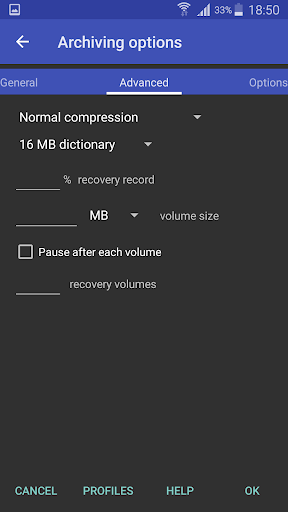
Please add back the option to create archives broken into separate volumes. I'm guessing you removed that option because of the ability to extract rare files larger than 4 GB. The whole purpose of me using this app is for a memory card that can't hold files larger than 4GB. I was able to create an archive with multiple volumes and store those on the memory card. Then I could copy them back whenever I needed and extract the files. You eliminated the most useful feature of the app.
LLuke Wood
2024-02-15★★★☆☆
3/5
The app works okay however it is frustrating that the option to sort the list of files/folder is hidden within the settings, it would be much easier if the option was on the menu at the top of the screen. Also the app is constantly asking for a 99p donation even after pressing dismiss. I'd be happy to donate 99p if the functionality was all there.
DDerick
2023-09-04★★★★☆
4/5
It works, but navigation is a little odd, plus you have to find what you want to comprese in the app, you can't be in another app, and select open as, and have rar, available, then have the app recognize that the files not a zip, giving you access to zipping it. That's not avalibke and should be.
LLady Ashura
2023-08-14★☆☆☆☆
1/5
No USB support. Doesn't recognize the external USB for me to create a bootable USB from a b2z image file for my Steam Deck. No options to even view an external device, eventhough my phone knows it's there and I can view it outside of RAR. Sad. I loved this program on my PC for its versatility and effectiveness. I'm disappointed that I can't access the external USB. Also, the popup to subscribe (for money) comes up way too often and during extraction and read operations.
SStigg
2023-06-22★☆☆☆☆
1/5
I'm a long time fan of WinRAR, but having to endure popups all the time for an inferior file archive utility is ridiculous. I would be happy to pay a one off payment, but it's ludicrous to be paying a yearly subscription for an Android file archiver. Let's face it, they're not used anywhere near as much on a phone.
GGarrett Carlson
2023-06-09★★★★★
5/5
I've been using 7zipper all this time, thinking it was the only app that could extract japanese encoded files! What was I thinking! Not only can I actually change the encoding, I can even preview the file!! This is actually the single greatest extraction tool I've EVER used on a chromebook!
EEric Henson
2023-05-23★★★★☆
4/5
Works very well, but a monthly SaaS subscription for an Android file utility app is ridiculous. Give me a one-time purchase option (even one that's "expensive" for the mobile space), and I'll pay for it straight away like I did for the desktop version.
LLiz Haha
2023-03-31★★★☆☆
3/5
One thing I like about it is it's very small in size & doesn't consume much on my phone storage unlike other similar apps. The design is simple and I find it somehow easy to create zip files. However, IDK if it's only me but I was expecting the zip file to be really compressed and smaller in size. It doesn't lessen the size as I had expected. If my file is 100mb, the zip file would be the same: 100mb still. I believe it should be >100mb like 70 or 80mb at least.? Is something wrong w my process?
HHenry Lee
2023-02-28★★★★★
5/5
One of the best data compression tools since ancient times. I have been using and relying on RAR to handle my digital data since the PC version until now. • I'm using premium version and very satisfied with its performance and compression output so far, without any major issues. • The App is getting better and better with each update. • A Big Thanks to the Developer Team, and Have a Great Day! ツ👍🏼☕️
SScott Nash
2023-01-25★★★★★
5/5
It does what it is supposed too. I just needed to open a rar and started looking for a program to do that. It seemed like they all had tons of ads and/or high recurring subscription costs. This application allowed me to use it with no issues at all. I checked the subscription price and it was only .99 / year. I did not have to subscribe, I could have just kept using it. I subscribed because the app is useful to me and they are not trying to gouge me for a ton of money. Thank you.
LLattoSideWest
2022-11-19★★★★★
5/5
Best I could find by far, tried 3 other ZIP extractors which all took like 5hrs and most of the time failed at 98%. This badboy did it in 1.5hrs, I could reliably run it in the background and although it doesn't scan of stuff automatically and you have to dig through the files manually, that gives you much more control over what's happening and where it's saved. Wish I could give it more than 5 stars
KKyle Oyama
2022-10-16★★★☆☆
3/5
I understand the need for funding, but to ask for money (especially a subscription) when someone opens the app for the first time, isn't a good business model. I was looking to buy a license, but not a subscription. RAR has fallen behind the times, 7z compression has proven better compression, and is free and open source. Zip has improved as well.
FFake Me
2022-09-21★★★★☆
4/5
I use a Samsung smartphone and have installed this application. however, When I open the ".rar" file with "Samsung My files" application. It didn't open directly to Winrar. rather, show the suggestion of search app dialogue. Please in the next update file ".rar, .zip, etc" which accessing via "My files or another pre-installed app" will be opened directly to Winrar app without users accessing manually via Winrar, it was waste of time. So, we can open files rar, zip, another with easy.
KKenneth Therkildsen
2022-08-17★★☆☆☆
2/5
It starts over with extraction of big files after a while. It doesn't matter if I'm using the device meanwhile or if it's left alone or if it's set to background mode or not. I even tried to cancel it after it started over and have it skip instead of overwrite existing files, but hilariously skipping is slower than extracting. Also RAR = 60+mins to fail | competition = sub 2 mins to complete. I love WinRAR, but this needs improvement... a lot of it.
WWarmer Weather
2022-05-07★☆☆☆☆
1/5
This app has a serious bug. When moving files from internal memory to an SD card, the SD card is afterwards no longer readable by the Android operating system, as if it has been deleted. I was moving files from my download folder in internal memory to a folder with the same name on the SD card which was formatted for external file storage. The files are still there and I was able to retrieve them in a Windows op system via a memory card reader, but were no longer visible on my Android devices.
BBaz Cuda
2022-04-12★★★★★
5/5
By far the best compression format and tool for years on Windows, and now on Android. Small issue: if you delete files from an archive which has a recovery record the app (unlike WinRar) doesn't create a new recovery record even if the default profile options are set to create one. As a result, you have to UnRar the entire archive, delete files and then recreate the archive with a recovery record. (*Adding* files to an archive does recreate the recovery record.) It would good if this was fixed.
CChris Derrick
2022-03-17★★★☆☆
3/5
For many, many years I’ve preferred using RAR to ZIP files on the PC but I’ve only been using encrypted ZIP files on my Samsung S8. This is because ES Explorer Pro (yes I know it’s been banned etc) will allow you to open encrypted ZIP files, you can then open the contained files in their associated apps and once ES Explorer Pro is closed it erases the entire contents of the tmp folder... RAR for Android doesn’t. After many years of hoping this issue would be fixed it’s still there in the latest version,... you open an encrypted RAR file and it leaves a copy of all the decrypted files behind... not good so looses it 2 stars!
NNihiru Narukami
2022-02-01★★★★★
5/5
The app was easy to use and light. But I would like to suggest one thing, I was thinking of adding an option in the app. The option was about automatic deletion of RAR/Zip files after extraction. Of course, it was optional choice. For me who is worrying about my phone storage space, this option was helpful in my case. Your app is great, keep up the good work!
PPaulina K
2022-01-05★☆☆☆☆
1/5
I used this app since 2018 because it was small, efficient and simple. I even paid the donation they asked for because I liked it so much. Well the past 3 times I have tried to use this app to open zip files (1 time file was 1.3GB & other time it was 15GB) it ran in background for 20 minutes and kept restarting itself then saying that I already have that folder. It was annoying and I dont have the time nor patience to deal with it any longer. I use 7zipper now and it works flawlessly.
AAntonio Eco
2021-11-01★★★☆☆
3/5
Requires all files access. Should only require limited access to folders i select. No way I'd trust an app able to delete any file. Please provide more limited requirements. After some tests: RAR pros: installs OK on Android 11 moto g30. unzipped .rar , .zip and .apk files Ok. Decent folder navigation. Cons: file extraction clunky, unclear where files go to how it handles duplicates. Annoyingly keeps asking for all file access even after granted. Upped from 1 to 3 stars.
NNEJ KOMO (Kill me)
2021-08-28★★★☆☆
3/5
Mostly okay, but some problems. This app can unzip rar files fine, but when I go to zip a bunch of files and folders, go to tap on send > RAR, it just tells me that there were "no files or folders selected" when I know for a fact that I selected everything. Am I doing something wrong here, or is this a bug that hasn't been ironed out yet?
NNochoers1
2021-05-30★☆☆☆☆
1/5
It was a good app, very helpful and kinda easy to use. But I once uninstalled it and suddenly my phone can't process (open) non-doc file, such as doing an app instalment anymore. Idk if it contains virus or nah, but it has been messed up my phone and I hate that. Now my phone is no longer able to do what it was originally able to do. Thanks for making this app, it was great, but I hope u could look into it more and maybe find and resolve the problems, viruses or bugs. Sorry for the complaints.
MMatt Davis
2021-04-16★★★★★
5/5
I finally bought a USB OTG adapter for my phone. I had some old RAR compressed ISOs in an ancient flash drive that I wanted to put in an equally old Sony PSP. This app, the official RAR app - not a knockoff, allowed me to do so. There's one ad that pops up asking you to subscribe but it's dismissable. After I saw that the app worked great, I subscribed. It's only 99¢ a year and the devs don't monetize the service in any way beyond the subscription. If you can afford to pay, you really should.
EE K
2021-03-20★☆☆☆☆
1/5
Confusing to use. Have only been able to open a few things over the time that I've had it (couple of years). Most of the time, it can't open anything. I can't figure out how to compress anything. UI should be more compartmentalized, to help infrequent users navigate the controls. Waste a lot of time trying to figure out what to do. Would make sense to offer a LITE version, which would be easier for other infrequent users, too. HELP menu seems too complicated to easily find a quick solution!!
FFDi (Dnan)
2021-03-07★☆☆☆☆
1/5
There is 1 big issue in this app, the 'opening' of a file. The app is 'not opening the files but rather temporarily extracting it to the phone storage folder which will consume extra storage before you can view it or extract it. And most of my archived files are big which are 1-4gb, rendering this tool useless since I don't have that big storage to begin with.
SShinosarna
2021-02-21★★★★★
5/5
Some guy said that this shouldn't require subscription because "it wasn't updated in years"? I don't know what that means, both PC WinRar and RAR are still updated. Subscription is voluntary, like tip jar Patreon. To me, it's a way to give back to developer who changed the computer compression scene for the better. If you can afford it - subscribe.
PPhil Deveau
2020-12-24★★★★☆
4/5
Opened corrupt archive when others couldn't! My zip was giving bad zip file error, and I didn't want to download again just for 1 file in archive. Tried this and it opened. No problem and extracted what I needed! 4 star only because I dislike annual subscriptions. If they had a premium version I'd pay for that to remove ads, just not annual.
Kkc
2020-12-05★★★☆☆
3/5
If you plan to continue using RAR for free, maybe don't upgrade for the moment. They added an intrusive greeting screen, asking for financial support, on any start and on any minimizing/maximizing of the app. Don't get me wrong, the devs deserve support. But there's more user friendly ways than the current solution. A more subtle way would be great. Maybe release a seperate "premium" version for 1€ without ads. For now i stick with version 5.91.build93.
AAlex Westphal
2020-11-18★★★★★
5/5
Works great, with no issues. Very happy they decided to remove ads, now I don't have to use modded apks for normal use. The support method of 1.09€ a year is a great alternative, bought it instantly and I encourage everyone to do the same. One suggestion I'd have is adding a true black (amoled) theme, as it's easier on my phone's battery, especially when converting stuff for a long period of time.
SSoul BF
2020-08-09★★★★★
5/5
Used this with an RPG2003 app called EASYRPG. Unzipped files to fit the right type so I could properly play games, and it worked. Be warned though, it can be a bit confusing if you're not comfortable or know anything about file types or what kind of files do what.
PPeter Fila
2020-08-07★★★★☆
4/5
Finally an app that allows to extract password protected ZIP files. User interface is maybe less sleek, but I don't mind the "file commander" look that I actually prefer. It even offered to remember password (unfortunately, for a single file only - a "favorite password" option would be sweet) but did not seem to work on a 2nd access to the file within 5 minutes... Still, it's the only app out of the 6 I tried today that I decided to keep on my phone
VViral Glitches LIVE *Screen Streams
2020-07-22★★★★★
5/5
Truly the veteran OF ALL APPS finally Android is seeing a file manager without yellow folders it's a miracle. the only problem I have with ar ar is they need to explain a little bit more in-depth to new users the difference between archiving and zipping because I had a problem we're all of my files on my PC will automatically archiving and I didn't want them to be and then I couldn't unlock the archive and then it had a code so that needs to be clarified but other than that PURRFECT APP❌♥️✔️🍃☘️
CCasual-Netizen
2020-07-16★★★★☆
4/5
The app pauses extracting files when encountering an existing file in the destination folder. It should be really helpful if it would just notify me when this error happens. I was wondering why it is stuck a certain percentage only to find out in only needs to RENAME AUTOMATICALLY...... maybe better if there's a setting for this error (checkbox before operation) that it will automatically rename without confirmation.
LLucille Jureidini
2020-05-28★★★★★
5/5
I've been using this for a week or so and the ads aren't too bad for a free app, even though they're fullscreen they aren't long, you can close them immediately. It's been good so far with opening up RAR files and such and i wouldn't say it has any downsides. I can see all my files. [I've been using this for my 2DS, and at first i used the app on my tablet, and i could only move the files to a home folder on that SD, but it doesn't happen on my phone so thats nice!] Suggestion: Search button
MMewkita
2020-05-03★☆☆☆☆
1/5
I'd give it a 0 out of 5 if I could. I tried to zip some files on my phone and it ran out of storage, so I went to delete the half-made zip file to start over, and it said the files couldn't be deleted. So I tried to zip the files again after freeing up some more space and there were no files. I had not set it to delete the files after zipping them. It deleted all of the images on my phone. All 2000+ of them.
DDavid Fisher (DΛVΣӨFŦΉΣDΣΛD)
2020-05-01★★★★☆
4/5
This is an amazingly awesome app. You'll NEVER need another rar extractor/file organizer ..EVER! Seriously top notch app here. Good job fellas. Was mad for a bit because it kept asking me to purchase subscription even though I already had it. However when I switched to my new phone, the problem stopped. -edit: it's been about a month now since, and I haven't had the problem reoccur since getting
AA Google user
2020-04-18★★★★★
5/5
Found a bug: if the original file/folder name contains '*' it cannot compress and there is no feedback of the cause. I think just the response to user about reason of failure should be enough, and the ads are jumpscares.😆 But all in all great features like recovery of corrupt compressed files, bulk compression with nice options and profiles.
AA Google user
2020-04-02★★★★★
5/5
The program is more than great... I don't know why some people put one star as an evaluation of the program. The program compresses files, unplugs files, opens files, and is able to put any file with a secret number. If you don't understand the program, don't put one star to evaluate, because the show is more than great.
AA Google user
2019-12-05★★★☆☆
3/5
I am experiencing some issues. While it is able to decompress a .cbz file that is on my phone's internal storage, the moment I move that same .cbz file to the external storage, it says error while decompressing which shouldn't be the case as moving the file back to the internal storage seems to fix it. Also .cbz files that were on my phone's external storage from quite some time ago seems to not face the same problem. If there is any bug, please try to fix it. Thanks!
AA Google user
2019-10-25★★★★★
5/5
This app makes life so much easier. I deal with a lot of compressed files from and to my phone and computer and this app doesn't need me transferring files to my computer just to decompress it. The decompression speed is also another thing to marvel at.
AA Google user
2019-10-25★★★★☆
4/5
Best Archiver 4 Android Period! COMPRESSION MORE THAN SPEED PLEASE! I am impressed and surprised it took rarlabs so long to release an Android version. This is the best archiver, due to the fact it supports a "recovery record". That is what I love the most about rar. App has great compression ratios for most files. You cannot beat it including % record. I pref solid arch. As of lately I'm not able to extract zips from&to ext sdcard. 🤔
AA Google user
2019-10-09★★★★☆
4/5
Can create password protected files. Unfortunately it cannot create 7z files, which are capable of hiding even the zipped filenames when password-protected. This would be a major differential if implemented. I still miss a better UI for quickly setting and accessing favorite places. Overall, this is a good App, which can be improved. And, NO, it is indeed not able to hide filenames.
AA Google user
2019-10-01★★★★★
5/5
Does the job, compresses and decompresses without fuss or drama or ads in your face with every click. Yes, the interface is old school, directory structure based, not point and drool, but if you are looking for a tool like this, you should understand directory hierarchy. Yes, there are adverts, the occasional full screen obvious sort, not that nasty subtle sort trying to lure in misclicks. Overall, full of win!
AA Google user
2019-08-28★☆☆☆☆
1/5
Absolutely terrible! It extracted the files but wouldn't let me access them outside of the app, no option to download the extracted files to my phone or allow me to access the location where the files were stored, which makes this app COMPLETELY useless!!!
AA Google user
2019-08-02★★★★☆
4/5
Really solid app for unpacking archives, but it would be better if the ads that it ran were muted to start. That way, if you're like me and you turn your phone all the way up while driving with an AUX cord, you dont blow your ears (or your speakers) out later when you plug your headphones in.
AA Google user
2019-07-11★★★★☆
4/5
Great app! Useful for when I want to open 7z or RAR folders. But i have issues, sometimes when I'm opening a 7z folder, it'll say that there are no files selected, so i have to delete the app and try again. The full screen ads are strange though. Otherwize, amazing. Its user interface is easy to use, I never had a hard time looking for files. The downloading of extracted folders takes a long time, but you can press the background button to download them in the background. Also SD card support!
AA Google user
2019-05-07★★★★☆
4/5
it works kinda well, but it either crashes or glitches out every time it displays an advertisement, which appears almost every time you either: - close a file; - move a file; - finish extracting or compressing; i would say that it is better to use for compressing files than for using it as a file explorer. still a good work in general though.
AA Google user
2019-05-07★★★★☆
4/5
Great app. Organized. Works Just like WinRAR on PC. My only complaint: I really wish they would have made the in-app payment to remove ads a one-time fee, rather than a subscribtion. I know it's only 99¢ per year, but I'd legitimately rather pay $3 - $5 now than have a paid subscribtion than I'm definitely going to forget about.
AA Google user
2019-04-19★★★★★
5/5
RAR works great. Extracting/archiving is efficient, fast, and easy to use. RAR rarely shows advertisements and has a nice low price for those wanting to go ad-free. Compressing files into an archive stored in the cloud is a good way to save space and keep your files safe. RAR makes what would otherwise be a tedious task easily manageable.
AA Google user
2019-03-23★★★★☆
4/5
Crashes when attempting to extract 1000 or more items from a file (don't ask why I needed to extract this many), but I have a computer so I can do that on there. Pretty much just like the desktop application WinRAR but with ads. Does what it needs to, and I'm satisfied with it so far.
AA Google user
2019-02-04★★★★★
5/5
Does its job of handling archives and archiving, and is a better file manager than the one supplied with Android Lollipop. Strike that for 'damning with faint praise:' It is an excellent file manager. Not as good as compupic / cpic, but what is? Really, what is, please? PlayStore asked if it's good for 'collaboritive editing.' No, that isn't in its nature. It is an archive program like ;-p Winrar. It is very good for encrypted backups and updates to them but cannot version a draft email.
AA Google user
2019-01-18★★★★★
5/5
The best I have found amongst various archiver apps here. It is the only one which worked perfectly for placing, copying and deleting the files in the archives without extracting, which I frequently and badly need while hacking roms, apks. Otherwise, I had to depend upon PC. Now, all the said app related things are done on the phone only.
AA Google user
2018-12-30★★★★★
5/5
Thanks for the response. I have already done that. Cleared the default and also to the point of completely deleting the "used to be" default app that always opens this type of file and then restart phone and try to use rar. But now it doesn't do anything. The app option list to open that file doesn't come up at all. Not sure why. Used to work beautifully. Just tried ZArchiver, and it's working fine opening these epub files, in case anyone else experiencing same issue. I have also reinstalled RAR
AA Google user
2018-12-10★☆☆☆☆
1/5
I keep popping an error when extracting, but a full page video ad pops up exactly the same time as the error message, therefore, I cannot attempt to fix. I understand the costs involved, developers deserve to eat, too. I just wish I could (easily) pay instead of being forced to view ads. This company has been known for their great products in the past, and it was my obvious first choice. Unfortunately, I'll have to find a better option for my mobile needs.
AA Google user
2018-11-19★★☆☆☆
2/5
Everything is fine with the app except for the fact that it said free and I am being charged .99 cents a year for it. Time flies by faster than you expect and I don't need to have bad credit or overcharges on my card that will cost me more than 99 cents. I don't use the app or my card that much either so I will definitely forget. Remove my payment subscription and I will gladly remove the app.
AA Google user
2018-11-06★★★★★
5/5
There are some things I miss from WinRAR: 1. Keep creation, access and modification timestamps of archived files; 2. Lock Archive option; 3. Restore timestamps of extracted files using root permissions when needed; 4. Command-line tool. // Synthesis: This is a very nice and the only app capable of compressing files with the best (most reliable, safe, secure) file compression format.
AA Google user
2018-11-05★★★★★
5/5
The app did exactly what I needed to do. Unzipped a fat file of Facebook history right on to the phone. Maybe because I have a pixel it is possible. Not sure why others are having issues. Everything is right in front of your face and easy to navigate. Got one ad and successfully got my files now I'm finished.
AA Google user
2018-09-30★☆☆☆☆
1/5
Full screen ad=automatic 1 star; keep it to banners and the highest you can go is 3 with me (even knowing they're there before download/install). As for functionality, for some reason no matter what I download, this app is now what's asking me what to open it with (pops up, then asks me what OTHER app to use, then launches it). All I want is something that can open, create, or extract the multitude of superfluous compression formats out there. I love WinRar on desktop; this is not that and I'd have given this app maybe 2 stars with no ads, 1 with banners, and 0 in its current form if Google would let me.
AA Google user
2018-09-19★★★☆☆
3/5
Needs to be more user friendly with rar files I see ..as to unpacking them or extracting them in certain folder than auto unpacking them without giving you destination place they are at. Letting have more user control is needed with this. If I can't place files where I want to begin with...then what's the point, but otherwise good app.
No reviews match this filter.


 Download RAR V7.23.build134 APK Free, Mod Premium