Merged APK · re-signed. Discover and download millions of the latest Android apps and games for free at AndroidRU.com. Fast, secure, and always updated with top-rated APKs. Download Alarmy: Smart Alarm Clock APK Free, fast, safe, reliable, and daily updated, this application supports ABI: arm64-v8a. AndroidRU.com is the number one Best Google Play Store Alternative in 2027 for Safe APK Downloads. Get the best Premium Android apps & games APKs for free now. All apps and games are unlocked & ad-free. Best download apk latest version from Androidru.com APK downloader
Converter signature verifiedVirusTotal: Scan pendingData safety available
31.0 MBSize
1,000Downloads
EveryoneContent rating
Nov 03, 2026Update date
4.3 ★101 ratings
6Written reviews
Signature
Android 12.1+Android OS
About Download Alarmy: Smart Alarm Clock V1.3.0 APK Free, Mod Premium
Download Alarmy: Smart Alarm Clock APK Free to set offline alarms with simple tones or arithmetic challenges.
Alarmy: Smart Alarm Clock Features
Alarmy is an alarm clock that actually gets you up — and every alarm works offline.
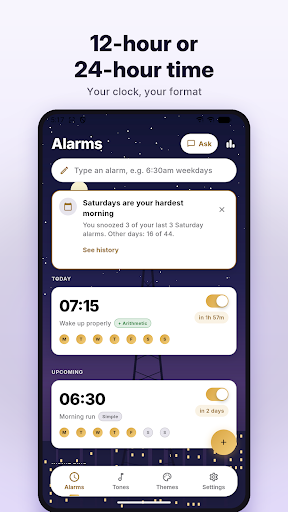
Set a Simple alarm when a tone is enough.
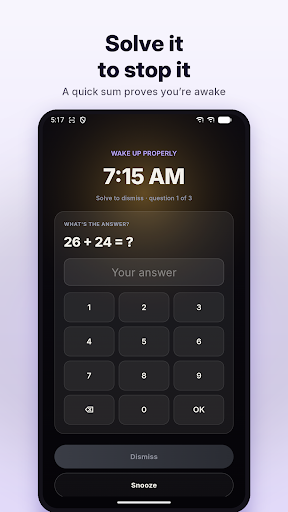
Set an Arithmetic alarm when it isn’t: it will not switch off until you have solved the maths, so you are properly awake before you can reach for snooze.
Wake up properly
Arithmetic alarms — answer between 1 and 10 questions before the alarm will stop.
Three difficulty levels, from quick sums to something you have to think about.
Available features include simple alarms too, for the mornings you don’t need convincing.
Snooze when you want it, and a one-off alarm switches itself off after it rings.
Reliable by design
Rings over the lock screen, the way your phone’s own clock does.
The app keeps ringing if you swipe the notification away — a swipe is not an answer.
Survives a restart: alarms re-arm themselves before you even unlock the phone.
Available features include Exact timing, not “somewhere around then”.
Clock widgets
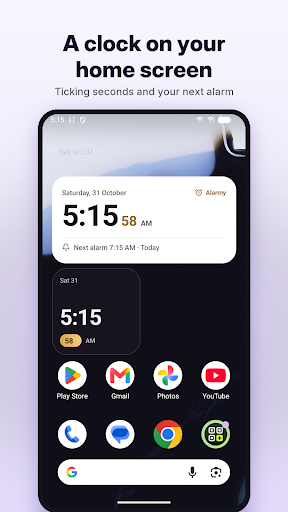
Two home-screen widgets: a card with the time, the date and your next alarm, and a compact clock.
Seconds tick live, right on your home screen.
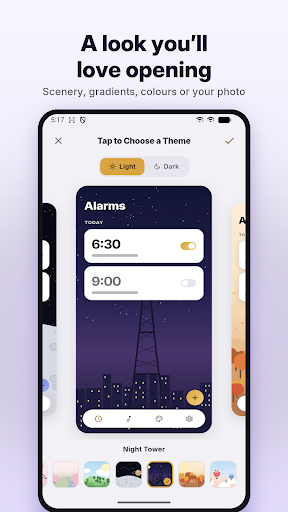
They wear your theme’s colors and follow your light or dark choice.
Tap either one to open the app.
Make it yours
Import any audio file from your device as an alarm tone.
Trim a long one down to the part you want — drag the waveform and hear it before you keep it.
Or pick from the alarm sounds your phone already has.
Themes: solid colors, gradients, textures, hand-drawn scenery, or your own photo.
Crop a photo as you choose it, so a landscape picture isn’t cut down to a narrow strip.
Available features include Light and dark, tuned per theme.
Repeat on any set of weekdays, or just once.
See how you wake up
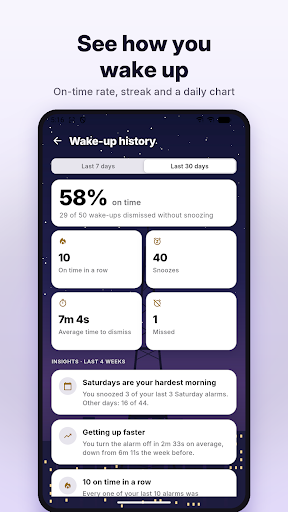
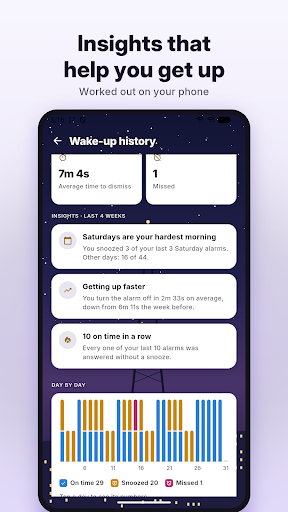
Wake-up history — every alarm marked on time, snoozed or missed.
Your on-time rate, your streak and a chart of each day, over a week or a month.
Optional reminders: bedtime, no alarm set for tomorrow, a weekly summary, your streak and a snooze tip.
Every reminder has its own switch, and all of them start switched off.
Ask, type or say it
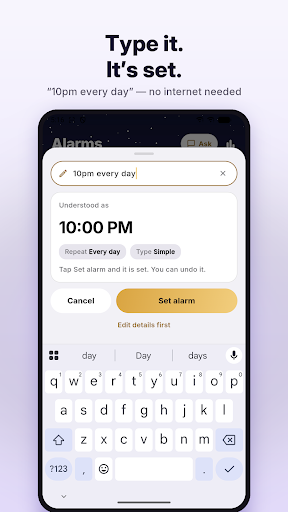
Type an alarm: write “7am weekdays” or “every day except Sunday at 6:45” and it is set, with Undo — on your phone, no internet needed.
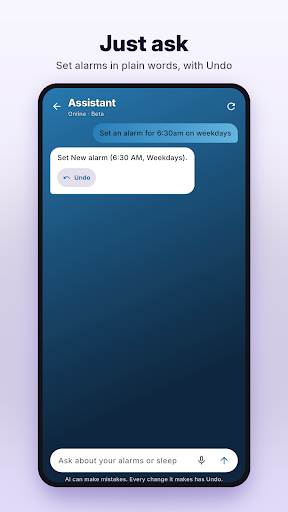
Optional AI assistant (beta): ask about your alarms or your sleep, or tell it to set, change or switch off an alarm.
Tap the mic to speak instead of typing.
Every change has Undo.
The assistant is off until you turn it on, and says what it sends before you do.
Sleep insights spot patterns in how you wake up, worked out on your phone.
12-hour or 24-hour time, your choice.
Works offline
Every alarm, tone and theme works with no connection.
No account, no sign-in, no email address.
There are no ads and no advertising identifier.
Your alarms, tones, photos and wake-up history stay on your phone — unless you ask the AI assistant about them.
Reminders and widgets are worked out on your phone — nothing is sent to produce them.
Anonymous crash reports and usage statistics help fix bugs — switch them off in Settings.
Tips and news from us only if you switch it on.
Cropping and trimming happen on your phone — nothing is uploaded to edit it.
Free, with nothing to buy and nothing to subscribe to.
Why the permissions
An alarm clock needs a few sensitive permissions to actually wake you, and none of them are used to collect anything.
Exact alarms so it rings at the minute you set.
Notifications, because a ringing alarm is a notification — without it the alarm screen cannot open.
Run at startup, because Android does not keep alarms across a reboot.
A foreground service and wake lock to keep the tone playing and the screen awake while it rings.
Internet, only for the anonymous crash reports, the optional tips and the optional AI assistant — no alarm needs it.
Get Started with Alarmy: Smart Alarm Clock
Explore Alarmy: Smart Alarm Clock and review the available features before getting started.
How to install APK files
1Download
Download the file with the button above.
2Open the file
On your Android device, open the file.
3Allow install
If asked, allow "Install unknown apps" for your browser or file manager.
An APK installs directly; no extra installer app is needed.
FAQ
Is this app safe to download?
Converter signature verified. Discover and download millions of the latest Android apps and games for free at AndroidRU.com. Fast, secure, and always updated with top-rated APKs. Download Alarmy: Smart Alarm Clock APK Free, fast, safe, reliable, and daily updated, this application supports ABI: arm64-v8a. AndroidRU.com is the number one Best Google Play Store Alternative in 2027 for Safe APK Downloads. Get the best Premium Android apps & games APKs for free now. All apps and games are unlocked & ad-free. Best download apk latest version from Androidru.com APK downloader A VirusTotal scan was submitted and its result is pending.
How much storage is needed to install this app?
The download is 31.0 MB. Keep at least that much free space, plus room for the installed app.
How do I install the APK file?
Download the file, then open it on your Android device. If asked, allow "Install unknown apps" for your browser or file manager. An APK installs directly; no extra installer app is needed.
Converter signature verified. This verification concerns the converter-signed file.
VirusTotal scan submitted, result pending. The file was sent to VirusTotal automatically; the numbers appear after the next bot run finds the completed analysis.
Safety starts with understanding how developers collect and share your data. Data privacy and security practices may vary based on your use, region, and age. The developer provided this information and may update it over time.
Data is encrypted in transit
User reviews
4.3
★★★★☆
101 ratings
5★67%
4★11%
3★11%
2★0%
1★11%
101 ratings on AndroidRU. 6 written reviews on AndroidRU, 9 shown below. Their honest reviews of this app.
PPoonam kakade 2026-10-28★★★☆☆ 3/5
more technology
KKUSHAL SINGH KUSHAL SINGH 2026-10-19★★★★★ 5/5
can't believe this app is for free...and doesn't ask for any permission.....works without internet....no ads...no premiums.... feels like an inbuilt app.... heavily recommended...i wonder how the developer even earns...
AAccount 2026-10-16★☆☆☆☆ 1/5
No 24 hours format??
AAbhiram Anand 2026-10-12★★★★☆ 4/5
good 👍😊 and easy to use
SSamta Modi 2026-10-11★★★★★ 5/5
So good.
AAnshu Keshari 2026-10-07★★★★★ 5/5
it helps me to wake up early only because of its arithmetic alarm clock
CCrew Wolfram 2026-09-27★★★★★ 5/5
I like it. It help me push myself to its limit
AAnjay Shah 2026-09-13★★★★★ 5/5
Looks good. Easy to use with lot's of new features.